



Picking the right WordPress event plugin is harder than it looks. The market is crowded, pricing models vary widely, and a plugin that works perfectly for a community meetup might fall apart under the demands of a paid conference with 500 registrants. This guide covers eight of the strongest WordPress event plugins available in 2026 — comparing their real feature sets, actual pricing, setup demands, and who each one genuinely suits.
The short answer: The Events Calendar leads in install count and reliability; Sugar Calendar wins on simplicity and value; Eventin goes deepest on ticketing and AI tools; and Amelia is the right choice when booking and appointments matter as much as event display. Read on for the full breakdown.
| Your Situation | Best Pick | Why |
|---|---|---|
| Small business or community org, limited budget | Sugar Calendar | Clean UX, free tier, paid plans start at $49.50/year |
| High-traffic site selling tickets to public events | The Events Calendar + Event Tickets | 700,000+ installs, proven reliability, Stripe/PayPal support |
| Virtual or hybrid events, multi-track agendas | Eventin | Zoom/Google Meet built-in, QR ticketing, AI creation tools |
| Booking-based business (salon, gym, consultant) | Amelia | Appointment + event hybrid, 4.6/5 rating, 90,000+ installs |
| Performance-sensitive site, lightweight setup | WP Event Manager | AJAX-powered, modular, nearly 1M installs |
Browse more WordPress plugin guides

What Separates an Event Plugin from a Calendar Plugin
A calendar plugin shows dates. An event plugin manages everything that surrounds those dates — RSVPs, ticket sales, attendee records, payment processing, automated email reminders, and venue details. If your goal is to publish a list of upcoming dates for reference purposes, a calendar plugin is sufficient. If you need to collect registrations, process payments, limit capacity, or check attendees in at the door, you need an event plugin.
Where the Line Is
Calendar plugins like My Calendar or the Timely All-in-One Event Calendar focus primarily on display: showing events in a grid, list, or agenda format. They handle recurring schedules, color coding, and iCal imports cleanly. That covers a lot of ground for blogs, church bulletin boards, and community websites.
Event plugins go further. They register attendees, issue tickets (including QR codes), integrate with payment gateways, send automated notifications before the event, and generate attendee export reports. Some include virtual event tools — Zoom or Google Meet links embedded directly into the event page.
When You Need More Than a Calendar
Three situations consistently push sites from a calendar to a full event plugin:
- Money changes hands. Any time you charge admission or sell tickets, you need payment gateway integration and ticket management.
- Capacity matters. If an event has a maximum headcount, you need registration limits, waitlists, and attendance tracking.
- Follow-up is required. Automated confirmation emails, reminders, and post-event surveys require a plugin that handles communication, not just display.
Read: Best WordPress Calendar Plugins
How We Evaluated These Plugins
Every plugin on this list was assessed against seven criteria. Active installation counts and star ratings come from WordPress.org (fetched March 2026). Pricing was verified from official plugin websites and confirmed via multiple sources.
- Feature depth: What does the free tier cover? What requires an upgrade?
- Total cost of ownership: Base price plus commonly needed add-ons
- Setup difficulty: Time and technical skill needed from install to first live event
- Page builder compatibility: Native Gutenberg blocks, Elementor support, shortcode fallbacks
- Active install count and rating: Proxy for reliability and community support
- Free tier depth: How much a site can accomplish without paying
- Support quality: Documentation, response times, forum activity
One additional note on security: plugins handling payments and attendee data carry risk. Patchstack’s security research identifies vulnerability histories for each major plugin. That data is referenced where relevant — not to alarm, but to inform decisions about which plugins have the most transparent security practices.
The 8 Best WordPress Event Plugins

1. The Events Calendar — Best for Established Organizations

The Events Calendar holds the largest install base of any WordPress event plugin — over 700,000 active sites rely on it. Developed by StellarWP (under Liquid Web), it has been maintained for over a decade and carries a 4.3/5 rating from 2,427 reviews on WordPress.org.
The free core plugin covers the essentials well: month, list, and day calendar views; Google Maps integration; iCal/Google Calendar export; and basic event search. The block editor is supported natively. Event Tickets (a separate free companion plugin) adds Stripe and PayPal ticket sales without requiring an upgrade.
The premium tier, Events Calendar Pro at $149/year for a single site, unlocks recurring events, additional calendar views, shortcode support, virtual event integrations (Zoom, Google Meet), and Eventbrite synchronization. Additional premium add-ons like Event Aggregator (for importing events), Filter Bar, and Community Events each carry their own annual fees, so total costs can rise quickly on feature-heavy builds.
From a security standpoint, StellarWP participates in the Patchstack vulnerability disclosure program, offers a public bug bounty, and issues hot patches independently of feature releases — a more transparent approach than most plugins on this list.
Setup difficulty: Low to medium. The UI integrates cleanly into the WordPress admin. Basic events are live within minutes; configuring recurring events and payment gateways takes more time.
Best suited for: Universities, established businesses, nonprofits, and any site that needs a well-documented, widely supported plugin with a large ecosystem of add-ons.
Trade-off: The base Pro license at $149/year is on the expensive side compared to competitors. Once add-ons are factored in, total annual costs can exceed $300–$400 for a feature-complete setup.
Read: The Events Calendar Full Review
2. Sugar Calendar — Best for Simplicity and Clean UX
Sugar Calendar occupies an underappreciated position in the WordPress event ecosystem. Built by the WPForms team (Jared Atchison and the same developers behind WPForms, OptinMonster, and MonsterInsights), it brings the same philosophy of clean UX and beginner-friendliness to event management.
The free Lite version on WordPress.org has 173,802 active installations and a 4.4/5 rating. It covers event creation, calendar and list views, Stripe ticketing, Google Maps venue support, iCal/Google Calendar sync, and Gutenberg block integration. That free feature set exceeds what many plugins lock behind paid tiers.
The paid plans are competitively priced:
- Basic: $49.50/year (1 site) — all core features
- Plus: $99.50/year (1 site) — adds RSVP addon, Zapier, and WooCommerce ticketing
- Pro: $199.50/year (3 sites)
- Elite: $299.50/year (10 sites)
All plans include a 14-day money-back guarantee. Recurring events and some advanced features require a paid plan, but the Basic tier at $49.50/year is one of the most affordable entry points on this list.
Sugar Calendar supports Gutenberg blocks and Elementor widgets natively, meaning it slots into modern theme setups without custom shortcode work. Multiple independent calendars can be created and color-coded — useful for organizations managing different event types (public events, internal meetings, seasonal programming).
Setup difficulty: Low. Designed specifically for non-technical users. Most sites are running their first event within 15 minutes of installation.
Best suited for: Small businesses, community organizations, churches, schools, coaches, and anyone who needs a reliable event calendar without the complexity of enterprise-grade tools.
Trade-off: Fewer visual display layouts than Modern Events Calendar or EventON. The review count on WordPress.org is relatively low (22 reviews on the Lite plugin) compared to some alternatives, though the overall WPForms team reputation provides credibility context.
Read: Sugar Calendar Full Review
3. Modern Events Calendar — Best for Visual Variety

Modern Events Calendar (MEC), developed by Webnus, is the most design-flexible option on this list. It offers over 50 display layouts — grid, list, masonry, timeline, and more — along with skin color customization. For agencies or design-conscious site owners who need events to match a specific brand aesthetic, MEC has no real competition.
The plugin handles virtual, in-person, and hybrid events from a single interface. Zoom and Webex integrations are included. For physical events, venue floor plans, seat reservations, and QR code check-ins are available at the Pro level. WooCommerce handles ticket payments. Multitrack agendas and speaker management suit conference-scale events.
One important fact most reviews omit: Modern Events Calendar’s free Lite version was permanently closed on WordPress.org in May 2022 due to a guideline violation. The plugin is now distributed exclusively through webnus.net. This means it does not appear in the WordPress.org plugin directory and cannot be installed via the standard WordPress admin plugin search. Sites that have the old Lite version installed should treat it as unsupported.
Pro pricing starts at $79/year for a single site, with multi-site plans available. The direct distribution model also means security vulnerability handling is less transparent than plugins within the official repository.
Setup difficulty: Medium. The feature set is deep; initial configuration takes time. The sheer number of layout options can be overwhelming without a clear design goal.
Best suited for: Event agencies, conference organizers, and design-focused sites where visual variety across multiple display formats is a priority.
Trade-off: Not in the WordPress.org repository (closed listing). Security changelog not easily accessible. Support quality has received mixed reviews historically. Not recommended for sites that require the assurance of official WordPress.org distribution.
4. Eventin — Best for Ticket-Heavy Operations

Eventin, developed by Arraytics (formerly Themewinter), has grown significantly. Its WordPress.org install count stands at 759,019 with a 4.6/5 rating from 364 reviews — among the highest ratings on this list. The free version covers a surprisingly wide range of features, and the paid tiers are competitively priced.
What distinguishes Eventin is its focus on the attendee experience. The plugin supports multiple ticket types (Early Bird, Regular, VIP) with individual pricing. Each attendee receives a unique QR code for check-in. The certificate builder lets organizers send branded completion certificates to attendees. A visual seat planner handles reserved seating for theater-style or assigned-seat events.
AI-powered event creation is a genuinely useful differentiator: the tool generates event titles, descriptions, FAQs, tags, categories, and banners from a brief prompt — a meaningful time-saver for organizations managing high event volume.
Virtual event support includes Zoom and Google Meet integrations. The multivendor marketplace feature (via Dokan integration) allows multiple organizers to sell tickets through one site and split revenue. Speaker profiles, schedule management, and FluentCRM integration for targeted email marketing complete a feature set that rivals dedicated event platforms.
Pricing (annual plans as of 2026):
- Standard: $89/year (2 domains)
- Premium: $199/year (100 domains)
- Agency: $329/year (unlimited domains, includes live video call support)
The free tier is usable but limited on ticket type variety and advanced analytics. The Standard plan at $89/year delivers full feature access for most single-site use cases.
Setup difficulty: Medium to high. The breadth of features means initial configuration is more involved. Eventin’s documentation is reasonable, but the learning curve is steeper than Sugar Calendar or The Events Calendar.
Best suited for: Event organizers running ticketed events, hybrid conferences, speaker series, or multi-vendor event marketplaces. Agencies managing events across client sites benefit from the multi-domain plans.
Trade-off: Security transparency has room for improvement — changelogs sometimes describe fixes vaguely. The plugin’s rapid feature growth is a strength but can introduce instability between major updates.
5. Events Manager — Best for Developers and Enterprise Networks
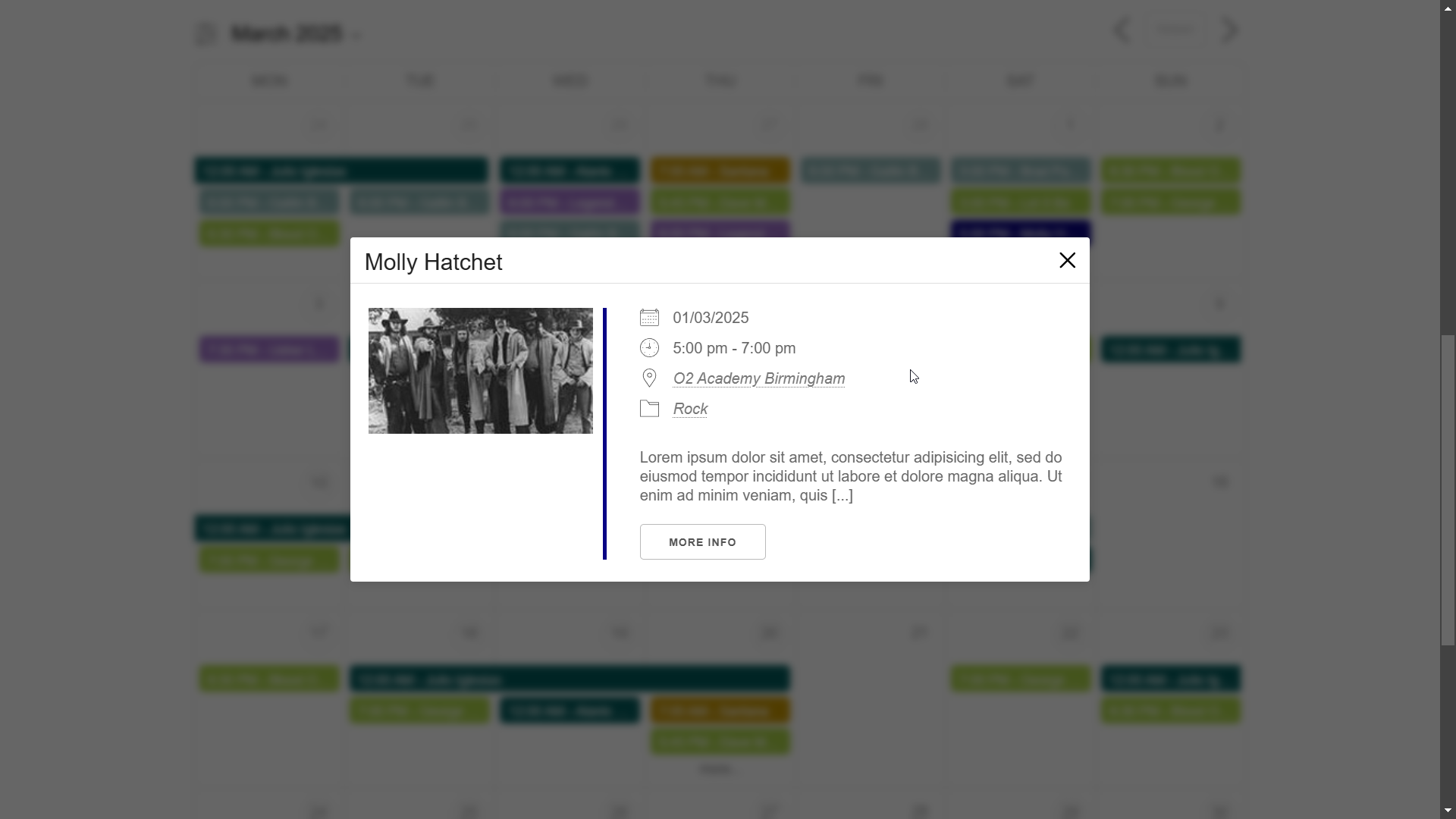
Events Manager has been in active development since 2008. With 80,000+ active installations and a 4.2/5 rating from 539 reviews on WordPress.org, it is not the largest player, but it occupies a specific niche: complex, developer-friendly event management for enterprise networks.
The plugin’s distinguishing capabilities are its multisite compatibility, BuddyPress/BuddyBoss integration for community event sharing, front-end event submissions, and detailed attendee booking forms with built-in validation. CSV export of attendee data is straightforward — useful for organizations that feed event data into external CRMs or spreadsheets.
The free version handles basic event creation, calendar display, Google Maps, iCal feeds, and front-end submissions. The Pro tier ($99/year for one site, $129/year for Pro Plus) adds payment gateways (Stripe, PayPal), PDF tickets, QR code check-in, coupon management, SMS reminders, Zoom integration, and automated email sequences.
For large platforms handling multiple organizers with different permission levels, Events Manager’s role-based access controls offer granular control that simpler plugins lack.
Setup difficulty: Medium to high. The configuration depth is real — the settings panel is extensive, and getting payment gateways configured with custom booking forms takes time. Developers will feel at home; non-technical users may find it overwhelming.
Best suited for: Enterprise WordPress networks, multisite installations, platforms with user-submitted events, BuddyPress-based communities, and developers building custom event workflows.
Trade-off: Security fixes are bundled with feature updates (no dedicated security releases). No dedicated bug bounty program. Community focuses on power users; beginner documentation is thin. The design of the default calendar is utilitarian and will require CSS customization to match modern themes.
6. WP Event Manager — Best Lightweight Option
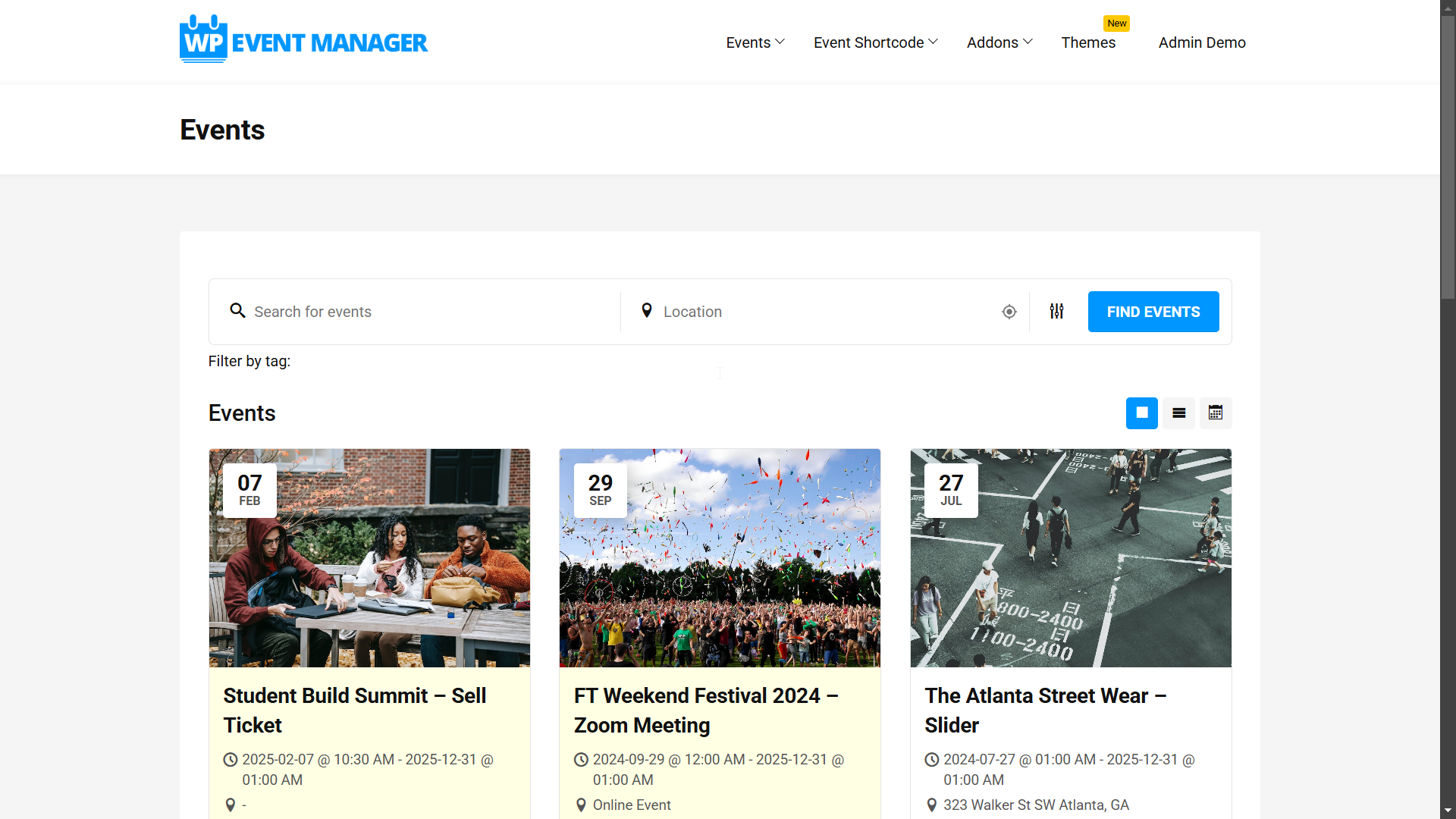
WP Event Manager takes a different architectural approach from most alternatives: the core plugin is deliberately minimal, and capabilities are added through individual add-ons rather than bloated into the base install. The result is a tool that handles AJAX-powered event listings, responsive design, and built-in caching without slowing sites down.
The stats reflect its mainstream adoption: nearly 965,000 active installations on WordPress.org, a 4.0/5 rating from 243 reviews, and consistent updates (last update: March 10, 2026).
The free core plugin provides event listing pages, front-end event submission forms, searchable event listings with AJAX filtering, and schema markup for SEO. The modular add-on system means sites pay only for the capabilities they actually need. Common add-ons include Google Maps, WooCommerce ticket sales, event registration, recurring events, event alerts, and Stripe integration.
Bundle pricing consolidates the most common add-ons:
- Plus bundle: $99/year
- Pro bundle: $199/year
- Virtual Event Manager Pro: $299/year
- All Events Manager Pro: $399/year
Setup difficulty: Low to medium. The core plugin installs in minutes and works immediately. The modular add-on model means setup complexity scales with feature requirements — a site using only the core plugin requires minimal configuration.
Best suited for: Performance-conscious sites, small teams, developers who prefer modular architecture, and WooCommerce stores that need events integrated into an existing shop.
Trade-off: The free tier is genuinely limited without add-ons — no ticketing, no maps, no registration forms. Total annual cost rises quickly once multiple add-ons are factored in. No native Gutenberg blocks in the core plugin; display relies on shortcodes and widgets.
7. Amelia — Best for Booking-Focused Sites
Amelia is the most booking-oriented option on this list. Where other tools treat appointments as an afterthought, Amelia was designed from the ground up for service businesses — fitness studios, salons, consultants, healthcare providers, coaches — that need both appointment scheduling and event management in one platform.
The WordPress.org stats are strong: 90,000+ active installations (developer-reported), a 4.6/5 rating from 751 reviews, and the plugin updated as recently as March 10, 2026. The free Lite version includes Square payment integration, multi-day events, SMS/email notifications, and time zone detection — a notably generous free tier.
Premium plans (2026 pricing):
- Starter: $69/year (1 domain) — essential booking features
- Standard: $69/year — adds taxes, invoices, multiple payment methods, multilingual support
- Pro: $199/year (unlimited domains) — adds Zoom, Google Meet, Google Calendar, Outlook, recurring appointments, discount coupons, service packages
- Elite: $499/year — all features, unlimited domains, comprehensive access
For event-specific needs, the Pro tier adds event ticketing, attendee capacity limits, WooCommerce integration, and the ability to set minimum and maximum attendee counts per event. The booking experience is polished: clients complete reservations in a few clicks on any device, and double-booking prevention works automatically.
Setup difficulty: Medium. The breadth of configuration options (multiple employees, locations, services, booking rules) takes time to set up properly. A basic installation with one service and one event type is fast; a multi-location, multi-staff setup requires more work.
Best suited for: Service businesses that run events alongside appointments — fitness studios offering both classes and personal sessions, event venues that also take private bookings, coaches who host webinars and one-on-one sessions.
Trade-off: Amelia is primarily a booking plugin. Event display is functional but less visually varied than MEC or EventON. For sites that need only event management (no appointment booking), other plugins on this list offer better event-specific features at comparable or lower cost.
Read: Amelia Booking Plugin Review
8. EventON — Best for Visual Presentation
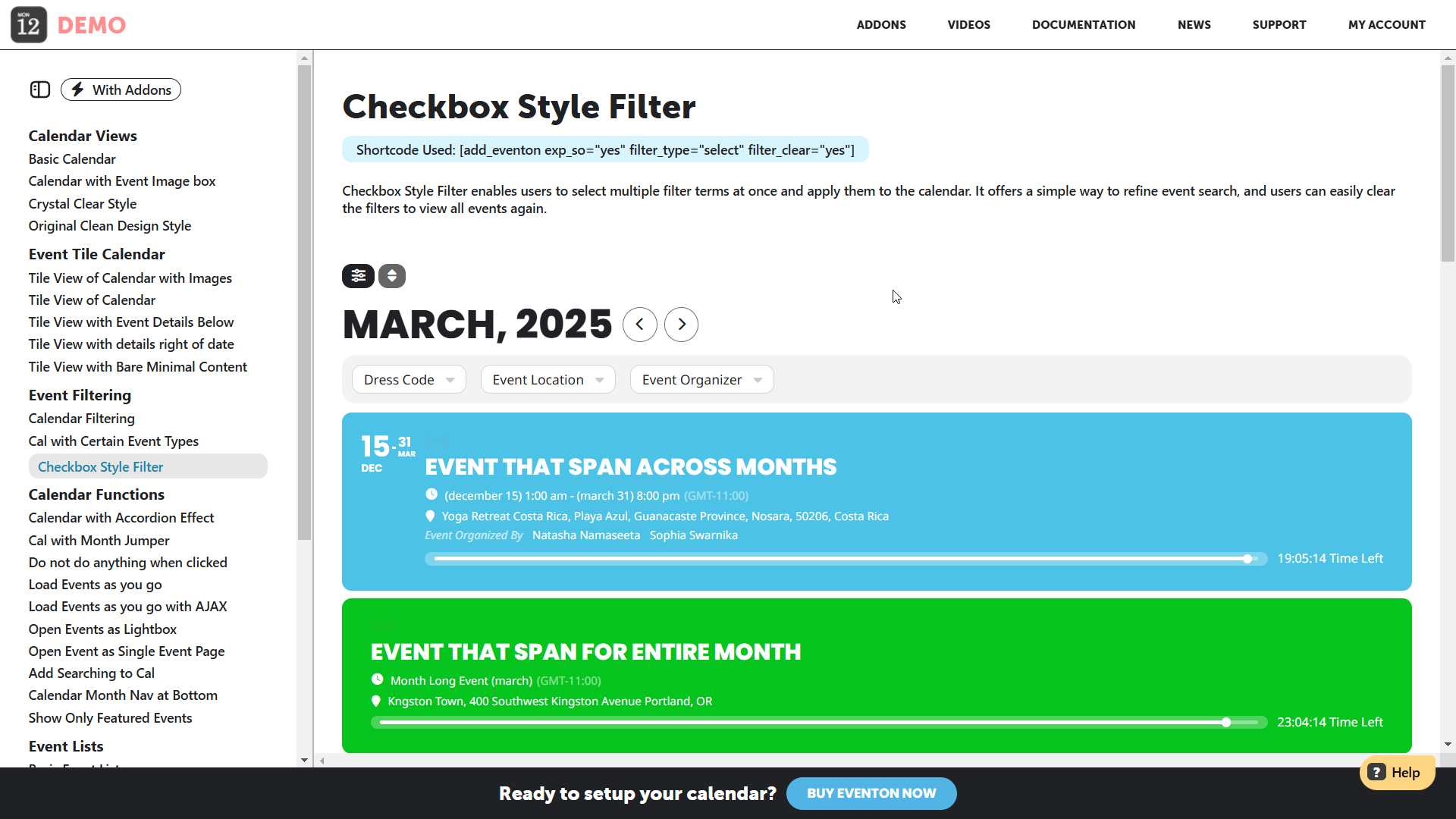
EventON has a single dominant advantage: it is the most visually distinctive calendar option available. Its tile, bubble, and list layouts use color, imagery, and flat design more effectively than any other solution on this list. For arts venues, entertainment companies, or portfolio-adjacent sites where the calendar is a visual centerpiece, EventON is hard to match aesthetically.
The free Lite version on WordPress.org has 169,924 active installations and a 4.0/5 rating from 42 reviews. The premium plugin (sold separately via the developer’s site at myeventon.com) adds extensive layout options, virtual event support (Zoom and Jitsi), live event progress bars, multiple organizers per event, and an SEO-friendly JSON-LD schema output.
The pricing structure differs from subscription-based plugins:
- The core premium plugin is a one-time purchase (approximately $19–25 on CodeCanyon historically, now sold directly at myeventon.com)
- Individual add-ons (tickets, RSVP, seats, QR codes, filters) are priced separately at $20–$70/year each, billed annually
- Bundle packages are available at a discount
Setup difficulty: Medium. The number of settings and layout options is large — finding the right configuration takes time. Shortcode generation and Gutenberg blocks are both available, which reduces the technical barrier for basic implementations.
Best suited for: Design-focused sites, arts and entertainment venues, event portfolios, and any organization where the calendar’s visual impact matters as much as its functionality.
Trade-off: EventON is maintained by a solo developer (Ashanjay). This raises legitimate concerns about emergency response times for critical bugs. Security contacts are limited; there is no public bug bounty program. Add-on costs can accumulate significantly for feature-complete builds.
Feature Comparison Table
The table below covers the eight plugins across eight attributes. “Yes” indicates the feature is available in the paid tier; “Free” indicates it is available without payment; “Add-on” means a separate purchase is required.
| Plugin | Free Tier | Recurring Events | Ticket Sales | Virtual Events (Zoom) | Gutenberg Blocks | Entry Paid Price | WP.org Rating | Active Installs |
|---|---|---|---|---|---|---|---|---|
| The Events Calendar | Yes | Pro | Free (basic) | Pro | Yes | $149/year | 4.3/5 | 700,000+ |
| Sugar Calendar | Yes | Paid | Free (Stripe) | No | Yes | $49.50/year | 4.4/5 | 173,800+ |
| Modern Events Calendar | Yes (direct) | Free | Pro | Pro | Yes | $79/year | N/A* | N/A* |
| Eventin | Yes | Free | Free | Free | Yes | $89/year | 4.6/5 | 759,000+ |
| Events Manager | Yes | Free | Pro | Pro Plus | No | $99/year | 4.2/5 | 80,000+ |
| WP Event Manager | Yes | Add-on | Add-on | Add-on | No | $99/year (bundle) | 4.0/5 | ~965,000 |
| Amelia | Yes | Pro | Pro | Pro | No | $69/year | 4.6/5 | 90,000+ |
| EventON | Yes (Lite) | Free | Add-on | Add-on | Yes | ~$25 (one-time) + addons | 4.0/5 | 169,900+ |
*Modern Events Calendar’s free Lite version was permanently removed from WordPress.org in May 2022. Install counts and ratings from that listing are no longer current. The plugin is distributed directly from webnus.net.
Pricing Comparison — Free vs. Paid Tiers
What the Free Tiers Actually Include
Most event plugins offer free tiers, but the gap between “free” and “functional for a real event” varies considerably. The table below shows what each free tier delivers without any payment.
| Plugin | Free Tier Features | Entry Paid Price | What Entry Paid Adds | Full-Featured Annual Cost |
|---|---|---|---|---|
| The Events Calendar | Event listings, calendar views, Google Maps, iCal export, basic ticketing (with Event Tickets plugin) | $149/year (Pro) | Recurring events, additional views, shortcodes, virtual events, Eventbrite sync | $300–$500+/year (with add-ons) |
| Sugar Calendar | Events, calendar/list views, Stripe ticketing, Google Maps, iCal sync, Gutenberg blocks, attendee export | $49.50/year (Basic) | Recurring events, venues, speakers, frontend submissions | $99.50–$199.50/year (Plus/Pro) |
| Modern Events Calendar | Basic calendar views, recurring events, event submission, shortcodes (requires direct install) | $79/year (Pro, 1 site) | All layouts, Google Maps, ticketing, bookings, premium support | $79–$299/year |
| Eventin | Event creation, calendar, basic ticketing, QR codes, Zoom/Google Meet, WooCommerce, recurring events | $89/year (Standard, 2 domains) | All pro add-ons, AI creation, template builder, email automation | $89–$329/year |
| Events Manager | Event listings, calendar, Google Maps, front-end submissions, iCal, BuddyPress | $99/year (Pro) | Payment gateways, PDF tickets, QR check-in, SMS, coupons, Zoom | $99–$129/year |
| WP Event Manager | Event listings, front-end forms, AJAX search, responsive display, schema markup | $99/year (Plus bundle) | Google Maps, ticketing, registration, recurring events, Stripe | $99–$399/year |
| Amelia | Booking forms, event management, Square payments, SMS/email notifications, multi-day events | $69/year (Starter) | Multiple payment gateways, recurring appointments, coupons, custom fields | $69–$499/year |
| EventON | Calendar display, event categories, Google Maps, basic views, SEO schema | ~$25 one-time | Visual layouts, multiple organizers, live events, Zoom integration | $25 + $50–$200/year (add-ons) |
When You Need to Upgrade
The most common trigger for upgrading from a free to a paid plan is recurring events. Nearly every plugin on this list locks recurring event functionality behind the paid tier. If your site runs weekly classes, monthly webinars, or any regularly scheduled event series, budget for at least the entry-level paid plan.
The second most common trigger is payment processing beyond basic Stripe. Sugar Calendar’s free Lite version includes Stripe ticketing — a rare exception. Most plugins require a paid upgrade for PayPal, WooCommerce, or offline payment support.
Read: Best WordPress Event Ticketing Plugins
Which Plugin Fits Your Situation?
Seven scenarios, seven answers. These are not rankings — they are honest use-case matches.
Running a small community website or nonprofit with no budget: The Events Calendar free tier, combined with the free Event Tickets plugin, covers basic event listing, ticketing, and Google Maps without any payment. Sugar Calendar Lite is the cleaner option if beginner-friendliness matters more than feature breadth.
Selling tickets to public paid events: Eventin or The Events Calendar (with Event Tickets Plus). Both handle Stripe and PayPal, QR code check-in, and attendee management. Eventin’s free tier includes more ticketing features out of the box. The Events Calendar’s larger install base and longer track record offers more confidence for high-traffic events.
Hosting virtual or hybrid events with Zoom: Eventin is the strongest fit. Zoom and Google Meet are included in the free version. Modern Events Calendar also handles virtual events well if the closed WordPress.org status is acceptable.
Running a booking-based service business (gym, salon, consultant): Amelia. No other plugin on this list integrates appointment booking and event management this cleanly. The Pro tier ($199/year, unlimited domains) includes Zoom, Google Calendar sync, recurring appointments, and coupons.
Managing a large conference with multiple tracks, speakers, and assigned seating: Eventin (Agency plan for multi-site) or Modern Events Calendar Pro. Both handle multitrack agendas, speaker profiles, and seat reservations. Eventin adds AI event creation and certificate generation for attendees.
Building for a developer client who needs full control: Events Manager or WP Event Manager. Events Manager’s hook system, BuddyPress integration, and multisite support give developers maximum control. WP Event Manager’s modular architecture keeps the codebase clean.
Running events in an existing WooCommerce store: WP Event Manager (with WooCommerce Sell Tickets add-on) or Sugar Calendar (Plus plan, which includes WooCommerce ticketing). Both integrate with WooCommerce without requiring a full platform switch. Eventin’s WooCommerce integration is also solid and available on the free tier.
Read: WooCommerce and WordPress Events
Page Builder and Theme Compatibility
Many WordPress sites use page builders — Gutenberg (the block editor), Elementor, or Divi. Native block or widget support makes a real difference in setup speed and ongoing content management.
| Plugin | Gutenberg Blocks | Elementor Widgets | Shortcode Fallback |
|---|---|---|---|
| The Events Calendar | Yes (native) | Add-on available | Yes |
| Sugar Calendar | Yes (native) | Yes (native widgets) | Yes |
| Modern Events Calendar | Yes | Yes | Yes |
| Eventin | Yes (native) | Yes (native) | Yes |
| Events Manager | No | No native | Yes |
| WP Event Manager | No | Yes (some add-ons) | Yes |
| Amelia | No | No native | Yes |
| EventON | Yes | No native | Yes |
Gutenberg (block editor) support is strongest with Sugar Calendar, Eventin, and The Events Calendar — all three ship native blocks that display calendars directly in the block editor without shortcodes. For Elementor-heavy builds, Eventin and Sugar Calendar both ship native Elementor widgets. Events Manager and Amelia rely entirely on shortcodes, which work fine but require manual embedding in content.
Read: Best Gutenberg Block Plugins for WordPress
Frequently Asked Questions
What is the difference between a WordPress event plugin and a calendar plugin?
A calendar plugin displays dates in a visual grid or list format. A WordPress event plugin adds functionality around those dates — registration forms, ticket sales, payment processing, attendee management, automated notifications, and check-in tools. Calendar plugins are suitable for displaying event schedules. Event plugins are necessary when attendee interaction, payments, or capacity management are involved.
Which WordPress event plugin is completely free?
The Events Calendar’s core plugin and the companion Event Tickets plugin are both free and together provide basic event listings and ticket sales via Stripe or PayPal. Sugar Calendar Lite is also free and includes Stripe ticketing. Events Manager’s free version covers event listings, front-end submissions, and Google Maps without payment. Eventin’s free tier is notably generous, covering QR ticketing, Zoom integration, and recurring events without a paid upgrade.
Do I need a paid WordPress event plugin to sell tickets?
Not necessarily. The Events Calendar paired with the free Event Tickets plugin supports ticket sales through Stripe and PayPal at no cost. Sugar Calendar Lite includes Stripe ticketing in the free version. Eventin’s free tier also supports basic ticket sales with QR codes. The main limitations in free tiers are ticket type variety, advanced attendee management, and WooCommerce integration — all of which require paid plans.
Which event plugin has the lowest performance impact?
WP Event Manager is built specifically for performance — it uses AJAX-powered listings, built-in caching, and a modular architecture that keeps the base plugin lightweight. Sugar Calendar is also described by its developers as lightweight, built with clean code by the WPForms team. The Events Calendar’s large codebase can have a more noticeable footprint, particularly on shared hosting.
Can WordPress event plugins handle both virtual and in-person events?
Yes. Eventin, Modern Events Calendar, The Events Calendar Pro, and Events Manager Pro all support hybrid event types. Eventin handles this particularly well — virtual events with Zoom or Google Meet links are supported in the free version, and the plugin distinguishes clearly between online and in-person event types in the event creation workflow. The Events Calendar requires a Pro upgrade for virtual event tools.
Which event plugin is best for a small business with no technical background?
Sugar Calendar is the most accessible option for non-technical users. Its interface is designed with the same usability principles as WPForms, and most tasks — creating events, embedding a calendar, setting up Stripe payments — are completed without writing code. The Events Calendar’s free tier is also beginner-friendly for basic event display.
How do I migrate events from one plugin to another?
Migration support is limited across most plugins. Modern Events Calendar explicitly advertises an import tool for migrating events from other plugins. Sugar Calendar’s paid tier includes import functionality from third-party calendars. For most migrations, the practical approach is to export events as CSV or iCal from the source plugin and reimport them to the destination — most plugins on this list support iCal import. Complex migrations between platforms with custom fields may require developer assistance.
Is The Events Calendar really free, or does it require paid upgrades?
The core plugin is genuinely free and handles a lot: event listings, multiple calendar views, Google Maps, iCal export, and basic search. The companion Event Tickets plugin (also free) adds Stripe and PayPal ticket sales. The premium Pro plan ($149/year) is required for recurring events, virtual event integrations, and Eventbrite sync. For a site that only needs to display events and sell basic tickets, the free versions cover the requirement without any payment.
Which WordPress event plugin works best with WooCommerce?
WP Event Manager integrates directly with WooCommerce through its Sell Tickets add-on and is recommended specifically for WooCommerce users by WPBeginner. Sugar Calendar’s Plus plan ($99.50/year) includes WooCommerce ticketing. Eventin’s free tier includes WooCommerce integration. The Events Calendar also supports WooCommerce through Event Tickets Plus. For a site already running WooCommerce for product sales, WP Event Manager or Sugar Calendar Plus are the cleanest integrations.
Final Verdict
No single WordPress event plugin works best for everyone. The right choice depends on what your events actually require, how much complexity you are willing to manage, and what you are prepared to pay annually.
The Events Calendar remains the most trusted choice for organizations that need reliability, a large support community, and a proven track record. Its premium costs are higher than alternatives, but the plugin’s 700,000+ install base and decade of maintenance carry real weight.
Sugar Calendar is the best value for small businesses and community organizations — generous free tier, the most affordable paid entry point on this list ($49.50/year), and a development team with a strong reputation for support quality.
Eventin leads on AI-powered tools, ticketing depth, and virtual event capability. Its 4.6/5 rating and rapid development pace make it a strong choice for organizations that will grow into its features.
Amelia is the correct choice when appointment booking and event management need to coexist in one plugin — a use case no other plugin on this list serves as well.
For sites where performance matters above all else, WP Event Manager‘s modular architecture keeps the base footprint small. For pure visual impact, EventON‘s design quality is unmatched. For enterprise multisite deployments, Events Manager‘s depth and BuddyPress integration remain relevant. Modern Events Calendar serves design-driven agencies well, but its removal from WordPress.org is a transparency concern worth weighing carefully.
