


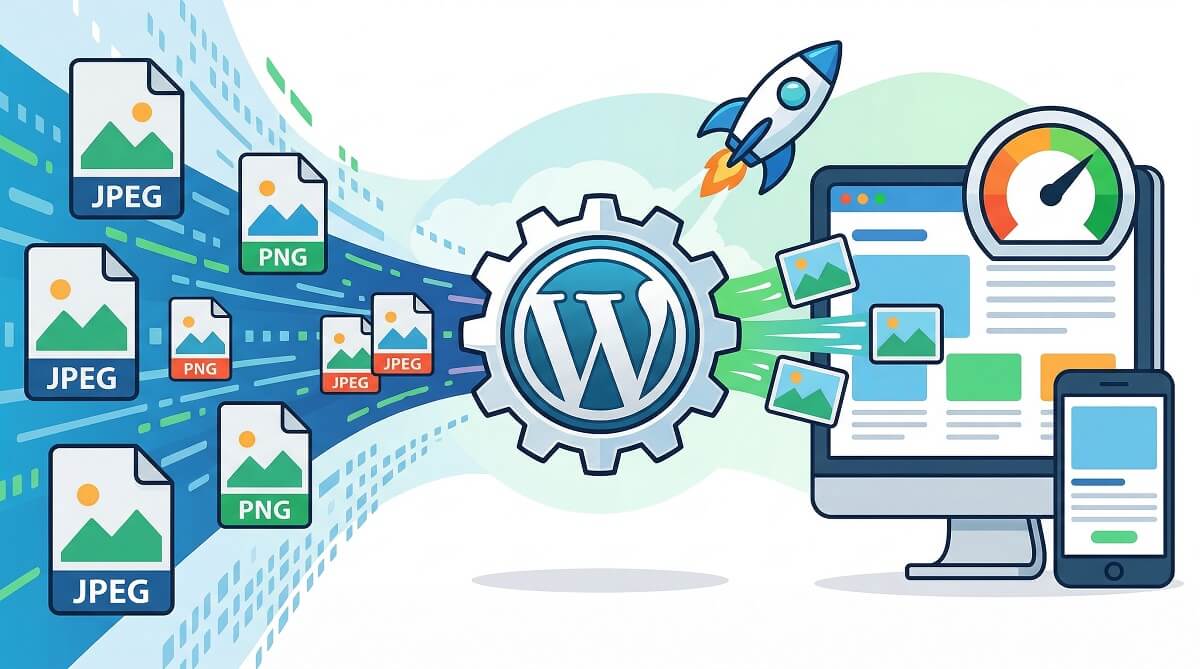
Images are heavy. A single unoptimized JPEG from a modern smartphone can easily weigh 4–6 MB, and your WordPress site may load a dozen of them on a single page. According to Google’s web.dev research, images account for roughly 73% of the LCP (Largest Contentful Paint) element on mobile pages — meaning your images are almost certainly what’s slowing your site down, and what’s affecting your search rankings.
The solution is an image optimizer plugin. But with dozens of options on the market — each claiming to be the fastest, the smartest, or the most affordable — picking the right one is harder than it should be. This comparison cuts through the noise. We tested and researched 8 of the most popular WordPress image optimization plugins, comparing their real pricing (not marketing copy), free tier limitations, compression quality, privacy implications, and which site types they actually serve well.
WordPress performance optimization guide
The Short Answer: Quick Picks by Use Case
If you’re in a hurry, here’s the snapshot. Each plugin serves different needs — so the “best” one depends entirely on what your site actually does.
| Plugin | Best For | Free Tier? | Paid From |
|---|---|---|---|
| ShortPixel | Overall / eCommerce / photographers | ✅ 100 credits/mo | $9.99/mo |
| EWWW Image Optimizer | Privacy / developers / server-side control | ✅ Unlimited (local) | $8/mo (cloud) |
| Smush | Beginners / simple blogs | ✅ Limited | $36/yr (1 site) |
| Imagify | Ease of use / AVIF early adopters | ✅ 20MB/mo | $4.99/mo (annual) |
| Optimole | CDN delivery / high-traffic sites | ✅ 2,000 visits/mo | ~$19/mo (annual) |
| WP-Optimize | All-in-one (cache + compress + database) | ✅ Core features | $58.80/yr (2 sites) |
| reSmush.it | Budget-conscious / truly free | ✅ Unlimited* | Free forever |
| TinyPNG | Simple JPEG/PNG compression | ✅ 500 img/mo** | Pay per use |
*reSmush.it free but limited to 5MB per image; no WebP support. **TinyPNG’s 500-credit no-cost plan covers roughly 100–125 original photos — more on that below.
Free tier reality check: TinyPNG gives you 500 image optimizations per month, which sounds generous. But WordPress automatically generates 3–4 thumbnail sizes for every image you upload. That means 500 credits ÷ 4 sizes = about 125 original photos per month. ShortPixel’s 100 free credits works out to around 25 original uploads if you count thumbnails. Factor this into your plan before choosing.
Why Images Are Slowing Your WordPress Site
Unoptimized images create a cascade of performance problems that extend well beyond “slow page load.” Google’s Core Web Vitals — which directly affect your search rankings — include Largest Contentful Paint (LCP), which measures how quickly the biggest visible element (usually an image) loads for users. The target is under 2.5 seconds. According to web.dev, only 62% of mobile pages currently achieve a good LCP score globally, and images are the primary bottleneck in most cases.
What image optimization actually fixes:
- File size reduction: Smaller files download faster. A 4MB JPEG optimized to 800KB loads 5x faster with no visible quality difference.
- Format conversion: WebP files are 25–35% smaller than equivalent JPEGs. AVIF goes further. Both are served automatically to browsers that support them.
- Lazy loading: Images below the fold don’t load until the user scrolls to them, dramatically improving initial page load speed and LCP scores.
- CDN delivery: Some plugins serve your images from globally distributed servers, reducing latency for international visitors.
improve Core Web Vitals on WordPress
None of this requires manually editing image files. A good plugin handles it automatically. The difference between plugins is how well they compress, what control they give you, and what it costs at your image volume.
The 8 Best Image Optimizer Plugins for WordPress (Reviewed)
ShortPixel Image Optimizer
ShortPixel has carved out a strong position in this market for one reason: it offers three distinct compression modes that most competitors don’t. Beyond the standard lossy and lossless options, ShortPixel has a Glossy mode — a high-quality lossy compression designed specifically for photographers and eCommerce stores where detail matters. It’s a middle ground between lossless (perfect quality, moderate savings) and aggressive lossy (maximum savings, visible artifacts).
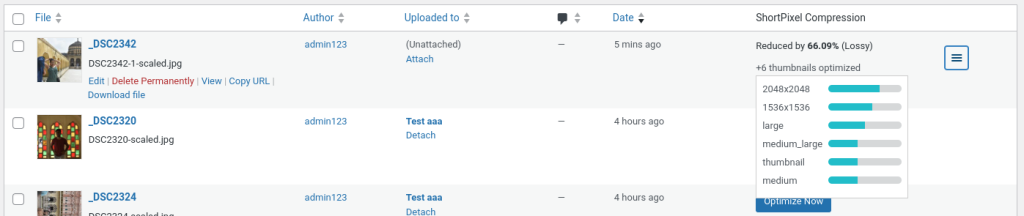
Key features include full WebP and AVIF conversion, thumbnail optimization (all WordPress-generated sizes are processed, not just the original), the ability to restore original images, and an API that developers can integrate directly. It uses external servers for compression — your images travel to ShortPixel’s servers and return optimized.
Pricing (as of March 2026): Free tier gives 100 credits/month. The unlimited monthly plan is $9.99/month ($99.90/year billed annually, roughly $8.33/month). One-time credit packs start at $19.99 for 50,000 credits that never expire — useful if your upload volume is irregular.
WordPress.org stats: 300,000+ active installs, 4.5/5 stars from 803 reviews, updated January 2026.
Best for: eCommerce stores, photographers wanting quality-preserving compression, agencies managing multiple client sites.
Not ideal for: Users who prefer local processing; sites with very high image volumes on tight monthly budgets.
EWWW Image Optimizer
EWWW is the odd one out in this list — in the best way. Its free tier compresses images directly on your own server, with no files sent to any external service. That’s a meaningful distinction for anyone handling sensitive imagery: confidential product photos, member-only content, or paywalled assets.

Beyond privacy, EWWW gives developers granular control: you can set per-format quality levels, exclude specific image sizes from optimization, choose which compression library to use, and even schedule EWWW to optimize images in a specific folder via its built-in scheduler. The paid cloud option (Easy IO CDN) adds automatic scaling, WebP delivery, and CDN functionality.
Worth noting: EWWW also minifies JavaScript and CSS files, making it a broader performance tool than most image-only competitors.
Pricing (as of March 2026): Core plugin is free with unlimited local compression. Cloud plans (Easy IO CDN) start at $8/month for one site with 200GB bandwidth. A 7-day free trial is available on paid plans.
WordPress.org stats: 1M+ active installs, 4.8/5 stars from 1,822 reviews, updated February 2026.
Best for: Privacy-focused sites, technically savvy users, developers who need full control, sites where local processing is a requirement.
Not ideal for: Complete beginners — the settings page has a lot of options and can feel overwhelming.
best WordPress speed optimization plugins
Smush
Smush is the beginner’s choice, and it’s earned that reputation legitimately. Its dashboard is clean, its setup takes minutes, and it starts compressing images automatically from the moment you activate it. With over a million active installs and a 4.8/5 rating across more than 6,000 reviews, it has the largest user base of any plugin on this list.

The free version supports lossless compression for files up to 256MB — notably higher than competitors’ file size limits. You can also run lazy loading and basic resizing at no cost. What’s behind the paywall: WebP conversion, CDN delivery, lossy compression, and unlimited bulk optimization (the no-cost version limits bulk runs to 50 images at a time).
Pricing (as of March 2026): Free version available. Pro plans through WPMU DEV start at $36/year for one site (discounted price; standard is $60/year). All pro plans include WebP, AVIF, CDN with 50GB bandwidth, and unlimited bulk optimization. If you’re already a WPMU DEV hosting customer, Smush Pro is included.
WordPress.org stats: 1M+ active installs, 4.8/5 stars from 6,033 reviews, updated February 2026.
Best for: Beginners, small blogs, non-technical users, WPMU DEV hosting customers.
Not ideal for: Sites with large media libraries who need WebP without paying; users where the 50-image bulk limit becomes a frustration.
Imagify
Imagify comes from WP Media, the same team behind WP Rocket, which gives it credibility in the WordPress performance space. Its standout feature is Smart Compression — an algorithm that automatically picks the best balance between quality and file size reduction without requiring you to dig into settings. It also supports both WebP and AVIF out of the box, making it one of the more format-forward plugins on this list.

One thing worth knowing: Imagify offloads compression to its own servers, which means your images travel externally during processing. Privacy considerations aside, this also means the quota system is based on file size (MB), not image count. During testing by Patchstack’s security team, the quota dashboard showed inconsistent numbers — different parts of the UI displayed different usage figures for the same image. Imagify attributed it to how quota is calculated, but it’s worth monitoring if you’re on a limited plan.
Pricing (as of March 2026): Free plan covers 20MB/month (roughly 200 standard images). Growth plan is $5.99/month or $4.99/month billed annually, covering 500MB/month. The Infinite plan (unlimited) is $11.99/month or $9.99/month annually.
WordPress.org stats: 900k+ active installs, 4.3/5 stars from 1,625 reviews, updated February 2026.
Best for: Users who want a zero-configuration setup, those who want AVIF support, WP Rocket users who prefer a matched stack.
Not ideal for: Privacy-sensitive sites; users who need transparent quota tracking.
Optimole
Optimole takes a different architectural approach than most plugins on this list. Rather than compressing and replacing your original files, it serves images directly from its CDN in real-time — automatically selecting the right size, format (WebP/AVIF), and quality level based on the visitor’s device, browser, and screen resolution. This is powerful for sites with international audiences, since images are served from CloudFront’s 450+ edge locations globally.

One limitation discovered during testing by Patchstack’s security team: Optimole only accepts image uploads smaller than 5.7MB through its dashboard. Since the entire point is to optimize large images, this is a counterintuitive restriction. Large original files may need to be resized before they can be processed through Optimole.
Pricing is visitor-based rather than image-count-based, which is unusual. This model works well for high-traffic sites but can feel expensive for smaller sites that just have a lot of media files.
Pricing (as of March 2026): Free tier handles up to 2,000 monthly visits. Starter plan is approximately $22.52/month or $19.08/month billed annually (48,000 visits). Business plan is approximately $55.46/month or $39.08/month annually (120,000 visits), adding custom domain support and live chat.
WordPress.org stats: 200k+ active installs, 4.7/5 stars from 629 reviews, updated March 2026.
Best for: High-traffic sites, sites with international audiences, those who want a CDN-first approach.
Not ideal for: Small sites (visitor-based pricing gets expensive fast); anyone uploading large raw files regularly.
WP-Optimize
WP-Optimize positions itself as the all-in-one WordPress performance plugin: image compression, database cleanup, page caching, and CSS/JS minification in a single install. For site owners who’d rather manage performance with one plugin than five, this is appealing. The image optimization component uses intelligent compression and supports WebP conversion in the premium version.
The trade-off is that no single “all-in-one” tool does every component as well as a dedicated specialist. If compression quality is your primary concern, a plugin like ShortPixel or EWWW will give you more control and potentially better results. WP-Optimize shines when you want holistic performance management without installing and configuring multiple plugins separately.
Note: WP-Optimize is developed by TeamUpdraft, the same team behind UpdraftPlus (the popular backup plugin), so there’s an established track record in the WordPress performance space.
Pricing (as of March 2026): Free version includes core image compression, basic caching, and database optimization. Premium plans start at $58.80/year for up to two sites, unlocking lazy loading, WebP, advanced scheduling, and CDN integration.
WordPress.org stats: 1M+ active installs, 4.7/5 stars.
Best for: Site owners who want one plugin for multiple performance tasks; those who already use UpdraftPlus.
Not ideal for: Users who need maximum compression control; specialized use cases like photography where per-format quality settings matter.
reSmush.it
reSmush.it holds a unique place in this list: it’s genuinely, completely free. No monthly limits on image count, no upsell to a Pro version, no credits system. It has been optimizing images since 2015 and has processed over 25 billion images across 400,000+ websites. For sites with limited budgets that just need basic JPEG and PNG compression, it works reliably.

The limitations are real, though. Images larger than 5MB cannot be processed. More significantly, reSmush.it does not support WebP or AVIF conversion — a meaningful gap given that Google PageSpeed actively recommends serving next-gen formats. The WebP feature has been listed as “coming soon” on the plugin’s FAQ for some time now. If WebP is a priority, reSmush.it isn’t the right choice at this stage.
A practical combo that practitioners use: pair reSmush.it with Imsanity (which automatically resizes oversized uploads before optimization) for a fully free, server-friendly compression setup.
Pricing: Free. Forever. No paid plan.
WordPress.org stats: 400k+ active installs, ~4.2/5 stars from 158 reviews, updated September 2024.
Best for: Budget-constrained sites; simple JPEG/PNG-only workflows; users who don’t need WebP.
Not ideal for: Sites serving modern next-gen formats; images larger than 5MB; WebP conversion needs.
TinyPNG / Compress PNG & JPEG Images
TinyPNG has one of the best compression algorithms available for PNG and JPEG files, and it’s been that way for over a decade. Benchmark testing from 2015 showed TinyPNG achieving up to 93% file size reduction on large JPEG batches — significantly better than EWWW’s 11% on the same files. Even accounting for improvements in other plugins since then, TinyPNG’s compression quality remains strong.
The API-based WordPress plugin connects your media library to TinyPNG’s servers. Like other cloud-based tools, your images are processed externally. TinyPNG’s terms of service state they comply with government requests for data, which is worth knowing if that matters for your content.
The 500-image monthly allowance sounds adequate until you remember that WordPress creates multiple thumbnail sizes per upload. With a theme that generates 4 thumbnail sizes, 500 credits covers approximately 100 original photos. TinyPNG does offer settings to disable optimization on specific thumbnail sizes, which helps manage this.
Pricing: Free: 500 image credits/month. Paid options available per API key on a usage basis — suitable for irregular or seasonal needs.
WordPress.org stats: 100k+ active installs, 4.5/5 stars.
Best for: PNG/JPEG-heavy sites where compression ratio matters most; users with predictable, moderate image volumes.
Not ideal for: Sites needing EXIF data preservation (TinyPNG strips all EXIF data); WebP/AVIF conversion; very high upload volumes on the free tier.
Cloud vs. Local Processing: What It Actually Means for Your Site
Most image optimization plugins send your files to external servers for compression. This is called cloud-based processing. A few — notably EWWW’s free tier — process images directly on your hosting server (local processing). The difference matters more than most articles acknowledge.
Cloud-based plugins (ShortPixel, Imagify, TinyPNG, Optimole, Smush Pro):
- Generally achieve better compression ratios because they can use more CPU-intensive algorithms
- Reduce load on your hosting server
- Your images travel to external servers — processing is transient, but worth knowing
- Subject to their terms of service (privacy, data compliance, government requests)
Local processing (EWWW free tier, WP-Optimize):
- Images never leave your server
- Compression may be slightly less aggressive but still meaningful
- Uses your server’s CPU during bulk optimization runs
- No privacy concerns with external parties
For the vast majority of WordPress sites — blogs, small businesses, portfolios — cloud-based compression is fine. The plugins mentioned are reputable services that don’t claim ownership of your images and process them transiently. The exception: if your site hosts sensitive content (paywalled courses, client files, proprietary product imagery), local processing with EWWW is the safer choice.
WordPress security best practices
Full Plugin Comparison Table
All data verified as of March 2026. Prices and features can change — always check official plugin pages before purchasing.
| Plugin | Free Tier | Paid From | WebP | AVIF | Local Processing | CDN | Lazy Load | Active Installs | Rating |
|---|---|---|---|---|---|---|---|---|---|
| ShortPixel | 100 img/mo | $9.99/mo | ✅ | ✅ | ❌ | ✅ (optional) | ❌ | 300k+ | 4.5/5 |
| EWWW | Unlimited (local) | $8/mo | ✅ | ✅ | ✅ (free) | ✅ (Easy IO) | ✅ | 1M+ | 4.8/5 |
| Smush | Yes (50 bulk limit) | $36/yr | ✅ (Pro) | ✅ (Pro) | ❌ | ✅ (Pro) | ✅ | 1M+ | 4.8/5 |
| Imagify | 20MB/mo | $4.99/mo | ✅ | ✅ | ❌ | ❌ | ❌ | 900k+ | 4.3/5 |
| Optimole | 2,000 visits/mo | ~$19/mo | ✅ | ✅ | ❌ | ✅ (CloudFront) | ✅ | 200k+ | 4.7/5 |
| WP-Optimize | Core features | $58.80/yr | ✅ (Premium) | ❌ | ✅ | ❌ | ✅ | 1M+ | 4.7/5 |
| reSmush.it | Unlimited* (5MB limit) | Free | ❌ | ❌ | ❌ (API) | ❌ | ❌ | 400k+ | ~4.2/5 |
| TinyPNG | 500 img/mo** | Per use | ❌ | ❌ | ❌ | ❌ | ❌ | 100k+ | 4.5/5 |
*reSmush.it limited to 5MB per image. **TinyPNG 500 credits ÷ ~4 WordPress thumbnail sizes ≈ 125 original uploads per month.
How to Pick the Right Plugin for Your Site Type
The comparison table tells you what each plugin does. This section tells you which one to actually use.
Personal Blog or Small Business Site
Your priority is simple: set it up, let it run, don’t think about it again. You need something with an easy interface and a workable free tier. Smush is the most accessible for non-technical users. reSmush.it handles unlimited compression for free if you don’t need WebP. If you do want WebP without paying, EWWW’s free tier covers local compression and WebP conversion.
eCommerce Store (WooCommerce)
Product images live or die by their visual quality. Your visitors are zooming in, comparing details, making purchase decisions based on what they see. You want compression that preserves sharpness and color accuracy. ShortPixel’s Glossy mode was built for exactly this — strong compression without the soft edges that aggressive lossy can introduce. EWWW also handles this well if you need more per-format control.
Photography or Portfolio Site
Photographers typically care about two things: image quality and EXIF data. EXIF data stores camera settings, lens info, and metadata inside the image file. TinyPNG strips EXIF data entirely — a dealbreaker for photographers who want that information preserved. ShortPixel and EWWW both preserve EXIF on request. ShortPixel’s Glossy mode is the most popular choice in photography communities for balancing quality and file size.
High-Traffic Site or Global Audience
If your site gets tens of thousands of monthly visitors and/or has users across multiple continents, CDN delivery matters as much as compression. Optimole serves images from CloudFront’s 450+ edge locations, resizing and converting in real time based on the user’s device. The visitor-based pricing model works well here because the value scales with traffic.
Multi-Site Agency or WordPress Developer
Managing images across multiple client sites calls for reliability and cost predictability. ShortPixel’s unlimited plan at $9.99/month covers unlimited sites and images. EWWW’s Infinite cloud plan at $32/month does the same with local-processing options. For agencies on strict budgets, EWWW’s free local tier across all sites is viable if cloud CDN isn’t needed.
Tight Budget / Free Only
The most effective truly-free stack: Imsanity (resize images to a maximum pixel size before processing) + reSmush.it (bulk compression with CRON scheduling). If you’re on LiteSpeed hosting, the LiteSpeed Cache plugin includes image optimization as part of its feature set at no additional cost. EWWW’s free tier covers unlimited local compression with WebP support — arguably the best free single-plugin option overall.
What to Look for When Evaluating an Image Optimizer Plugin
Before settling on a plugin, these are the features worth actually checking — not just the ones highlighted on plugin marketing pages.
- Compression types: Look for lossy, lossless, and ideally a third intelligent or glossy mode. Each serves different image types and use cases.
- Next-gen format support: WebP is now supported by all modern browsers and reduces image payloads by 25–35% compared to JPEG. AVIF goes further but has slightly less universal browser support. Both improve Core Web Vitals scores. Not all plugins support both.
- Processing location: Cloud-based means images go to external servers. Local means they stay on yours. Neither is inherently wrong, but it affects privacy and server resource usage.
- Bulk optimization: Essential for sites with existing media libraries. Check if the plugin processes all WordPress-generated thumbnail sizes, not just the original upload.
- Automatic compression on upload: Should happen by default. Confirm it applies to all image sizes, not just the original file.
- EXIF data control: If you care about preserving camera metadata, verify the plugin supports keeping or stripping EXIF selectively.
- Free tier real limits: After accounting for WordPress thumbnail multiplication, how many original photos does the free tier actually cover per month?
- CDN integration: Compressing files reduces size; a CDN reduces delivery distance. Many premium plugins bundle CDN delivery. For others, pair with Cloudflare or BunnyCDN separately.
Frequently Asked Questions
What is the best free image optimizer plugin for WordPress?
For truly free with no ongoing cost, reSmush.it handles unlimited compression (with a 5MB-per-image limit). EWWW Image Optimizer’s free tier is arguably the stronger option because it supports unlimited local compression and WebP conversion without any monthly cap. ShortPixel offers 100 free credits per month, which covers around 25 original photos if WordPress is generating 4 thumbnail sizes per upload.
Does image optimization affect SEO rankings?
Yes, directly. Image optimization improves Largest Contentful Paint (LCP), one of Google’s three Core Web Vitals signals. LCP measures how quickly the main image on a page loads for users. Pages with good LCP scores (under 2.5 seconds) rank higher. Smaller, compressed images also mean lower bandwidth usage, faster Time to First Byte (TTFB), and reduced bounce rates — all signals search engines track.
Will compressing images make them look worse?
With lossless compression, no — quality is fully preserved while file size decreases. With lossy compression at 80–85% quality, the difference is invisible to most viewers and achieves 40–70% file size reduction. Aggressive lossy settings below 70% can introduce visible artifacts, particularly in images with sharp edges or fine text. Most plugins default to a balanced setting that avoids visible quality loss.
What’s the difference between WebP and AVIF?
WebP, developed by Google, has near-universal browser support and typically reduces file sizes 25–35% compared to JPEG at equivalent quality. AVIF is a newer format that can achieve even greater compression, especially for photographic images, but browser support is still catching up (it covers most modern browsers but less than WebP). Both formats are what Google PageSpeed Insights refers to as “next-gen formats.” Most plugins that support next-gen formats serve WebP by default and fall back to JPEG/PNG for unsupported browsers.
Is it safe to use cloud-based image optimization?
For most WordPress sites, yes. Major providers like ShortPixel, Imagify, and TinyPNG process images transiently — they compress and return the file, they don’t store or claim ownership. However, all of these services comply with government requests for data if legally required, as stated in their terms of service. For sites handling sensitive, confidential, or paywalled imagery, use EWWW Image Optimizer’s free local tier, which keeps everything on your own server.
How many images does TinyPNG’s free tier actually cover?
TinyPNG’s free tier includes 500 image credits per month. But WordPress automatically generates 3–4 additional thumbnail sizes for every image you upload (medium, large, thumbnail, plus any theme-specific sizes). That means 500 credits ÷ 4 sizes = approximately 125 original photos per month on a standard WordPress install. Themes that add extra image sizes can reduce this further. TinyPNG’s plugin settings let you disable optimization on specific sizes to preserve credits.
Can I optimize images that are already in my WordPress media library?
Yes. All eight plugins on this list support bulk optimization of existing media libraries. Most run the process in the background via an asynchronous batch queue, which prevents server timeouts on large libraries. Some plugins (like EWWW) also offer WP-CLI commands if you prefer running bulk operations via the command line.
What happens to my images if I uninstall an image optimization plugin?
Your compressed images remain as-is — plugins don’t automatically restore originals when uninstalled. If you enabled the backup-originals feature during optimization (most plugins offer this), you can restore images through the media library or via the plugin settings before uninstalling. If you didn’t enable backups and then uninstall, your images stay compressed. This is generally fine unless you later need the original file at full resolution.
Which image optimizer works best for WooCommerce product images?
ShortPixel’s Glossy compression mode is the most popular choice among WooCommerce store owners because it achieves meaningful file size reduction while maintaining the sharpness that product zoom features depend on. EWWW gives more granular per-format quality control. Both support all WordPress-generated thumbnail sizes, which matters for WooCommerce since product galleries generate multiple image sizes automatically.
Do I need a separate CDN if my image optimizer plugin already does compression?
Compression and CDN delivery solve different problems. Compression reduces file size. A CDN reduces delivery distance by serving files from servers geographically close to your visitors. You benefit from both. Optimole bundles CDN delivery (CloudFront) into its plans. EWWW’s paid plan includes Easy IO CDN. For other plugins, pairing with Cloudflare’s free tier or BunnyCDN handles the delivery side. For small sites with mostly domestic traffic, compression alone is usually sufficient.
Conclusion
There’s no single best image optimizer plugin for WordPress — the right choice depends on what your site actually needs. For most personal and small business sites, EWWW’s free local tier or Smush’s free version handles the basics without any cost. For eCommerce and photography, ShortPixel’s Glossy mode is consistently the go-to. For sites with international audiences and meaningful traffic, Optimole’s CDN-first approach solves problems that compression alone can’t.
Whatever you choose, the thumbnail multiplication factor is worth understanding before you commit to a free tier. And with 73% of mobile LCP elements being images in 2026, image optimization isn’t optional for sites that care about Core Web Vitals — it’s one of the highest-leverage performance improvements available.
