



If you’ve spent more than five minutes researching managed WordPress hosting, you’ve probably seen both Kinsta and WP Engine show up at the top of every list. They’re both premium platforms, both powered by Google Cloud, and both charge prices that make budget hosting users wince. So which one is actually right for you?
The short version: they’re closer than either company wants to admit. An independent performance test that migrated a real site between the platforms found no observable difference in speed. What separates them isn’t raw performance — it’s features, support structure, pricing, and which workflow fits your team.
This article breaks down what you actually get from each platform, where each one charges extra, what the WP Engine controversy means for long-term users, and which platform makes more sense depending on how you build and run WordPress sites.
WordPress hosting guides on wplasma.com
The Short Answer — Who Should Pick What
For readers who need a fast answer before diving into the details, here’s how the two platforms stack up by use case:
| Your Situation | Recommended Platform | Key Reason |
|---|---|---|
| Single site, tightest budget | WP Engine | $25/mo vs Kinsta’s $35/mo at entry level |
| Need phone support | WP Engine | Kinsta offers chat only; WP Engine has phone on Professional+ |
| Agency managing many client sites | WP Engine | Agency Partner Program, lower multi-site pricing, transferable billing |
| Want everything included (WAF, APM, migrations) | Kinsta | Cloudflare Enterprise WAF, APM tool, unlimited migrations — all included |
| Need multilingual support | Kinsta | 10 languages; WP Engine is English-only |
| Windows developer using local dev tools | WP Engine (Local) | DevKinsta has documented Windows compatibility issues |
| Want more global data center options | Kinsta | 37 locations vs WP Engine’s 20 |
| WooCommerce store | Either (Kinsta slight edge) | Kinsta’s isolated containers can help under traffic spikes |
What Both Platforms Actually Are
Managed WordPress hosting means the hosting company handles the server configuration, security hardening, automatic updates, and performance optimization — so you don’t need to be a server administrator to run a fast, secure WordPress site. Both WP Engine and Kinsta sit at the premium end of this category, several tiers above shared hosting.
WP Engine has been around since 2010 and powers over 1.5 million WordPress sites across 150 countries. It’s long been the go-to for agencies and enterprise teams. Kinsta launched in 2013 with a strong focus on Google Cloud infrastructure and has grown to serve 230,000+ businesses globally.
The WP Engine Controversy — What You Need to Know
If you’re evaluating WP Engine in 2026, you should know about the dispute that erupted in September 2024. WordPress co-creator Matt Mullenweg accused WP Engine of being a “cancer to WordPress,” arguing the company profited heavily from the open-source project without contributing adequately in return. Automattic then blocked WP Engine and its customers from accessing WordPress.org plugin and theme updates. TechCrunch has a detailed timeline of how the dispute unfolded.
The situation was disruptive but not permanent. In December 2024, a court granted WP Engine’s injunction, restoring access to WordPress.org for WP Engine customers. As of March 2026, the legal dispute between WP Engine and Automattic is still active in court — but user access is fully restored, and WP Engine continues operating normally.
The controversy doesn’t make WP Engine a dangerous choice, but it does introduce long-term uncertainty about the relationship between WP Engine and the broader WordPress ecosystem. It’s worth factoring in if you’re making a multi-year commitment.
Learn more about the WordPress ecosystem on wplasma.com
Pricing — What You Actually Pay
Annual billing is the default pricing model for both hosts, with month-to-month options available at higher rates. Here’s how the plans compare as of March 2026.
WP Engine Pricing
WP Engine’s Essential plans run from $25/month to $242/month (billed annually). The platform currently offers 4 months free on annual plans, which meaningfully reduces the effective cost.
- Startup: $25/month — 1 site, 25,000 visits, 10 GB storage, chat support only
- Professional: $50/month — 3 sites, 75,000 visits, 15 GB storage, chat + phone support
- Growth: $96/month — 10 sites, 100,000 visits, 20 GB storage
- Scale: $242/month — 30 sites, 400,000 visits, 50 GB storage
- Core: $400+/month — isolated resources, 99.99% uptime SLA, managed migrations
WP Engine offers a 60-day money-back guarantee on Startup, Professional, Growth, and Scale plans — double what Kinsta offers.
Kinsta Pricing
Kinsta starts at $35/month and includes more out of the box than WP Engine at comparable price points — though you pay more upfront for that convenience.
- Starter: $35/month — 1 site, 25,000 visits, 10 GB SSD, 14-day backups
- Pro: $70/month — 2 sites, 50,000 visits, 20 GB SSD
- Business 1: $115/month — 5 sites, 100,000 visits, 30 GB SSD
- Business 2–4: $225–$450/month — 10–40 sites, 250,000–600,000 visits
Kinsta offers a 30-day money-back guarantee. Some plans include a first month free promotional offer.
True Cost Comparison: Included vs. Add-on
Base price only tells part of the story. Many features that Kinsta includes on every plan cost extra with WP Engine:
| Feature | WP Engine | Kinsta |
|---|---|---|
| Cloudflare Enterprise WAF | Paid add-on (Global Edge Security) | ✅ Included on all plans |
| DDoS Protection | Via paid Global Edge Security | ✅ Included on all plans |
| APM Tool | Core/Enterprise plans only | ✅ Included on all plans |
| Uptime Monitoring | Add-on ($3/mo) | ✅ Every 3 minutes, all plans |
| Expert Migrations | DIY plugin (complex sites = paid) | ✅ Unlimited, expert-handled, free |
| Malware Cleanup | Not included | ✅ Free (Malware Security Pledge) |
| Automated Plugin Updates | Add-on ($3/mo) | Add-on ($3/env/mo) |
| Free Premium Themes | ✅ 30+ StudioPress themes | None included |
| Phone Support | ✅ Professional+ plans | Not available |
The practical implication: if you need enterprise-grade WAF protection on WP Engine, you’re adding to your monthly bill. On Kinsta, it’s already there. WP Engine partially offsets this by including StudioPress themes and being cheaper on multi-site plans.
Compare more WordPress hosting options on wplasma.com
Performance — How Fast Are They Really?
Here’s a finding that doesn’t make it into either company’s marketing: when an independent agency migrated a real site between these two platforms and ran performance tests under identical conditions, they found no meaningful difference in speed. The reason? WP Engine and Kinsta share the same underlying infrastructure — Google Cloud Platform — which levels the playing field considerably.
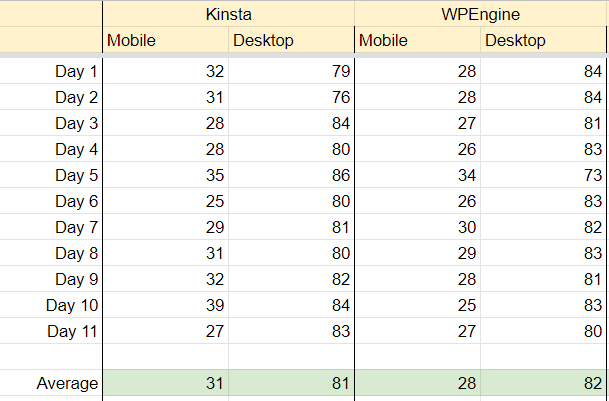
Exemplifi, a development agency that actually migrated a site from WP Engine to Kinsta and tested performance under identical conditions, reached a straightforward conclusion: “We didn’t observe much of a difference between the two platforms.” PageSpeed Insights scores were comparable across multiple test days.
That said, the infrastructure specs do differ in ways that can matter depending on your situation:
| Metric | WP Engine | Kinsta |
|---|---|---|
| Cloud infrastructure | Google Cloud Platform + AWS | Google Cloud Platform |
| Global data centers | 20 locations | 37 locations |
| Uptime SLA | 99.95% | 99.9% |
| Edge caching | CDN (static assets by default) | Full-page edge caching, 300+ PoPs |
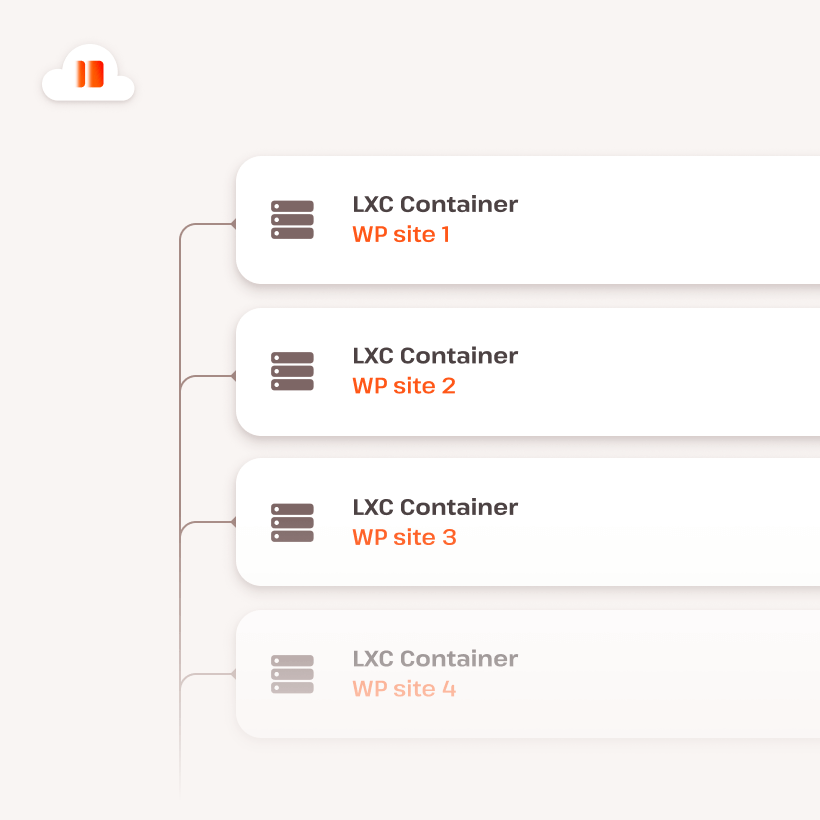
| Server isolation | Dedicated VMs on higher tiers | Isolated containers on all plans |
| Proprietary caching | EverCache® | Nginx-based + Cloudflare edge |

Kinsta’s larger data center footprint matters if your audience is in a region where WP Engine doesn’t have a nearby location. Hosting your site closer to your visitors reduces latency in a way that no amount of caching can fully compensate for. For sites with global audiences, Kinsta’s 37-location network is a genuine advantage.
WP Engine’s EverCache® technology and its AWS infrastructure options (available on higher tiers) do provide competitive scalability for high-traffic spikes. For most standard WordPress sites, though, the hosting platform itself is rarely the bottleneck — theme quality, plugin count, and image optimization tend to have a larger impact on load times than the choice between these two providers.
Security — What’s Included and What Costs Extra
Security is where Kinsta’s “everything included” approach becomes most apparent. Every Kinsta plan ships with Cloudflare Enterprise-level WAF and DDoS protection — the same product that enterprises pay thousands per month for when purchased directly.
WP Engine’s equivalent — Global Edge Security — is available, but it’s a paid add-on for Essential plan users rather than a standard inclusion. WP Engine’s Core and Enterprise plans include more security features natively, but those plans start at $400+/month.
On backups, the two platforms take different approaches:
- WP Engine: Daily automated backups with 60-day retention. Manual backups and backup downloads available. Smart Plugin Manager (automated plugin updates) available as an add-on ($3/mo).
- Kinsta: 6 types of backups (daily, hourly on some plans, manual, downloadable, external, system-generated) with 14–30 day retention depending on plan. External backups available as add-on. Hourly backups available at premium pricing.
WP Engine’s 60-day backup retention is meaningfully longer than Kinsta’s 14–30 days. If you’ve ever needed to roll back a site to a version from six weeks ago, that difference matters.
Kinsta’s Malware Security Pledge is worth highlighting: if your site gets compromised, Kinsta’s team will clean it up for free. WP Engine doesn’t offer an equivalent guarantee.
Developer Tools — Local Dev, Environments, and Workflow
Free local development tools, multiple environments, Git integration, SSH, and SFTP — both hosts cover the standard developer checklist. Where they diverge is in the details, and one of those details matters a lot if your team develops on Windows.
| Developer Feature | WP Engine | Kinsta |
|---|---|---|
| Local dev tool | Local by Flywheel (free) | DevKinsta (free) |
| Environments | 3 (dev / staging / production) | 2 (staging / production) |
| Git integration | ✅ Yes | ✅ Yes |
| SSH access | ✅ Yes | ✅ Yes |
| SFTP | ✅ Yes | ✅ Yes |
| PHP restart | Via support | ✅ Direct (in dashboard) |
| Redirect export | Support ticket required | ✅ Direct export |
| Built-in APM | Core+ only | ✅ All plans, native |
| Free themes included | ✅ 30+ StudioPress themes | None |
| Genesis Framework | ✅ Included | Not included |
WP Engine’s three-environment setup (development, staging, production) is particularly valuable for teams who want a dedicated sandbox separate from staging. Kinsta offers staging but not a separate development environment by default.
The DevKinsta Windows Issue
DevKinsta — Kinsta’s free local WordPress development tool — works well on macOS. On Windows, there are documented compatibility problems that developers should know about before making the switch.
A detailed bug report from a web agency transitioning from WP Engine/Flywheel to Kinsta described DevKinsta as “nothing short of unusable on Windows.” Specific issues included Vite build failures due to WSL path resolution problems, Gulp errors caused by file glob mismatches, and general file system slowness affecting npm operations. The same developer confirmed that Local by Flywheel worked correctly for identical projects on the same Windows machine.
If your team develops primarily on Windows and relies on modern build tools like Vite or Gulp, this is worth testing before committing to Kinsta. The hosting platform itself is excellent — it’s specifically the local development tool that has these limitations on Windows.
Explore WordPress development tools and workflows
Support — Reaching a Human When It Matters
24/7 support is table stakes for premium managed hosting, and both hosts offer it. The practical differences — response speed, available channels, language support, and how tiers are structured — vary in ways that matter depending on how your team works.
| Support Type | WP Engine | Kinsta |
|---|---|---|
| Live chat | ✅ 24/7, all plans | ✅ 24/7/365, all plans |
| Phone support | ✅ Professional+ ($50/mo+) | ❌ Not available |
| Avg response time | <3 minutes | <2 minutes |
| Languages | English only | 10 languages |
| Support tiers | Varies by plan | Same level on all plans |
| NPS score | 86 (verified) | Not publicly cited |
Kinsta’s response time of under two minutes is fast, and the quality of their WordPress expertise is consistently praised by users who’ve switched from WP Engine. The lack of phone support, however, is a genuine limitation for teams that need to escalate a critical production issue and want to talk to someone in real time.
WP Engine’s phone support starts at the Professional plan ($50/month), which is a meaningful advantage for small businesses and agencies managing client sites where a phone call can resolve a tense situation faster than a chat thread.

Migration — How Hard Is It to Switch?
If you’re moving an existing site, the migration experience is quite different between the two platforms.
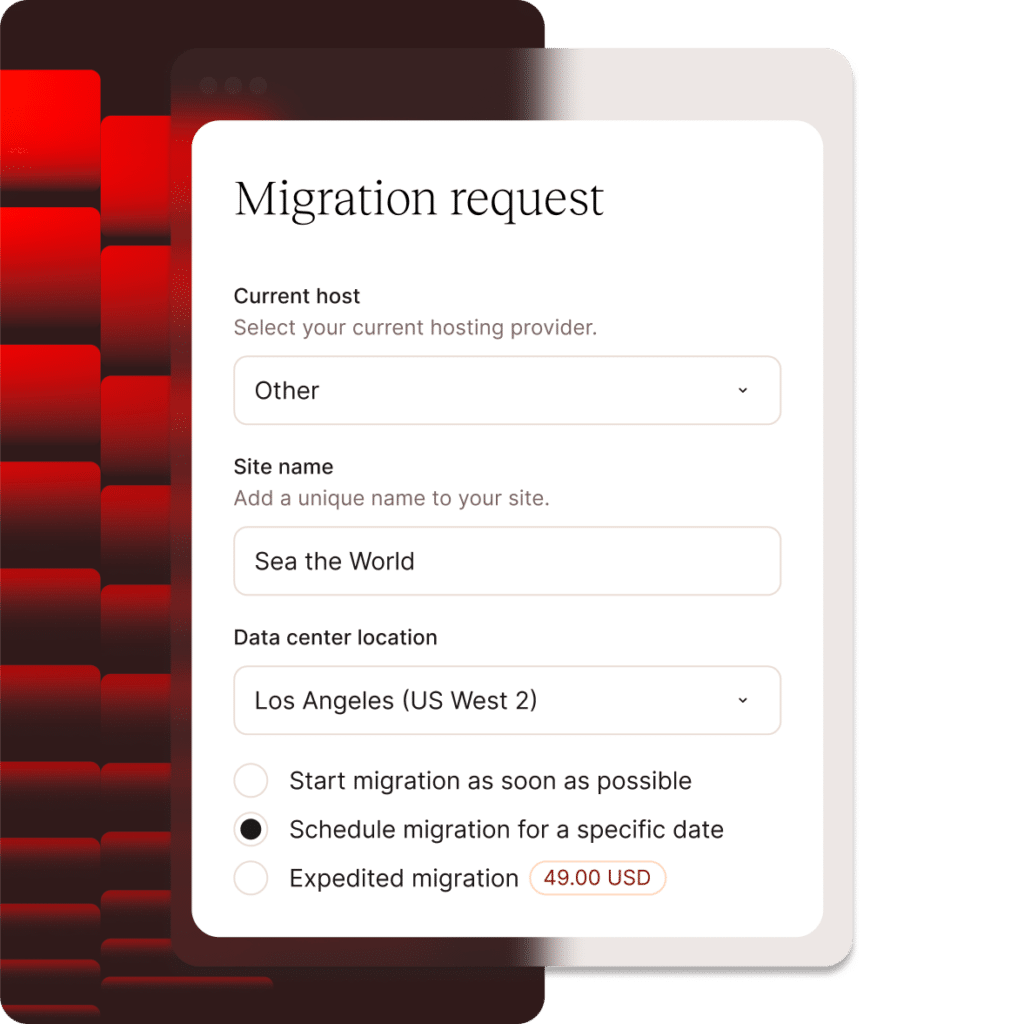
Kinsta handles migrations for you. Submit a request through the MyKinsta dashboard, provide your credentials, and their team migrates the site — for free, with no limit on how many sites you move. For most sites, this is a genuinely hands-off experience.
WP Engine provides an automated migration plugin that handles the process for most standard sites. You install the plugin, enter your destination credentials, and the migration runs automatically. For complex sites (multisite networks, large databases, WooCommerce stores with extensive order history), WP Engine may recommend their premium migration service. WP Engine never charges for migrations regardless of your plan or whether you cancel within the 60-day guarantee window.
Kinsta’s approach is more convenient for non-technical users. WP Engine’s plugin-based approach gives developers more direct control over the process.
WordPress migration guides on wplasma.com
WP Engine vs Kinsta — Who Should Choose Which
After looking at pricing, features, performance, and real-world user experience, here’s a clear breakdown by audience:
Choose Kinsta if:
- You want security features (WAF, DDoS, malware cleanup) included without add-ons
- Your team needs support in a language other than English
- You’re hosting sites for an international audience and want more data center flexibility
- You want hands-off expert migrations
- You prefer a modern, intuitive dashboard (MyKinsta) with built-in analytics and APM
- You use macOS or Linux for local development and want a well-integrated local tool
Choose WP Engine if:
- You’re running an agency and need the Agency Partner Program, transferable billing, and lower multi-site pricing
- You or your clients need phone support and don’t want to pay enterprise pricing for it
- You prefer Local by Flywheel for local WordPress development (particularly on Windows)
- You want 30+ free StudioPress premium themes and the Genesis Framework included
- You need a 60-day money-back guarantee rather than 30 days
- You want a dedicated development environment separate from staging
For WooCommerce stores: Both platforms handle WooCommerce well. Kinsta’s isolated container architecture can be an advantage during traffic spikes, preventing other customers’ activity from affecting your store’s resources. WP Engine’s scalable architecture, particularly on Core and Enterprise plans, handles high-volume WooCommerce sites reliably. For most small to mid-size stores, either platform performs adequately — the choice comes down to the other factors above.
WooCommerce hosting guides on wplasma.com
Frequently Asked Questions
Is WP Engine or Kinsta faster?
In independent testing, the performance difference between WP Engine and Kinsta is negligible for most sites. An agency that migrated a real site between the two platforms using identical configurations found no observable difference in Google PageSpeed Insights scores. What matters more than the platform choice is your site’s code quality, image optimization, plugin count, and how close the data center is to your primary audience. Kinsta’s larger network of 37 data centers gives it a geographic advantage for sites targeting audiences in specific regions.
Which is cheaper — WP Engine or Kinsta?
WP Engine is cheaper on entry-level and multi-site plans. The Startup plan runs $25/month (annual) versus Kinsta’s Starter at $35/month. At the multi-site level, WP Engine’s pricing advantage grows significantly — 10 sites costs $96/month with WP Engine versus $225/month with Kinsta. However, Kinsta includes more features out of the box (WAF, APM, migrations), so the true cost comparison depends on which features you actually need.
Does Kinsta offer phone support?
No. Kinsta offers 24/7 live chat support in 10 languages, with an average response time of under two minutes, but does not provide phone support on any plan. WP Engine includes phone support on Professional plans and above ($50/month and up). If phone access to your hosting team is important to you or your clients, WP Engine is the better fit.
Can I migrate from WP Engine to Kinsta for free?
Yes — Kinsta handles unlimited expert migrations at no cost on all plans. You submit a migration request through the MyKinsta dashboard, provide your WP Engine credentials, and Kinsta’s team takes care of the transfer. WP Engine also offers free migrations via their automated plugin, which handles most standard sites without manual assistance.
Is WP Engine safe to use after the WordPress.org dispute?
Yes, WP Engine is safe to use. The access issue that affected WP Engine customers in late 2024 — when Automattic blocked access to WordPress.org plugin and theme updates — was resolved in December 2024 following a court ruling in WP Engine’s favor. As of 2026, WP Engine customers have full access to WordPress.org. The legal case between WP Engine and Automattic is still in progress, but it hasn’t disrupted normal platform operations. It’s a factor worth monitoring if you’re planning a long-term commitment.
Which is better for WooCommerce?
Both platforms support WooCommerce effectively. Kinsta’s isolated container architecture ensures your store’s resources aren’t affected by other customers’ traffic, which can help maintain stability during sales events or traffic spikes. WP Engine’s scalable infrastructure, especially on Core and Enterprise plans, handles high-traffic stores reliably, and its StudioPress themes include WooCommerce-optimized options. For most WooCommerce stores under 100,000 monthly visits, the hosting platform choice matters less than the store’s code quality and caching configuration.
Does DevKinsta work on Windows?
DevKinsta works on Windows in many cases, but there are documented compatibility issues that primarily affect developers using modern build tools. Reported problems include Vite build failures related to WSL path resolution, Gulp file glob errors, and general file system slowness compared to working outside of DevKinsta. Local by Flywheel (WP Engine’s local dev tool) does not have these reported issues on Windows. If you develop on Windows and rely on Vite, Gulp, or similar tools, it’s worth testing DevKinsta with your specific setup before fully committing to Kinsta.
Which has better uptime — Kinsta or WP Engine?
WP Engine’s official uptime SLA is 99.95%, while Kinsta’s is 99.9%. In practice, both platforms typically deliver real-world uptime of 99.99% or better. For most WordPress sites, the difference between a 99.9% and 99.95% SLA is about 22 minutes per month — negligible for most use cases. Enterprise-critical sites that need a guaranteed 99.99% SLA should look at WP Engine’s Core plan or contact either company about enterprise arrangements.
Conclusion
WP Engine and Kinsta are both excellent platforms that outperform general shared hosting by a wide margin. The performance gap between them, when tested independently, is smaller than their marketing departments suggest. The real differences are in what each platform includes by default, how they structure support, and which workflows they fit best.
Kinsta wins on features-per-dollar at each tier, multilingual support, and hands-off migration experience. WP Engine wins on agency tooling, multi-site pricing, phone support access, and local development on Windows.
Neither platform is universally better. The right choice depends on how you build, who you support, and which features matter most to your specific situation. Use the comparison tables above to identify which gaps and advantages apply to your workflow — that’ll point you in the right direction more reliably than any single-platform verdict.
