



If you’ve spent any time searching for a keyword research tool, you’ve probably noticed two things: the free options are frustratingly limited, and the paid ones marketed most aggressively cost $100+ per month. That gap between “free but barely functional” and “enterprise pricing” is where most bloggers, solopreneurs, and small business owners actually live — and it’s underserved by most comparisons you’ll find.
This guide covers the real options at every budget tier, from genuinely free tools to the sub-$30 range that most people don’t realize exists. Pricing is verified as of March 2026 — but tools change their plans regularly, so always confirm at the official site before subscribing.

The Quick Answer (Before You Scroll)
Here’s the bottom line for each budget level:
- Best free option: Google Keyword Planner (unlimited, requires a free Google Ads account)
- Best free question-based tool: Answer Socrates (no account needed, 3 free searches/day)
- Best budget add-on: Keywords Everywhere ($21/year — worth noting that’s not a monthly price)
- Best cheap paid tool: Ubersuggest ($12/month, cleanest interface)
- Best for long-tail research: KWFinder by Mangools (~$29.90/month, deep database)
- Best full suite under $30: Keysearch ($24/month, includes YouTube research and AI features)
| Your situation | Best fit |
|---|---|
| Zero budget, just getting started | Google Keyword Planner + Answer Socrates |
| Want data while browsing Google, minimal spend | Keywords Everywhere ($21/year) |
| Need a real paid tool, tightest budget | Ubersuggest ($12/month) |
| Daily research + full SEO suite under $25 | Keysearch ($24/month) |
| Long-tail content strategy + local SEO | KWFinder/Mangools (~$29.90/month) |
| Serious SEO, multiple clients, competitive niches | Semrush or Ahrefs (different category) |
— if you’re running WordPress and want to know which of these integrate directly with your site, that guide covers plugin-level SEO options too.
What Makes a Keyword Research Tool Worth the Price?
Before getting into specific tools, it helps to understand the three factors that actually separate useful cheap tools from useless ones.
Where the Data Comes From
Not all keyword data is equal — and the differences between tools come down to their data source.
Google Ads Keyword Planner API: Some tools (including Google Keyword Planner itself and Ubersuggest) pull data directly from Google’s own advertising infrastructure. This is about as close to the source as you can get for search volume data. The tradeoff is that Google’s data is oriented toward advertisers — organic volume for long-tail keywords can be shown as ranges rather than exact numbers.
Proprietary databases: Tools like Keysearch and Mangools/KWFinder build their own databases, often using a combination of clickstream data, web crawling, and third-party data providers. These databases tend to have better long-tail coverage and more granular difficulty scores, but they’ll show different numbers than Google’s own tools. Neither is wrong — they’re measuring different things slightly differently.
The practical takeaway: pick one tool and stick with it. Consistency in your research process matters more than chasing perfect data accuracy. Use (free, forever, 100% accurate for your own site) to ground-truth your keyword decisions against what’s actually driving traffic to you.
Free Plan Limits — What They Mean in Practice
“5 searches per day” sounds fine until you’re in the middle of a keyword research session for a new content piece. Let’s put the numbers in real terms:
- 3 searches/day (Ubersuggest free, Answer Socrates free): enough for light, occasional research — one topic per day maximum
- 5 searches/day (KWFinder free): better, but you’ll still hit the wall mid-session if you’re doing competitive analysis
- Unlimited (Google Keyword Planner): genuinely unlimited — the only real “no ceiling” free option
If you do keyword research more than 2-3 times per week, you’ll outgrow most free plans faster than you expect.
The Features That Matter at This Price Point
Must-have at any budget: Search volume estimates, keyword difficulty score, related keyword suggestions.
Worth paying for: SERP analysis (seeing who currently ranks for a keyword and why), rank tracking, competitor keyword research.
Skip for now: Full site audits (Ahrefs offers a solid free version of this separately), API access, white-label reports. These matter at agency scale — not for the $12-30/month tier.
The Best Cheap Keyword Research Tools — Reviewed
Google Keyword Planner — Best Free Option (Free)
Google Keyword Planner is the only truly unlimited free keyword research tool that exists — and it’s built by the company that runs the world’s largest search engine, which counts for something.

You need a Google Ads account to use it, but creating one is free and you don’t need to run any ads. Once inside, the Keyword Ideas feature lets you enter a seed term and get hundreds of related keyword suggestions complete with monthly search volume, competition level, and CPC data. The Forecast tool adds budget planning for anyone who does eventually run paid ads.
The honest limitation: Google shows search volumes as ranges (“1K–10K” rather than an exact number) unless you’re actively running ads. For directional research — figuring out whether a topic gets significant search demand or almost none — this is perfectly adequate. For precise volume comparison between similar keywords, you’ll want a paid tool.
Best for: Anyone on a $0 budget; PPC advertisers; anyone just getting started with SEO who wants real data without any cost.
Not ideal for: Precise organic SEO research where exact volume differences matter; heavy competitive analysis.
Price: Free (free Google Ads account required)
Answer Socrates — Best Free Question-Based Tool (Free)
Answer Socrates takes a different approach: rather than search volume and difficulty scores, it maps out the questions people are actually typing into Google around any topic — pulling from Google Suggests, People Also Ask, and Google Trends.
The free plan gives you 3 searches/day plus one recursive search (which takes your initial results and searches again on the most-searched questions, expanding your keyword map significantly). Built-in clustering organizes questions by topic, and you can export everything as a CSV. No account required at all for basic use.
It’s not a replacement for a full SEO platform — there are no difficulty scores or search volumes on the free plan — but for generating content ideas and FAQ sections, it’s genuinely excellent and genuinely free. Worth bookmarking alongside whatever paid tool you end up using.
Best for: Content ideation, FAQ generation, understanding what your audience is actually asking; complement to any other tool.
Not ideal for: Competitive analysis, rank tracking, or any task that needs search volume data.
Price: Free (3 searches/day, no account needed)
Keywords Everywhere — Best Budget Browser Add-On ($21/year)
Keywords Everywhere is a browser extension that overlays keyword data directly onto your Google search results page, YouTube, Amazon, and Instagram. Instead of switching to a separate tool, you see search volume, CPC, competition, and trend data inline as you browse.
The pricing model is credit-based: the Bronze plan is $21/year (about $1.75/month), which gives you 100,000 credits. Each Google search uses approximately 10-50 credits depending on how many keyword suggestions are shown. That works out to roughly 2,000–10,000 searches before you need to top up — more than enough for casual use over 12 months.
What it doesn’t do: it’s not a standalone research platform. You can’t build keyword lists, run SERP analysis, or track rankings. Think of it as a constant, low-key data layer over your normal browsing — not a dedicated research session tool.
Best for: Casual bloggers who want quick data without switching tabs; anyone who already has a primary tool and wants supplementary data.
Not ideal for: Deep research sessions, competitor analysis, or anything requiring more than surface-level metrics.
Price: $21/year (Bronze plan, credit-based); no free plan
Ubersuggest — Best Cheap Tool for Beginners ($12/month)
At $12/month for the Individual plan, Ubersuggest is currently the most affordable full-featured keyword research tool available. Neil Patel’s platform covers keyword research, rank tracking, site auditing, backlink analysis, and content ideas — all in one of the cleanest interfaces in this category.

Because it pulls from Google’s Keyword Planner API directly, the volume data is as close to the source as you’ll get from a third-party tool. The free plan (3 searches/day) is workable for very occasional use; the $12/month Individual plan unlocks 150 searches/day and tracking for up to 125 keywords across one domain.
The comparison keyword feature deserves a mention: Ubersuggest is the only tool in this price range that specifically surfaces “vs.” and comparison search terms alongside a standard keyword — useful for review content and product comparisons.
One known limitation: the data refresh credit system can be frustrating if you do heavy research. Each keyword update uses credits, and the Starter plan limits how many you can refresh at once. It’s less of an issue if you’re doing research for a single blog rather than managing many clients.
pairs well with this tool — Ubersuggest’s content ideas feature maps nicely to building out topical authority on a WordPress site.
Best for: Beginners who want an easy, visual interface; content marketers who want keyword ideas alongside blog post data; anyone who wants Google-sourced data at the lowest possible paid price.
Not ideal for: Power users doing heavy daily research across many projects; users in competitive niches who need highly precise difficulty data.
Price: Free plan (3 searches/day); Individual: $12/month; Business: $20/month; Enterprise: $40/month (verify at neilpatel.com)
Keysearch — Best Full Suite Under $25/Month ($24/month)
Keysearch has been around since 2015, which in the SEO tools market means something — cheap tools come and go, but Keysearch has maintained a consistent user base of bloggers and indie publishers for over a decade.
The Starter plan at $24/month gives you 200 keyword searches per day — substantially more than most comparable tools in this range. That’s enough for a dedicated blogger doing multiple research sessions daily without hitting a limit. The plan includes keyword research, live SERP analysis, competitor analysis, backlink data, YouTube keyword research (rare in this price tier), site auditing, rank tracking, and an AI Content Assistant.
Annual billing brings the effective cost down to $20/month (billed as $240/year — “2 months free”). That’s a meaningful saving if you’re committed for a year.
The honest assessment of accuracy: Keysearch’s difficulty scores have a reputation among experienced SEOs for being on the optimistic side — keywords that look easy to rank for sometimes turn out to be more competitive than the score suggests. This isn’t a dealbreaker for content strategy (you’re still identifying relative difficulty), but factor it in if you’re making high-stakes content investment decisions based on difficulty scores alone.
Best for: Bloggers and content creators who do daily keyword research; anyone who wants YouTube keyword research included; solopreneurs who need a broad feature set on a budget.
Not ideal for: Users in highly competitive niches where precise difficulty scoring is critical; enterprise-level campaigns.
Price: 7-day free trial; Starter: $24/month ($20/month annual); Pro: $48/month (verify at keysearch.co)
KWFinder by Mangools — Best for Long-Tail and Local SEO (~$29.90/month)
Mangools built its reputation on doing keyword research well — particularly for long-tail terms and local SEO, where its database outperforms most tools in this price range.
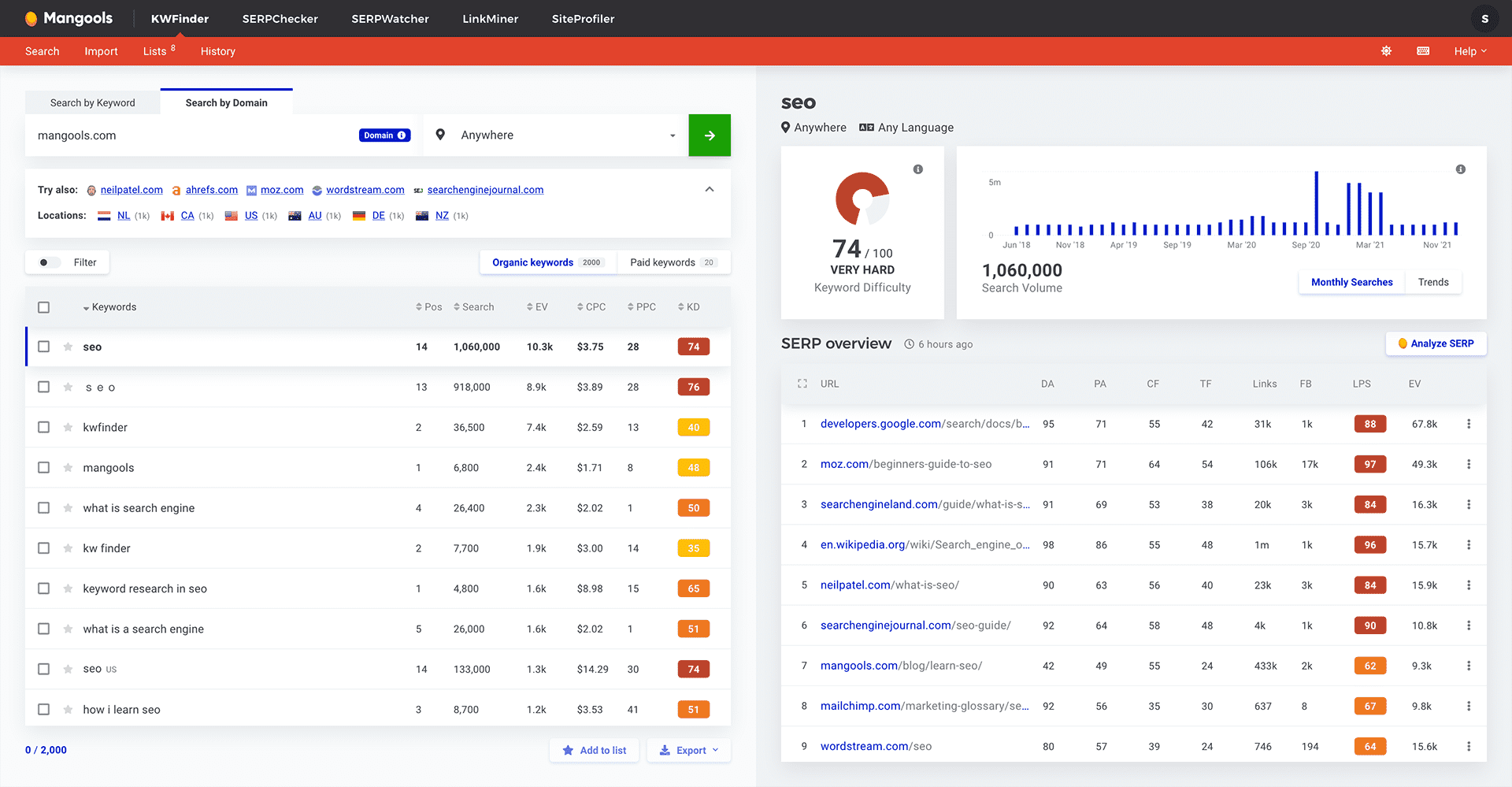
KWFinder is one of five tools in the Mangools suite (which also includes SERPChecker, SERPWatcher for rank tracking, LinkMiner for backlinks, and SiteProfiler). The Basic plan at approximately $29.90/month gives you access to all five tools — making it good value if you actively use more than just keyword research. Annual billing offers a 35% discount.
The free account includes 5 keyword lookups per 24 hours — slightly more generous than Ubersuggest’s free plan, and each lookup provides full data rather than limited metrics. The 10-day free trial (no credit card required) is one of the more generous trials in this category.
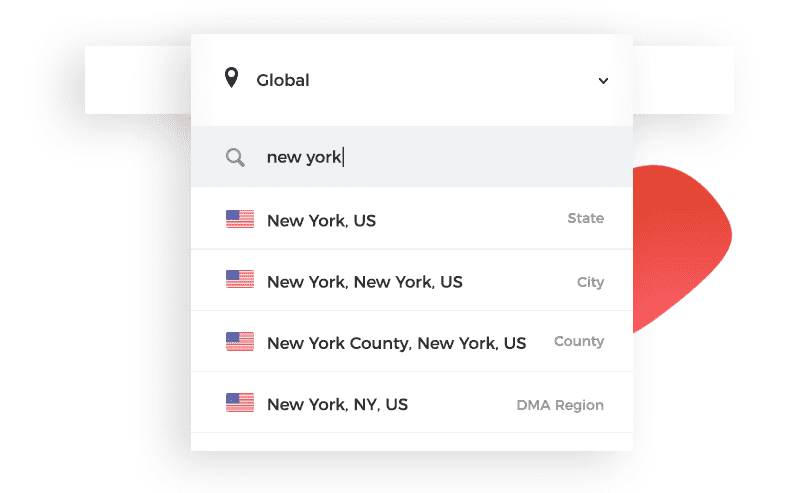
Local SEO is a genuine differentiator: KWFinder supports over 65,000 geographic locations worldwide, letting you see search volume and difficulty for specific cities, regions, or countries rather than national averages. For a local business — a restaurant, law firm, or home services company — this level of local data at $29.90/month is significant.
Honest limitation: there is no built-in site audit tool in the Mangools suite. If you need technical SEO auditing, Ahrefs offers a free version of its site audit separately — a practical workaround that one content strategist described as just using “the right tool for each job.”
Best for: Content marketers focused on long-tail keywords; local businesses that need city- or region-specific search data; users who want a full suite (keyword + SERP + rank + backlinks) at one price.
Not ideal for: Users who need site audit features; anyone whose primary need is bulk/daily research at the lowest possible price (Keysearch’s search cap is higher at this price point).
Price: Free account (5 lookups/day) + 10-day trial; Basic: ~$29.90/month (~$19.43/month annual); verify at mangools.com
Side-by-Side Pricing and Features Comparison
Here’s the full picture in one place. All prices are in USD, verified March 2026 — always confirm at official sites before purchasing.
| Tool | Free Plan | Monthly Price | Annual Cost | Daily Search Limit (paid) | Data Source | AI Features | Best For |
|---|---|---|---|---|---|---|---|
| Google Keyword Planner | ✅ Unlimited | $0 | $0 | Unlimited | Google Ads API | ❌ | Free research, PPC planning |
| Answer Socrates | ✅ 3/day | $0 | $0 | — | Google Suggests + PAA | ❌ | Content ideation, FAQs |
| Keywords Everywhere | ❌ None | $1.75/mo (billed annually) | $21/year | Credit-based (~100K credits) | Google autocomplete | ❌ | Browser overlay, casual use |
| Ubersuggest | ✅ 3/day | $12/month | ~$144/year | 150/day (Individual) | Google Ads API | ✅ AI writer | Beginners, content marketing |
| Keysearch | ✅ 7-day trial | $24/month | $240/year | 200/day (Starter) | Proprietary | ✅ AI Content Assistant | Bloggers, full suite on budget |
| KWFinder/Mangools | ✅ 5/day + 10-day trial | ~$29.90/month | ~$233/year | 100/day (Basic) | Proprietary | ✅ AI search grader | Long-tail, local SEO |
Note: Semrush and Ahrefs are not included here — their entry-level paid plans start well above this range. Their free tiers (Semrush: 10 analytics reports/day; Ahrefs: limited free tools) can supplement the tools above for specific tasks.
The Data Accuracy Question Nobody Likes to Answer
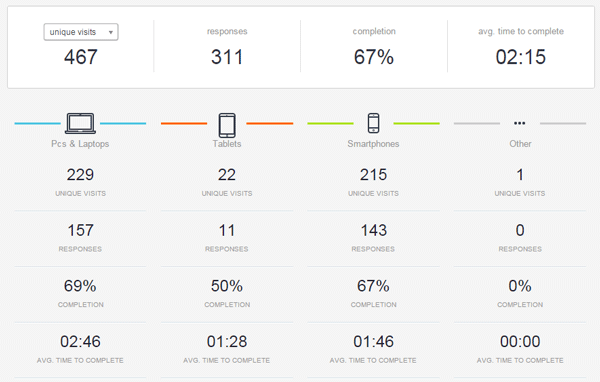
Here’s a fact that trips up a lot of people: run the same keyword through Ubersuggest, Keysearch, and KWFinder, and you’ll get three different search volume numbers and three different difficulty scores. None of them is definitively “right.”
This isn’t a cheap-tool problem specifically. Enterprise platforms like Semrush and Ahrefs also show different numbers from each other, and from Google’s own data. A 2015 survey by Rand Fishkin found that volume accuracy was the single most-cited frustration across all keyword research tools — from free to expensive. That was true then and it’s still true now.
Why does this happen? Three reasons:
- Different data sources: Tools using Google’s API get official ad-system data (but as ranges for organic searches). Proprietary databases sample clickstream data and web usage, which captures signals Google’s API doesn’t expose.
- Different update frequencies: Some tools refresh data monthly; others do it more often. Trending keywords can look outdated in a slower-refreshing tool.
- Different methodologies for difficulty scores: One tool weights domain authority heavily; another weights content quality. Neither is wrong — they’re different models.
The practical answer: choose one tool, learn what its numbers mean in your niche, and use it consistently. Over time, you’ll develop an intuition for how its difficulty scores translate to actual ranking outcomes in your specific corner of the internet. Then use to ground-truth your assumptions against actual search data from your own site.
Who Should Use Which Tool (A Practical Framework)
The right cheap keyword research tool depends on three variables: how often you do research, what type of content you’re creating, and how much you’re willing to spend per month.
If You’re a Blogger or Content Creator
- $0/month: Google Keyword Planner for volume data + Answer Socrates for content ideas. These two together cover most of what a starting blogger needs.
- $21/year: Add Keywords Everywhere as a low-effort overlay. Minimal investment, always-on data as you browse.
- $12/month: Ubersuggest Individual plan — clean interface, 150 searches/day, and content ideas built in.
- $20-24/month: Keysearch for the best balance of search volume, daily limits, and features (including YouTube if your content spans multiple platforms).
If You’re a Small Business Owner Managing Your Own SEO
Your research sessions are less frequent but the stakes per keyword are higher — you’re choosing topics that will drive business, not just traffic.
Start with Google Keyword Planner to understand search patterns in your industry. Add Ubersuggest ($12/month) when you’re ready for competitor insights and more precise data. If local search is central to your business — a physical location, service-area business, or regional focus — KWFinder/Mangools is worth the extra cost for its location-specific keyword data across 65,000+ locations.
If You’re Running SEO for Multiple Sites or Clients
At this scale, you’ll quickly outgrow both the free plans and the single-domain limitations of entry-level paid tiers. Keysearch’s Pro plan ($48/month, 500 searches/day) or Mangools Premium ($39.90/month) are the natural next steps. When client budgets allow, this is also the tier where Semrush starts to justify its cost.
| User Type | Free ($0) | Ultra-budget ($21/yr) | Budget ($12/mo) | Mid-range ($24-30/mo) |
|---|---|---|---|---|
| New blogger | ✅ Start here | ✅ Keywords Everywhere | ✅ Ubersuggest | If publishing 3+/week |
| Small business owner | ✅ Google KP | Supplement only | ✅ Good starting point | ✅ KWFinder for local |
| Solopreneur/Freelancer | Outgrow quickly | Good add-on only | ✅ Ubersuggest (1 client) | ✅ Keysearch (multiple sites) |
| Content agency (small) | Not enough | Not enough standalone | Too limited | ✅ Keysearch Pro or Mangools Premium |
When Free Stops Being Free — Signs You Need to Upgrade
There’s real value in free and ultra-cheap tools, but they have a ceiling. Here are four signs you’ve hit it:
- You’re hitting daily limits mid-session. If you regularly run out of searches before you’re done with a research task, the friction is costing you more in time than a paid plan would cost in money.
- You need competitive data. Google Keyword Planner won’t tell you what keywords your competitors rank for. That requires a paid tool with competitor analysis features (Ubersuggest, Keysearch, Mangools all include this).
- You want to track your rankings over time. Free plans generally don’t include rank tracking. Without it, you’re flying blind on whether your SEO efforts are working.
- You’re creating content regularly but not ranking. This is often a keyword selection problem — the free tools might be showing you competition levels that are overly optimistic, and a tool with better difficulty data (like Mangools) can help you find genuinely winnable keywords.
The math is straightforward: at $12-24/month, a keyword research tool costs less than a single paid guest post, a stock photo subscription, or most other content marketing expenses. If you’re serious about organic traffic, it’s one of the highest-leverage places to spend.
— once your keyword research is sorted, this covers the on-page and technical steps to actually rank for the keywords you’ve identified.
FAQ — Common Questions About Cheap Keyword Research Tools
- What is the cheapest paid keyword research tool?
- As of March 2026, Ubersuggest’s Individual plan at $12/month is the most affordable full-featured paid keyword research tool. Keywords Everywhere is technically cheaper at $21/year ($1.75/month), but it’s a browser add-on rather than a standalone research platform. For a complete tool with search volume, difficulty, competitor analysis, and rank tracking, Ubersuggest at $12/month is the entry point.
- Is Google Keyword Planner good enough for organic SEO?
- For directional research — understanding whether a topic has high, medium, or low search demand — yes, Google Keyword Planner is genuinely useful. Its limitation for organic SEO is that it shows search volumes as ranges (like “1K–10K”) rather than exact numbers, which makes it hard to compare similar keywords. It also doesn’t show keyword difficulty scores, so you’d need to evaluate competition manually. Many bloggers and small businesses use it as their primary free tool and get good results.
- Are cheap keyword tools accurate enough?
- For most content strategy decisions, yes. The main limitation isn’t inaccuracy — it’s inconsistency across tools. Every keyword research tool shows different numbers, and that’s normal regardless of price. Tools that use Google’s Keyword Planner API directly (like Ubersuggest) tend to show volume data that aligns well with what you’d see in Google Ads. Proprietary-database tools (like Keysearch and Mangools) often show different volumes but can surface long-tail opportunities that Google’s data misses. The key is picking one tool and learning what its numbers mean for your niche.
- What is the difference between Keysearch and KWFinder/Mangools?
- Both are affordable SEO suites in a similar price range, but they have different strengths. Keysearch ($24/month) offers higher daily search limits (200/day on Starter) and includes YouTube keyword research — useful if your content strategy spans platforms. KWFinder/Mangools (~$29.90/month) has a superior long-tail keyword database and better local SEO support (65,000+ locations), but a lower daily search cap (100/day on Basic). Keysearch is better for high-volume daily research; KWFinder is better for depth, especially for local businesses or niche long-tail strategies.
- Can AI chatbots like ChatGPT be used for keyword research?
- You can use them for brainstorming keyword ideas, but not for actual keyword data. ChatGPT and Gemini don’t have access to real-time search volume, keyword difficulty scores, or current SERP data. When tested head-to-head with dedicated keyword tools, AI chatbots produce inconsistent results — running the same prompt twice can return completely different keyword sets. They’re useful for generating seed keyword ideas to then research in a real tool, not as a replacement for one.
- Which free keyword research tool has the highest daily search limit?
- Google Keyword Planner has no daily search limit at all — it’s genuinely unlimited. For third-party tools, KWFinder’s free account allows 5 keyword lookups per 24 hours, which is higher than Ubersuggest’s free plan (3/day) or Answer Socrates (3/day). Google Search Console is also unlimited and free, though it only shows keywords your own site already ranks for (not new research).
- Is Keywords Everywhere worth paying for?
- At $21/year, it’s worth it as a supplement to your main research tool — not as a replacement. The browser overlay means you get quick volume and competition data while doing normal Google searches, which builds intuition without requiring you to open a separate tab. It’s not suitable for deep research sessions, competitor analysis, or rank tracking. Think of it as a low-cost upgrade to your normal browsing rather than a standalone SEO tool.
- When should I upgrade from a cheap tool to Semrush or Ahrefs?
- When the limitations of the cheap tier are actively costing you money or time. Specifically: when you’re managing SEO for multiple clients and need enterprise-level data, when you’re competing in high-stakes niches (finance, health, legal) where data precision has real consequences, or when you need features that cheap tools don’t offer — such as content gap analysis across hundreds of competitors, API access, or custom reporting. For a solo blogger or small business owner, the $12-30/month tier handles the vast majority of real-world keyword research needs.
- Do cheap keyword tools work for local SEO?
- Most do, but with varying degrees of specificity. Google Keyword Planner supports country and region-level filtering. Keysearch supports location-based research. KWFinder/Mangools stands out with the broadest local coverage — 65,000+ specific locations — making it the strongest cheap option for local businesses that need city- or neighborhood-level keyword data. For hyperlocal research (a specific ZIP code or small town), even these tools have limits, and Google Search Console data from your own site becomes the most reliable reference.
- What keyword metrics matter most for a beginner?
- Three metrics cover 90% of what you need when starting out: Monthly search volume (how many people search for this term — generally target keywords with at least 100-500 monthly searches to make content creation worthwhile); Keyword difficulty (how hard it is to rank on page one — aim for scores under 40-50 on most tools when you’re building domain authority); and Search intent (is the person looking for information, a product to buy, or a specific website — your content format should match the intent). CPC data and trend graphs are secondary. Master these three first.
Wrapping Up
The keyword research tool market is not binary — it’s not “free tools that barely work” versus “enterprise software at $100+/month.” The $12-30 range contains genuinely capable tools used by working bloggers, content strategists, and small business owners every day.
The quick summary: start free with Google Keyword Planner and Answer Socrates. Add Keywords Everywhere ($21/year) for passive data. When you’re doing regular content research — say, three or more times per week — a paid plan at $12-24/month removes the friction that’s slowing you down. Ubersuggest at $12/month is the lowest-barrier entry; Keysearch at $24/month gives you more daily searches and a broader feature set; KWFinder at ~$29.90/month wins on long-tail depth and local SEO.
Pick the tool that fits your current research volume and budget — and remember that consistency with one tool beats switching between three. Your data gets more useful over time as you learn what the numbers mean for your specific niche.
