



- A keyphrase in introduction means placing your target search phrase in the very first paragraph of your content.
- Google reads your introduction to establish what a page is about — your keyphrase there sends an immediate topical signal.
- Both Yoast SEO and Rank Math run this as a named check; failing it costs you points in their SEO analysis panels.
Knowing how to use a keyphrase in introduction is one of the most practical on-page SEO skills you can develop, and it takes less than five minutes to get right once you understand what’s actually happening. This guide breaks down the concept with real examples — good and bad — so you can see exactly what passing this check looks like in practice, whether you’re using Yoast SEO, Rank Math, or neither.
What “Keyphrase in Introduction” Actually Means
A focus keyphrase is the phrase you want your content to rank for in search results. If you’re writing a post about home office setups on a budget, your focus keyphrase might be “home office setup ideas” or “affordable home office equipment.” Every piece of content should have one primary focus keyphrase — the phrase that best represents the topic.
The “introduction” in this context means your opening paragraph: the first block of text a reader sees after your heading. When SEO tools refer to the keyphrase in introduction check, they’re asking one straightforward question: does your focus keyphrase appear in that first paragraph?
The combination of those two elements — the keyphrase and its placement in the introduction — is what the check measures. It’s not about how many times you use the phrase, or whether it appears in your title, or whether it shows up later in the article. Just: is it in the first paragraph?
Learn more about on-page SEO for WordPress
Where Does the Introduction End?
Different SEO tools define the boundary slightly differently. Yoast SEO checks the content of the first paragraph block in the WordPress editor. Rank Math is more precise: it checks the first 10% of your content, which works out to roughly the first 100–150 words for a typical 1,200-word article.
In practice, both checks are satisfied by placing your keyphrase in the first one or two sentences. If your introduction runs long (three or four sentences before a second topic appears), get the keyphrase in early rather than relying on Rank Math’s word-count buffer.
Why Google Cares About Your First Paragraph
Search engines read your content to understand what it’s about before deciding whether to show it for a given query. Your introduction carries extra weight in that process. Google’s crawlers analyze early content signals to establish page topic — your opening paragraph is read first, and it contributes disproportionately to the engine’s initial assessment of relevance.
Your readers are doing the same thing. When someone lands on your page from a search result, they’re scanning the introduction to confirm they’re in the right place. If they searched for “bathroom remodel cost” and your first paragraph talks generally about home renovation without mentioning the specific phrase, they may bounce — even if the information they need is two scrolls away.
The keyphrase in the introduction serves both audiences simultaneously: it tells Google what the page is about, and it tells the reader they’re in the right place. That dual function is why SEO plugins treat it as a meaningful check.
Compare the best SEO plugins for WordPress
How Much Does It Actually Affect Rankings?
The keyphrase in introduction check is a topical relevance signal, not a direct ranking factor on its own. No SEO plugin can guarantee a ranking improvement from any single check. What these checks do is help ensure your on-page SEO is coherent — and a coherent page, optimized across multiple signals, tends to outperform one that ignores them.
Think of it this way: missing the keyphrase in your introduction alone won’t cause a well-built, authoritative page to drop. But adding it back won’t hurt, takes thirty seconds, and removes a legitimate gap in your topical signal. For competitive queries, those small edges accumulate.
Keyphrase in Introduction Examples — Good and Bad
Theory only goes so far. The most useful thing this guide can show you is what a keyphrase-in-introduction looks like in practice — including what not to do. Each example below uses a real-world niche and a realistic focus keyphrase.
Example 1: Home Renovation Niche
Focus keyphrase: bathroom remodel cost
BAD introduction:
“Thinking about remodeling your bathroom? You’re not alone. Millions of homeowners every year decide to give their bathrooms a makeover. Before you start picking tiles and fixtures, there are some important things to know about the process.”
Why it fails: The phrase “bathroom remodel cost” never appears in this paragraph. Google sees “bathroom,” “makeover,” and “tiles,” but has no confirmation that this page is specifically about costs. The Yoast SEO analysis will show a red or orange light for keyphrase in introduction. A reader who searched for cost information will feel uncertain.
GOOD introduction:
“The average bathroom remodel cost in the US ranges from $6,000 to $15,000, depending on the size of the space and the materials you choose. Understanding that range before you start helps you set a realistic budget — and avoid the expensive surprises that derail most projects.”
Why it works: The keyphrase “bathroom remodel cost” appears in the very first sentence. It provides immediate value (an actual number range). Google gets a clear topical signal. Yoast SEO will return a green light. The reader knows immediately they’re in the right place.
Example 2: WordPress / Technology Niche
Focus keyphrase: how to speed up WordPress
BAD introduction:
“I’ve been managing WordPress sites for clients for over a decade, and one thing that constantly surprises me is how many site owners overlook performance. It wasn’t until a client called in a panic about their bounce rate that I really started digging into what makes a site feel slow.”
Why it fails: Personal anecdote openers often delay the keyphrase. This paragraph mentions “WordPress” and “performance” but never “speed up WordPress” — the exact phrase a user searched for. The Rank Math check would fail because the focus keyword doesn’t appear in the first 10% of the content.
GOOD introduction:
“Learning how to speed up WordPress doesn’t require a developer or expensive plugins. With the right combination of caching, image compression, and a lightweight theme, most sites cut their load time in half within an afternoon — without touching a line of code.”
Why it works: The exact keyphrase “how to speed up WordPress” lands in the first sentence. It immediately signals to the reader (and to Google) what this page covers. The sentence is also genuinely useful — it sets expectations and reduces anxiety about difficulty.
Read the full guide on speeding up WordPress
Example 3: Local Business Niche
Focus keyphrase: best coffee shops in Austin
BAD introduction:
“Austin has a thriving food and beverage scene. From tacos to barbecue, the city is known for its independent local culture. Coffee is no exception — the city has dozens of independent cafes that locals love, scattered across every neighborhood.”
Why it fails: “Best coffee shops in Austin” never appears. The paragraph mentions Austin and coffee, but only thematically. A search engine cannot confirm this page ranks for that specific query from the introduction alone. The reader has no confirmation that a curated “best” list is coming.
GOOD introduction:
“The best coffee shops in Austin aren’t hard to find — but knowing which ones are worth your time takes some local knowledge. This guide covers 12 spots that regulars keep coming back to, from the independent roasters on South Congress to the specialty cafes taking over the East Side.”
Why it works: Exact keyphrase in sentence 1. Promises a specific deliverable (12 spots). Adds geographic specificity (South Congress, East Side). Natural, readable, and passes every SEO plugin check immediately.
Example 4: Long-Tail Keyphrase
Focus keyphrase: free WordPress themes for photographers
BAD introduction (keyword stuffing):
“Free WordPress themes for photographers — if you are a photographer looking for free WordPress themes for photographers, these free WordPress themes for photographers are the best free WordPress themes for photographers available.”
Why it fails: This is keyword stuffing. It would technically pass the Yoast check, but Google’s spam detection systems would flag it. It reads as machine-generated, not human-written. Even if it ranked, bounce rate would be catastrophic.
GOOD introduction:
“Finding free WordPress themes for photographers used to mean settling for generic layouts that didn’t do your images justice. That’s changed significantly — today’s best free options include portfolio-ready designs with full-screen galleries, EXIF data display, and clean typography built around visual content.”
Why it works: The exact long-tail keyphrase appears once, naturally, in the first sentence. It acknowledges the reader’s past frustration (generic layouts), establishes authority, and previews specific features they care about. One mention in the introduction is enough.
How to Write a Keyphrase-Optimized Introduction (Step by Step)
Most people overcomplicate this. The process below takes the guesswork out of it and works for any niche, any keyphrase length.
How to write a WordPress blog post that ranks
Step 1: Lock in your focus keyphrase before writing.
Don’t start writing and then try to fit a keyphrase in afterward. Know the exact phrase before you type the first word. Enter it in your SEO plugin’s focus keyphrase field first — that way the analysis runs live as you write.
Step 2: Write your core sentence first.
The core sentence is the single most important sentence in your introduction — the one that states clearly what the page is about. This sentence should contain your focus keyphrase. Write it before anything else.
Step 3: Build the rest of the introduction around that core sentence.
After your core sentence, write 2–3 supporting sentences that expand on it. Tell the reader what they’ll find, why it matters to them, or what problem the page solves. These sentences don’t need to repeat the keyphrase.
Step 4: Consider writing the introduction last.
This is a professional writing technique: complete the full article body first, then come back to write the introduction. You’ll have a clearer picture of what the article actually delivers, which makes writing a tight, accurate introduction much easier — and keyphrase integration feels more natural when you’re not under pressure at the start.
Step 5: Read it aloud.
If the sentence containing your keyphrase sounds awkward when spoken, rewrite it. A keyphrase that forces an unnatural sentence structure is worse than one that reads smoothly, even if the smooth version takes a slightly different form. Natural writing converts better and signals quality.
Step 6: Check the SEO analysis panel.
After writing your introduction, check Yoast SEO or Rank Math’s analysis panel. Confirm the “keyphrase in introduction” check shows green (Yoast) or passes (Rank Math). If not, revisit the first paragraph and confirm the exact keyphrase phrase is present — not just thematically related words.
Tips for Natural Keyphrase Integration
- Make the keyphrase the subject of the sentence. “WordPress speed optimization starts with your hosting plan” works better than forcing the phrase into a prepositional phrase.
- Use the keyphrase to answer an implied question. If your keyphrase is “best budget laptops for students,” open with a sentence that frames the answer: “The best budget laptops for students balance battery life, build quality, and price — and you don’t need to spend more than $500 to get all three.”
- For long-tail keyphrases, use the whole phrase once. Don’t break it across two sentences in a way that loses the phrase pattern. “How to speed up” in one sentence and “your WordPress site” in the next sentence won’t satisfy the exact-match check.
- Synonyms are secondary. Use the exact keyphrase in the introduction. Save synonyms and related phrases for the article body. If you’re on Yoast Premium, you can add synonyms to the settings, and Yoast will recognize them — but start with the exact match.
How Yoast SEO and Rank Math Check Your Introduction
Understanding what each plugin actually measures helps you interpret the feedback correctly — especially when you’re getting a red light despite having the keyphrase in your opening paragraph.
Complete Yoast SEO tutorial for WordPress
The Yoast SEO Keyphrase in Introduction Check
In Yoast SEO, the “Keyphrase in introduction” check lives in the SEO analysis panel — either in the sidebar (block editor) or the meta box at the bottom of the post editor (classic editor). It analyzes the content of your first paragraph block.
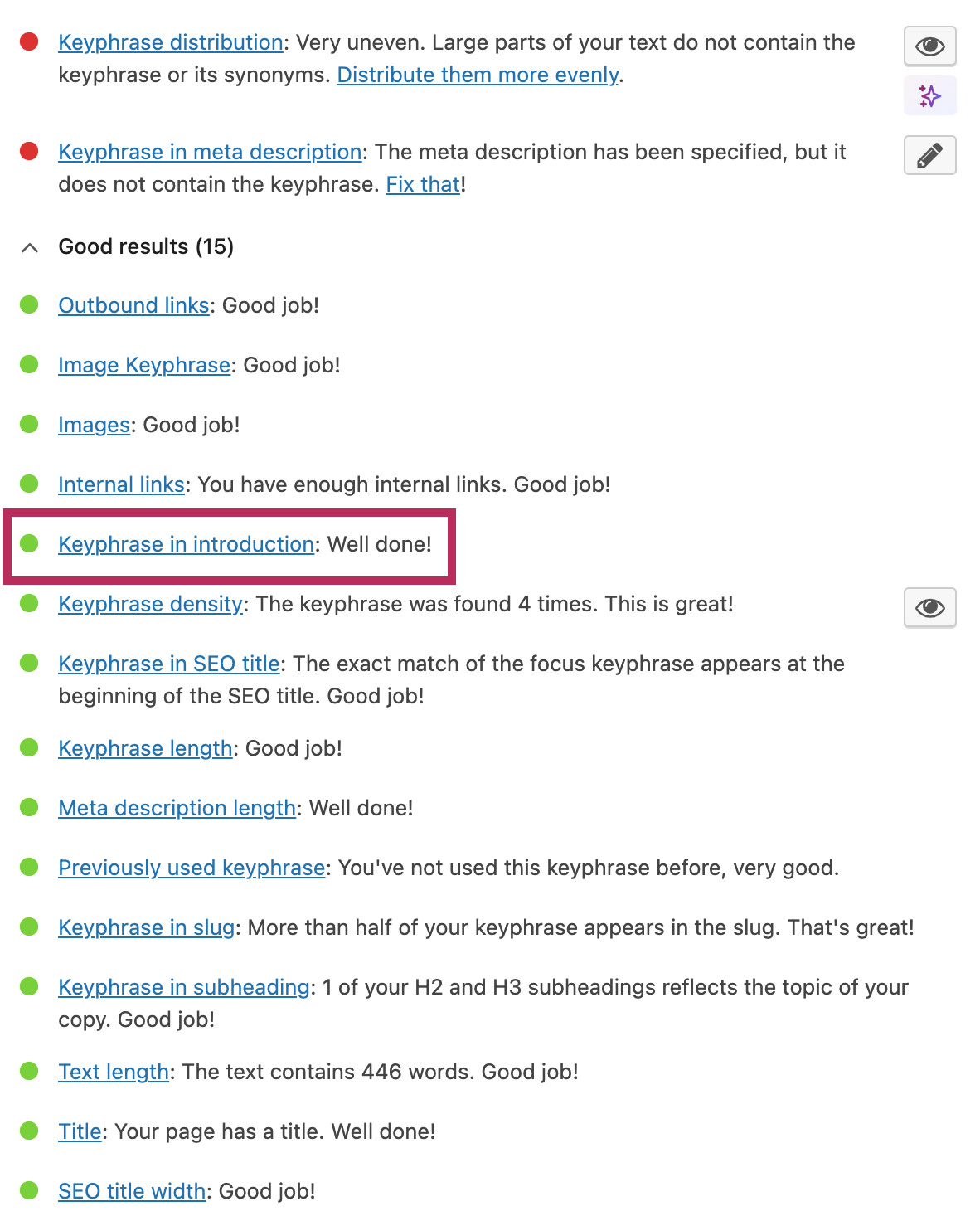
The check looks for the words in your keyphrase — in order, as a phrase — within that first paragraph. Here’s what each result means:
- Green light: Yoast found your focus keyphrase (or a recognized synonym, if you’re on Premium) in the first paragraph. No action needed.
- Orange light: Yoast found some words from the keyphrase but not the full phrase, or it detected the keyphrase but not prominently enough. Review your first paragraph and check the exact phrasing.
- Red light: Yoast did not find the keyphrase in the first paragraph. The keyphrase may be in a later paragraph, or it may be missing from the post entirely.
Common reasons for an unexpected red or orange light:
- Your introduction is inside a custom HTML block rather than a standard paragraph block — Yoast may not read it.
- You’re using a synonym that’s not registered in Yoast Premium’s synonym settings.
- You have the keyphrase in a caption, table, or sidebar widget that appears before the main paragraph — Yoast checks the paragraph content specifically.
- A page builder is wrapping your content in div containers that Yoast’s parser doesn’t recognize as a first paragraph.
Rank Math review: is it better than Yoast SEO?
The Rank Math Keyphrase in Introduction Check
Rank Math’s equivalent check is labeled “Focus Keyword in Introduction” and appears in the Content Analysis panel within the post editor sidebar. The threshold differs from Yoast: Rank Math checks the first 10% of your content, which typically corresponds to the first 100–150 words.
When the check fails, Rank Math displays the message: “Focus Keyword doesn’t appear at the beginning of your content.” In versions with Content AI enabled, a “Fix with AI” button appears alongside the failed check — clicking it prompts Content AI to rewrite your introduction to include the focus keyword.
Rank Math also recommends including the focus keyword in your conclusion, which Yoast does not specifically check for by default. If you want a high content score in Rank Math, both the opening and closing sections should reference the keyphrase.
Side-by-Side Comparison: Yoast vs Rank Math
| Feature | Yoast SEO (Free) | Yoast SEO (Premium) | Rank Math (Free) |
|---|---|---|---|
| Checks introduction for keyphrase | Yes | Yes | Yes |
| Threshold | First paragraph/block | First paragraph/block | First 10% (~100–150 words) |
| Exact match required | Yes | No (synonyms OK) | Yes |
| Synonym recognition | No | Yes | No |
| AI-assisted fix | No | No | Yes (Content AI) |
| Check label | Keyphrase in introduction | Keyphrase in introduction | Focus Keyword in Introduction |
| Result format | Green / Orange / Red | Green / Orange / Red | Pass / Fail with score points |
How to choose a focus keyword in WordPress
Common Mistakes When Using a Keyphrase in Your Introduction
Most keyphrase-in-introduction errors fall into a small number of patterns. Recognizing them makes them easy to fix.
1. Burying the Keyphrase
Placing the keyphrase in the second or third paragraph is the most frequent mistake. The SEO plugin checks the first paragraph specifically — a keyphrase in paragraph two does not satisfy the check, even if it’s close to the top of the page visually.
2. Using Only Thematically Related Words
Writing about “website performance” when your keyphrase is “WordPress speed optimization” will not pass an exact-match check. The words in the keyphrase need to appear together as a phrase. Thematic proximity is not enough.
3. Repeating the Keyphrase Multiple Times in the Introduction
One use in the introduction is the goal. Using the keyphrase two or three times in the first paragraph starts to read as keyword stuffing — even if each individual sentence makes sense. It signals to both readers and algorithms that the text was written for search engines rather than people.
4. Starting with an Anecdote That Delays the Keyphrase
Personal stories and scene-setting anecdotes can be engaging, but they frequently push the keyphrase past the first paragraph. If you want to open with an anecdote, keep it to one sentence and follow it immediately with the core sentence containing the keyphrase.
5. Assuming the Title Satisfies the Introduction Check
The keyphrase-in-title check and the keyphrase-in-introduction check are separate. Having the keyphrase in your H1 does not satisfy the introduction check. You need the keyphrase in the paragraph text that follows the heading.
6. Using a Synonym Without Registering It
If your keyphrase is “WordPress speed optimization” but you write “WordPress performance improvement” in your introduction, Yoast Free will show a red light. Unless you’ve added the synonym in Yoast Premium settings, the plugin only recognizes the exact phrase.
7. Using a Page Builder That Breaks First-Paragraph Detection
Some page builders (Elementor, Divi, WPBakery) wrap content in custom containers that Yoast’s parser may not read as a first paragraph. If you’re getting a red light despite having the keyphrase at the top of your content, test the post in the standard WordPress block editor to rule this out.
Full WordPress SEO checklist before publishing
Frequently Asked Questions
What is a keyphrase in introduction in Yoast SEO?
In Yoast SEO, “keyphrase in introduction” refers to a specific SEO analysis check that verifies whether your focus keyphrase — the phrase you want your page to rank for — appears in the first paragraph of your content. Yoast checks this automatically when you set a focus keyphrase in the plugin settings, and it returns a green (found), orange (partial), or red (not found) result in the SEO analysis panel.
Where exactly should the keyphrase appear in the introduction?
The keyphrase should appear in the first one or two sentences of your opening paragraph. The earlier the better — placing it in the very first sentence gives the strongest topical signal to both search engines and readers. Both Yoast and Rank Math will recognize it anywhere in the first paragraph or first 10% of content, but the first sentence is the optimal position.
Why is my Yoast SEO keyphrase in introduction check showing red?
A red light means Yoast did not find your focus keyphrase in the first paragraph. Common causes: the keyphrase is in paragraph two or later; you’re using a synonym not registered in Yoast Premium; your first paragraph is inside a page builder container Yoast doesn’t read; or there’s a mismatch between the keyphrase you entered and the exact phrasing in your text. Check the first paragraph and confirm the exact phrase appears there.
Can I use a synonym instead of the exact keyphrase in the introduction?
With Yoast SEO Free, no — only the exact keyphrase counts. With Yoast SEO Premium, you can add synonyms and related keyphrases in the plugin settings, and those synonyms will satisfy the introduction check. With Rank Math Free, you also need the exact match. If your introduction reads more naturally with a synonym, upgrade to Yoast Premium or rewrite the sentence to include the exact phrase.
Does Rank Math check for keyphrase in the introduction?
Yes. Rank Math’s equivalent check is labeled “Focus Keyword in Introduction” in the Content Analysis panel. It checks the first 10% of your content (approximately the first 100–150 words) for the exact focus keyword. If it’s missing, Rank Math displays a failure message and — if you have Content AI enabled — offers a “Fix with AI” button that rewrites the introduction to include the keyword.
How many times should I use the keyphrase in the introduction?
Once. The introduction check only requires the keyphrase to appear one time in the first paragraph. Using it two or more times in a short introduction risks reading as keyword stuffing and can reduce the quality of your writing. Place it once, in the first or second sentence, and let the rest of the introduction serve the reader rather than the algorithm.
Do I have to write the introduction before the rest of the article?
No — and many experienced writers recommend doing the opposite. Writing the article body first gives you a complete picture of what the post actually covers, which makes it much easier to write a tight, accurate introduction afterward. When you write the introduction last, integrating the keyphrase naturally feels less forced because you’re summarizing what you’ve already written rather than trying to set up content you haven’t written yet.
Does using the keyphrase in the introduction directly improve Google rankings?
Not in isolation. The keyphrase in introduction is a topical relevance signal — one of many factors that, taken together, influence how Google understands and ranks your page. A single check passing won’t move a page from position 20 to position 1. However, a page that satisfies this check as part of a coherent on-page SEO strategy — with a good title, meta description, heading structure, internal links, and content quality — is better positioned than one that ignores it. It’s a quick win with no downside.
How to write a meta description that improves click-through rate
Getting Your Keyphrase into the Introduction Without Overthinking It
The keyphrase in introduction check is one of the simplest SEO tasks to complete — and one of the most commonly overlooked. The reason it gets skipped isn’t that it’s hard; it’s that writers naturally focus on content quality and forget to confirm the mechanics of where specific phrases land.
The fix is straightforward: write your core sentence first, make it your first sentence, and put your focus keyphrase in it. Use the inverted pyramid structure that journalists have relied on for a century — lead with the most important information, then support it. That first sentence, the one that earns the right to open your article, is naturally the place where your topic (and therefore your keyphrase) belongs.
Both Yoast SEO and Rank Math will confirm you’ve done it correctly. One check, one sentence, and your introduction is working for both your reader and search engines at the same time. That’s the goal — and it requires no compromise between the two.
Compare Yoast SEO vs Rank Math vs AIOSEO
Sources and Further Reading
