


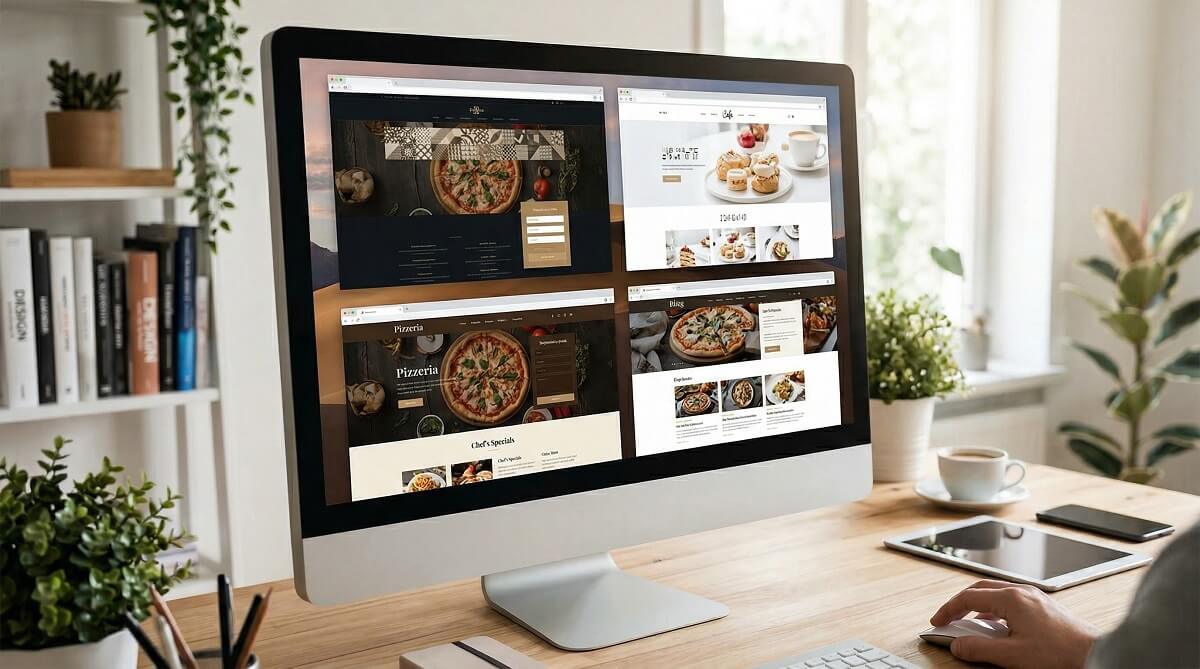
Your restaurant’s website is open 24 hours a day, 7 days a week. While your kitchen closes at night, your website keeps taking reservations, showing off your menu, and convincing strangers to visit. The theme you choose determines whether that works or fails — whether the page loads in under two seconds or drives visitors away, whether your menu looks sharp on a phone or becomes a pinch-to-zoom disaster.
There are over 600 “restaurant” themes listed on WordPress.org alone, and that number balloons when you add ThemeForest and premium marketplaces. Most roundup articles list them all without honest trade-offs. This guide takes a different approach: 10 themes, real pricing data verified in March 2026 directly from theme vendors and WordPress.org, honest pros and cons, and a “best for” label on each one so you can match the theme to your specific restaurant type — cafe, fine dining, food truck, or takeaway.

What Makes a Great WordPress Restaurant Theme?
Before the theme list, it helps to know what to look for. A theme that photographs well in a marketing screenshot can still fail your restaurant in practice. Here are the five things that actually matter.
Speed and Mobile Performance
Over 72% of restaurant searches happen on mobile devices. A slow-loading theme costs you those customers before they even see your menu. The best restaurant themes are lightweight — ideally under 100KB of base CSS/JS — and designed with Core Web Vitals in mind. If a theme demo loads slowly even without your content added, that is a structural problem no plugin can fix.
Menu Display Options
Not every theme handles food menus the same way. Some include built-in menu section templates with categories, prices, and photos. Others rely entirely on third-party plugins (like the Jetpack Food Menu block or WP Food Manager). Built-in menu sections are convenient; plugin-based menus are more flexible. Know which approach you prefer before committing to a theme.
Reservation Integration
Can the theme accommodate a reservation button, booking form, or integration with services like OpenTable? Some themes include reservation section blocks. Others assume you will use a plugin like Amelia, WP Booking System, or a simple WPForms contact form. Either approach works — but a theme that fights your reservation plugin of choice creates unnecessary friction.
Customization Without Code
If you need a developer to change your hero image color, that is a problem. The best restaurant themes work with popular page builders like Elementor or the WordPress block editor so you can update menus, hours, and seasonal promotions yourself without touching code.
Ongoing Support and Updates
A theme last updated more than two years ago is a red flag. Outdated themes accumulate security vulnerabilities and break with new WordPress versions. Before choosing any theme, check its “last updated” date on WordPress.org or the theme marketplace. Active development is non-negotiable for a business-critical website.
Quick Comparison: Best WordPress Restaurant Themes at a Glance
The table below covers all 10 themes in this guide. All pricing is as of March 2026 — verify current pricing at each vendor’s site before purchasing, as these figures can change.
| Theme | Free Version | Paid Price | Best For | Page Builder | Last Updated | WP.org Rating |
|---|---|---|---|---|---|---|
| Astra | ✅ Yes | ~$49/yr | Restaurants on a budget, starter sites | Elementor, Gutenberg, Divi | Mar 2026 | 4.9/5 (6,400+ reviews) |
| Divi | ❌ No | $89/yr or $277/yr Pro | Custom-branded restaurant designs | Divi Builder (built-in) | Active | N/A (premium) |
| OceanWP | ✅ Yes | ~$43/yr (extensions) | Multi-location, WooCommerce ordering | Elementor, Beaver Builder, Divi | Feb 2026 | 4.9/5 (5,694+ reviews) |
| Neve | ✅ Yes | ~$69/yr | Speed-first, Google Core Web Vitals | Elementor, Bricks, Oxygen | Mar 2026 | 4.7/5 (1,274 reviews) |
| Restaurantz | ✅ Yes (free only) | Free | Dedicated restaurant, zero budget | SiteOrigin | Jan 2026 | 5/5 (2 reviews) |
| Rosa 2 | ⚠️ Lite (outdated) | ~$59 one-time | Fine dining, upscale restaurant branding | Gutenberg blocks | Check ThemeForest | 5/5 (Lite, 16 reviews) |
| SeedProd | ❌ No | From $79/yr | New restaurant launches, event promos | SeedProd Builder (built-in) | Active | N/A (premium plugin) |
| GloriaFood Theme | ✅ Yes (fully free) | Free | Online ordering, zero commissions | Basic customizer | Active | N/A (own platform) |
| Hestia | ✅ Yes | Check ThemeIsle | One-page restaurant marketing sites | Elementor, Gutenberg | Sep 2025 | 4.8/5 (560 reviews) |
| Blocksy | ✅ Yes | ~$49/yr | Block editor / FSE-forward restaurants | Gutenberg (FSE), Elementor | Active | 4.9/5 |
The 10 Best WordPress Restaurant Themes in 2026
1. Astra — Best Free Option for Restaurant Websites
Best for: Restaurants on a budget, first-time WordPress users, and anyone who wants to launch fast.
Astra is the most installed WordPress theme in the world with over one million active installations and a 4.9/5 rating from more than 6,400 reviews — and it earns that position. Its free core theme is genuinely functional, not a stripped-down teaser. For restaurants, Astra offers 150+ starter templates including several designed for cafes, restaurants, and food businesses. You install a demo, swap the content, and have a professional site ready in an afternoon.
Speed is Astra’s defining strength. The base theme loads in under 50KB, which translates to fast first contentful paint scores and better Google rankings. It works natively with Elementor, Gutenberg, Beaver Builder, and Divi — so you are not locked into a single page builder. WooCommerce compatibility means you can add online ordering without switching themes.
The honest caveat: Astra is not restaurant-specific. You are using a general-purpose theme with a restaurant-flavored template. If you want purpose-built food menu blocks or a native reservation section, you will need plugins to fill those gaps. For most small to mid-size restaurants, that is a fair trade-off for the speed, flexibility, and cost savings.
- Pros: 1M+ installs, massive community support, 150+ templates, fastest load times, Elementor-native, free core
- Cons: Not restaurant-specific; menu and reservation features require separate plugins
- Price: Free; Astra Pro approximately $49/yr (single site) — verify at wpastra.com
- Last updated: March 16, 2026
2. Divi — Best for Custom Design Control
Best for: Restaurants that want a fully custom, branded design without hiring a developer.
Divi from Elegant Themes is not just a theme — it is a complete design system. The built-in Divi Builder replaces the need for a separate page builder like Elementor, giving you drag-and-drop control over every element on every page. For restaurants, Divi offers over 100 layout packs including dedicated restaurant, cafe, and food business designs that you can import and customize.
The $89/year standard plan covers unlimited websites, which makes Divi excellent value for restaurant groups or agencies managing multiple locations. The $277/year Pro plan adds Divi AI (for generating content and design suggestions), Divi Cloud (for saving reusable layouts), and VIP support with a 30-minute response time. Elegant Themes offers a 30-day money-back guarantee on all plans.
The trade-off is learning curve and weight. Divi has more features than most restaurant owners will ever use, and that complexity means a steeper initial setup compared to Astra or Neve. The Divi Builder also creates some theme lock-in — if you ever switch themes, your Divi-built content does not transfer cleanly. For a restaurant owner committed to DIY design control, Divi is excellent. For someone who wants “set it up and maintain it simply,” it may be overkill.
- Pros: Unlimited sites on one license, 100+ restaurant layouts, A/B testing built-in, Divi AI in Pro tier, 30-day money-back guarantee
- Cons: Steeper learning curve, heavier than Astra/Neve, creates builder lock-in, no free version
- Price: $89/yr (standard) or $277/yr (Pro) — verify at elegantthemes.com
3. OceanWP — Best Multipurpose Free Theme for Restaurants
Best for: Multi-location restaurants, WooCommerce online menus, and restaurant sites needing design flexibility.
OceanWP has over 500,000 active installations and a 4.9/5 rating — almost matching Astra in both scale and quality. The free theme on WordPress.org is highly capable, and unlike some “free” themes, it is not artificially limited. OceanWP has dedicated restaurant and food business demo sites that install with one click, giving you a working starting point immediately.
Where OceanWP shines is WooCommerce integration and multi-builder compatibility. It works with Elementor, Divi, Beaver Builder, Brizy, Visual Composer, and SiteOrigin — more page builder options than almost any other theme. If your restaurant wants an online shop (merchandise, packaged goods, gift cards, or online ordering), OceanWP handles it cleanly. It is also available in over 30 languages, useful for restaurants serving multilingual communities.
The limitation: OceanWP’s most polished features live in the premium Core Extensions Bundle. The free version covers a lot, but sticky headers, custom sidebars per page, and advanced WooCommerce customization require the paid extensions. The bundle has historically been priced around $43/year — modest compared to Astra Pro or Divi, but worth factoring into your budget.
- Pros: 500K+ installs, 4.9/5 rating, works with 6+ page builders, excellent WooCommerce support, 30+ languages
- Cons: Best features need paid extensions; slightly more complex setup than Astra
- Price: Free on WordPress.org; premium extensions approximately $43/yr — verify at oceanwp.org
- Last updated: February 16, 2026
4. Neve — Best for Speed-First Restaurant Sites
Best for: Restaurants where Google search rankings and Core Web Vitals scores are a priority.
Neve from ThemeIsle is built with one primary obsession: speed. It has 200,000+ active installations and scores consistently well on Google’s Core Web Vitals metrics — Largest Contentful Paint, Cumulative Layout Shift, and First Input Delay. If your restaurant depends heavily on local SEO (which most do), a fast-loading theme directly supports your search rankings. Neve is also AMP-ready, meaning it can serve an accelerated mobile version of your pages automatically.
The theme works well with Elementor, Bricks, and Oxygen, and the free version on WordPress.org is genuinely useful for launching a restaurant site. Neve Pro adds advanced header and footer customization, mega menus, and enhanced WooCommerce support. The theme is updated regularly — version 4.2.3 was released March 9, 2026, showing active maintenance.
Where Neve falls short: it is a performance-first general-purpose theme, not a restaurant specialist. Restaurant-specific features like food menus, reservation blocks, and gallery displays require plugins. If your priority is ranking in Google and loading fast, Neve is the right call. If you want restaurant features out of the box, Restaurantz or GloriaFood Theme serve that need better.
- Pros: Core Web Vitals optimized, AMP-ready, 200K+ installs, accessibility ready, 40+ language translations
- Cons: No restaurant-specific features built-in; smaller template library than Astra
- Price: Free on WordPress.org; Neve Pro approximately $69/yr — verify at themeisle.com
- Last updated: March 9, 2026
5. Restaurantz — Best Dedicated Free Restaurant Theme
Best for: Restaurant owners who want purpose-built restaurant features without spending anything.
Restaurantz by WEN Themes is a dedicated restaurant theme built specifically for food businesses — not a general-purpose theme with a restaurant demo. It includes native food menu support, reservation section integration, food and drink category management, and sidebar options designed for restaurant use. The theme was last updated January 6, 2026, confirming it is actively maintained.
For a zero-budget restaurant launch, Restaurantz is the most practical dedicated option on WordPress.org. You get purpose-built restaurant layout sections without paying for a premium theme or buying additional plugins for the basics. It works with the SiteOrigin Page Builder for drag-and-drop editing.
The key limitation to understand: Restaurantz has only 300+ active installs and just two reviews (both 5 stars, but that is a very small sample). The limited community means fewer tutorial resources, fewer pre-built templates, and less peer support than Astra or OceanWP. If you hit a problem, you are more reliant on the developer or official support. For a restaurant owner comfortable with WordPress basics, this is manageable. For a complete beginner, Astra’s larger community may be safer.
- Pros: Purpose-built for restaurants, free, food menu support, reservation section, actively updated (Jan 2026)
- Cons: Small user base (300 installs), limited community support, SiteOrigin dependency
- Price: Free
- Last updated: January 6, 2026
6. Rosa 2 — Best Premium Dedicated Restaurant Theme
Best for: Fine dining, upscale bistros, and restaurants where brand aesthetics are a priority.
Rosa 2 is the most visually refined dedicated restaurant theme in this list. Designed specifically for restaurants, it features full-screen hero images, elegant typography, built-in food menu sections, a reservation area, parallax scroll effects, and background video support — all without requiring a separate page builder. The design language reads as polished and premium, which makes it well-suited for fine dining, wine bars, boutique cafes, and upscale casual dining.
The theme uses native WordPress blocks (Gutenberg) for its restaurant-specific elements, meaning no third-party builder dependency. The block-based approach also means cleaner code and better compatibility with future WordPress updates.
The honest limitations: The free “Rosa2 Lite” version on WordPress.org has not been updated since July 2021, making it unsuitable for a live site. The full premium Rosa 2 product is sold separately on ThemeForest — check there for current pricing (historically $59–$69 for a regular license) and confirm the premium version is actively maintained before purchasing. If it is, Rosa 2 is the strongest choice for visually-led restaurant brands.
- Pros: Most elegant restaurant-specific design, full-screen layouts, built-in restaurant blocks (Gutenberg), parallax + video support, no page builder dependency
- Cons: Lite version outdated (July 2021); premium version requires ThemeForest purchase; less flexible than Divi/Astra for non-standard layouts
- Price: Approximately $59–$69 one-time (regular license) — verify at themeforest.net
7. SeedProd — Best for New Restaurant Launches and Event Promotions
Best for: New restaurants launching with a coming soon page, event promotions, or reservation landing pages.
SeedProd is not a traditional WordPress theme — it is a full theme builder and page builder system. What makes it relevant for restaurants is its category of restaurant-specific landing page templates and its ability to build high-converting pages without touching code. For a restaurant opening, a seasonal promotion, a private dining event, or a “now taking reservations” campaign, SeedProd’s templates and drag-and-drop builder create polished pages quickly.
SeedProd’s pricing was confirmed in March 2026: Basic at $79/year (1 site), Plus at $199/year (3 sites), Pro at $399/year (5 sites), and Elite at $599/year (100 sites with full WooCommerce support). Note that 50% promotional discounts are frequently available — check seedprod.com/pricing for current offers. All plans include a 14-day money-back guarantee.
SeedProd is not the right choice as a restaurant’s primary theme for everyday content. For a full website, Astra or OceanWP give you more flexibility at lower cost. SeedProd earns its place as a specialized tool for restaurant owners who need landing pages and launch campaigns — something no other theme in this list handles as well.
- Pros: Best landing page builder for restaurant launches, restaurant-specific templates, drag-and-drop (no code), WooCommerce on Elite plan
- Cons: Not a full website theme, higher price than alternatives, overkill for simple sites
- Price: From $79/yr (Basic, 1 site) — verify current promotions at seedprod.com
8. GloriaFood Theme — Best for Free Online Ordering Integration
Best for: Restaurants that need online ordering and table reservations without paying commissions.
GloriaFood is uniquely positioned in this list: it is a completely free theme bundled with a complete online ordering and reservation system, with zero commissions on orders. Most restaurant ordering solutions charge per-transaction fees or monthly subscriptions. GloriaFood’s model — free theme, free ordering, unlimited orders, zero commissions — is genuinely unusual.
The feature set is substantial for a free product: unlimited online orders and table reservations, Android and iOS mobile apps for managing orders, thermal receipt printer support, integrated analytics with sales reports and CSV export, and a theme customizer for brand colors and logo. It connects directly to the GloriaFood ordering plugin, which installs on your WordPress site and handles the customer-facing ordering experience.
The trade-off to weigh carefully is ecosystem lock-in. GloriaFood is not a standalone theme — it is a gateway into the GloriaFood platform. Your menu, orders, and customer data live in their system. The design flexibility is limited compared to Astra or Divi. If your priority is getting online ordering running fast at zero cost, GloriaFood is the best option available. If you want design control or prefer not to depend on a single platform, the combination of Astra + a WooCommerce ordering setup gives you more independence.
- Pros: Completely free, zero-commission ordering, unlimited orders/reservations, mobile apps included, analytics built-in
- Cons: Locked into GloriaFood ecosystem, limited design flexibility, requires GloriaFood account, design feels templated
- Price: Free
9. Hestia — Best One-Page Restaurant Marketing Theme
Best for: Restaurants that want a single, scrollable homepage covering all essential info — menu, hours, reservations, contact.
Hestia from ThemeIsle uses a one-page material design layout that works exceptionally well for restaurants presenting their core information on a single marketing page. For a neighborhood restaurant, a popup dining event, or a chef’s personal brand, the one-page format communicates everything a potential customer needs — atmosphere, menu highlights, opening hours, location, and a reservation prompt — without requiring visitors to navigate multiple pages.
The theme has 80,000+ active installations and a 4.8/5 rating from 560 reviews. It supports Elementor and the standard WordPress block editor, making customization accessible without code. The last update was September 4, 2025, showing active maintenance.
Hestia’s limitation is format. The one-page approach is excellent for marketing, but less practical for restaurants with extensive multi-page menus, blog content, or event listings. If your restaurant needs a full multi-page website, Astra or OceanWP are better suited. If a single compelling homepage is all you need, Hestia delivers it cleanly.
- Pros: One-page layout perfect for restaurant marketing, 80K+ installs, 4.8/5 rating, Elementor compatible, material design aesthetic
- Cons: Not ideal for multi-page restaurant sites, restaurant-specific features require plugins
- Price: Free on WordPress.org; Hestia Pro pricing at themeisle.com
- Last updated: September 4, 2025
10. Blocksy — Best for Block Editor and Full Site Editing
Best for: Tech-forward restaurant owners who want to use WordPress’s native Full Site Editing (FSE) approach.
Blocksy is a modern theme built from the ground up for the WordPress block editor and Full Site Editing (FSE). If you plan to use WordPress’s native editing tools rather than a separate page builder, Blocksy offers an elegant, fast, and highly customizable experience. The theme has a strong 4.9/5 rating and is actively maintained, with restaurant-friendly starter templates available.
Blocksy Pro adds advanced header and footer builder, custom post types, and enhanced WooCommerce features. The free version is genuinely usable for a restaurant site. For food businesses interested in where WordPress is heading — FSE is the future of WordPress theming — Blocksy is the most forward-compatible choice in this list.
The trade-off is maturity. Blocksy has fewer starter templates than Astra and a smaller community. The restaurant-specific templates are less polished than what Astra or OceanWP offer. But for restaurant owners comfortable with the block editor and interested in a long-term, future-proof stack, Blocksy earns a strong recommendation.
- Pros: FSE-ready, fast performance, excellent WooCommerce, 4.9/5 rating, free version fully functional
- Cons: Fewer restaurant-specific templates than Astra, smaller community, FSE learning curve
- Price: Free on WordPress.org; Blocksy Pro approximately $49/yr (1 site) — verify at creativethemes.com

Free vs. Premium Restaurant Themes: Which Should You Choose?
Free themes are a reasonable starting point — Astra, OceanWP, Neve, Restaurantz, and GloriaFood Theme in this list all have fully functional free versions. But “free” does not mean zero cost, and understanding the real trade-offs helps you make a better decision.
Choose a free theme when: You are starting out and need to control spending, your restaurant is simple (single-page menu, basic contact info), you have comfort with WordPress plugins to fill feature gaps, or you want to test the platform before committing to paid tools.
Choose a premium theme when: Your restaurant brand requires specific visual sophistication (Rosa 2 for fine dining, Divi for total custom control), you need dedicated support with guaranteed response times, you run multiple restaurant locations and need a scalable system, or the time cost of working around free theme limitations exceeds the cost of a premium license.
One often-overlooked cost of free themes: developer time. If you need a developer to customize a free theme for your restaurant, even basic hourly work can exceed the annual cost of a well-chosen premium theme. The “free” label can become expensive when professional time is involved.
Choosing a WordPress Restaurant Theme by Restaurant Type
No single theme fits every restaurant equally well. Match your choice to your restaurant’s specific needs:
- Fine dining / upscale restaurant: Rosa 2 or Divi. Full-screen imagery, refined typography, and reservation prominence matter more than food-truck-style flexibility.
- Cafe / coffee shop: Astra, Neve, or Hestia. Clean, fast-loading, and blog-friendly for posting specials and events. Lightweight design matches the aesthetic.
- Food truck / pop-up: SeedProd or OceanWP. Location-agnostic, landing-page-ready, and easy to update when you change venues or hours.
- Fast casual / takeaway: GloriaFood Theme or Restaurantz. Mobile-first, ordering-focused, and practical over beautiful.
- Pizzeria / casual dining: Restaurantz or Astra (restaurant template). Color-forward menu display and simple reservation flow.
- Wine bar / craft beer: Rosa 2 or Divi with a dark/moody layout pack. Atmosphere matters in this category; the design should carry the brand’s character.
- Chef’s personal brand / tasting menu: Hestia or Blocksy. One-page storytelling, biography sections, and an editorial feel.
Visitors make trust decisions about a restaurant website in under 0.05 seconds. A fine-dining restaurant using a fast-food-style template loses credibility before the menu loads. Match your visual design language to your restaurant’s atmosphere.
What Restaurant Owners Get Wrong When Choosing a WordPress Theme
After reviewing hundreds of restaurant WordPress sites, several patterns emerge in poor theme choices. Avoid these common mistakes:
Choosing by screenshot alone. A beautiful demo site uses professional photography, custom fonts, and carefully crafted sample content. Your real site will look different. Check the theme’s performance on a basic hosting plan, not just the polished demo.
Ignoring the last updated date. A theme not updated in two or more years is a compatibility and security risk. On WordPress.org, the “last updated” date is shown on every theme’s page. On ThemeForest, check the “Last Update” line in the item details. Do not skip this check.
Not testing mobile before committing. Use Chrome DevTools or Google’s Mobile-Friendly Test to check a theme’s demo on a phone-sized viewport before installing it. A theme that looks perfect on desktop can still be unusable on mobile.
Buying a niche restaurant theme when flexibility is needed. Dedicated restaurant themes look great but can be harder to customize for unusual use cases. For restaurants with complex needs — event ticketing, membership clubs, merchandise stores — a flexible multipurpose theme like Astra or OceanWP plus targeted plugins often serves better.
Skipping the demo import. Most premium themes offer a one-click demo import. Before choosing a theme, test the demo import on a staging site. If the demo import fails or produces a broken result, expect similar problems in production.
To check any theme’s update history on WordPress.org, visit wordpress.org/themes/[theme-name]/ and look for the “Last Updated” line in the right-hand sidebar.
Frequently Asked Questions About WordPress Restaurant Themes
What is the best free WordPress theme for a restaurant?
Astra is the strongest free option for most restaurants — it has 1 million+ installs, a 4.9/5 rating, and restaurant-ready starter templates. If you specifically need built-in food menu and reservation sections without plugins, Restaurantz is a dedicated free alternative. For free online ordering, GloriaFood Theme is the only option in its category.
Do I need a special restaurant theme, or can any WordPress theme work?
Any well-maintained WordPress theme can technically work for a restaurant with the right plugins added. The advantage of a restaurant-specific theme is that menu sections, reservation areas, and food gallery layouts are built-in, saving setup time. General-purpose themes like Astra or OceanWP with restaurant starter templates offer a practical middle ground — purpose-built layout without niche theme limitations.
Which WordPress restaurant theme is best for online ordering?
GloriaFood Theme is the only theme in this list with full online ordering built-in at zero cost with zero commissions. For WooCommerce-based ordering on a more flexible theme, Astra and OceanWP both integrate cleanly with WooCommerce restaurant ordering plugins. SeedProd’s Elite plan also supports WooCommerce for online menus and ordering.
How much does a WordPress restaurant theme cost?
Free options include Astra, OceanWP, Neve, Restaurantz, GloriaFood Theme, Hestia, and Blocksy (all on WordPress.org). Premium options range from approximately $49–$89/year for subscription themes (Astra Pro, Divi Standard, Neve Pro, Blocksy Pro) to $59–$69 as a one-time purchase for Rosa 2. SeedProd starts at $79/year for its page builder. Total build cost also includes hosting, domain, and any additional plugins.
Is Divi good for restaurant websites?
Yes, if you want maximum design control. Divi offers 100+ restaurant layout packs, a visual drag-and-drop builder, and unlimited websites on a single $89/year license. The trade-off is a steeper learning curve and heavier code weight compared to lightweight themes like Astra or Neve. Divi is best for restaurant owners who want a fully custom design and are willing to spend time learning the builder.
What page builder works best with WordPress restaurant themes?
Elementor is the most widely compatible option — Astra, OceanWP, Neve, and Hestia all support it natively. Divi uses its own built-in Divi Builder, which is equally powerful. Gutenberg (WordPress’s native block editor) is improving rapidly and works well with Neve, Blocksy, and Rosa 2. For SeedProd, the proprietary SeedProd Builder is used. Choose your page builder first, then find a theme that supports it — not the other way around.
Can I use a restaurant WordPress theme with WooCommerce for online menus?
Yes. Astra, OceanWP, Neve, and Blocksy all have full WooCommerce compatibility, allowing you to create an online menu as a product catalog, add cart and checkout functionality, and accept payments. Restaurantz also supports WooCommerce. This approach gives you more customization control than the GloriaFood system but requires more setup.
How do I add a reservation system to my WordPress restaurant site?
Most themes support reservation plugins. Popular options include Amelia (professional booking management), WP Booking System, OpenTable’s WordPress plugin, and WPForms with a booking form template. Rosa 2 and Restaurantz include dedicated reservation sections in their layouts, but the actual booking logic still runs through a plugin. If reservations are a critical feature, install your preferred booking plugin first and verify it works with your theme before committing to a full site build.
Bottom Line: Which Restaurant Theme Should You Choose?
There is no single “best” WordPress restaurant theme — only the best theme for your specific restaurant, budget, and technical comfort level. Here is how to cut through the choice:
If you are starting out and need to control costs: Use Astra’s free version with a restaurant starter template. Install a free reservation plugin and a food menu plugin. You will have a professional restaurant site for zero theme cost.
If design quality is your priority: Rosa 2 (fine dining) or Divi (full custom control) give you the most polished results. Budget $59–$89/year and plan for a few days of setup time.
If online ordering matters most: GloriaFood Theme solves this immediately at no cost. If you want WooCommerce-based ordering with more design flexibility, pair Astra or OceanWP with a WooCommerce menu plugin.
If Google rankings are critical: Neve or Astra are the fastest-loading options, directly supporting Core Web Vitals scores and local SEO performance.
If you want future-proof technology: Blocksy’s Full Site Editing support positions you well for where WordPress is heading over the next several years.
Before committing to any theme, install the demo on a staging site, check the last-updated date, and test the mobile view. The difference between a theme that works and one that just looks good in a screenshot is often discovered only after installation — catching that early saves hours of rework.
For more guidance on building your WordPress foundation, see our comparison of the best free WordPress themes and our guide to speeding up a WordPress site — both relevant whether you are starting a new restaurant site or improving an existing one.
