



Choosing a WordPress theme for a video-heavy site is not the same as picking a general-purpose theme. A standard theme will display videos, yes — but a purpose-built video theme handles thumbnails, embeds, playlists, fullscreen layouts, and video-specific navigation in ways that matter to both your visitors and your search rankings. The difference shows up in your bounce rate, your mobile experience, and how quickly pages load when a YouTube or Vimeo embed is waiting to play.
This guide covers 11 WordPress video themes with verified pricing as of March 2026, honest assessments of where each one excels and where it falls short, and a clear breakdown of which theme suits which type of creator. Whether you run a YouTube-style video blog, a videography portfolio, a podcast with video content, or a full entertainment portal, there is a theme here that fits your specific situation — and several that probably do not.
All prices listed below are sourced directly from vendor pages and marketplaces. Verify at the vendor’s site before purchasing, as these figures can change without notice.
Quick Comparison — Best WordPress Video Themes at a Glance
Short on time? The table below summarizes all 11 themes covered in this guide. Scroll down for the detailed reviews once you have narrowed down your options.
| Theme | Free Version | Price | Best For | Video Platforms | Model |
|---|---|---|---|---|---|
| Inspiro PRO | ✅ Free version (Inspiro) | From $69/yr | Videographers, portfolios | YouTube, Vimeo, self-hosted | Annual |
| Vlog by Meks | ❌ No | $59 one-time | Video bloggers, magazines | YouTube, Vimeo, Dailymotion, Facebook, Twitch, JWPlatform, Playwire | One-time |
| Tusant | ❌ No | $69/yr | Podcasters + video creators | YouTube, Vimeo | Annual |
| BeTube | ❌ No | $49 one-time | Video portal sites | YouTube, Vimeo, Dailymotion, Hulu, and more | One-time |
| VideoPro | ❌ No | $59 one-time | News + magazine + video | YouTube, Vimeo, self-hosted | One-time |
| Astra | ✅ Yes | Free / $119/yr | Beginners, flexible setups | Any (theme-agnostic) | Freemium/Annual |
| Videozoom | ❌ No | WPZOOM subscription | Video galleries, portfolios | YouTube, Vimeo | Subscription |
| VideoBox | ❌ No | WPZOOM subscription | Video bloggers | YouTube, Vimeo | Subscription |
| OceanWP | ✅ Yes | Free / from $35/yr | Budget-conscious beginners | Any (theme-agnostic) | Freemium/Annual |
| VidoRev | ❌ No | ~$59 one-time | Movie/TV review sites | YouTube, Vimeo, Dailymotion, self-hosted | One-time |
| Inspiro (Free) | ✅ Yes (it IS free) | Free | Free video portfolio start | YouTube, Vimeo | Free |
What to Look for in a WordPress Video Theme
Before comparing specific themes, it helps to know what separates a capable video theme from a generic one. These four criteria account for most of the meaningful differences you will encounter.
Video Platform Support
Every theme on this list handles YouTube and Vimeo embeds, but that is the floor, not the ceiling. Some themes extend support to Dailymotion, Facebook Video, Twitch, self-hosted MP4 files, and even podcasting platforms like JWPlatform. If you distribute content across more than two platforms, platform coverage matters more than design features. The Vlog theme by Meks, for example, supports seven platforms out of the box — a meaningful advantage for multi-channel creators.
Page Speed and Core Web Vitals
Video embeds are inherently heavy. A well-built video theme offsets that weight with lazy loading, thumbnail-first rendering, and minimal JavaScript bloat in the base theme. Multipurpose themes like Astra and OceanWP ship with near-zero base weight, which helps — but they also require more configuration to get video-specific features working. Purpose-built video themes trade some speed headroom for built-in functionality. That trade-off is worth it for most video creators.
Layout Flexibility
Video content comes in different shapes: portfolio grids, blog feeds, playlists, channel pages, and fullscreen hero backgrounds. A theme that only handles one layout type will limit you as your content grows. Look for themes that offer at least two or three layout modes — a grid, a list, and a fullscreen or featured option — so you can adapt your presentation without switching themes.
Monetization and Ad Support
If you plan to run ads — Google AdSense, pre-roll video ads, or sponsored placements — check whether the theme includes built-in ad zones. Some themes like BeTube include a pre-roll ad system out of the box. Others require a separate ad management plugin. Neither approach is wrong, but knowing what comes included versus what costs extra changes the total cost calculation significantly.
Best WordPress Video Themes — Detailed Reviews

1. Inspiro PRO by WPZOOM — Best for Video Portfolios
Price: From $69/yr (Inspiro Premium) | Free version: Inspiro (WordPress.org)
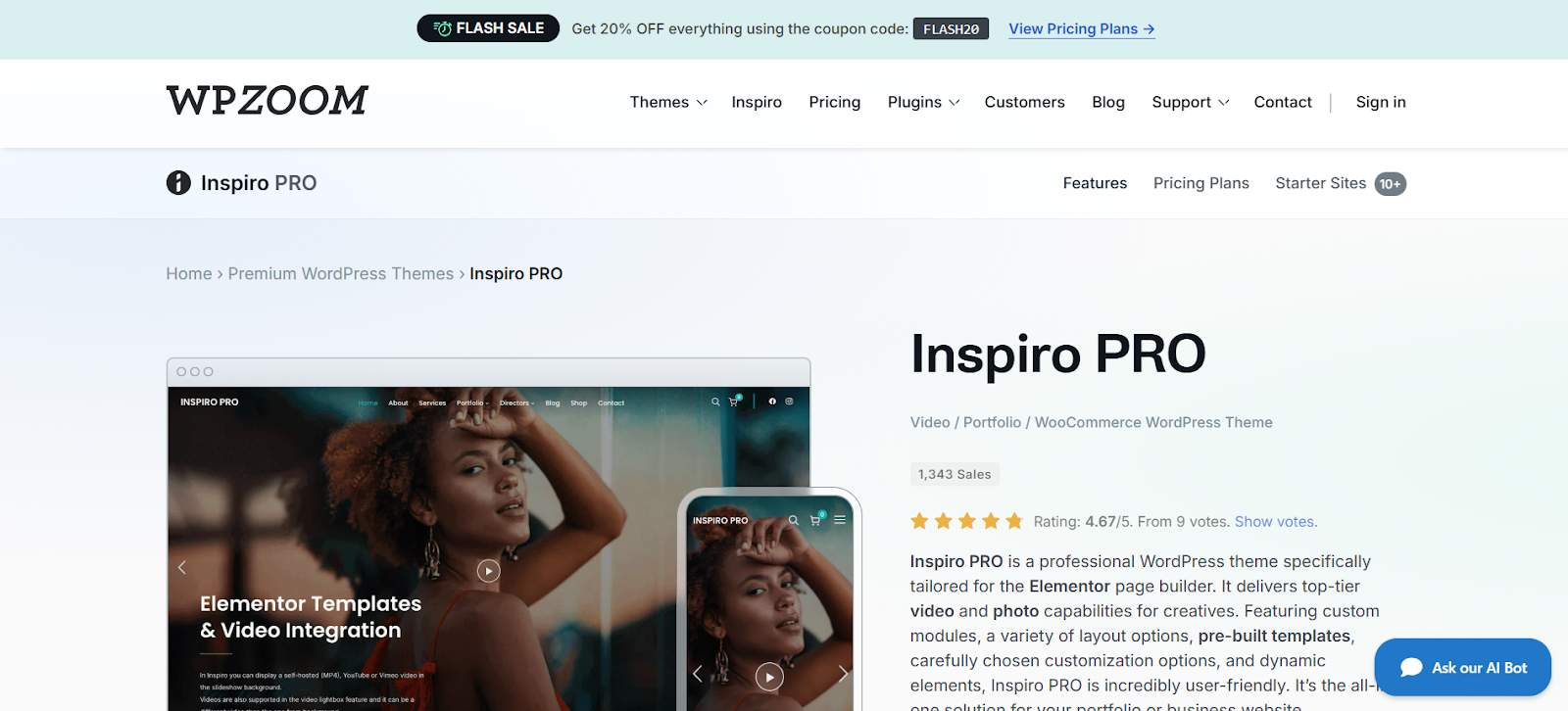
Inspiro PRO is WPZOOM’s flagship video and portfolio theme, built specifically for Elementor. The design puts visual content first — fullscreen video backgrounds, clean portfolio grids, and minimal chrome that keeps attention on the work rather than the interface. WPZOOM maintains the free version (Inspiro) actively, with version 9.6.1 released in February 2026, which is a strong signal of ongoing support.
The premium version adds custom Elementor modules, pre-built starter sites, and the Inspiro Patterns plugin for block-based layouts. If you run a photography or videography business and want a theme that handles both still images and video reels without significant customization, this is the most direct path.
Pros: Elementor-native design, AJAX navigation, free version available, actively maintained
Cons: Annual renewal required; best features locked behind paid tier; design is portfolio-focused, not blog-focused
Best for: Photographers, videographers, and creative studios building portfolio sites
2. Vlog by Meks — Best for Video Blogs and Magazines
Price: $59 one-time (ThemeForest) | Sales: 6,500+ with 242 ratings

Vlog by Meks has earned its position through consistent sales and genuine specialization. At $59 one-time on ThemeForest, it covers more video platforms than almost anything else in this list: YouTube, Vimeo, DailyMotion, Facebook, Twitch, JWPlatform, and Playwire. That platform breadth matters for creators who cross-post or rely on platforms other than YouTube.
The theme includes a Video Importer plugin for pulling content automatically, a Series plugin for playlist-style organization, a Watch Later feature, Cinema mode for distraction-free viewing, and a flexible module system for homepage layout. Ad placement zones are built in. RTL support makes it usable for audiences reading right to left. This is a genuinely mature video theme, and the one-time pricing is a practical advantage over subscription models.
Pros: Seven video platforms supported, one-time pricing, proven with 6,500+ sales, Watch Later + Cinema mode, Video Importer plugin included
Cons: No free version; design is busy by current minimalist standards; updates require renewal on ThemeForest
Best for: Video bloggers, multi-platform content creators, YouTube-style magazine sites
3. Tusant by SecondLineThemes — Best for Podcasters Adding Video
Price: $69/yr individual | $139 bundle | $389 lifetime | Guarantee: 30-day money back

Tusant occupies a specific niche: creators who produce both audio and video content. SecondLineThemes built it for podcasters, musicians, and video publishers who need a site that handles episodes, shows, and multimedia archives without forcing you to choose between audio-first and video-first presentation.
The annual price of $69 includes the YouTube & Podcast Import Pro plugins, which carry a combined stated value of $48 — making the effective cost closer to $21 for the theme itself. Unlimited active domains is a significant feature for agencies or creators running multiple shows. The 30-day money-back guarantee is longer than most premium theme providers offer.
The Elementor integration is solid. Demo import works reliably. The main limitation is that Tusant is genuinely optimized for the podcast-plus-video format — it is not a general-purpose video theme, and forcing it into a pure video portal or photography portfolio layout takes more effort than starting with a purpose-built option.
Pros: Bundled import plugins ($48 value), unlimited domains, 30-day guarantee, Elementor ready, lifetime option available
Cons: Annual renewal model; best suited for audio+video hybrid — not pure video; niche enough that templates are limited
Best for: Podcasters, musicians, media creators who publish in both audio and video formats
4. BeTube — Best for Video Portal Sites
Price: $49 one-time (ThemeForest) | Latest version: 3.0.22 (December 2025)
BeTube is the closest you get to a YouTube-style platform on WordPress without building custom functionality. The theme includes ten homepage designs, one-click demo import, front-end video submission (users can post videos without accessing the dashboard), a pre-roll ad system supporting video ads and Google AdSense, RTL support, and user registration features.
Platform support covers YouTube, DailyMotion, Vimeo, Hulu, and more. The December 2025 update is a good sign — active maintenance matters more for feature-heavy themes than lightweight ones, because the integration points (YouTube API, AdSense, front-end posting) can break with WordPress core or plugin updates.
At $49 one-time, BeTube represents reasonable value for a portal-style site. The trade-off is that the design, while functional, shows its age compared to newer minimalist alternatives. If your audience is there for content rather than aesthetics, that matters less.
Pros: Front-end video submission, pre-roll ad system, ten homepage layouts, one-time pricing, updated December 2025
Cons: Design is dated by 2026 standards; community portal features add complexity for simple blogs
Best for: Community video portals, entertainment sites, sites where users submit their own videos
5. VideoPro — Best All-in-One Video Magazine Solution
Price: $59 one-time (ThemeForest)
VideoPro by CactusThemes positions itself as a complete video solution for news and magazine sites. Where Vlog by Meks focuses on creator-style blogs and BeTube targets portals, VideoPro targets sites that publish a high volume of video content alongside editorial text — think video news outlets, entertainment magazines, or review channels with accompanying written analysis.
The theme handles YouTube, Vimeo, and self-hosted video, with WooCommerce compatibility built in for any e-commerce layer. The layout system supports multiple homepage configurations, category pages optimized for video archives, and single video pages with recommended content sidebars. At $59 one-time, it competes directly with Vlog by Meks — the choice between them comes down to content structure: Vlog for creator-style blogs, VideoPro for editorial magazines.
Pros: Magazine-style layouts, WooCommerce compatible, editorial-oriented design, one-time pricing
Cons: Less platform variety than Vlog; community features are minimal compared to BeTube
Best for: Video news sites, entertainment magazines, review channels with editorial content
6. Astra — Best Multipurpose Option for Video Sites
Price: Free (WordPress.org) | Premium from $119/yr
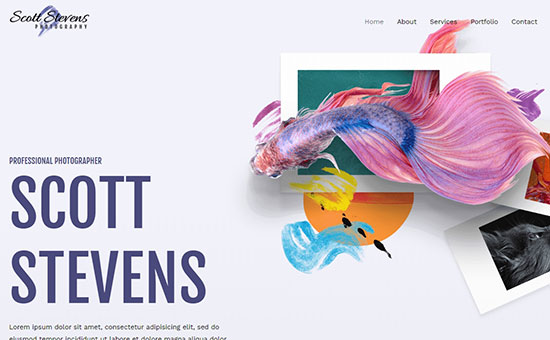
Astra is not a video theme — it is a multipurpose theme with strong video compatibility. The distinction matters. Astra does not ship with Video Importer plugins, Watch Later features, or pre-roll ad systems. What it does ship with is performance-optimized code, 300+ starter templates (some video-focused), Spectra Pro integration, and compatibility with virtually every page builder and plugin on the market.
For a beginner who is not sure what direction their video site will take, or for someone who wants maximum flexibility to pivot, Astra makes sense. The free version is genuinely capable. The $119/yr premium plan adds templates, advanced headers, and the Spectra Pro plugin. The performance baseline is among the best of any theme in this list — Astra consistently posts sub-50ms time-to-first-byte in independent tests.
The limitation for video-specific work is that you are building video features through plugins rather than theme-native functionality. That adds setup time and potential compatibility complexity.
Pros: Free version capable, near-zero base weight, 300+ templates, works with any plugin or page builder
Cons: No video-native features; video-specific functionality requires separate plugins; requires more configuration than purpose-built options
Best for: Beginners, flexible setups, anyone who is not certain about their video site structure yet
7. Videozoom by WPZOOM — Best for Clean Video Galleries
Price: Available via WPZOOM subscription | Version: Videozoom 4.0
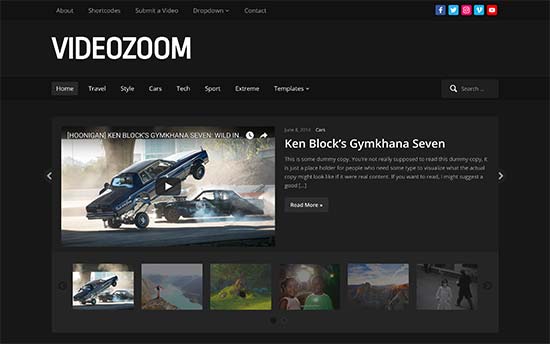
Videozoom 4.0 by WPZOOM takes a cleaner, more gallery-oriented approach than the magazine-heavy options in this list. The theme centers on a video slider and gallery presentation, SEO-friendly markup, translation support, and one-click demo import. WPZOOM backs it with a 14-day money-back guarantee and ongoing updates as part of the WPZOOM theme ecosystem.
The main trade-off is the pricing model. Videozoom is part of WPZOOM’s subscription, meaning you access it alongside other WPZOOM themes — which is good value if you plan to run multiple sites with WPZOOM themes, but potentially overpriced if you only need Videozoom specifically. For single-theme buyers, WPZOOM’s individual theme pricing (around $69/yr for Inspiro Premium as a comparable) is the better benchmark.
Pros: Clean gallery-first design, SEO-friendly code, translation-ready, actively maintained by WPZOOM
Cons: Subscription model; less platform variety than Vlog or BeTube; gallery-oriented design not ideal for text-heavy blogs
Best for: Video galleries, portfolio-style video archives, creators who want an elegant browse-first experience
8. VideoBox by WPZOOM — Best for Video Blogging with Mixed Content
Price: Available via WPZOOM subscription

VideoBox by WPZOOM sits between a traditional blog theme and a dedicated video theme. It handles YouTube and Vimeo embeds cleanly in a blog-style layout, with gallery widgets, social integration, and the WPZOOM theme options panel for customization. For a creator who publishes written posts alongside video content — rather than running a purely video-driven site — VideoBox hits a practical middle ground.
As with Videozoom, access comes through the WPZOOM subscription. The design is cleaner and more blog-oriented than BeTube’s portal approach, which suits creators whose audience reads as much as it watches. The limitation is that VideoBox lacks the advanced video-specific features (Watch Later, Video Importer, front-end submission) found in more specialized themes.
Pros: Blog-friendly layout, WPZOOM ecosystem access, clean design, gallery widgets
Cons: WPZOOM subscription required; limited video-specific features compared to Vlog or BeTube
Best for: Video bloggers with mixed written and video content
9. OceanWP — Best Free Starting Point for Video Sites
Price: Free (WordPress.org) | Premium extensions from $35/yr
OceanWP’s value proposition is breadth at a low entry cost. The free version on WordPress.org includes the Ocean Extra plugin, demo import, custom widgets, and basic customization. Premium extensions start at $35/yr for a single site, covering WooCommerce integration, advanced headers, a sticky header, scroll effects, and more — each sold as individual extensions or in bundles.
For video sites, OceanWP works like Astra: it handles video embeds through standard WordPress embed blocks and does not add platform-specific features natively. Where OceanWP has an edge is in its WooCommerce depth — for a video creator who also sells courses, merchandise, or digital downloads, the WooCommerce integration is better documented and more extensible than most alternatives at this price.
The extension-based pricing can add up. If you need three or four extensions, the cost approaches Astra’s all-in premium plan. Do the math before committing to the extension model.
Pros: Genuinely capable free version, granular extension pricing, strong WooCommerce integration, active community
Cons: Extension costs stack up; no video-native features; requires plugins for video-specific functionality
Best for: Budget-conscious creators, those who also run WooCommerce stores alongside video content
10. VidoRev — Best for Movie and TV-Style Review Sites
Price: ~$59 one-time (ThemeForest) | Latest version: 2.9.9.9.9.9.8 (December 2025)
VidoRev serves a specific niche: movie review sites, TV show trackers, and entertainment platforms that need a rating system, structured content archives, and the visual language of streaming services rather than blog publishing. The theme ships with rating and review functionality, advanced search for video archives, ad integration, and layouts that prioritize content discovery over individual post presentation.
The version number (2.9.9.9.9.9.8) is admittedly unusual, but the December 2025 update confirms the theme is actively maintained. At approximately $59 on ThemeForest, it is competitive with VideoPro and Vlog. The main limitation is specialization: VidoRev is very good at what it does — entertainment platforms — and somewhat awkward for anything else.
Pros: Movie/TV style layouts, rating system included, advanced search, entertainment platform design language, updated December 2025
Cons: Highly specialized — poor fit for standard video blogs or portfolios; version history is confusing
Best for: Movie review sites, TV show trackers, entertainment portals with structured content
11. Inspiro (Free) — Best Free WordPress Video Theme
Price: Free (WordPress.org) | Version: 9.6.1 (February 2026)
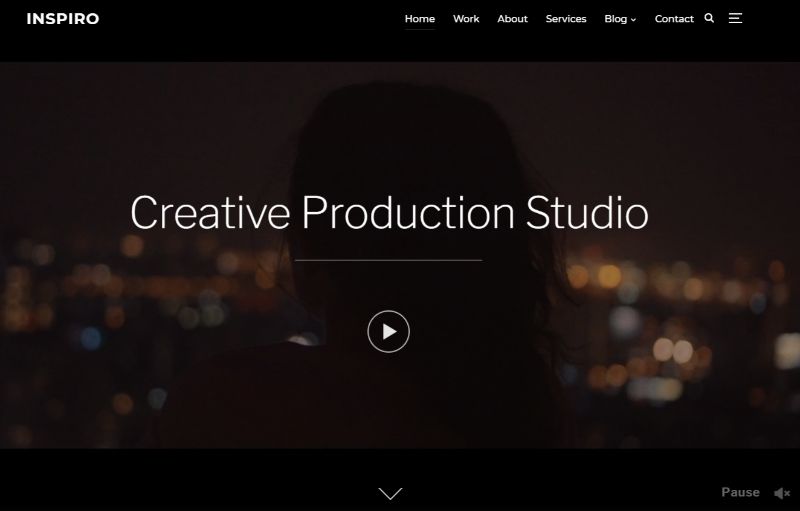
The free version of Inspiro by WPZOOM deserves its own entry because it is genuinely maintained rather than abandoned. Version 9.6.1 released in February 2026 means WPZOOM is still actively developing the free tier, which is not guaranteed with free themes in competitive niches. The theme provides fullscreen video backgrounds (YouTube and Vimeo), portfolio grid layouts, AJAX navigation, and a responsive design that holds up well on mobile.
For a creator just starting out who wants to test whether a video portfolio site fits their needs before committing to annual fees, Inspiro free is the most defensible starting point. The upgrade path to Inspiro Premium or Inspiro PRO is clear and straightforward, which reduces switching pain when the time comes to expand.
Pros: Completely free, actively updated (February 2026), clean design, clear upgrade path to premium
Cons: Portfolio-focused — not suitable for video blogs or portals; limited customization without upgrading
Best for: Beginners, photographers, videographers who want to start free and upgrade later
Free vs. Premium — Which Should You Choose?
The case for free themes is straightforward: Inspiro and OceanWP (with free core) give you a working video site without spending anything beyond hosting and a domain. Both receive active updates. Both handle video embeds through standard WordPress functionality. If your site is new, your content is limited, and you are still figuring out your format, starting free is sensible.
The case for premium starts when you need something a free theme cannot provide without significant plugin stacking. Dedicated features like Watch Later lists (Vlog), front-end video submission (BeTube), built-in pre-roll ads (BeTube), or Audio + Video hybrid show layouts (Tusant) simply do not exist in free themes. If those features are central to your site’s model, paying $49–$69 for a one-time license or $69/yr for a supported annual plan is the more efficient path.
The hidden cost to watch for: ThemeForest one-time purchases typically include six months of support and then require a renewal fee for continued support access. The theme still functions after support expires, but you lose access to developer assistance and, sometimes, future major updates. Factor that into total cost calculations, especially for sites that will run for multiple years.
Which Theme Is Right for Your Use Case?
| Use Case | Recommended Theme | Why |
|---|---|---|
| YouTube-style video blog | Vlog by Meks | 7 platform support, Watch Later, Video Importer, Cinema mode — built for this exact use |
| Photography & videography portfolio | Inspiro PRO (or Inspiro free to start) | Fullscreen video backgrounds, portfolio grids, Elementor integration, WPZOOM ecosystem |
| Podcast + video hybrid | Tusant | Built specifically for audio + video shows; includes import plugins; unlimited domains |
| Community video portal | BeTube | Front-end submission, pre-roll ads, user registration, 10 homepage layouts |
| Video news / entertainment magazine | VideoPro or VidoRev | VideoPro for editorial magazine style; VidoRev for movie/TV platform style |
| Beginner with flexible needs | Astra (free) | Zero cost to start, 300+ templates, no lock-in, works with any page builder |
| Video + WooCommerce store | OceanWP | Strong WooCommerce integration, granular extension pricing, active community |
| Clean video gallery | Videozoom | Gallery-first design, SEO-friendly, translation-ready, WPZOOM ecosystem |
Frequently Asked Questions
Do I need a special WordPress theme for video content?
No — any WordPress theme can embed YouTube or Vimeo videos using standard WordPress blocks. But a purpose-built video theme adds features that general themes do not provide: platform-specific integrations, Watch Later lists, front-end video submission, pre-roll ad systems, and layouts optimized for video archives. If video is your primary content type, a dedicated theme reduces the number of additional plugins you need and gives you a more coherent design out of the box.
What is the best free WordPress video theme?
Inspiro by WPZOOM is the most credible free video theme available in 2026. Version 9.6.1 was released in February 2026, confirming active maintenance. It provides fullscreen video backgrounds, portfolio layouts, and AJAX navigation without cost. OceanWP is the better choice if you also run a WooCommerce store. Astra is the better choice if you want maximum flexibility through templates and page builders.
Will a video theme slow my site down?
Theme choice affects base page weight, but video embeds themselves are the primary performance factor on video sites. A well-built video theme uses lazy loading for thumbnails, defers embed scripts until interaction, and avoids loading unnecessary styles. Multipurpose themes like Astra and OceanWP have the lowest base weight. Purpose-built themes like Vlog and BeTube add more code but also add corresponding functionality. Use a CDN and caching plugin regardless of which theme you choose.
Can I embed YouTube and Vimeo videos in any WordPress theme?
Yes. WordPress core handles YouTube and Vimeo oEmbeds natively — paste the video URL into any block and WordPress generates the embed automatically. Every theme in this list supports this, along with Gutenberg blocks and classic editor embeds. The difference between themes is in how they present those embeds: grid layouts, thumbnails, featured video sections, playlists, and platform-specific metadata handling.
Which WordPress video themes work with Elementor?
Inspiro PRO is built specifically for Elementor and includes custom Elementor modules. Tusant includes Elementor integration as part of its standard install. Astra and OceanWP are compatible with Elementor by design — they are among the most page-builder-agnostic themes available. Vlog by Meks and BeTube have their own options panels and are less Elementor-centric, though they remain compatible for building custom layouts.
How much do WordPress video themes cost?
The range runs from free (Inspiro, Astra, OceanWP) to $49–$69 for one-time ThemeForest licenses (BeTube at $49, VideoPro and Vlog at $59 each) to $69/yr for annual subscriptions (Tusant, Inspiro Premium). WPZOOM themes like Videozoom and VideoBox are available through WPZOOM’s subscription model. Always verify current prices at the vendor’s site before purchasing, as promotional pricing and renewal rates differ from initial purchase prices.
Are WordPress video themes mobile-friendly?
Every theme in this guide is responsive. Mobile optimization has been a baseline requirement for WordPress themes since 2015, and all reputable theme developers maintain it. The more relevant mobile question is video performance: some themes load full-resolution thumbnails on mobile, which hurts performance on slower connections. Look for themes that implement responsive images and lazy loading — Inspiro, Astra, and OceanWP are strong here.
Can I switch WordPress themes without losing my video content?
Your posts, pages, and embedded videos are stored in the WordPress database — not in the theme. Switching themes does not delete content. However, theme-specific features like custom layouts, widget configurations, and options panel settings will not carry over to a new theme. Some themes use custom post types for video-specific content (video playlists, show episodes), which can become inaccessible or display incorrectly after switching. Plan any theme change carefully, and back up before making the switch.
Conclusion
The best WordPress video theme for your site depends on what you are actually building. For a YouTube-style video blog with multi-platform support, Vlog by Meks at $59 one-time is the most direct fit. For a videography portfolio, Inspiro PRO (or Inspiro free to start) handles the visual demands without unnecessary complexity. For a podcast that is expanding into video, Tusant’s bundled import plugins and unlimited domains make the $69/yr cost straightforward to justify.
If you are not sure yet, Astra’s free version and OceanWP’s free core both give you a working starting point without financial commitment. Both support video embeds, work with any page builder, and have clear upgrade paths once your needs become clearer. The goal is not to pick the most feature-rich theme — it is to pick the one that matches your actual content structure and grows with your audience.
