


Most WordPress site owners know internal linking matters for SEO. Fewer actually do it consistently — because going back through dozens of posts to find and add relevant links is tedious work that never quite makes it to the top of the priority list. That’s where internal linking plugins come in.
But the landscape ranges from fully automated keyword-matchers to AI-powered suggestion tools, and from free utilities built into your existing SEO plugin to dedicated premium tools costing nearly $300 per year. Picking the wrong one wastes money or, worse, creates a sitewide linking pattern that looks spammy to Google.
This guide breaks down the best WordPress SEO internal linking plugins with verified March 2026 pricing, honest pros and cons, and — the piece most roundups skip — a recommendation by site type so you can pick what actually fits your situation.
Quick Summary — Best Internal Linking Plugins at a Glance
If you need a fast answer before diving into the full reviews, here’s what stands out across the options covered in this article:
- Best AI-powered suggestions: Link Whisper — surfaces contextual link recommendations as you write, gives you control over each placement
- Best free auto-linker: Internal Link Juicer — 1.3+ million active installs, handles automation passively once configured
- Best if you already use AIOSEO: AIOSEO Link Assistant — integrated link reporting and orphan page detection included in Pro+
- Best free all-in-one coverage: Rank Math — internal link suggestions included in the free version
- Best value SEO + linking bundle: SEOPress PRO — starts at $49/year, includes TF-IDF link suggestions and site audit
| Plugin | Best For | Free Version | Paid From | Automation Type |
|---|---|---|---|---|
| Internal Link Juicer | Passive auto-linking on blogs | Yes | $69.99/yr | Full auto (keyword) |
| Link Whisper | AI-assisted suggestions, larger sites | No | $97/yr | AI suggestions |
| AIOSEO Link Assistant | All-in-one SEO + link management | Yes (limited) | $174.65/yr (Pro) | AI suggestions |
| Rank Math | Free built-in suggestions | Yes | $7.99/mo (PRO) | Suggestions |
| Yoast SEO Premium | Cornerstone content strategy | Yes | $118.80/yr | Suggestions |
| SEOPress PRO | Budget-conscious all-in-one | Yes (unlimited sites) | $49/yr | TF-IDF suggestions |
| Interlinks Manager | Link analytics and juice tracking | Yes | Unknown (Pro) | Analytics + auto (Pro) |
Pricing verified March 2026 from official plugin websites. AIOSEO Link Assistant requires Pro plan ($174.65/yr for 10 sites) or above — verify current pricing at aioseo.com.
Why Internal Links Matter More Than Most People Think
Search engines discover content by following links. Every internal link you create is a path that Google’s crawler can follow from one page to another — which means that a well-linked post gets indexed and revisited faster than one buried in your archive with no connections to anything else on your site.
Beyond crawlability, internal links distribute what SEO professionals call link equity (sometimes called “link juice”) — the measure of authority that passes from one page to another through links. When a high-performing post links to a newer, less established page, it passes some of that authority along. Done deliberately, this is one of the most controllable ways to improve rankings for pages that aren’t getting enough traction.
There’s also the reader experience angle. A visitor reading your post on WordPress security basics who sees a natural link to your guide on choosing a secure hosting plan is more likely to keep reading. That leads to lower bounce rates, more pages per session, and stronger engagement signals — all of which factor into how Google evaluates your content.
One common problem: orphaned content. These are posts or pages with no internal links pointing to them, making them practically invisible to both visitors navigating your site and search engine crawlers following your link structure. Internal linking plugins help surface these pages so you can connect them back into your content network.
on-page SEO checklist for WordPress
Automatic, Semi-Automatic, or Suggestion-Only — What’s the Difference?
Before picking a plugin, it helps to understand the three ways internal linking tools work. The right type depends on how much control you want and how much time you have.
Full Automation (Keyword-Based)
You define a list of keywords, assign each one a target URL, and the plugin automatically inserts links throughout your existing and future content whenever those keywords appear. You configure it once and mostly leave it alone.
The appeal is obvious — zero ongoing effort. The risk is equally obvious: if the same keyword appears 50 times across your site and always links to the same page with identical anchor text, Google may flag this as manipulative. That concern dates back to Google’s Penguin update, which penalized sites with repetitive, unnatural anchor text patterns.
Modern tools like Internal Link Juicer have largely addressed this with anchor text diversification features — you can define multiple anchor variations per keyword so the same phrase doesn’t repeat verbatim throughout the site. Still, full automation works best with careful initial configuration and periodic review.
Best plugins for this approach: Internal Link Juicer, Internal Links Manager
AI-Assisted Suggestions (You Approve Each Link)
These tools analyze the content of your post using natural language processing or TF-IDF algorithms and suggest relevant pages you could link to. You see the suggestions, choose which ones make sense, and click to add them. You stay in control of every link placed.
This approach eliminates the anchor text repetition problem because each link is placed intentionally in context. The tradeoff is that it’s not passive — you need to review suggestions when writing or editing posts.
Best plugins for this approach: Link Whisper, AIOSEO Link Assistant, SEOPress PRO, Yoast SEO Premium
SEO Plugin Built-in Suggestions
If you’re already paying for Yoast SEO Premium, AIOSEO Pro, or Rank Math Business, you may already have internal linking suggestions built into your editor without installing anything extra. These built-in tools are generally less powerful than dedicated linking plugins, but they’re a logical starting point if you’re already paying for a premium SEO plugin and want to consolidate tools.
Rank Math’s free version even includes basic link suggestions, making it a reasonable option for smaller sites that don’t want to invest in a dedicated plugin.
The 7 Best WordPress Internal Linking Plugins — Reviewed
What follows covers each plugin honestly: what it does well, where it falls short, verified March 2026 pricing, and the type of site it fits best.
best WordPress SEO plugins comparison
1. Internal Link Juicer — Best Free Auto-Linker
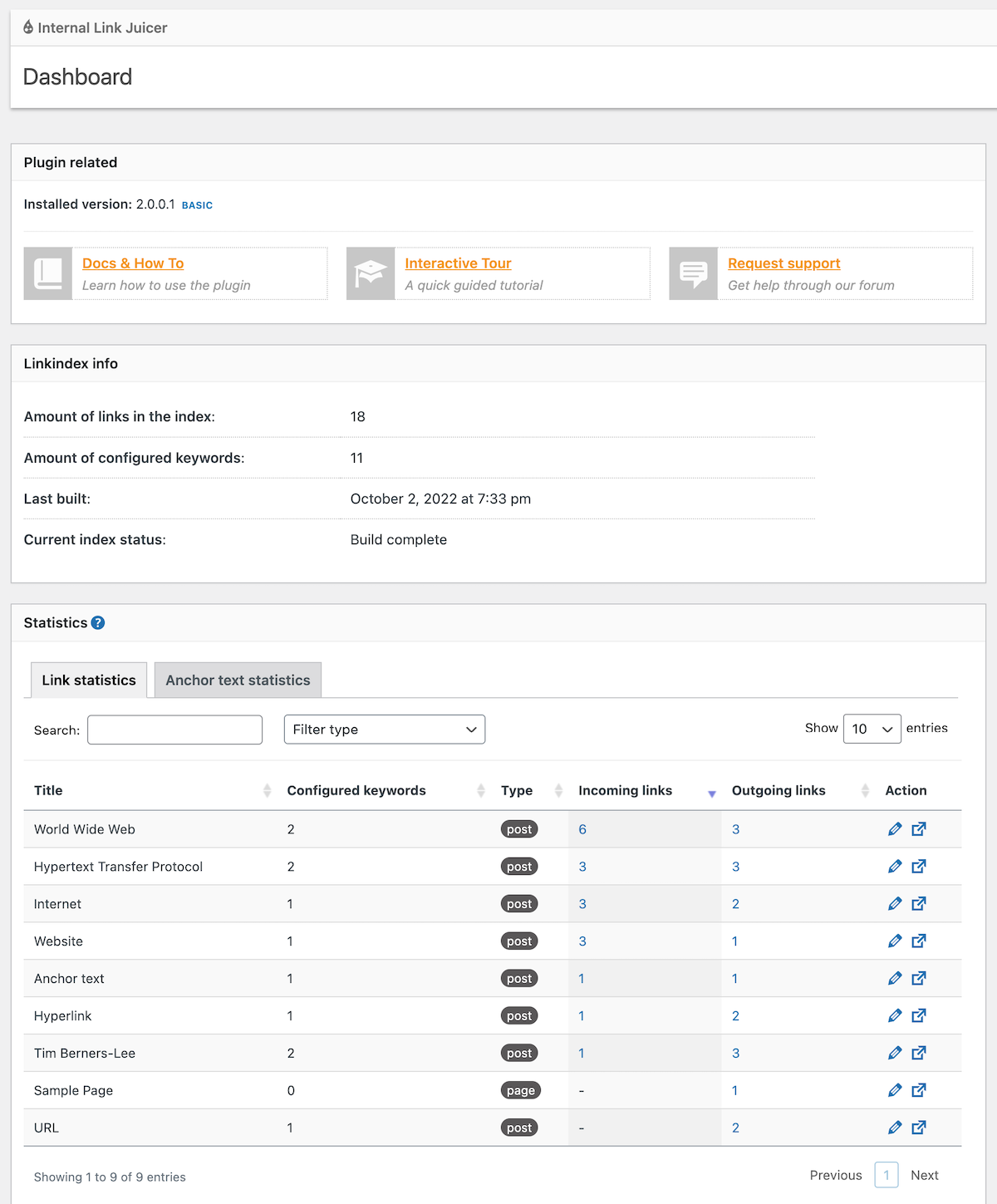
With 1.3 million active installs and a 4.7/5 rating from over 526 reviews on WordPress.org, Internal Link Juicer is the most widely adopted dedicated internal linking plugin in the WordPress ecosystem. It works by letting you define keywords for each post — the plugin then automatically creates links to that post whenever those keywords appear elsewhere on your site.

The free version covers the core use case well: keyword configuration, blacklist/whitelist controls for individual posts, frequency limits, and a statistics dashboard showing all auto-generated links. The Pro version adds support for taxonomy pages (categories and tags), custom fields, ACF compatibility, auto-import of keywords from Yoast or Rank Math focus keywords, and team role management.
Anchor text diversification is included — you can define multiple keyword variations per post so links don’t repeat the same phrase sitewide.
Pricing (March 2026):
- Free: Full core feature set
- Pro 1-site: $69.99/year
- Pro 5-sites: $149.99/year
- Pro 10-sites: $189.99/year
- Pro Unlimited: $1,299/year
Pros:
- Most installed dedicated internal linking plugin (1.3M+ installs)
- Free version covers automatic linking with anchor diversification
- Actively maintained — updated February 2026
- WPML and Polylang compatibility confirmed
- No frontend performance impact (server-side index)
Cons:
- No orphan page detection
- No AI or context-aware suggestions — strictly keyword matching
- Requires careful keyword configuration to avoid over-linking
Best for: Content blogs, affiliate sites, and small business sites that want passive, automated linking without manual review. Works particularly well for multilingual sites (WPML/Polylang support).
2. Link Whisper — Best for AI-Powered Suggestions
Link Whisper takes a different approach: instead of fully automating links, it surfaces suggestions as you write and edit. The AI analyzes the context of your current post and recommends relevant pages from your own site to link to. You click to add — or skip — each suggestion.
Beyond suggestions while writing, Link Whisper includes a link health dashboard that identifies orphaned pages, broken links, and 404 errors. There’s also a bulk linking feature for adding links to older content without reopening each post individually. The plugin supports WooCommerce, Gutenberg, Elementor, and Beaver Builder.
The main drawback: there’s no free version. All features require a paid license starting at $97/year for a single site — which is the highest starting price among the options in this list.
Pricing (March 2026):
- 1 site: $97/year
- 3 sites: $197/year
- 10 sites: $297/year
- 50 sites: $497/year
- 7-day money-back guarantee
Pros:
- Context-aware AI suggestions — not keyword matching
- Orphan page detection and broken link finder included
- Bulk linking for retroactively linking older content
- WooCommerce and major page builder compatibility
- 40,000+ users across 134 countries
Cons:
- No free tier — $97/year entry price is higher than alternatives
- Requires active review of suggestions (not passive)
Best for: Content-heavy sites with 50+ posts, bloggers who write frequently and want smart suggestions while working, and agencies managing multiple client sites (multi-site licensing available).
3. AIOSEO Link Assistant — Best All-in-One Option
AIOSEO is one of the most installed WordPress SEO plugins overall — 3 million+ active installs. Its Link Assistant feature generates a detailed link report for your entire site: how many internal, outbound, and affiliate links each post has, where the linking opportunities are, and which pages are orphaned.
Suggestions appear when editing posts. You can see the recommended page, the exact anchor text it would use, and add the link with a single click. The plugin also includes a standalone broken link checker. The catch is that Link Assistant is only available on the Pro plan ($174.65/year for 10 sites) and above — the Basic plan at $49.60/year doesn’t include it.
Pricing (March 2026):
- Free (Lite): Core SEO features only, no Link Assistant
- Basic (1 site): ~$49.60/year — no Link Assistant
- Plus (3 sites): ~$99.60/year — no Link Assistant
- Pro (10 sites): ~$174.65/year — Link Assistant included ✅
- Elite (100 sites): ~$224.70/year — Link Assistant included ✅
AIOSEO pricing verified via search (March 2026) — confirm at aioseo.com/pricing before purchasing.
Pros:
- Integrated with a full SEO toolkit (sitemaps, schema, audit, redirects)
- Detailed link report across all posts and pages
- Orphan page detection built in
- Single-click link additions from suggestions
- WooCommerce and multisite support
Cons:
- Link Assistant requires Pro plan ($174.65/yr) — higher cost if you only want the linking feature
- Pricing page is JS-rendered, making it harder to verify directly
Best for: Sites already invested in the AIOSEO Pro ecosystem, WooCommerce stores needing a full SEO + link management solution, and teams managing multiple sites at scale.
4. Rank Math — Best Free Built-in Option
Rank Math’s free version includes more internal linking functionality than most plugins charge for: link suggestions appear in the editor sidebar as you write, you can flag posts as pillar content to get prioritized linking recommendations, and there’s no cost for unlimited personal sites.
The free link suggestion feature is keyword-aware but less sophisticated than AI-based tools. For more advanced capabilities — like the AI Link Genius feature — you need the Business plan at $24.99/month (billed annually).
Pricing (March 2026):
- Free: Unlimited personal sites, basic link suggestions, pillar content flagging
- PRO: $7.99/month (billed annually) — more SEO features
- Business: $24.99/month — AI Link Genius, broken link checker, priority support
- Agency: $54.99/month — 500 client sites
Pros:
- Internal link suggestions in the free version — no extra plugin needed
- Pillar content flagging for cornerstone-first linking strategy
- Unlimited personal sites on free plan
- WooCommerce, multisite, and WPML support
Cons:
- Free link suggestions are basic — no orphan detection, no link reports
- AI Link Genius only on Business plan ($24.99/mo)
- Initial setup complexity can be high for new users
Best for: Sites already using Rank Math (especially free users), bloggers who want decent built-in suggestions without paying extra, and agencies using Rank Math across many sites.
5. Yoast SEO Premium — Best for Cornerstone Content Strategy
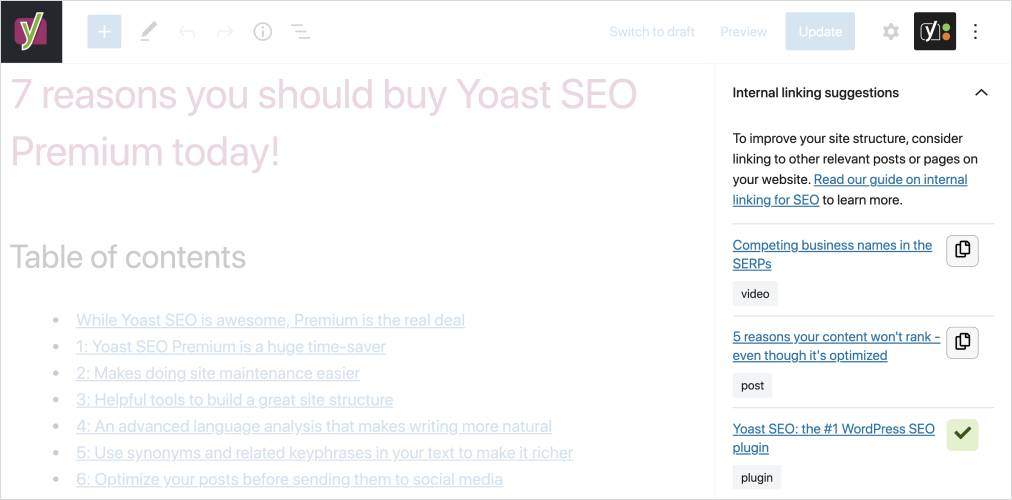
Yoast SEO Premium’s internal linking tool works by analyzing the “prominent words” in your current post — key one-to-five word phrases that reflect what the post is actually about — and then finding other posts on your site with overlapping prominent words. The suggestions appear in the editor sidebar, ranked by relevance. You drag or copy links directly into your content without leaving the editor.
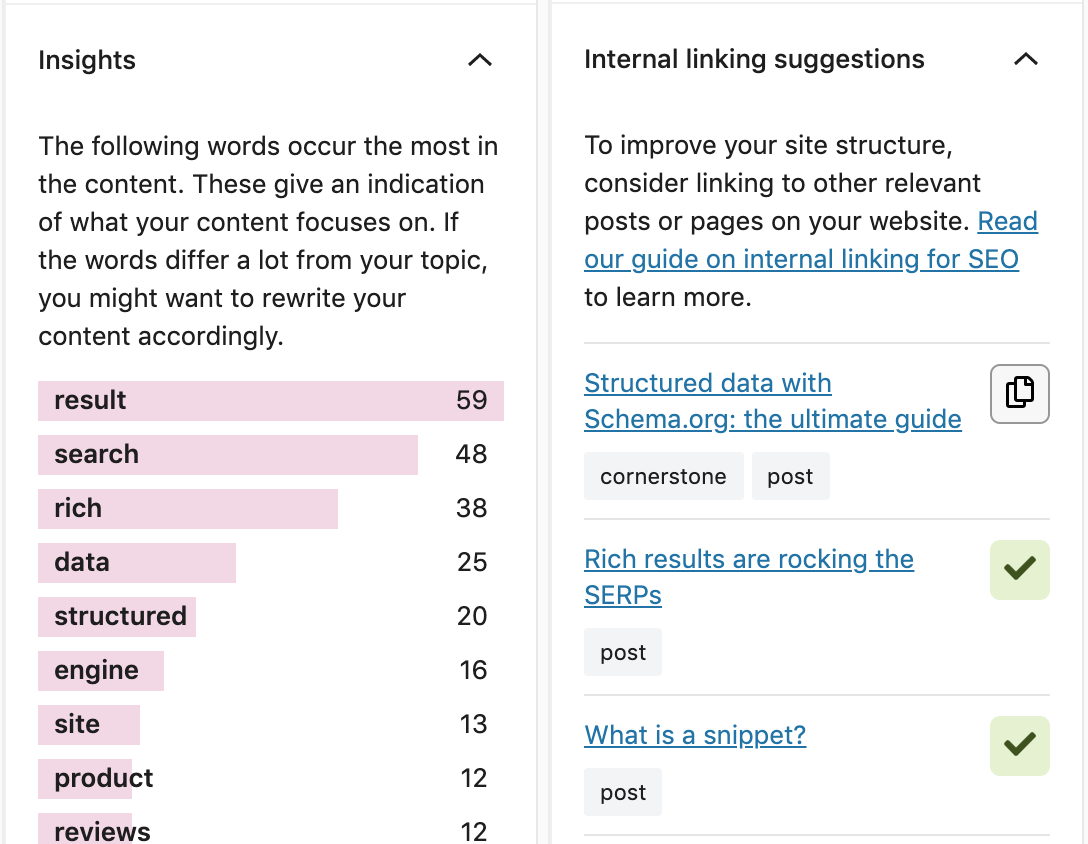
Yoast also shows you a link count overview: how many internal links each post has pointing to it, and how many links each post sends out. This makes it straightforward to find content that’s getting no internal links and needs attention. However, there’s no dedicated orphan finder or broken link checker — these require separate tools.
Pricing (March 2026):
- Free: Core SEO features, no internal linking suggestions
- Premium (1 site): $118.80/year (excluding VAT)
Pros:
- Natural in-editor workflow — suggestions appear without switching screens
- Cornerstone content system works well for topic cluster strategies
- 13M+ users — extensive community and documentation
- Includes redirect manager and multi-focus keyword support
Cons:
- Internal linking is Premium-only — free users get nothing for linking
- $118.80/year is on the higher end for a one-site license
- No orphan page detection or broken link checker included
- Link suggestions are less comprehensive than dedicated linking plugins
Best for: Sites with a clear topic cluster / cornerstone content strategy, teams already on Yoast SEO Premium who want to use what they’re paying for, and content-focused blogs prioritizing quality over volume linking.
6. SEOPress PRO — Best Value All-in-One
SEOPress offers something unusual: the free version works on unlimited WordPress sites, and the PRO plan starts at $49/year — the most affordable entry point on this list for an all-in-one SEO + internal linking solution. The PRO internal linking feature is powered by TF-IDF (Term Frequency–Inverse Document Frequency), a more statistically rigorous approach than simple keyword matching that looks at the context and relative importance of terms across your content library to suggest relevant links.

The PRO version also includes a site audit tool that surfaces orphaned content and broken links, a redirect manager, XML/HTML sitemaps, and support for multilingual setups via WPML, Polylang, TranslatePress, and Weglot. At 350,000+ websites and a 4.9/5 rating from 1,200+ reviews, SEOPress is often overlooked in favor of more prominent brands, but the value per dollar is hard to match.
Pricing (March 2026):
- Free: Unlimited sites, core SEO features, no internal linking suggestions
- PRO (1 site): $49/year
- Higher tiers available (5-site, unlimited)
- Renewal price locked at purchase price
Pros:
- Lowest entry price for a full SEO + linking bundle ($49/year)
- Free version supports unlimited sites — useful for developers and agencies
- TF-IDF suggestions are context-aware, not just keyword-matching
- Orphan content detection via site audit tool
- Broad multilingual support (WPML, Polylang, TranslatePress, Weglot)
- Renewal price doesn’t increase
Cons:
- Smaller user base (350K) vs. Yoast or AIOSEO — less community documentation
- Internal linking limited to 5 suggestions per analysis
Best for: Budget-conscious site owners who want an all-in-one SEO + linking solution, developers managing multiple client sites, and multilingual WordPress sites.
7. Interlinks Manager — Best for Link Analytics
Interlinks Manager takes a different angle from the rest: it focuses less on creating links and more on analyzing and understanding the links you already have. The free version gives you a dashboard showing all your internal links, an estimated “link juice” score for each page (essentially a PageRank-like calculation), and real-time optimization feedback in the post editor.
The Pro version adds automated linking, internal link suggestions, click-through rate tracking, and CSV export — making it the most analytics-heavy option on this list. With 8,000+ installs, it’s niche but serves a specific audience: site owners who want to measure what their internal links are actually doing before adding more.
Pricing (March 2026):
- Free: Link analytics dashboard, link juice estimation, optimization feedback
- Pro: Automated linking, suggestions, CTR tracking (price not publicly listed — check plugin site)
Pros:
- Unique focus on link juice analysis and measurement
- Click-through rate tracking (Pro) — rare in this category
- Free version offers real value for analytics-focused users
Cons:
- Small install base (8K) — limited community support
- Pro pricing not publicly listed on plugin page
- Less suitable as a primary internal linking tool for most sites
Best for: Data-oriented site owners who want to measure and optimize existing link equity before scaling, or as a companion analytics layer alongside a dedicated linking plugin.
Full Feature Comparison
| Plugin | Auto-Linking | AI/Context Suggestions | Orphan Finder | Broken Links | WooCommerce | WPML/Multilingual | Active Installs |
|---|---|---|---|---|---|---|---|
| Internal Link Juicer | Yes (free) | No | No | No | Pro | Yes | 1.3M+ |
| Link Whisper | Yes (paid) | Yes | Yes | Yes | Yes | Not confirmed | 40,000+ |
| AIOSEO Link Asst. | No | Yes (Pro+) | Yes (Pro+) | Yes | Yes | Partial | 3M+ (AIOSEO) |
| Rank Math | No | Yes (free basic) | No | Business plan | Yes | Yes | 2M+ |
| Yoast SEO | No | Yes (Premium) | No | No | Yes | Yes | 13M+ |
| SEOPress PRO | No | Yes (TF-IDF) | Yes (audit) | Yes | Yes | Yes | 350K+ |
| Interlinks Manager | Pro only | Pro only | No | No | Limited | Not confirmed | 8,000+ |
Which Plugin Is Right for Your Site Type?
The most common mistake when choosing an internal linking plugin is picking the one with the most features instead of the one that fits how your site actually works. Here’s a more practical breakdown:
choosing the right WordPress setup for your site type
| Site Type | Recommended Plugin | Reason |
|---|---|---|
| Personal blog (under 50 posts) | Rank Math (free) or ILJ (free) | Free tools cover the basics — no need to spend money yet |
| Growing content site (50–200 posts) | Link Whisper or ILJ Pro | AI suggestions scale better; orphan detection becomes important |
| WooCommerce store | AIOSEO Link Assistant (Pro) | Handles product + post pages, orphan finder, WooCommerce-aware |
| Agency / multiple sites | Link Whisper (10-site: $297/yr) or SEOPress PRO | Multi-site licensing; SEOPress free tier works for dev staging |
| Already using Yoast SEO Premium | Yoast built-in | You’re already paying for it — use it before adding another plugin |
| Already using AIOSEO Pro | AIOSEO Link Assistant | Integrated reporting eliminates the need for a separate tool |
| Multilingual site (WPML/Polylang) | Internal Link Juicer or SEOPress PRO | Both have confirmed multilingual plugin compatibility |
| Budget-conscious site any size | SEOPress PRO ($49/yr) | Lowest cost all-in-one with TF-IDF suggestions and orphan audit |
Internal Linking Best Practices That Actually Move the Needle
A plugin is a tool — not a strategy. Even the best automated linker can create a mess if you don’t follow a few basic principles.
Use descriptive anchor text. The visible text of your link tells both readers and search engines what the linked page is about. “Click here” or “read more” communicates nothing. “Guide to WordPress caching plugins” tells Google exactly what it will find. Google’s John Mueller has consistently emphasized that descriptive, contextual anchor text is more useful than generic phrases.
Link earlier in the post, not just at the end. Links buried in the final paragraph pass less authority and get fewer clicks than links placed within the first few paragraphs or in the main body of the content. When a link is relevant, add it where the topic naturally comes up — not as an afterthought at the bottom.
Think in a pyramid structure. Your homepage should link to your key category or pillar pages. Those pillar pages should link to supporting posts. And those posts should link back up to the pillar when relevant. This hierarchy makes your most important content easier to find and signals its importance to crawlers.
Fix orphaned content systematically. Use your plugin’s orphan finder (Link Whisper, AIOSEO, SEOPress PRO) to identify posts with zero internal links. Prioritize these by traffic potential — pages that could rank if they had more authority flowing to them. Then add links to those posts from two or three related, higher-traffic pages.
How many links per post? There’s no magic number. Google’s John Mueller has confirmed there’s no hard limit. The right number is however many links serve the reader — each one pointing to something genuinely useful for someone reading the current post. Three to six links is a reasonable starting point for most blog posts; comprehensive guides naturally warrant more.
how to run a WordPress SEO audit
Free vs. Paid — When Do You Actually Need to Upgrade?
Free is probably enough if you…
- Have fewer than 50 posts and are still building your content library
- Already have a premium SEO plugin (Yoast, AIOSEO, Rank Math) with built-in linking suggestions
- Are comfortable reviewing and adding links manually as you write
- Want basic keyword-based auto-linking without reporting or AI features
Upgrading makes sense when you…
- Have 100+ posts and need link reporting to understand your current link structure
- Want AI-powered suggestions that go beyond exact keyword matching
- Need orphan page detection to find content that’s getting no link equity
- Manage multiple sites and need efficient multi-site tools
- Run an e-commerce site where internal linking between products and category pages directly affects revenue
For most solo bloggers with a growing site, Internal Link Juicer (free) handles the basics, and Link Whisper becomes worth the $97/year once you hit 100+ posts and want better visibility into your link structure. For WooCommerce stores or agencies, the economics of AIOSEO Pro or Link Whisper’s multi-site licenses make more sense.
FAQ — Common Questions About WordPress Internal Linking Plugins
Will an internal linking plugin slow down my WordPress site?
It depends on the plugin’s architecture. Plugins like Internal Link Juicer use a server-side index — links are generated before the page loads rather than injected with JavaScript, so there’s no measurable frontend impact. JavaScript-based approaches (older linking tools, some related posts plugins) can add load time. When evaluating a plugin, check whether it processes on the server side or the front end.
Is it safe to use automatic internal linking? Can it hurt my SEO?
Yes — if you configure it carelessly. The main risk is repetitive anchor text: if the same phrase links to the same page 40 times across your site with identical wording, Google may read this as an unnatural linking pattern. Modern auto-linkers like Internal Link Juicer have anchor text diversification built in, which significantly reduces this risk. Set up multiple anchor variations per keyword and review your statistics periodically to catch problems early.
How many internal links should I add to each post?
There’s no confirmed number that improves rankings by itself. The guiding principle, confirmed by Google’s John Mueller, is that links should serve the reader — not exist purely for SEO. A 500-word post might need 2–3 links; a 3,000-word comprehensive guide might naturally include 8–12. Focus on relevance over quantity.
Do I need a separate plugin if I already use Yoast SEO or Rank Math?
Not necessarily. If you’re on Yoast SEO Premium, the built-in linking suggestions may be enough for your workflow. Rank Math’s free version also includes basic suggestions. You’d want a dedicated plugin like Link Whisper if you need AI-powered context-aware suggestions, orphan detection, detailed link reports, or bulk linking features that go beyond what your SEO plugin provides.
What is the difference between keyword-based and AI-based internal linking?
Keyword-based linking (Internal Link Juicer, Internal Links Manager) creates a link every time a defined phrase appears in your content — it’s rule-based and doesn’t consider context. AI-based linking (Link Whisper, AIOSEO Link Assistant) analyzes what a post is actually about using language models or statistical analysis, then suggests links based on conceptual relevance rather than exact keyword matches. AI suggestions tend to be more accurate and less likely to create irrelevant links, but they require your input to approve each one.
How do I find orphaned pages in WordPress?
Orphaned pages are posts with no internal links pointing to them. Several plugins find them automatically: Link Whisper’s link health dashboard, AIOSEO’s Link Assistant, and SEOPress PRO’s site audit all flag orphaned content. You can also use Screaming Frog or Ahrefs site audit if you have access to those tools. Once found, the fix is straightforward: identify two or three existing posts on related topics and add a contextual link to the orphaned page from each.
Which internal linking plugins work with WooCommerce?
Link Whisper, AIOSEO, Rank Math, Yoast SEO Premium, and SEOPress PRO all explicitly support WooCommerce. Internal Link Juicer’s WooCommerce support is available on the Pro version (not free). Interlinks Manager has limited WooCommerce compatibility. If product-to-product or product-to-post linking is important to your store, AIOSEO Link Assistant or Link Whisper are the strongest options.
Which plugin works best with WPML for multilingual sites?
Internal Link Juicer is the most reliably confirmed WPML/Polylang-compatible option, with its own compatibility mode for translation plugins documented in the WordPress.org FAQ. SEOPress PRO also supports WPML, Polylang, TranslatePress, and Weglot — making it a strong alternative for multilingual setups that want a full SEO + linking bundle.
Can I run more than one internal linking plugin at the same time?
Technically yes, but it’s usually not advisable. Running both an auto-linker and a suggestion plugin can create duplicate link handling, conflicting anchor text, or redundant processing. A cleaner approach is to pick one tool that covers your primary need — auto-linking or suggestions — and use it consistently. If you want both analytics and linking, some plugins (SEOPress PRO, AIOSEO) combine these in a single install.
What is anchor text diversification and why does it matter?
Anchor text is the visible, clickable text of a link. Anchor text diversification means using varied phrasing across different links pointing to the same page — for example, “WordPress caching guide,” “how to speed up WordPress,” and “caching plugins explained” might all link to the same post. Diversity signals to Google that links were placed naturally in context rather than inserted artificially, which reduces the risk of triggering spam signals associated with repetitive exact-match anchor text.
Final Thoughts
Internal linking is one of those SEO tasks that produces consistent, compounding returns when done well — and creates problems when automated carelessly. The good news is that the best plugins in this category have matured significantly: anchor text diversification, AI-driven context analysis, and orphan page detection are all available without paying premium prices.
If you’re just starting out, Rank Math’s free suggestions or Internal Link Juicer’s free auto-linker are solid first steps. For sites with substantial content libraries or specific needs like WooCommerce or multilingual support, the paid options — particularly Link Whisper and SEOPress PRO — offer real value per dollar. And if you’re already paying for a premium SEO plugin, check what linking features you’re already entitled to before adding anything new.
