



Getting useful feedback from your audience shouldn’t require a $100/month SaaS subscription. WordPress has a solid ecosystem of survey plugins — some free, some paid, and a few that blur the line between form builder and dedicated survey tool. The challenge is figuring out which one actually fits how you work.
This guide covers eight of the most widely used WordPress survey plugins, comparing what each one offers for free, what the paid tiers unlock, and which situations each plugin handles best. Pricing is verified as of March 2026 — but always check the plugin’s official site before making a decision, since these figures change.
WordPress plugin guides on wplasma.com
The Short Version
If you’re short on time, here’s where most people land after comparing these plugins:
- Best overall (ease of use + ecosystem): WPForms
- Best free tier: Forminator (conditional logic, quizzes, and payments — all free)
- Best for quizzes + surveys combined: Quiz and Survey Master
- Best for developers: Gravity Forms
- Best for conversational-style forms: Fluent Forms
- Best dedicated survey tool: Survey Maker by AYS Pro
- Best open-source / privacy-first option: Formbricks
- Best for simple polls: CrowdSignal (Automattic-backed)
One thing to know before diving in: WordPress-native survey plugins are different from SaaS tools like SurveyMonkey or Typeform. SaaS tools store your data on their servers and often limit what you can do inside your WordPress dashboard. Native WordPress plugins keep everything within your installation — submissions, analytics, and settings all live in your WordPress admin. For most site owners, that’s the better setup.
What to Look for in a WordPress Survey Plugin
Before comparing individual plugins, it helps to know which features actually matter for your situation. Not every plugin is built for every purpose.
- Question types: Basic plugins offer multiple choice and text fields. More advanced ones add NPS (Net Promoter Score), Likert scales, matrix questions, file uploads, and ranking options. The more question types available, the more survey formats you can build.
- Conditional logic (skip logic): This routes respondents to different questions based on their previous answers. Essential for longer surveys — without it, everyone sees every question regardless of relevance.
- Multi-step / multi-page support: Breaking a long survey into pages reduces abandonment. Progress bars help too.
- Analytics and reporting: Some plugins give you a visual dashboard with charts; others just store entries in a database table. The difference matters when you need to interpret results quickly.
- Integrations: If you want survey responses to flow into Mailchimp, HubSpot, Google Sheets, or Zapier, you need a plugin that supports those connections. Some reserve integrations for paid tiers only.
- Free tier realities: “Free” means different things across plugins. Forminator gives you a lot for free; WPForms’ free version is mainly a contact form builder with survey features gated behind paid plans.
- Data privacy (GDPR): If you’re collecting data from EU residents, you need a plugin that gives you control over data storage and consent. Self-hosted plugins generally have an advantage here.
- Update frequency: A plugin that hasn’t been updated in 12+ months is a liability on a live site. Check the WordPress.org listing for the last updated date before installing.

Best WordPress Survey Plugins at a Glance
Here’s a side-by-side comparison of the main options — something you won’t find in most competitor roundups, which list plugins individually without ever putting them next to each other.
| Plugin | Free Tier | Starting Price (Paid) | Active Installs | Conditional Logic | NPS Surveys | Best For |
|---|---|---|---|---|---|---|
| WPForms | Basic forms only | $49.50/yr (intro) | 6M+ | Paid only | Via add-on (paid) | Beginners, small businesses |
| Gravity Forms | None | $59/yr | 5M+ | Yes | Via add-on | Developers, agencies |
| Formidable Forms | Basic forms only | $39.50/yr (intro) | 300K+ | Paid only | No native | Data-heavy surveys, reports |
| Fluent Forms | Yes (generous) | ~$79/yr | 400K+ | Free tier | No | Conversational forms, speed |
| Forminator | Yes (excellent) | ~$15/month | 300K+ | Free tier | No | Budget users, max free features |
| Quiz & Survey Master | Yes (core features) | $149/yr | 40K+ | Paid only | No | Quizzes + surveys combined |
| Survey Maker (AYS) | Yes (solid) | Check ays-pro.com | 30K+ | Pro only | Pro only | Dedicated survey work |
| CrowdSignal | Yes (capped) | $15/month | 100K+ | No | Yes (NPS block) | Simple polls, block editor |
| Formbricks | Yes (open source) | Cloud plans vary | Growing | Yes | Yes | GDPR-focused, open source |
Active install figures sourced from WordPress.org and reputable industry sources. Pricing verified March 2026 — check official plugin sites for current rates.
WPForms
With over 6 million active installs on WordPress.org, WPForms is the most widely used form builder in the WordPress ecosystem. That install count reflects something real: it’s genuinely easy to set up, well-documented, and actively maintained (last updated March 3, 2026).

The caveat: WPForms’ survey-specific capabilities — including the Surveys and Polls add-on that generates visual reports — require a paid plan. The free version (WPForms Lite) covers basic contact forms but won’t give you survey analytics or poll visualization. If survey collection is your primary goal, factor that into your budget calculation.
Key features:
- Drag-and-drop builder with 2,000+ pre-built templates
- Conditional logic (premium plan required)
- Real-time survey reports with charts (paid tier — via Surveys & Polls add-on)
- Integrations: Stripe, Mailchimp, Google Sheets, HubSpot, Zapier
- Akismet spam protection built in
- Active security patching with separate security releases
Pricing (March 2026): Basic plan starts at $49.50/year (introductory rate, renews at $99/year). The Pro plan — which includes the survey add-on — starts at $199.50/year introductory, renewing at $399/year. Verify current pricing at wpforms.com/pricing.
Best for: Small businesses and bloggers who want a trusted, beginner-friendly form builder and don’t mind paying for the survey features.
Limitations: Survey capabilities require a paid plan; renewal pricing is notably higher than the intro rate.
More WordPress form plugin comparisons
Gravity Forms
Gravity Forms takes a different approach: no free version, no freemium tier, just a straightforward paid plugin that’s been powering WordPress forms for over 15 years. It runs on more than 5 million sites, primarily among developers and agencies who need precise control over form behavior.

For survey use cases specifically, Gravity Forms includes 8 dedicated survey field types: Likert scales, ranking systems, star ratings, and more. You also get conditional logic and merge tags built in, plus paginated form support for WCAG 2.0 accessibility compliance — something most competitors don’t address.
Key features:
- 8 specialized survey field types (Likert, ranking, star rating, radio, checkbox, drop-down, single line text, paragraph)
- Conditional logic and merge tags
- WCAG 2.0 compliant paginated forms
- Built-in survey reporting with graphs and filters
- Large add-on ecosystem (payment gateways, CRM, email marketing)
Pricing (March 2026): Basic plan $59/year (1 site), Pro $159/year (3 sites), Elite $259/year (unlimited sites). No free trial or free tier. See gravityforms.com/pricing for details.
Best for: WordPress developers and agencies that need full control, accessibility compliance, and a mature ecosystem of add-ons.
Limitations: No free option; add-ons can add significant cost; security changelogs are less transparent than some competitors.
Formidable Forms
Formidable Forms earns its reputation among users who need to do more than collect survey responses — they need to display, analyze, and report on that data. Over 300,000 WordPress sites use it, and the 220+ pre-built templates make it easy to launch a customer feedback survey, employee satisfaction form, or brand awareness questionnaire without building from scratch.

The free version handles basic forms but won’t get you far for surveys specifically — advanced features like conditional logic, branching, and the data views that make Formidable useful are paid-only. One pricing note worth flagging: the introductory rate is significantly lower than the renewal rate, so budget accordingly.
Key features:
- 220+ pre-built survey and form templates
- Conditional logic and smart question branching (premium tier only)
- Multi-page forms with progress bars (reduces abandonment)
- Data views and graph-based reporting
- Payment integrations: Stripe, PayPal, Square, Authorize.net
- Saves abandoned form data automatically
Pricing (March 2026): Basic plan starts at $39.50/year (first year discounted); renewal pricing increases substantially. Check formidableforms.com for current rates.
Best for: Agencies, small businesses, and marketers who need customized reporting and data visualization beyond a basic results table.
Limitations: Free tier doesn’t include survey-specific features; renewal pricing is higher than the introductory rate.
Fluent Forms
Fluent Forms doesn’t shout about being a survey plugin, but it handles surveys well — particularly if you want a conversational form experience where one question appears at a time, much like Typeform. That conversational mode is available in the free version, which is more generous than most competitors at no cost.

The plugin’s free version includes conditional logic, conversational forms, and 25+ field types — features that WPForms and Formidable Forms lock behind paid plans. If you run a site where performance matters (fast load times, minimal plugin bloat), Fluent Forms has a reputation for being lighter than most form builders in its class. Last updated March 4, 2026, with a 4.8-star rating from 742 reviews.
Key features:
- Conversational form mode (one question at a time) — free
- Conditional logic — free
- 50+ field types including quiz scoring
- Multi-step forms and form scheduling
- 60+ integrations (Pro): Mailchimp, HubSpot, Slack, Zapier, Google Sheets
- Quiz results with email delivery
Pricing (March 2026): Pro plans start from approximately $79/year per domain. Lifetime licenses available from $279/domain. Check fluentforms.com/pricing for current offers.
Best for: Speed-conscious WordPress sites and anyone who wants a solid survey setup without paying for it right away.
Limitations: Survey-specific analytics aren’t as deep as Formidable Forms or WPForms; no native NPS survey type.
Forminator
If you’re looking for the most feature-complete free survey plugin, Forminator is the answer. The free version from WPMU DEV includes multi-step forms, conditional logic, quizzes, polls, and Stripe/PayPal payment collection — features that most plugins reserve for their paid tiers. It has a 4.8-star rating from 2,042 reviews and was last updated February 27, 2026.
The tradeoff is setup complexity. Multi-step form creation requires more configuration than competitors like WPForms, and the advanced reporting and e-signature features only unlock with a paid WPMU DEV Membership plan.
Key features:
- 25+ field types including quizzes, polls, and payments — all free
- Conditional logic — free
- Multi-step forms with progress bars — free
- Stripe and PayPal integrations — free
- GDPR-compliant data handling tools
- 1,000+ app integrations via Zapier, Make, and webhooks
- Google reCAPTCHA, hCaptcha, Cloudflare Turnstile support
Pricing: Free on WordPress.org. WPMU DEV Membership from approximately $15/month unlocks Pro features including e-signatures and PDF generation.
Best for: Users who need maximum free functionality — particularly bloggers and small site owners who want surveys, polls, and payments without spending anything upfront.
Limitations: Multi-step form setup is more involved than competitors; advanced reporting requires a paid plan; WPMU DEV ecosystem can feel like a subscription lock-in.
Quiz and Survey Master (QSM)
Quiz and Survey Master is the go-to choice when you need both quizzes and surveys from a single plugin. With over 1 million total downloads and a 4.7-star rating from 1,277 reviews, it’s particularly popular with educators, e-learning sites, and bloggers who want to run interactive quizzes alongside customer feedback surveys.

The free version gets you the core quiz and survey builder with 18+ question types. For conditional logic, advanced integrations, and gamification features, you’ll need one of the paid add-on bundles. One important note on security: Patchstack has documented 37 historical vulnerabilities in this plugin, all of which have been patched. The developers tend to bundle security fixes with feature updates rather than issuing separate security releases — something to keep in mind for high-traffic or sensitive deployments.
Key features:
- 18+ question types (multiple choice, dropdown, flashcards, true/false)
- Timer and countdown functionality
- Multipage navigation with progress tracking
- Customizable result pages
- Gamification add-ons (leaderboards, badges)
- WooCommerce product linking
- 40+ available add-ons
Pricing (March 2026): Basic $149/year (1 site, limited add-ons), Plus $199/year (5 sites, conditional logic), Pro $249/year (10 sites), All Access $299/year (10 sites, all 40+ add-ons). Free core plugin available on WordPress.org.
Best for: Online course creators, educators, and bloggers who want quizzes and surveys under one plugin with gamification options.
Limitations: Add-on costs add up quickly; security patches bundled with feature updates; not ideal for mission-critical data collection.
Survey Maker by AYS Pro
Most form builders treat surveys as a feature. Survey Maker treats surveys as the entire product. Built by AYS Pro, this plugin focuses exclusively on surveys — and it shows in the depth of its question types, the NPS support, and the conversational “chat mode” that turns a traditional form into something that feels more like a conversation.
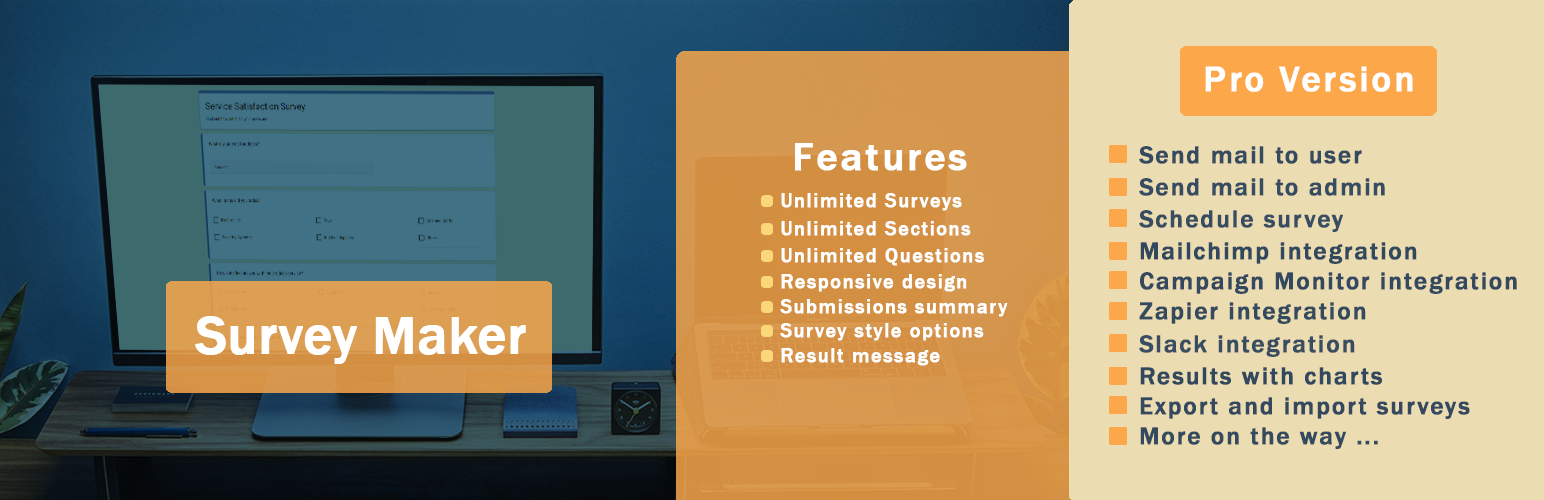
The free version provides unlimited surveys with unlimited questions, 6 question types, multi-page support, popup surveys, and basic analytics. That’s more than most competitors offer for free. The Pro version adds NPS surveys, conditional jump logic, ChatGPT integration, PDF export, and payment collection. Notably, Survey Maker was updated on March 17, 2026 — making it one of the most actively maintained plugins in this comparison.
Key features (free):
- Unlimited surveys, sections, and questions
- 6 question types (radio, checkbox, dropdown, paragraph, short text, yes/no)
- Multi-page surveys with drag-and-drop question ordering
- Popup survey support
- IP-based duplicate submission prevention
- 6 style themes
Key features (Pro):
- 20+ question types including NPS, matrix scale, linear scale, file upload, star rating
- Conditional jump logic (skip logic)
- Conversational survey / chat mode
- ChatGPT integration
- PDF export and Google Sheets integration
- Stripe, PayPal, Zapier integrations
Pricing: Free version on WordPress.org. Pro version available at ays-pro.com — check the site for current pricing.
Best for: Anyone who wants a dedicated survey tool rather than a form builder. Particularly strong for researchers, HR teams, nonprofits, and businesses running structured feedback programs.
Limitations: Smaller community than WPForms or Gravity Forms; fewer third-party integrations in the free tier.
WordPress plugin reviews and comparisons
CrowdSignal
CrowdSignal (formerly Polldaddy) is the poll and survey tool built by Automattic, the company behind WordPress.com. It’s the most tightly integrated option for block editor users — the plugin adds six Gutenberg blocks (Polls, Feedback, NPS, and others) that drop directly into any post or page. It has over 100,000 active installs and benefits from Automattic’s HackerOne bug bounty program for security research.

The free tier works for small-scale use — up to 2,500 signals — but caps exports and limits advanced reporting. It’s the right call when you want a fast, reliable poll without a complex setup, but not the right tool for detailed multi-question surveys or conditional logic.
Key features:
- 6 native Gutenberg blocks (Poll, Survey, Feedback, NPS, etc.)
- Real-time analytics with geolocation tracking
- IP filtering to catch duplicate responses
- Scheduling (open and close dates for polls)
- Response limit settings
- Google Sheets export (Premium)
Pricing: Free tier (2,500 signals/month). Premium $15/month (unlimited responses, Google Sheets). Business $45/month (removes branding, custom CSS).
Best for: WordPress users who want simple, reliable polls embedded directly in blog posts or pages — especially those already using the block editor.
Limitations: Free tier capped at 2,500 signals; no conditional logic; limited to simpler poll/survey formats.
Formbricks
Formbricks is the open-source option in this list, and it fills a gap the others don’t address: genuinely GDPR-compliant surveys with a self-hosted deployment option. If your site collects data from EU residents and you need to demonstrate where that data lives, Formbricks is worth a close look.
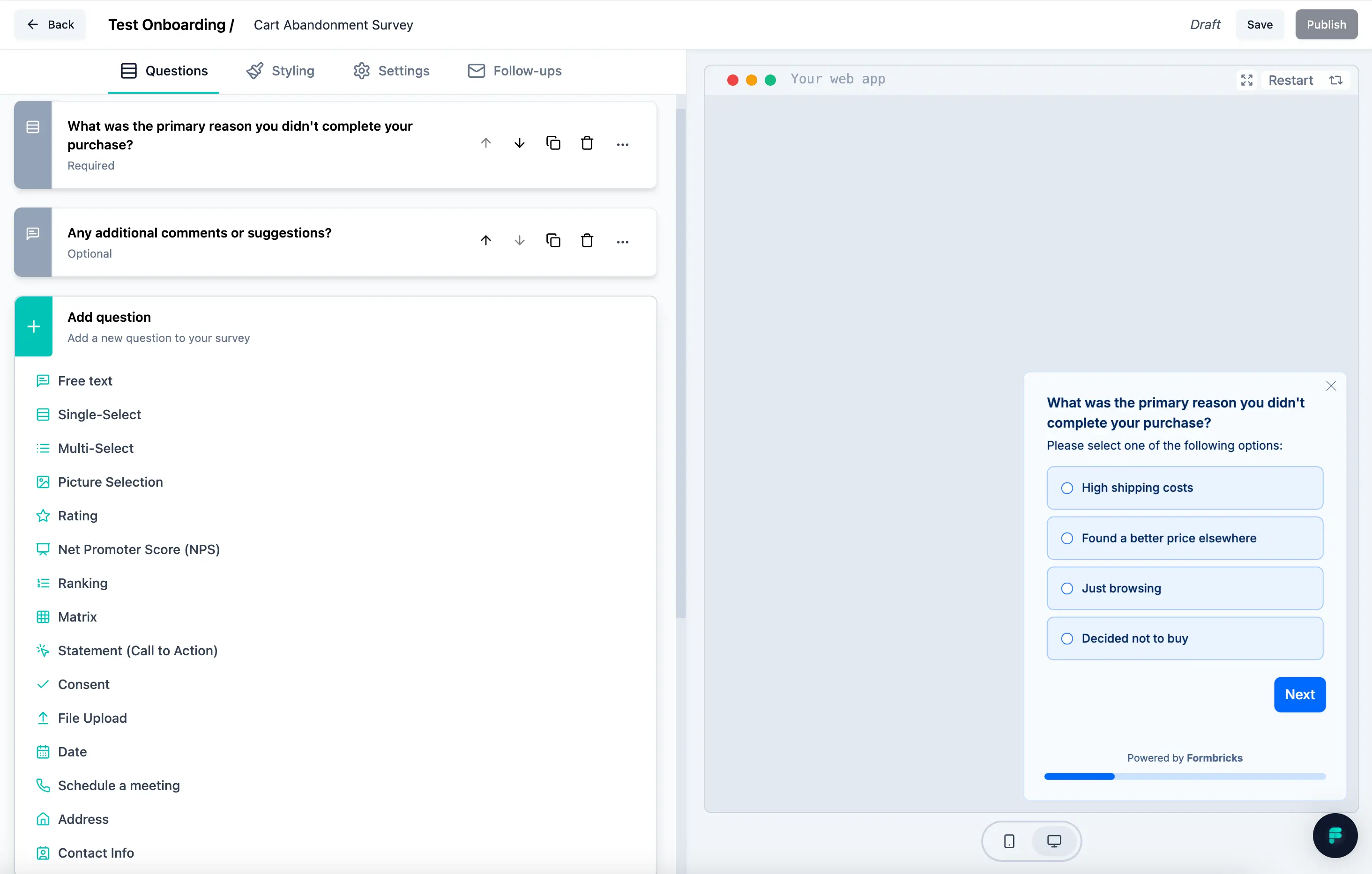
The WordPress plugin connects to a Formbricks account (cloud or self-hosted) and lets you embed surveys or trigger pop-up surveys within your site. You get conditional logic, NPS support, real-time analytics, and full GDPR compliance. For developers who want to run a completely self-hosted setup, the code is public on GitHub and can be deployed without depending on Formbricks’ cloud infrastructure.
Key features:
- Open-source (MIT license)
- Self-hosted option — data stays on your server
- GDPR and global privacy regulation compliance
- Embedded and pop-up survey formats
- Conditional logic and skip logic
- NPS survey support
- Real-time analytics dashboard
Pricing: Free for self-hosted deployments. Cloud plans available through formbricks.com for teams who prefer managed hosting.
Best for: EU-based businesses, privacy-conscious site owners, and developers who want an open-source survey solution they can fully control.
Limitations: Requires a Formbricks account or self-hosted instance; smaller community than established plugins like WPForms; newer entrant in the WordPress ecosystem.
Which Survey Plugin Is Right for You?
The honest answer is that it depends on what you’re trying to accomplish. Here’s a breakdown by common situation:
- Running quick polls on a blog: CrowdSignal (free) handles this with minimal setup. Install it, drop a Poll block into your post, and you’re done.
- Collecting customer feedback for a small business: Forminator’s free tier covers most needs here — conditional logic, multi-step forms, and decent analytics without any cost. WPForms Pro is a good upgrade if you want better reporting and template selection.
- WooCommerce post-purchase surveys: Fluent Forms (free tier for basics) or WPForms Pro both connect well to WooCommerce. Fluent Forms has a slight edge on performance and pricing.
- Complex research surveys with branching logic: Survey Maker’s Pro version handles this well with its jump logic, NPS support, and conversational mode. Formidable Forms is the alternative if you also need to display and report on results in your WordPress dashboard.
- Educational quizzes with grading and leaderboards: Quiz and Survey Master is purpose-built for this. The free core plugin is enough to get started; add-ons expand the feature set as you grow.
- Developer-managed forms with precise control: Gravity Forms. It’s the most consistent option for complex conditional logic, WCAG accessibility, and tight integration with custom code.
- EU site with GDPR requirements: Formbricks with a self-hosted deployment. All data stays on your server, and the plugin is built with privacy compliance as a core consideration.
- Maximum features without spending anything: Forminator. It genuinely gives you more in the free tier than any other plugin on this list.
More WordPress guides for small business owners
FAQ — WordPress Survey Plugins
- What is the best free WordPress survey plugin?
- Forminator offers the most comprehensive free tier — conditional logic, multi-step forms, quizzes, polls, and even Stripe/PayPal payments are available without paying. Survey Maker by AYS Pro is a strong alternative if you specifically need a dedicated survey tool rather than a general form builder. Both are free to install from WordPress.org.
- Do WordPress survey plugins work with Elementor and Gutenberg?
- Most do. WPForms, Fluent Forms, Formidable Forms, and Forminator all provide blocks for the Gutenberg editor and widgets or shortcodes for Elementor. CrowdSignal is natively block-based. If you use a specific page builder, check the plugin’s compatibility page before installing.
- Can I export survey results to Excel or CSV?
- Yes, most paid tiers include CSV export. Survey Maker, Quiz and Survey Master, WPForms, Gravity Forms, and Formidable Forms all support CSV (and in some cases Excel or PDF) export. Forminator’s free version stores entries in your WordPress database, which you can export from the dashboard.
- Which plugin has the best conditional logic?
- Gravity Forms and Fluent Forms are the most capable here. Gravity Forms is particularly strong for complex multi-path logic, while Fluent Forms includes conditional logic in the free version — making it the best value for conditional survey branching. WPForms’ conditional logic is solid but restricted to paid plans.
- Are WordPress survey plugins GDPR compliant?
- It depends on the plugin and your configuration. Self-hosted plugins (those that store data in your WordPress database) give you more direct control over data residency. Formbricks is explicitly designed with GDPR compliance in mind and offers a fully self-hosted option. Forminator and Fluent Forms also include GDPR tools. For plugins that connect to third-party services (like Opinion Stage or the cloud version of Formbricks), review their data processing agreements.
- Which plugin supports NPS (Net Promoter Score) surveys?
- CrowdSignal has an NPS block built in. Survey Maker’s Pro version includes NPS. Formbricks also supports NPS surveys natively. WPForms and Gravity Forms can approximate NPS through rating scale fields, though they don’t have a dedicated NPS question type.
- Do I need a survey-specific plugin, or can I use a contact form plugin?
- A contact form plugin works fine for simple questionnaires — a few questions, email notification, basic data collection. But once you need conditional logic, multi-page flow, visual analytics, NPS tracking, or question randomization, a dedicated survey plugin or a form builder with strong survey features (WPForms Pro, Formidable Forms) handles it more cleanly. The distinction matters most at scale.
- How do I add a survey to a WordPress page?
- Most plugins use either a Gutenberg block, a shortcode, or a widget. With a block-based plugin (like CrowdSignal or WPForms), you add the block directly in the post editor. With shortcode-based plugins (like Survey Maker or Quiz and Survey Master), you copy the survey’s shortcode and paste it into any page or post. Both methods take under a minute once the plugin is set up.
- Can WordPress survey plugins integrate with Mailchimp?
- Yes. WPForms, Fluent Forms Pro, Formidable Forms, Survey Maker Pro, and Quiz and Survey Master all offer Mailchimp integration. Most of these are available at the paid tier. Forminator integrates with Mailchimp and other email tools via Zapier or direct connections depending on the plan.
- What’s the difference between a WordPress survey plugin and SurveyMonkey or Typeform?
- SurveyMonkey and Typeform are SaaS (software as a service) platforms — they host your survey data on their own servers and often limit what you can do within WordPress. A WordPress-native survey plugin keeps all data in your WordPress database, gives you full control over design and placement, and doesn’t require a separate monthly subscription just to have the survey on your site. For most WordPress site owners, a native plugin is the more practical and cost-effective choice.
Wrapping Up
There’s no single best WordPress survey plugin — the right choice depends on your survey type, how much you’re willing to spend, and how deeply you need to analyze results. For most small businesses and bloggers, Forminator’s free tier is a natural starting point. If you outgrow it, WPForms Pro or Fluent Forms Pro are reasonable paid upgrades. Developers building complex forms consistently reach for Gravity Forms. And if privacy or open-source matters to your organization, Formbricks is the option worth exploring.
Whichever plugin you choose, verify pricing on the official site before purchasing — introductory rates and renewal rates differ significantly across most of these plugins.
