


Most articles about WordPress CRM plugins will tell you there’s one clear winner. There isn’t. The plugin that’s perfect for a freelance consultant is completely wrong for a WooCommerce store owner, and the tool that serves a five-person sales team falls flat for a solo blogger managing a newsletter list.
What you actually need is an honest breakdown: what each plugin does, what it costs right now, who it’s built for, and where it falls short. This guide covers nine of the most popular options with pricing verified directly from official sources in March 2026. For more WordPress plugin guides, browse the wplasma.com plugin review library.
Quick Picks — Best WordPress CRM Plugins at a Glance
Short on time? Here’s how the main options stack up across the most important decision criteria.
| Plugin | Best For | Free Plan | Paid From | Data Hosted |
|---|---|---|---|---|
| FluentCRM | Email automation + WooCommerce | ✅ Yes (core) | $90/yr | Your server |
| Jetpack CRM | Freelancers, small businesses | ✅ Yes (core) | $132/yr (bundle) | Your server |
| HubSpot | Teams needing a full platform | ✅ Yes (limited) | $450/mo (paid tiers) | HubSpot servers |
| Groundhogg | Advanced automation, developers | ✅ Yes (core) | ~$240/yr (bundle) | Your server |
| WP-CRM System | Basic contact + project tracking | ✅ Yes (fully functional) | $99/yr (bundle) | Your server |
| FunnelKit Automations | WooCommerce cart recovery | ❌ No | $99.50/yr | Your server |
| Zoho CRM | Sales teams, multi-department | ✅ Yes (3 users) | ~$14/user/mo | Zoho servers |
| Brevo | Email-first on a tight budget | ✅ Yes (300 emails/day) | ~$9/mo | Brevo servers |
The single biggest decision you’ll make isn’t about features — it’s about where your customer data lives. The section below explains why that matters more than any individual feature list.
What a WordPress CRM Plugin Actually Does
A CRM (Customer Relationship Management) plugin gives your WordPress site a structured contact database. Every visitor who fills out a form, makes a purchase, or sends an email can become a contact record, with a complete history of their interactions with your business.
At its core, a WordPress CRM plugin does three things:
- Stores contact data: Names, email addresses, phone numbers, custom fields — and a timeline of every interaction
- Tracks activity: Form submissions, purchases, email opens, page visits — depending on the plugin’s depth
- Enables follow-up: Email campaigns, task reminders, automation sequences, or sales pipeline management
What a CRM plugin typically does not replace: a full-featured email marketing plugin if you’re sending millions of emails per month, a dedicated helpdesk tool, or project management software. Some plugins (like FluentCRM and HubSpot) blur these lines by bundling multiple functions, but most sit firmly in the “contact management + basic email” space.
Self-Hosted vs. SaaS WordPress CRM — Which Type Fits You?
Before comparing individual plugins, you need to understand the most fundamental divide in this category: where your data actually lives. This single decision shapes everything from pricing to GDPR compliance to what happens if you cancel your subscription.
| Feature | Self-Hosted (Native WordPress) | SaaS CRM + WordPress Plugin |
|---|---|---|
| Data location | Your WordPress database, your server | Provider’s servers (US, EU, or unknown region) |
| Pricing model | Annual plugin license or one-time (no per-contact fees) | Monthly subscription, often scales with contact count |
| Contact limits | Typically unlimited (server resource dependent) | Usually tiered — costs increase as list grows |
| If you cancel | Data stays on your server indefinitely | You may lose access to your contacts and history |
| GDPR / data privacy | Full control — data in your jurisdiction | Dependent on provider’s data processing agreements |
| Uptime dependency | Only your hosting | Your hosting + provider’s platform |
| Features | Growing rapidly; some gaps vs. enterprise SaaS | Typically more polished, broader feature sets |
Self-Hosted (Native WordPress) CRM Plugins
With a native CRM plugin, all your contact records live inside your WordPress database — the same way your blog posts and pages do. You’re not dependent on any external platform staying online, and your customer list isn’t at risk if you decide to stop paying a subscription or the provider shuts down.
The tradeoff is that server performance matters more as you scale. A small site with 500 contacts will notice nothing. A WooCommerce store with 80,000 customer records needs well-managed hosting that can handle database queries at scale.
Native WordPress CRM plugins covered here: FluentCRM, Jetpack CRM, Groundhogg, WP-CRM System, FunnelKit Automations.
SaaS CRM Tools with WordPress Integration
SaaS CRMs — HubSpot, Zoho CRM, Brevo, ActiveCampaign, Pipedrive — are full software platforms that offer a WordPress plugin as one of many integration channels. Your data lives on their servers, which comes with both convenience (automatic backups, no server load, polished interfaces) and risk (price increases, vendor lock-in, cross-border data transfers).
For teams that already use a SaaS CRM across multiple tools (Slack, Gmail, Salesforce, etc.), the WordPress plugin integration makes sense. For a business whose entire operation runs through WordPress, a native plugin is usually the more economical and privacy-friendly choice.
The 8 Best WordPress CRM Plugins — Detailed Reviews
Below are detailed reviews of eight plugins — four native WordPress tools that store data on your hosting account, and three SaaS platforms with strong WordPress integration. Each review covers features, verified 2026 pricing, honest limitations, and a specific “Best for” use case.
1. FluentCRM — Best Native WordPress CRM for Email Automation
FluentCRM has over 1.4 million active installs and a 4.8-star rating on WordPress.org, making it the highest-rated native CRM plugin in this comparison. It’s built by WPManageNinja — the same team behind the popular Fluent Forms plugin — and the two work together without any configuration headache.
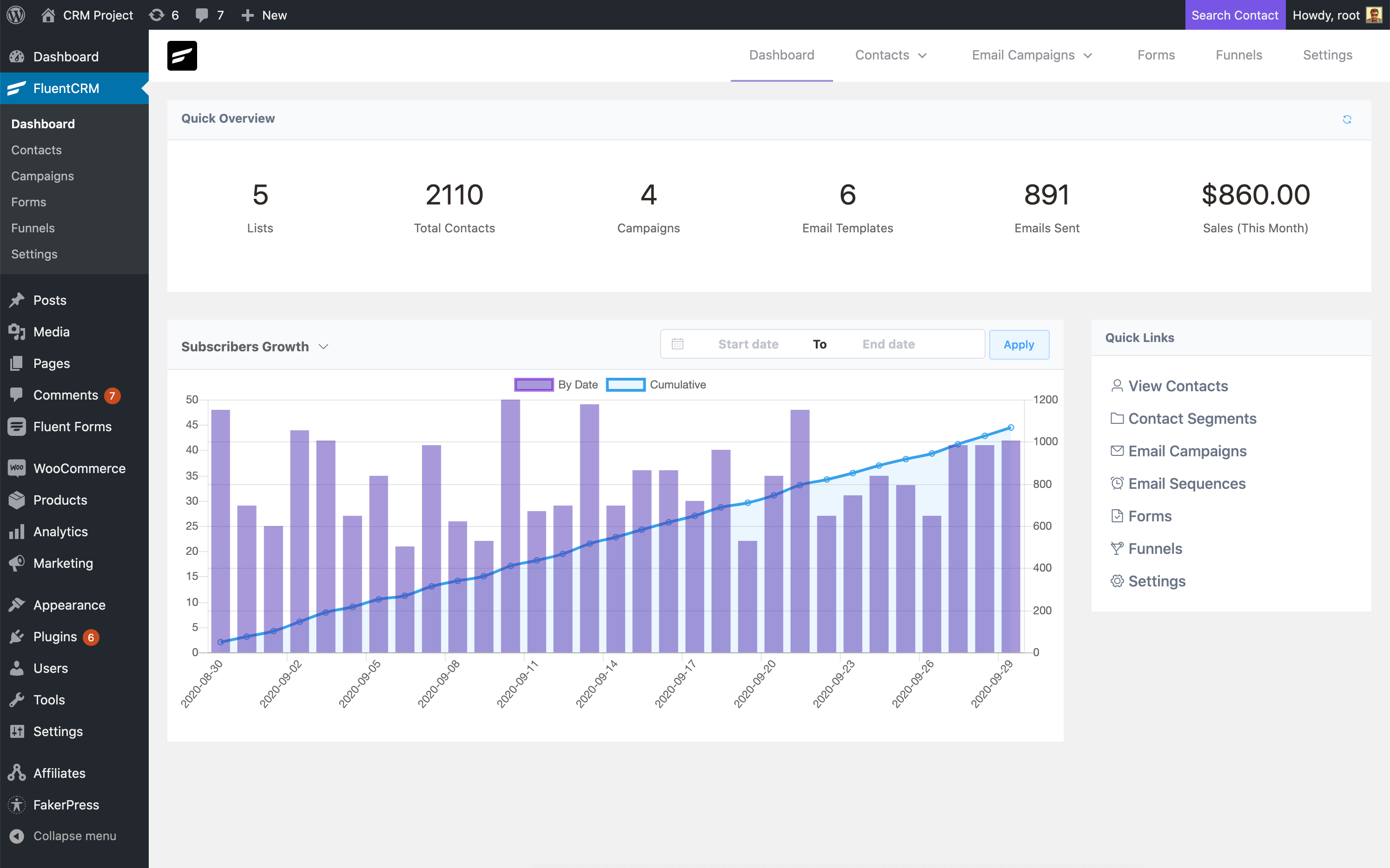
What makes FluentCRM stand out is the combination of true WordPress integration (your data, your hosting account) with a feature set that matches many paid SaaS tools. You get unlimited contacts, a visual automation builder, abandoned cart sequences, A/B testing for emails, a company module for B2B contacts, and 45+ free integrations with WooCommerce, LearnDash, MemberPress, and most major form plugins. For a full breakdown of WooCommerce-compatible tools, see our guide to the best WooCommerce plugins.
Pricing (verified March 2026, fluentcrm.com):
- Free core plugin: Available at WordPress.org — includes basic contact management and email campaigns
- Solo/Blogger: $90/year (single site)
- Small Business: $174/year (5-domain license)
- Agency: $349/year (50-domain license)
Pros:
- Highest WordPress.org rating in this comparison (4.8/5, 227 reviews)
- All data stays on your own server — no third-party dependency
- Deep WooCommerce integration including abandoned cart recovery
- Visual automation builder with 11+ trigger types
- 45+ integrations included at no extra cost
Cons:
- No visual sales pipeline (deal tracking) — not ideal for sales-focused teams
- SMS requires a third-party SMTP/SMS provider
- The automation builder has a learning curve for non-technical users
Best for: Bloggers, course creators, WooCommerce store owners, and agencies managing email marketing across multiple sites.
2. Jetpack CRM — Best Free Starting Point with Solid Foundations
Jetpack CRM is made by Automattic — the company behind WordPress.com, WooCommerce, and the broader WordPress ecosystem. That pedigree matters. The plugin was previously known as Zero BS CRM before Automattic acquired and rebranded it in 2019.
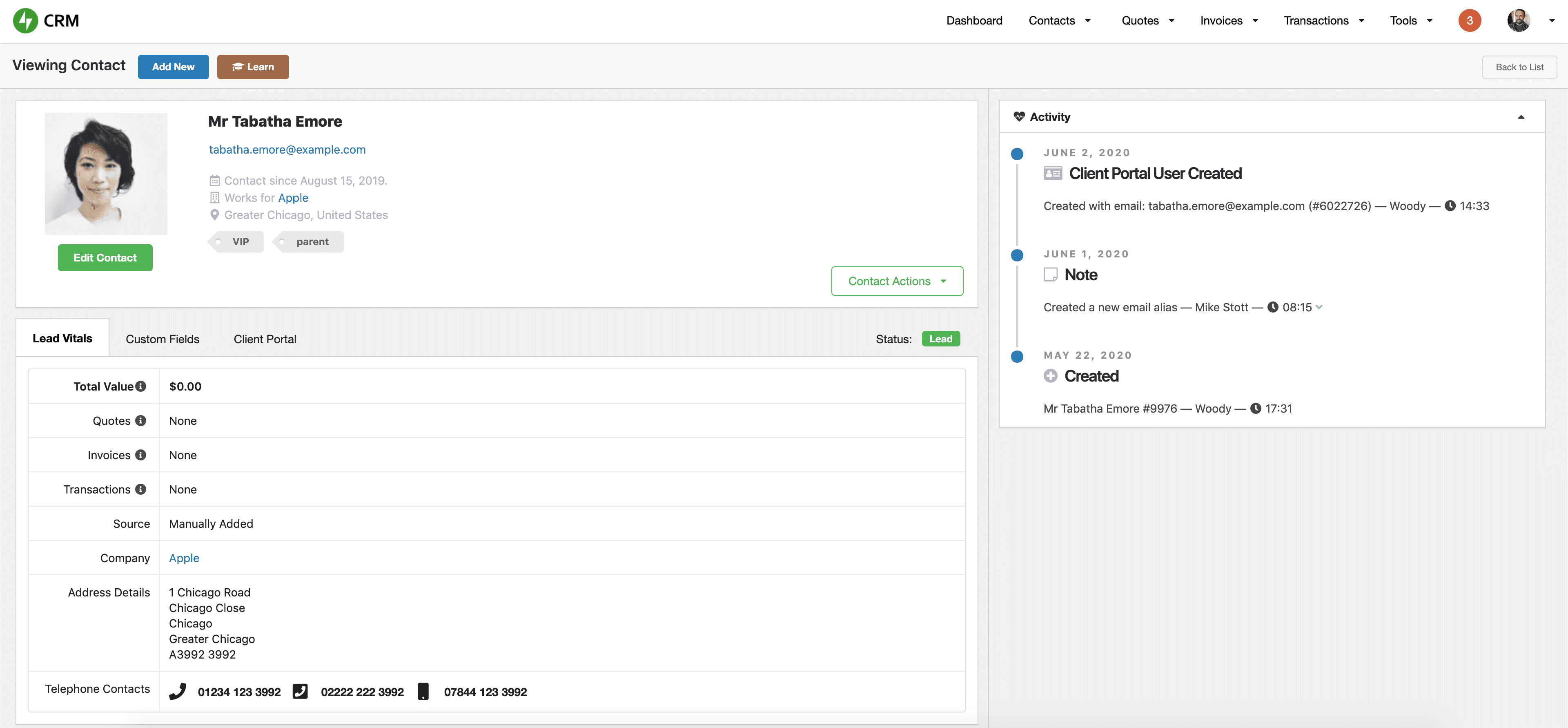
One point that confuses a lot of WordPress users: Jetpack CRM does not require the Jetpack plugin to work. The two products share a parent company but are completely separate plugins. You can install Jetpack CRM on any WordPress site without Jetpack. According to WordPress.org, Jetpack CRM has 1.8 million+ downloads and a 4.3/5 rating across 153 reviews.
The free core plugin gives you contact management, activity logging, segmentation, basic invoicing, quotes, and a form builder. Premium extensions add deeper functionality like payment processing (Stripe, PayPal) and WooCommerce order sync.
Pricing (verified March 2026, jetpackcrm.com):
- Free core: Available at WordPress.org (153 ratings, 4.3/5)
- Freelancer: $11/month billed yearly ($132/yr) — includes 4 key extensions
- Entrepreneur: $17/month billed yearly ($204/yr) — all 30+ extensions
- 14-day money-back guarantee on all paid plans
Pros:
- Built by Automattic — strong long-term development commitment
- Great free core plugin for basic CRM needs
- Invoicing and quotes included (useful for freelancers and service businesses)
- Native WordPress — all contact records on your own server
- Does not require the Jetpack plugin
Cons:
- Email marketing features are limited in the free tier; paid plans unlock more
- No built-in visual sales pipeline
- Fewer integrations than FluentCRM at the same price point
Best for: Freelancers, consultants, and small service businesses who want a clean, self-hosted CRM with invoicing capability and no per-contact pricing.
3. HubSpot — Best for Teams Needing a Full CRM Platform
HubSpot’s WordPress plugin has 19 million+ total downloads according to WordPress.org — more than any other CRM plugin in this category. The free CRM tier is legitimately useful, covering contact management for up to 1 million contacts, live chat, email marketing, forms, and basic pipelines.
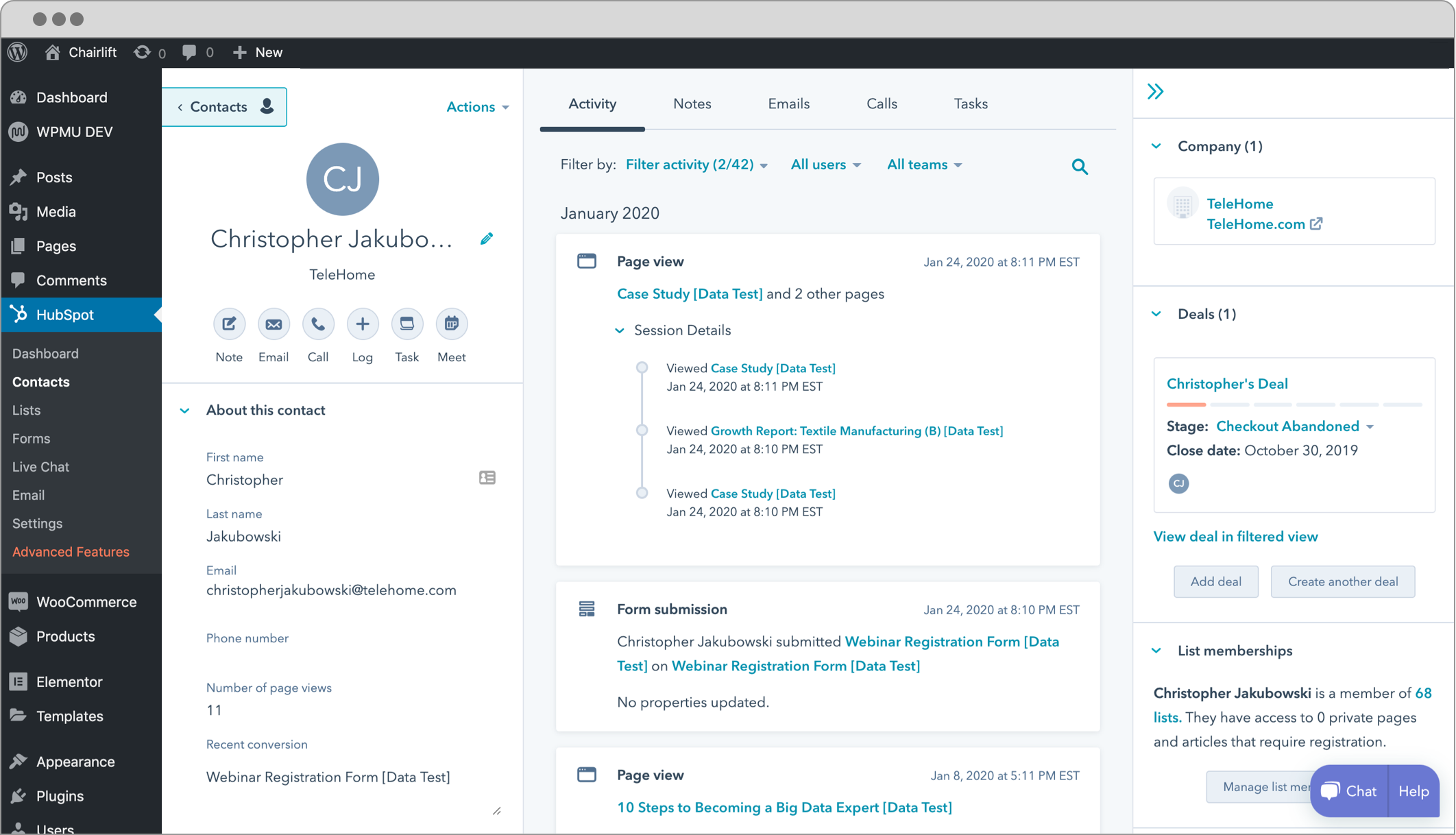
The important distinction: HubSpot is a SaaS platform. Its WordPress plugin is a well-built connector, but your data lives on HubSpot’s servers, not on your hosting account. For most businesses using HubSpot’s free tier, that’s an acceptable tradeoff given the feature depth. For teams already using WordPress-based email tools, compare HubSpot against options in our WordPress email marketing plugin guide.
Where HubSpot gets complicated is the upgrade path. The free tier has real limitations on automation, sequences, and reporting. Moving to a paid plan — Sales Hub Professional at $450/month or Marketing Hub Professional at $800/month — is a significant jump that puts HubSpot out of reach for most small businesses.
Pricing (verified March 2026, verify current rates at hubspot.com/pricing):
- Free CRM: Up to 1 million contacts; basic contact management, forms, live chat, email marketing
- Sales Hub Professional: $450/month
- Marketing Hub Professional: $800/month
- Note: Full suite pricing can exceed $3,200/month — verify current pricing before committing
Pros:
- Most popular WordPress CRM plugin by download count
- Free tier is genuinely functional — not a bait-and-switch for basic use cases
- 300+ native integrations beyond WordPress
- Live chat and chatbot builder included
- Strong analytics and reporting dashboard
Cons:
- Data stored on HubSpot’s servers — not self-hosted
- Paid plans are expensive for small businesses ($450–$800+/month)
- More complex interface than native plugins — steeper learning curve
- Vendor lock-in — migrating away can be difficult
Best for: Growing teams that need a full-featured CRM platform with broad integrations and can either use the free tier long-term or have budget for paid plans.
4. Groundhogg — Best for Advanced Marketing Automation on Your Own Server
Groundhogg holds the highest WordPress.org rating of any plugin in this comparison: 4.9 stars across 145 reviews (verified at WordPress.org). Its goal is to bring SaaS-level marketing automation — think ActiveCampaign or HubSpot’s automation features — to a native WordPress plugin, so your data stays on your hosting account and you’re not paying per-contact pricing.
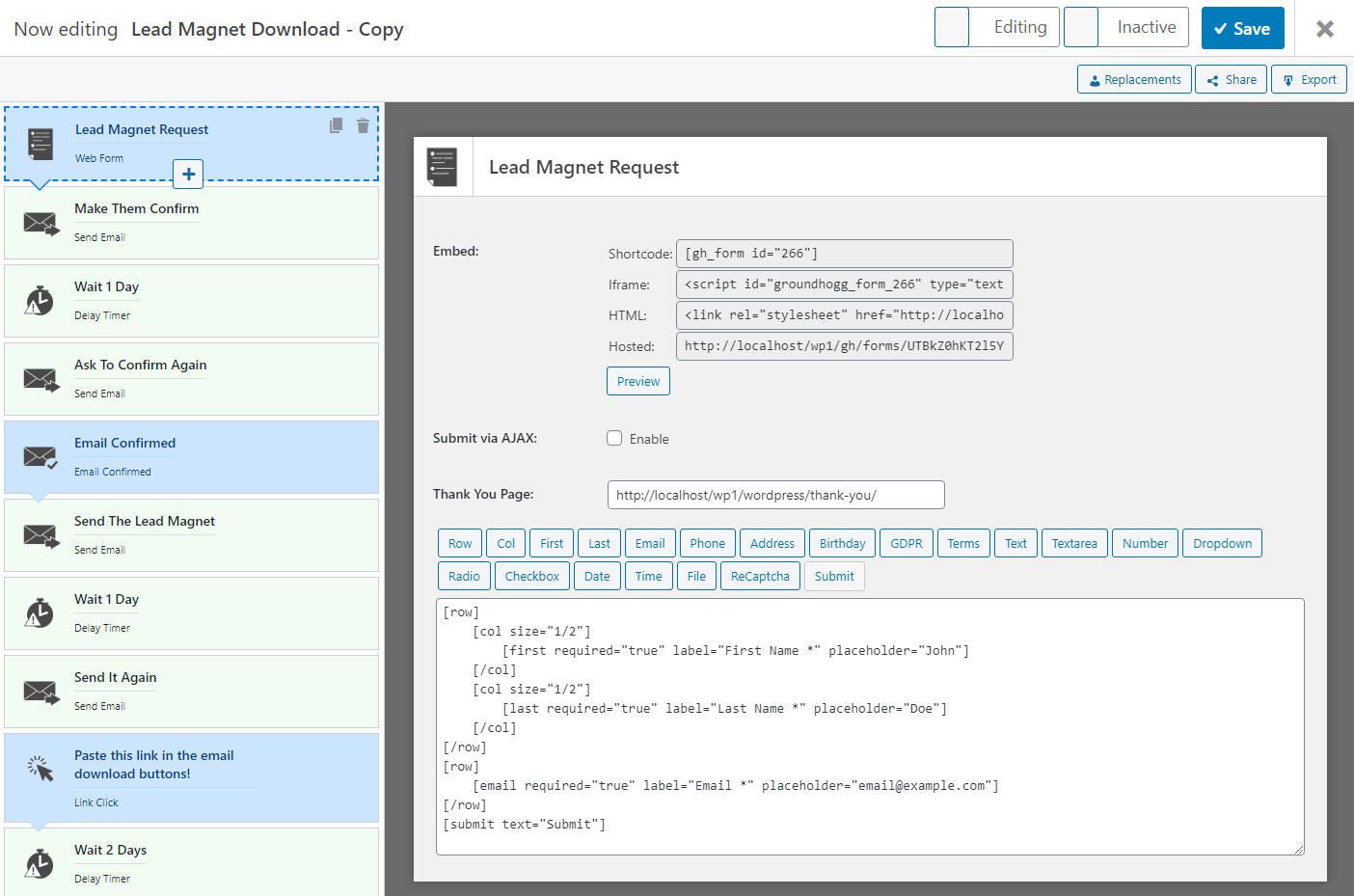
The catch is that Groundhogg follows an extension-based model. The free core plugin is functional but bare. To get the features that matter most — SMS, pipeline management, advanced reporting — you need to buy individual extensions or bundles. A reasonably complete setup typically runs $240 to $480 per year.
Pricing (verified March 2026):
- Free core: Available at WordPress.org (4.9/5, 145 reviews, 309,650 installs)
- Plus bundle: ~$240/yr
- Scale bundle: ~$480/yr
- Individual extensions: SMS, pipeline, reporting available separately ($99–$199 each)
Pros:
- Highest WordPress.org rating in this roundup (4.9/5)
- Fully self-hosted — open-source codebase
- Powerful visual funnel builder with pre-built templates (welcome series, abandoned cart, lead magnet sequences)
- 30+ integrations including WooCommerce, Zapier, LifterLMS, Easy Digital Downloads
- Developer-friendly with hooks and filters throughout
Cons:
- Core plugin is limited without extensions; useful features add to the annual cost
- Steeper learning curve — not ideal for beginners
- Total cost can exceed simpler alternatives once extensions are factored in
- Interface is less polished than SaaS competitors
Best for: Technical WordPress users, developers, and businesses that want self-hosted, automation-heavy marketing funnels and don’t mind the complexity of managing extensions.
5. WP-CRM System — Best Lightweight Free CRM for Contact Tracking
WP-CRM System sits in a different category from the others. It’s not trying to be an email marketing platform or a complex automation engine — it’s a straightforward contact and project management tool that slots cleanly into the familiar WordPress admin interface.
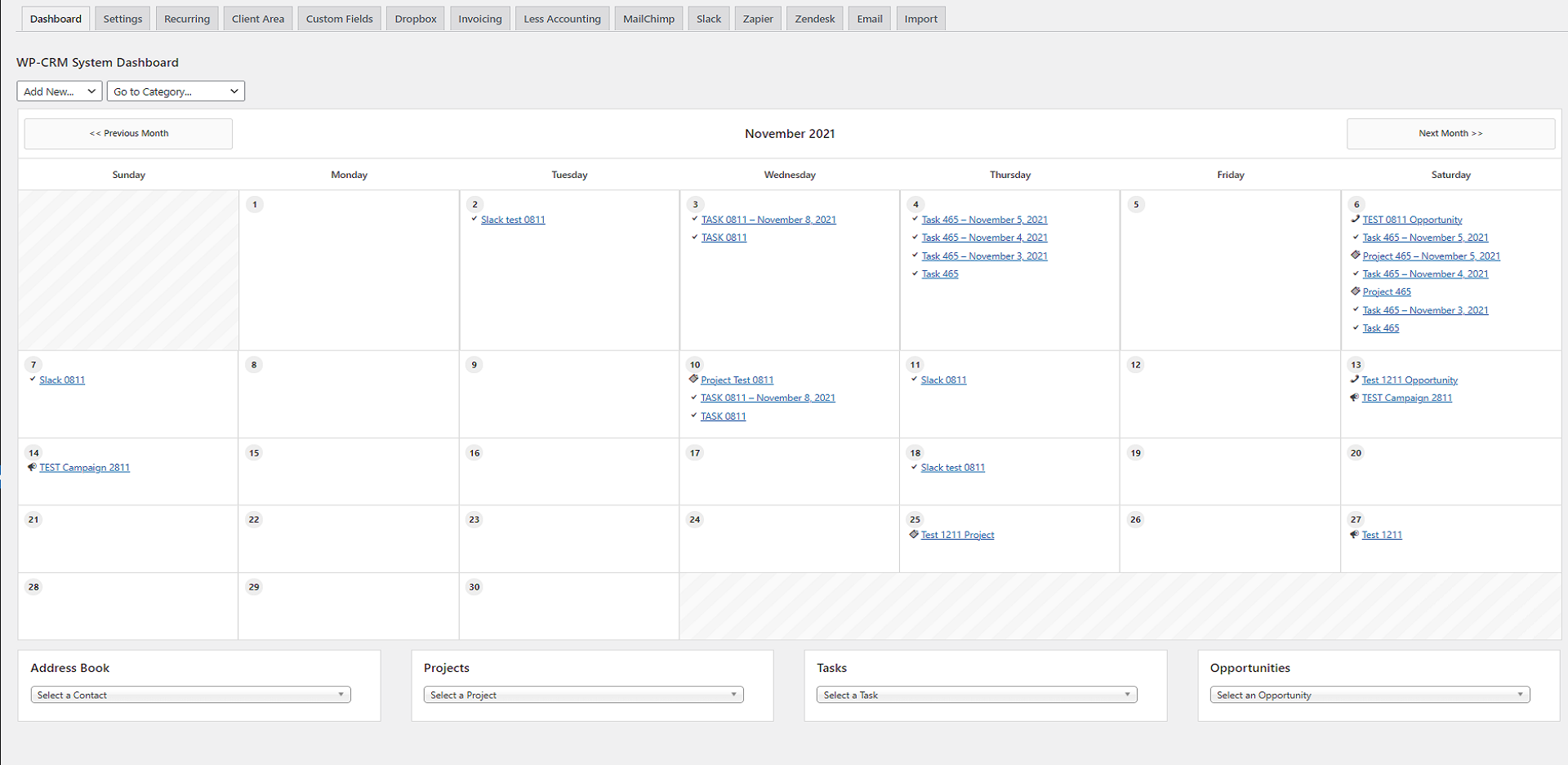
The plugin gives you unlimited contacts, project tracking, task assignment, opportunity management, and campaign tracking — all free, all stored on your server. A CSV import/export tool handles migration. Extensions add Zapier, WooCommerce, invoicing, a client portal, and custom fields.
Pricing (verified March 2026, WordPress.org):
- Free core: Fully functional for basic CRM — 87,096 active installs, 3.9/5 rating, 15 reviews
- Extension bundle (3 extensions): $99/yr
- All extensions bundle: $199/yr
Pros:
- Completely free for core contact + project management — no upsell required to get basic functionality
- Native WordPress interface — zero learning curve for existing WordPress users
- GDPR compliance tools built in (contact data export and deletion requests)
- Unlimited contacts, unlimited users — no per-record or per-seat pricing
- Data stays on your own server
Cons:
- Limited email marketing — basic outreach only, not suitable for campaigns
- No visual pipeline or deal tracking in core plugin
- Smaller community and fewer integrations than FluentCRM or Jetpack CRM
- Lower WordPress.org rating (3.9/5 based on 15 reviews)
Best for: Freelancers, small agencies, and service businesses that need to track contacts, projects, and tasks in WordPress without any upfront cost — and don’t need email automation.
6. FunnelKit Automations — Best CRM for WooCommerce Stores
FunnelKit Automations (formerly Autonami) is the most specialized plugin in this list. It’s built almost entirely around WooCommerce — purchase behavior, cart abandonment, post-purchase sequences, order-based segmentation. If you run a WooCommerce store and need to recover more revenue from your existing customer base, it’s one of the strongest tools available.
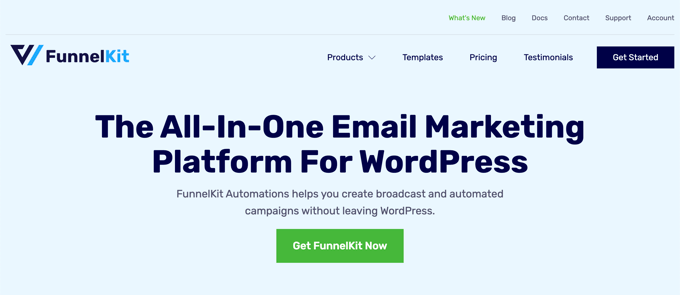
The limitation is equally clear: FunnelKit is not a general-purpose CRM. If your business isn’t WooCommerce-driven — if you run a service business, a blog, or an agency — there’s almost no reason to choose it over FluentCRM or Jetpack CRM.
Pricing (verified March 2026, funnelkit.com):
- No free plan
- Automations (1 site): $99.50/yr (promotional; normally $149)
- Automations + Funnel Builder (2 sites): $249.50/yr
- SMS functionality requires a separate add-on purchase
Pros:
- Best cart abandonment recovery of any plugin in this comparison
- Deep WooCommerce data integration — purchase behavior triggers automation
- 100+ integrations built around WooCommerce workflows
- Native WordPress — contact data stays on your hosting account
Cons:
- Only practical for WooCommerce stores — not suited to service businesses or blogs
- No free plan
- No visual deal pipeline
- SMS costs extra
Best for: WooCommerce store owners focused on cart recovery, post-purchase email sequences, and automating revenue recovery from abandoned orders.
7. Zoho CRM — Best SaaS Option for Sales Teams
Zoho CRM is one of the most feature-complete CRM platforms available at its price point. It includes omnichannel communication (email, phone, social media), an AI assistant (Zia), visual pipelines, predictive sales analytics, and deep customization. The free plan covers up to 3 users, making it accessible for very small teams.
The WordPress connection works through a plugin that syncs contact form submissions into your Zoho account. It’s functional but not as deeply integrated as native plugins — Zoho is fundamentally a SaaS product with a WordPress connector, not a WordPress-first tool.
Pricing (approximate USD, March 2026 — verify at zoho.com for your local currency):
- Free: Up to 3 users, basic CRM features
- Standard: ~$14/user/month
- Professional: ~$23/user/month
- Enterprise: ~$40/user/month
Pros:
- Extremely feature-rich at a reasonable per-user price
- Works across sales, marketing, and support teams from a single dashboard
- Built-in AI assistant, predictive analytics, and visual pipeline
- Free plan for up to 3 users is genuinely functional
Cons:
- Data stored on Zoho’s servers — not self-hosted
- Per-user pricing multiplies quickly with team growth
- More complex to configure than native WordPress plugins
- WordPress integration is a connector, not a native tool
Best for: Businesses with dedicated sales teams that need a full pipeline CRM with omnichannel communication and don’t mind data living on Zoho’s servers.
8. Brevo — Best Free CRM for Email-First Businesses
Brevo (formerly Sendinblue) built its reputation as an email marketing platform, and the CRM features are an extension of that core. The free plan stands out: unlimited contacts, 300 emails per day, no credit card required (verified at brevo.com). For a solo business owner or a small blog just starting to build an email list, that’s a genuinely compelling offer.
The WooCommerce plugin is free and syncs order data and customer behavior to your Brevo account, enabling segmentation and automated post-purchase campaigns. The CRM functionality itself is less capable than dedicated tools — no visual pipeline, limited contact field customization, and simpler automation than FluentCRM or HubSpot.
Pricing (verified March 2026, brevo.com):
- Free: Unlimited contacts, 300 emails/day — no credit card needed
- Starter: From ~$9/month (5,000 emails/month)
- Business: Adds automation, A/B testing, landing pages
- Professional: From 150,000 emails/month, 10 user seats
Pros:
- Most generous free plan of any tool in this comparison — unlimited contacts, no credit card
- SMS and email marketing combined in one platform
- Free WooCommerce integration plugin
- Very low technical barrier to get started
Cons:
- CRM functionality is basic compared to dedicated contact management tools
- Data stored on Brevo’s servers
- Daily send limit on free plan (300 emails/day) is restrictive for active campaigns
- No visual sales pipeline
Best for: Solo entrepreneurs, bloggers, and small businesses that want a free starting point with basic contact management and email marketing — and aren’t ready to invest in a dedicated CRM yet.
Feature Comparison at a Glance
Here’s how all eight plugins compare across the features that matter most for WordPress site owners. Pricing verified March 2026; see wplasma.com for updated plugin coverage as products evolve.
| Plugin | Native WP | Free Plan | Paid From | Unlimited Contacts | Email Automation | Sales Pipeline | WP.org Rating | Installs |
|---|---|---|---|---|---|---|---|---|
| FluentCRM | ✅ | ✅ | $90/yr | ✅ | ✅ Advanced | ❌ | 4.8/5 (227) | 1.4M+ |
| Jetpack CRM | ✅ | ✅ | $132/yr | ✅ | ⚠️ Limited | ❌ | 4.3/5 (153) | 1.8M+ |
| HubSpot | ❌ SaaS | ✅ | $450/mo | ✅ (1M) | ✅ Advanced | ✅ | 4.3/5 (207) | 19M+ DL |
| Groundhogg | ✅ | ✅ | ~$240/yr | ✅ | ✅ Advanced | 💰 Add-on | 4.9/5 (145) | 310K+ |
| WP-CRM System | ✅ | ✅ | $99/yr | ✅ | ⚠️ Basic | ❌ | 3.9/5 (15) | 87K+ |
| FunnelKit | ✅ | ❌ | $99.50/yr | ✅ | ✅ WooCommerce | ❌ | — | — |
| Zoho CRM | ❌ SaaS | ✅ (3 users) | ~$14/user/mo | ✅ | ✅ Advanced | ✅ | — | — |
| Brevo | ❌ SaaS | ✅ | ~$9/mo | ✅ | ✅ Basic | ❌ | — | — |
Pricing verified March 2026. WP.org ratings and install counts sourced from WordPress.org plugin pages. Prices are subject to change — verify on official plugin websites before purchasing.
Which WordPress CRM Should You Choose?
The plugin with the most features isn’t automatically the right choice. Here’s how to match a CRM to your actual situation.
You’re a freelancer or consultant tracking clients and projects:
Start with WP-CRM System (free) or Jetpack CRM (free core). Both handle contact management, task tracking, and basic project organization without any upfront cost. If you later need invoicing, Jetpack CRM’s paid plans add that cleanly.
You run a blog or content site and want email automation:
FluentCRM is the strongest native option — the free core handles basic campaigns, and the $90/yr Pro plan unlocks automation sequences, WooCommerce integration, and list management. Brevo is worth considering if you want to start completely free, accepting that it’s less capable as your list grows.
You have a WooCommerce store:
FluentCRM and FunnelKit Automations both excel here, but for different reasons. FluentCRM is the better general-purpose pick with solid WooCommerce integration. FunnelKit is the stronger choice if cart abandonment recovery is your primary goal and you’re already invested in the FunnelKit ecosystem.
You have a sales team and need pipeline management:
HubSpot’s free CRM is the most practical starting point — it includes a visual pipeline, deal tracking, and email sequences at no cost. Zoho CRM is worth comparing for teams that want per-user pricing and deeper reporting. Neither stores data on your own server.
You’re building complex automation funnels and have technical skills:
Groundhogg. It’s the most powerful self-hosted automation tool in this comparison, with a visual funnel builder and pre-built templates for welcome series, lead magnets, and cart recovery sequences. Budget for $240–$480/yr in extensions to unlock its full capability.
Privacy and data ownership are your top priority:
Any of the native WordPress options (FluentCRM, Jetpack CRM, Groundhogg, WP-CRM System, FunnelKit) keep your contact records on your own hosting account. FluentCRM is the most fully-featured native option; WP-CRM System is the lightest and simplest. For a broader look at WordPress GDPR compliance, including data handling best practices, that guide covers the topic in depth.
You want email marketing + basic CRM completely free:
Brevo’s free plan (unlimited contacts, 300 emails/day, no credit card) is hard to beat as a starting point. Just understand that it’s email-marketing-first, with limited CRM depth.
A Note on Performance: What Self-Hosted CRMs Mean for Your Server
Native WordPress CRM plugins store all contact data in your WordPress database. For most sites, this has no meaningful performance impact — a site with 500 or even 5,000 contacts won’t notice anything.
At larger scales, the calculus changes. A WooCommerce store that has processed 50,000 orders will have a substantial contact database, and complex CRM queries — segmenting contacts by purchase history, triggering automations based on behavior — add real database load. Both FluentCRM and Groundhogg are built with optimized database queries and handle large lists well on properly configured servers.
The practical recommendation: if your contact list is under 10,000, any shared or managed WordPress host will be fine. Once you’re approaching 50,000+ contacts with active automation running, managed WordPress hosting (WP Engine, Kinsta, SiteGround’s higher-tier plans) is worth the investment to keep things running smoothly.
Frequently Asked Questions About WordPress CRM Plugins
These are the questions WordPress site owners most commonly ask before choosing a CRM plugin.
- What is the best free WordPress CRM plugin?
- For native WordPress with full data ownership: WP-CRM System (contact and project management, completely free) or Jetpack CRM (stronger feature set in the free core). For email marketing + basic CRM without self-hosting: Brevo (unlimited contacts, 300 emails/day, no credit card). HubSpot’s free tier is the most feature-rich but stores your data on external servers.
- What’s the difference between a native WordPress CRM and a SaaS CRM?
- A native (self-hosted) CRM plugin stores all your contact data inside your WordPress database — on your own server, under your control. A SaaS CRM stores contact records on the provider’s servers. The practical implications: native plugins have no per-contact pricing and your data isn’t dependent on a third-party platform staying online, but you’re responsible for your own hosting performance and backups.
- Does Jetpack CRM require the Jetpack plugin to work?
- No. Despite sharing the Automattic parent company, Jetpack CRM and the Jetpack plugin are completely separate products. You can install Jetpack CRM on any WordPress site without installing Jetpack. The naming overlap is a common source of confusion but has no functional implication.
- Can WordPress CRM plugins slow down my website?
- For most sites with fewer than 10,000 contacts, the performance impact is negligible. At 50,000+ contacts with active automation running, you’ll want managed WordPress hosting to handle the increased database queries. Both FluentCRM and Groundhogg are optimized for larger datasets, but the hosting environment is typically the more important variable.
- What is the best WordPress CRM plugin for WooCommerce?
- FluentCRM integrates deeply with WooCommerce and handles abandoned cart recovery, purchase-based segmentation, and automated post-purchase sequences. FunnelKit Automations is the strongest pick if cart abandonment is your single biggest priority. Jetpack CRM also offers WooCommerce order sync in its extension ecosystem.
- Is HubSpot CRM really free forever?
- The free tier is genuinely free and includes up to 1 million contacts, contact management, forms, live chat, email marketing, and basic pipelines. The catch is that meaningful automation sequences, advanced reporting, and sales features require upgrading — which starts at $450/month for Sales Hub Professional or $800/month for Marketing Hub Professional (as of March 2026; verify current rates at hubspot.com/pricing).
- Which WordPress CRM is best for GDPR compliance?
- Self-hosted options — FluentCRM, Jetpack CRM, Groundhogg, WP-CRM System — keep your data on your server in your jurisdiction, which simplifies GDPR data processing agreements. WP-CRM System specifically includes GDPR tools for contact data viewing, export, and deletion requests. SaaS tools require you to review the provider’s data processing agreements and ensure they comply with applicable regulations in your region. For a full breakdown, see our WordPress GDPR compliance guide.
- Can I migrate my contacts from one WordPress CRM to another?
- Yes — all major plugins support CSV import/export, which is the most universal migration method. FluentCRM includes direct import tools for contacts from HubSpot, ActiveCampaign, Mailchimp, and other common platforms. Jetpack CRM and WP-CRM System both support CSV import from any source. Expect to spend some time remapping custom fields during any migration.
- What’s the difference between a CRM plugin and an email marketing plugin?
- A CRM manages relationships — who your contacts are, their history with your business, their status in your sales process. An email marketing plugin sends campaigns to contact lists. Many modern WordPress tools (FluentCRM, HubSpot, Groundhogg) combine both functions, which is why the line is blurry. If you only need newsletters and don’t need contact history or pipelines, a dedicated email marketing plugin may be simpler and cheaper.
Summary: Finding the Right WordPress CRM for Your Business
There’s no single best WordPress CRM plugin — but there is a best one for your specific situation. The self-hosted vs. SaaS question is the first and most important decision: if owning your data and avoiding per-contact pricing matters to you, FluentCRM or Jetpack CRM are natural starting points. If you need enterprise-level features and have the budget, HubSpot’s ecosystem is hard to match.
For most small businesses and solo operators, the combination of a capable free core plugin (Jetpack CRM or WP-CRM System) and a solid email marketing layer (Brevo or a paid FluentCRM plan) covers the majority of real-world CRM needs — without committing to monthly subscription costs that scale as your contact list grows.
Start with what fits your business today. All of the plugins covered here have CSV export tools and migration paths as your requirements evolve.
