



Most churches don’t need a general-purpose WordPress theme stretched to fit their needs — they need something designed specifically for ministry content, event schedules, and community engagement. The Grace Church WordPress theme by AncoraThemes has been one of the most recognized options in this niche since its release, accumulating over 2,000 sales on ThemeForest. But does it still hold up in 2026?
This review covers everything you need to decide: what the theme includes, what it costs, how it compares to other church themes, and whether it’s the right fit for your organization. All pricing data in this article reflects information available as of March 2026 — verify current prices at ThemeForest before purchasing.

What Is the Grace Church WordPress Theme?
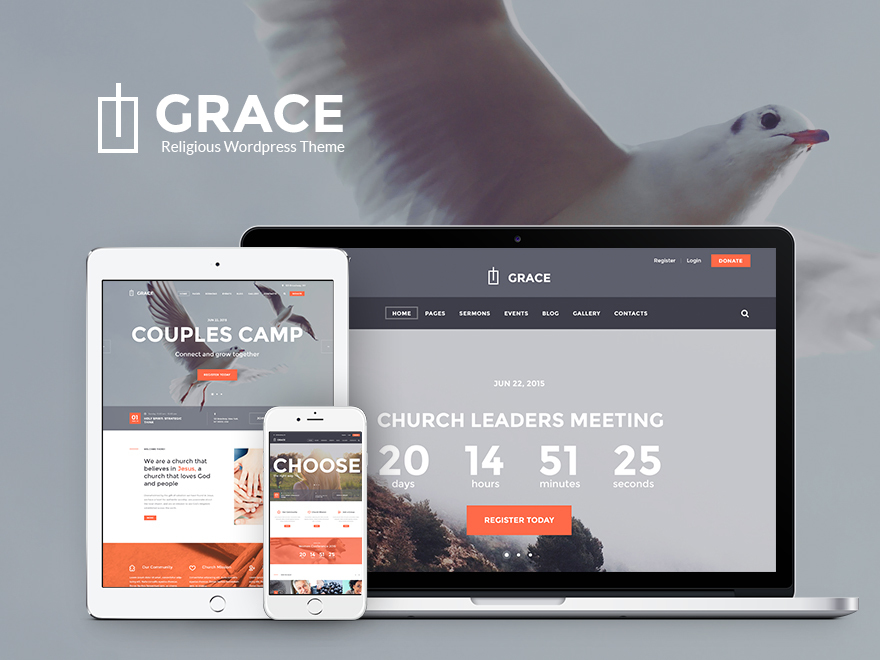
Grace Church is a premium WordPress theme developed by AncoraThemes (also known as the ThemeREX brand), a Cyprus-based theme development company. The theme is sold exclusively on ThemeForest, Envato’s marketplace for premium WordPress themes and templates.
The theme is built specifically for churches, prayer groups, Christian organizations, charities, and non-profit entities. Unlike adapting a multipurpose theme to a church context, Grace Church ships with church-oriented design elements pre-configured — including event integration, ministry sections, and congregation-focused page layouts.
With approximately 2,257 sales and a 4.67/5 rating from 72 reviews on ThemeForest (as of March 2026, via search data — verify on the product page), Grace Church ranks as one of the better-performing church themes in the premium marketplace. Its demo site is live at gracechurch.ancorathemes.com, where you can explore the default layout before purchasing.
Key Features of the Grace Church Theme
Feature lists in theme marketing are notoriously inflated. Here’s a practical breakdown of what Grace Church actually offers and why each element matters for a typical church or ministry website.

Layout & Design Options
Grace Church supports both boxed and wide page layouts, giving administrators control over the visual scope of their site. The theme includes multiple header styles, making it possible to adjust the look without custom coding.
The design is fully responsive and retina-ready, meaning it renders clearly on high-density screens (like newer iPhones and MacBooks) and adapts to mobile devices without a separate mobile version. Cross-browser compatibility covers Firefox, Safari, Chrome, and IE9+.
Slider & Visual Components
The theme bundles two slider options:
- Revolution Slider — commonly used as a full-width homepage hero slider
- Swiper Slider — a lighter alternative for posts and gallery views
These sliders are typically sold as separate plugins elsewhere, so their inclusion adds real value. CSS3 and jQuery animation effects are available for hover interactions, giving the site a polished, professional feel without custom development.
Page Builder & Shortcode System
Grace Church integrates with Elementor as its primary page builder (the theme has been updated from its original WPBakery integration to reflect the current WordPress ecosystem). WPBakery Page Builder remains supported as well, giving existing users a familiar option.
The theme includes a Shortcode Builder with a substantial library of custom shortcodes:
- Accordion, Tabs, Toggle
- Google Map
- Table, Columns, Sections
- Team, Testimonials, Skills
- Timeline, Scroller, Video List
- Blogger, Content Slider, eMailer
For a church site, the most practically useful of these are Google Map (for directions to services), Testimonials (congregation stories), and Team (staff/ministry team bios).
Plugin Compatibility
Grace Church works with several well-maintained WordPress plugins:
- The Events Calendar — current version 6.15.17.1, last updated March 9, 2026, with 80+ million total downloads and a 4.3/5 rating on WordPress.org. Actively maintained. This is arguably the most important integration for a church website, as it handles service schedules, special events, and recurring meetings cleanly.
- Essential Grid — for gallery and portfolio-style content presentation
- WooCommerce — if the organization collects donations or sells items
- Revolution Slider and Swiper Slider — both bundled
The custom widget set includes Social Icons, Flickr, Popular Posts, Recent Posts, Advertisement, Logo, and Content Slider widgets — all useful for building out sidebar and footer areas without additional plugins.
Grace Church Theme Pricing & License Options
Grace Church is a premium theme — there is no free version. It sells exclusively through ThemeForest under Envato’s standard license structure.
| License Type | Price (March 2026) | Use Case |
|---|---|---|
| Regular License | $69 | Single site; free or no-charge end product to users |
| Extended License | ~$249+ | Single site; charges users (paid membership, SaaS) |
Price note: ThemeForest pricing data sourced via search snippets as of March 2026. Prices are subject to change — confirm the current price on the ThemeForest product page before purchasing. Item #13025267.
For most church organizations, the Regular License at $69 is the appropriate choice. A congregation website doesn’t typically charge users for access, which means the Regular License covers the use case fully.
For comparison: free church themes on WordPress.org are available, but the most-installed free option has only 400+ active installs — indicating that most serious church websites invest in premium themes. The $69 price point for Grace Church is competitive within the premium church theme segment.
WordPress Compatibility & Technical Requirements
This is where transparency matters most. Grace Church’s original ThemeForest listing notes “WordPress 4.0+ Tested and Approved” — a figure that was accurate in 2016 but has not been publicly updated to reflect WordPress 6.x compatibility on that original description.
Worth noting: the theme has received active updates through early 2025 (version 3.15 released January 7, 2025; version 3.14 in December 2024), suggesting the developer is maintaining the theme. ThemesInfo reports the current tracked version as 3.7.0 deployed on live sites.
Key compatibility considerations for 2026:
- WordPress 6.x: The theme has been updated post-WP 6.0 release based on changelog data, but confirm Gutenberg block editor compatibility before committing if that’s a requirement for your workflow
- PHP: AncoraThemes development practices typically align with standard WP requirements — PHP 7.4+ is generally expected for modern theme operation, but verify in the ThemeForest changelog
- Elementor: The current version supports Elementor, which is block editor-adjacent but not a native Gutenberg/FSE solution
- Full Site Editing (FSE): Grace Church does not appear to be a block theme with full FSE support — it operates as a classic theme with page builder tools
For organizations that need deep Gutenberg / Full Site Editing support, a newer theme built natively on blocks may be a better fit. For those comfortable with a page builder workflow, Grace Church’s Elementor integration is workable.
How to Install the Grace Church Theme
The installation process follows the standard ThemeForest/WordPress workflow. Here’s a concise overview:
- Purchase & download — After buying on ThemeForest (item #13025267), download the “Installable WordPress file only” ZIP from your Envato downloads page
- Upload the theme — In WordPress admin, go to Appearance → Themes → Add New → Upload Theme, select the ZIP file, and click Install Now
- Activate — Click Activate after installation completes
- Install required plugins — The theme uses TGM Plugin Activation, which will prompt you to install required and recommended plugins (The Events Calendar, WPBakery or Elementor, Revolution Slider, etc.) automatically
- Import demo content — AncoraThemes includes a one-click demo import feature via the Theme Options panel. Navigate to Theme Options → Demo Install and select the demo you want to import. This populates the site with sample content matching the live demo
- Customize — Adjust colors, typography, header layout, and content via the Theme Options panel and the selected page builder
Full documentation is available at gracechurch.ancorathemes.com/doc/. Support is handled through themerex.net/support/.
Grace Church Theme vs. Other Church WordPress Themes
Shopping for a church theme means comparing a fairly narrow set of serious options. Here’s how Grace Church stacks up against its closest competitors as of March 2026.
| Theme | Price | Sales/Installs | Rating | Page Builder | Last Updated | Best For |
|---|---|---|---|---|---|---|
| Grace Church (AncoraThemes) | $69 | ~2,257 | 4.67/5 | Elementor + WPBakery | Jan 2025 | Churches, charities, non-profits |
| Deeds (webinane) | $59 | ~968 | 4.34/5 | Elementor | 2024 | Non-profits, churches, organizations |
| My Church (cmsmasters) | ~$59 | ~358 | 3.00/5 | WPBakery | 2024 | Churches with sermon/events focus |
| Charitas PRO (WPlook) | $75 | 2,500+ orgs | 4.9/5 | Elementor | 2025 | Charities, non-profits, fundraising |
| The Church Lite (free) | Free | 400+ installs | 5/5 | Gutenberg | Aug 2024 | Budget-conscious, Gutenberg-first users |
Data sources: ThemeForest search data, wordpress.org, wplook.com — as of March 2026. Verify current pricing and ratings before purchasing.
A few observations from this comparison:
- Grace Church has the highest confirmed sales count among the dedicated church themes — over twice as many as its nearest competitor (Deeds). This suggests a larger base of users, community knowledge, and available third-party tutorials
- Charitas PRO scores higher on rating (4.9/5) and has more active updates through 2025, which makes it worth evaluating if support responsiveness is a priority
- My Church has the lowest rating (3.00/5) of the premium options — worth researching why before considering it
- The Church Lite is the strongest free option if your team wants Gutenberg-native editing and has a minimal budget
Who Should Use the Grace Church Theme?
Best Suited For
- Small to mid-size churches and congregations that want a professional website without custom development costs
- Non-profit and charity organizations needing a polished design with event management capabilities
- Religious ministries and community groups that want church-specific design defaults (rather than repurposing a generic theme)
- Web developers or freelancers building church websites for clients — the one-click demo import and comprehensive options panel reduce build time significantly
- Organizations already comfortable with Elementor or WPBakery as their editing workflow
Consider Alternatives If…
- Your team requires full Gutenberg / Full Site Editing (FSE) compatibility and wants to use block-based editing throughout — Grace Church is a classic theme and won’t provide that experience natively
- You’re building a multi-site church network with complex architecture — a more enterprise-focused theme or framework would be more appropriate
- You need first-class WooCommerce integration for a church bookstore, merchandise, or complex donation flows — WooCommerce is listed as compatible, but it’s not the theme’s core strength
- Budget is a hard constraint and you’re open to doing more setup yourself — free themes from WordPress.org can serve a basic church site effectively
Pros and Cons of the Grace Church Theme
| Pros | Cons |
|---|---|
| Church-specific design out of the box | Classic theme — no native FSE/Gutenberg block support |
| Highest sales count in the church theme niche (~2,257) | Last update January 2025 — verify continued support |
| Solid 4.67/5 rating from 72 reviews | WP version listed as “4.0+” on original page (needs verification for 6.x) |
| The Events Calendar integration (actively maintained plugin) | Premium only — no free version to test before purchasing |
| One-click demo import reduces setup time | Relies on page builders (Elementor/WPBakery) — adds plugin dependency |
| Rich shortcode library included | Revolution Slider dependency may affect page load speed if not optimized |
| Responsive, retina-ready, cross-browser compatible | Alternatives like Charitas PRO have slightly higher ratings |
Frequently Asked Questions
What is the Grace Church WordPress theme?
Grace Church is a premium WordPress theme developed by AncoraThemes (ThemeREX brand), sold on ThemeForest. It’s designed specifically for churches, prayer groups, charities, and non-profit organizations. The theme includes event management integration, ministry-focused page layouts, shortcode tools, and support for Elementor and WPBakery page builders.
How much does the Grace Church theme cost?
The Regular License is priced at approximately $69 on ThemeForest as of March 2026. This license covers a single-site use where users are not charged for access. An Extended License is available for sites that charge users. Prices on ThemeForest may change over time — always verify the current price on the product page (item #13025267) before purchasing.
Is the Grace Church theme compatible with WordPress 6.x?
The theme has received updates through early 2025 (version 3.15, January 2025), which suggests ongoing maintenance beyond the original “WordPress 4.0+ tested” listing. However, the developer has not publicly updated the official compatibility statement. Before purchasing, review the current changelog on the ThemeForest listing and test against your WordPress version if possible.
Does the Grace Church theme support the Gutenberg block editor?
Grace Church is a classic WordPress theme, not a block theme. It does not offer Full Site Editing (FSE) capabilities. The theme uses Elementor as its primary page builder for visual editing. If your workflow depends on native Gutenberg block editing throughout the site, a block-native theme like The Church Lite (free) would be a better fit.
What plugins does the Grace Church theme include or support?
The theme is compatible with The Events Calendar (v6.15.17.1, actively maintained as of March 2026), Elementor, WPBakery Page Builder, Revolution Slider, Swiper Slider, Essential Grid, and WooCommerce. Revolution Slider is typically bundled with the theme purchase, which adds value since that plugin costs extra if purchased separately.
Can I use the Grace Church theme for a non-church website?
Technically yes — the theme is built on standard WordPress architecture and can be customized for other use cases. In practice, it’s most naturally suited to religious organizations, charities, and community groups. If your site has no ministry content, the theme’s pre-designed sections (sermons, prayer groups, events) will require more reworking than starting with a general-purpose theme would.
Does the Grace Church theme include an events calendar?
Yes — Grace Church is compatible with The Events Calendar plugin, one of the most widely used event management plugins for WordPress (80+ million total downloads, 4.3/5 rating, version 6.15.17.1 as of March 2026). The integration allows you to display service schedules, special events, and recurring meetings in multiple views (calendar, list, day view). A premium upgrade (Events Calendar Pro) adds additional views and features if needed.
How do I import the demo content for the Grace Church theme?
After installing and activating the theme, navigate to Theme Options → Demo Install in your WordPress admin panel. AncoraThemes includes a one-click demo import that populates your site with sample content matching the live demo at gracechurch.ancorathemes.com. Make sure all required plugins are installed and activated before running the demo import, as the importer typically needs those plugins active to import all content types correctly. Full documentation is at gracechurch.ancorathemes.com/doc/.
Final Thoughts
Grace Church remains one of the most established dedicated church themes available on ThemeForest, with a sales track record that reflects real-world adoption across hundreds of congregations and religious organizations globally. Its strongest selling points are the focused church design, The Events Calendar integration, and the streamlined demo import process.
The theme’s main consideration for 2026 is currency: the original compatibility description references WordPress 4.0+, and while updates continued through early 2025, the theme is not a modern block-native or FSE theme. Organizations that prioritize Gutenberg-first workflows should evaluate whether Grace Church’s page builder approach fits their team’s skills and preferences before purchasing.
For a church that wants a professional website with event management, ministry-focused design, and a proven track record — and is comfortable working with Elementor or WPBakery — the Grace Church theme at $69 represents solid value within the premium church theme market. Organizations that need full FSE support, a higher update frequency, or a free entry point have viable alternatives to explore.
