



Block themes have changed a lot since Full Site Editing first landed in WordPress 5.9 back in January 2022. Back then, they felt half-finished — limited mobile menus, sparse pattern libraries, and a Site Editor that confused more people than it helped. Four years and several major releases later, that picture looks very different.
With WordPress 6.7 shipping Twenty Twenty-Five as its default theme and the Zoom Out editor view finally stable, block themes are now a legitimate choice for everything from personal blogs to fully-featured business sites. This guide covers the best WordPress block themes available today — with a comparison table no other roundup has bothered to build, a use-case decision guide, and an honest look at where block themes still fall short.
What These Themes Have in Common (and Why It Matters in 2026)
Every theme on this list is a true block theme — not just “block-ready.” That distinction matters. A block-ready theme supports the block editor for page content but still relies on the classic Customizer for the header, footer, and global settings. A block theme hands all of that to the Site Editor, where you edit everything in one place using blocks.
The technical backbone of every block theme is a file called theme.json. Think of it as the theme’s design system — it defines color palettes, typography scales, spacing presets, and per-block styling rules. When you make a change in Global Styles inside the Site Editor, you’re editing what theme.json controls. No CSS knowledge required.
What’s changed most in the last two years is stability. WordPress 6.5 brought the Block Bindings API, which lets block templates pull in dynamic data from custom fields without needing Advanced Custom Fields. WordPress 6.7 (November 2024) added a stable Zoom Out editing view for working with full-page designs, expanded the Font Library, and improved the styling controls for individual blocks. The Site Editor you use today is a significantly better piece of software than it was in 2022.
That said, block themes still have some rough edges — particularly around navigation and mobile menus. We’ll cover that honestly below.
How to Choose a WordPress Block Theme: 5 Things Worth Checking
Before jumping to specific theme recommendations, it’s worth knowing what separates a solid block theme from a mediocre one. Here are five things worth checking before you commit:
- Site Editor compatibility — Confirm the theme is a true FSE theme, not just block-ready. Check for a Site Editor link under Appearance in the WordPress dashboard after installation.
- Pattern library depth — A rich library of pre-built block patterns (header layouts, hero sections, pricing tables, testimonials) means you spend less time building from scratch. Thirty or more patterns is a reasonable baseline for a general-purpose theme.
- Update frequency — Themes that aren’t updated regularly fall behind WordPress core changes. On WordPress.org, check the “Last updated” date and look at the version history tab. Monthly or quarterly updates are a good sign.
- Companion plugin ecosystem — Some themes are built to work alongside a block plugin that extends their capabilities. Kadence pairs with Kadence Blocks, Raft with Otter Blocks, Spectra One with Spectra. These combinations can be powerful, but you should know upfront whether a plugin is required or just recommended.
- Free vs premium needs — Many block themes offer genuinely complete free versions. For a personal site or a simple business page, free is often enough. If you need advanced header/footer builders, priority support, or pro e-commerce patterns, that’s when a paid upgrade earns its cost.
The Best WordPress Block Themes in 2026
The table below gives you a quick side-by-side view of the ten themes covered in this guide. Detailed reviews follow.
| Theme | Developer | Free / Premium | Patterns (approx.) | WooCommerce | Best For |
|---|---|---|---|---|---|
| Twenty Twenty-Five | WordPress.org | Free (open source) | 35+ | ✅ | Personal sites, first-time users |
| Kadence | Kadence WP | Free / $59 per year (Pro) | 500+ (with Kadence Blocks) | ✅ | Beginners, small business, e-commerce |
| GeneratePress | Tom Usborne | Free / $59 per year (Premium) | 40+ (Premium) | ✅ | Developers, performance-focused sites |
| Blocksy | Creative Themes | Free / $69 per year (Pro, 1 site) | 40+ | ✅ | Portfolios, business, e-commerce |
| Ollie | Mike McAlister | Free / ~$79 per year (Pro) | 50+ | ✅ | Developers, design-forward sites |
| Spectra One | Brainstorm Force | Free only | 30+ | ✅ | Small business, performance-focused |
| Raft | ThemeIsle | Free (Otter Blocks Pro optional) | 30+ | ✅ | Blogs, startups, small business |
| YITH Wonder | YITH | Free only | 60+ | ✅ (YITH-optimized) | WooCommerce stores, corporate sites |
| Extendable | Extendify | Free only | 50+ | ✅ | Quick-launch sites, style testing |
| Neve FSE | ThemeIsle | Free (Neve Pro optional) | 20+ | ✅ | Existing Neve users, content sites |
Pricing as of March 2026. Install counts and pattern numbers are approximate — verify at WordPress.org and official theme pages for current data.
1. Twenty Twenty-Five
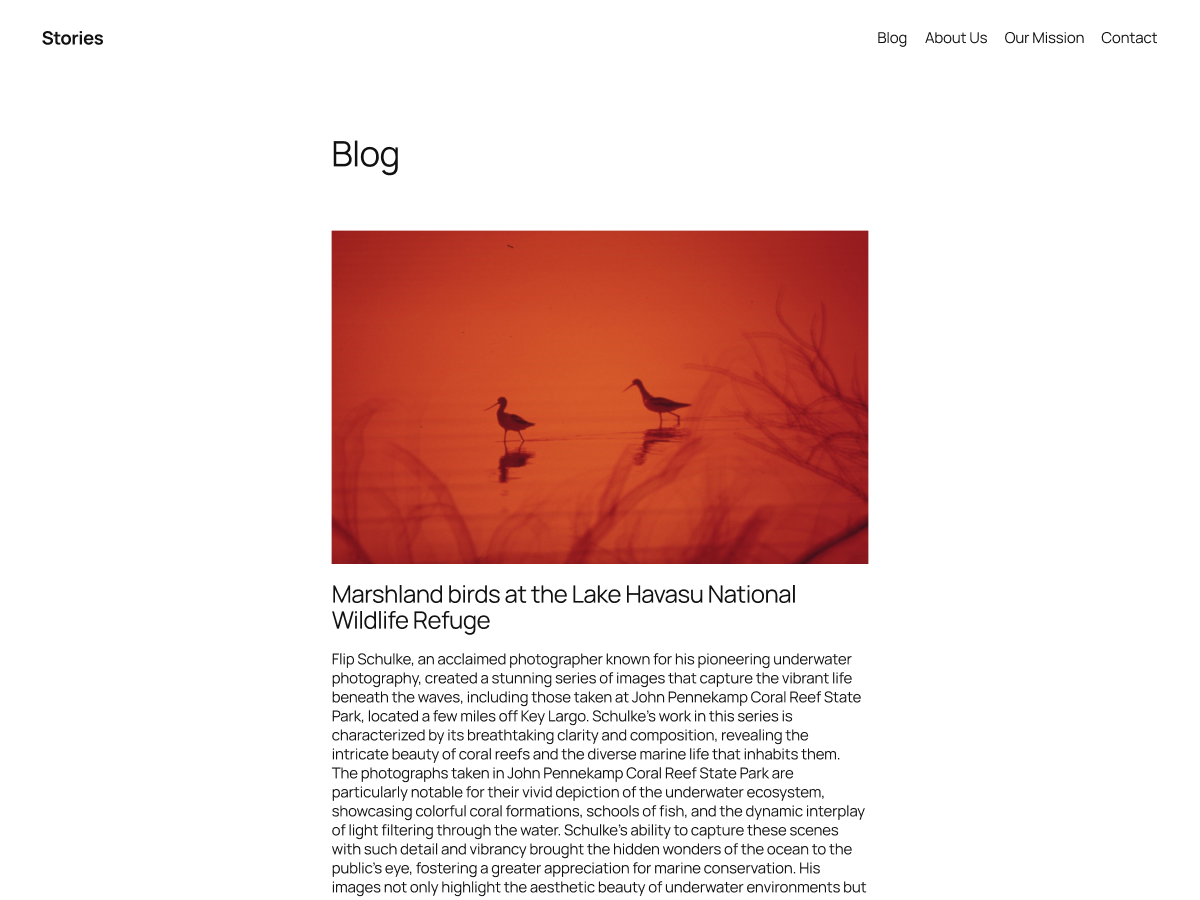
Twenty Twenty-Five ships pre-installed with every new WordPress installation running 6.7 or later. It’s designed around a concept of flexible content — meaning the layouts work as well for a personal journal as for a small portfolio or simple service page.
What makes it worth considering rather than just deleting is the 16 style variations it ships with. Each variation swaps out colors and fonts in a way that feels intentional rather than just recolored. The pattern library covers the basics: hero sections, content columns, testimonials, and archive layouts.
Key features:
- 16 style variations with matched font and color pairings
- 35+ block patterns for common layout types
- Full Site Editor compatibility
- No companion plugin required
- Maintained by the WordPress core team
Free vs Pro: Entirely free, open source, no premium version.
Best for: Personal blogs, simple portfolio pages, anyone just getting started with block themes.
Watch out for: Standard themes don’t receive new features — they’re maintained for stability, not expansion. If your site evolves quickly, you may outgrow it.
2. Kadence
Kadence has over 400,000 active installs as of February 2026, which puts it in the conversation with the biggest names in WordPress themes. That growth didn’t happen by accident — Kadence hits a balance point between beginner accessibility and developer flexibility that few themes manage well.
The free version is genuinely capable. Install Kadence Blocks (free) alongside it and you unlock a library of 500+ block patterns and starter templates spanning dozens of industries. The header and footer builder is intuitive without being locked behind a paywall. For most personal sites and small business pages, the free tier is enough.

Key features:
- 400,000+ active installs — large community, extensive documentation
- 500+ patterns when paired with Kadence Blocks (free)
- Advanced header/footer builder
- Deep WooCommerce integration
- Multiple sidebar layouts and page templates
Free vs Pro: Free tier covers most needs. Kadence Theme Pro at $59/year adds advanced customization controls, more header layouts, and priority support. The Essential Bundle ($129/year) includes Kadence Blocks Pro and starter templates.
Best for: Beginners who want hand-holding, small businesses, WooCommerce stores, agency client projects.
Watch out for: The full ecosystem (theme + Kadence Blocks + WooCommerce addon) can feel like a lot of moving parts. Start with just the theme and add plugins as you need them.
3. GeneratePress
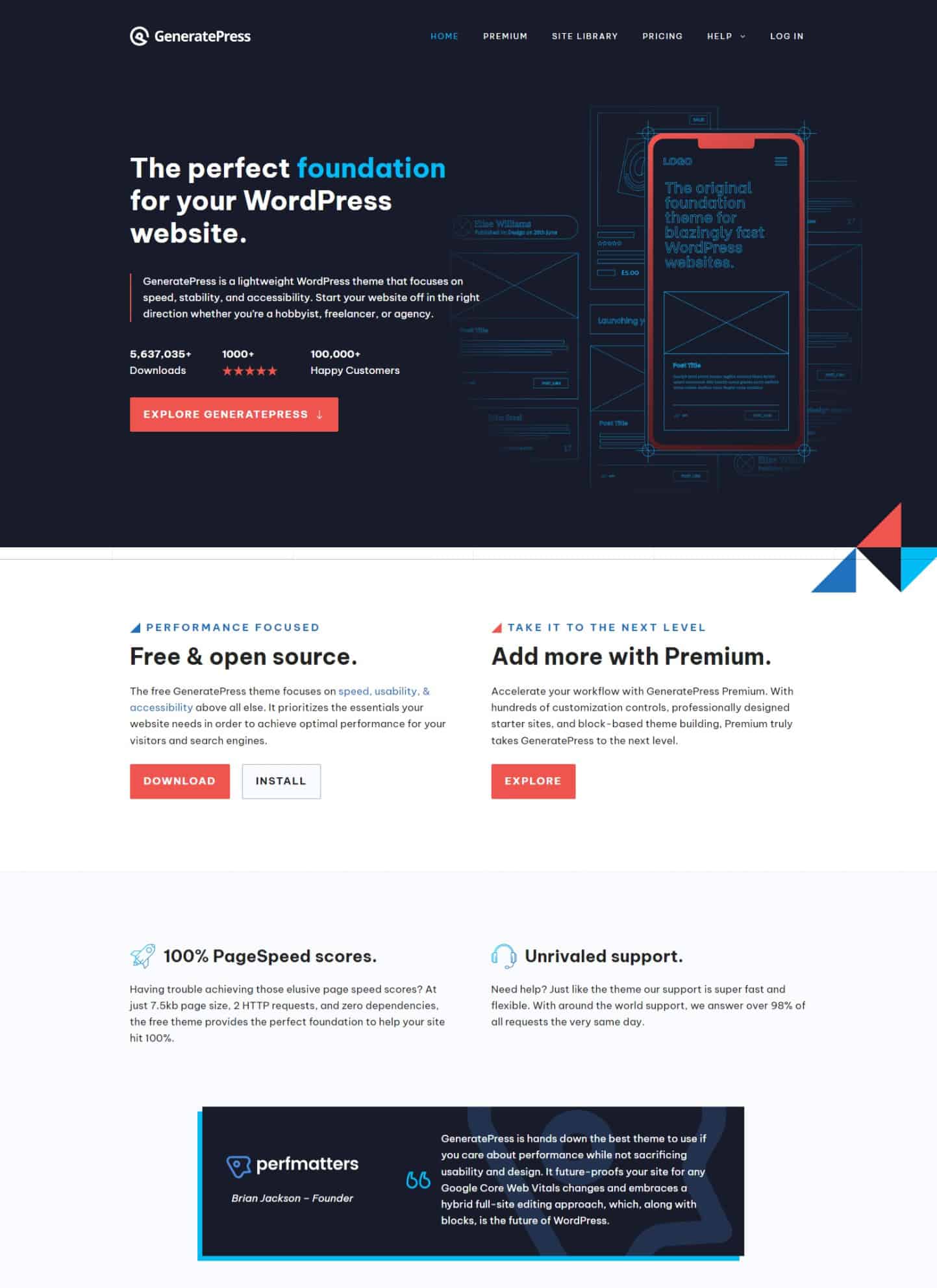
GeneratePress has been a developer favorite for years, and for good reason: it loads nothing it doesn’t need. The free version is genuinely minimal — useful as a blank canvas rather than a design-forward theme. Where GeneratePress earns its place on this list is as a block theme base for developers and performance-obsessed site owners.
The GeneratePress Premium upgrade ($59/year) transforms it into a fully configurable system with advanced typography, multiple header layouts, dozens of site library templates, and WooCommerce-specific controls. It works equally well in the classic Customizer and the Site Editor.
Key features:
- Extremely lightweight — among the leanest themes available
- Compatible with any page builder (Elementor, Beaver Builder, Bricks)
- 60+ color controls in the premium version
- Strict adherence to WordPress coding standards
- Consistent, high-quality updates with long-term support record
Free vs Pro: Free version is intentionally sparse. GeneratePress Premium at $59/year (or $249 lifetime) unlocks the full design toolkit, including site library templates and advanced layouts. The GeneratePress One bundle ($105/year) adds GenerateBlocks Pro.
Best for: Developers, agencies, performance-focused sites, anyone who wants a clean base to build on.
Watch out for: The free version is too minimal for most non-developers. Budget for Premium if you’re building a real site.
4. Blocksy
Blocksy aims at the middle of the market — versatile enough for portfolios, blogs, business sites, and WooCommerce stores, without being a generalist that does everything poorly. It’s one of the few block themes with a genuinely polished header builder in the free version.
The design is clean and contemporary, and the customization controls go deeper than most free themes. Style variations let you shift the overall aesthetic without rebuilding from scratch. For e-commerce specifically, Blocksy Pro ($69/year for one site) adds dedicated WooCommerce product page templates, wishlist support, and advanced layout controls.
Key features:
- Advanced header and footer builder included free
- 40+ block patterns across multiple layout types
- Custom sidebar options per post and page
- WooCommerce integration in both free and pro tiers
- RTL language support
Free vs Pro: Free tier is strong. Blocksy Pro starts at $69/year (1 site) and adds WooCommerce product enhancements, more header layouts, sticky elements, and a white-label option for agencies.
Best for: Portfolios, business sites, WooCommerce stores that want design flexibility without full developer involvement.
Watch out for: The plugin dependency for some pro features. Make sure any extensions you use are actively maintained.
5. Ollie
Ollie is what a block-first philosophy looks like in practice. Created by Mike McAlister, the theme was built from the ground up for the Site Editor — no legacy Customizer support, no compatibility shims, no compromise. The result is one of the cleanest implementations of Full Site Editing available.
The free version ships with 50+ patterns and 7 full-page layouts. The global style system is one of the better-implemented in any block theme, and the 21 style variations give real design variety without requiring manual configuration. Developers in particular appreciate how well it follows block theme best practices.
Key features:
- 50+ block patterns with 7 full-page layouts
- 21 pre-built style variations
- Pure block-first design — no classic Customizer fallback
- Optimized for performance and Core Web Vitals
- Companion plugin: Ollie Menu Designer (free) solves the navigation gap
Free vs Pro: Free tier is complete. Ollie Pro (approximately $79/year — verify at olliewp.com/pricing) expands the pattern library to 200+ patterns and 30+ full-page designs, plus priority support.
Best for: Developers, freelancers building client sites, content creators who want a design-forward FSE experience.
Watch out for: No classic Customizer — everything is done in the Site Editor. If you’re coming from a classic theme workflow, plan for a learning curve.
6. Spectra One
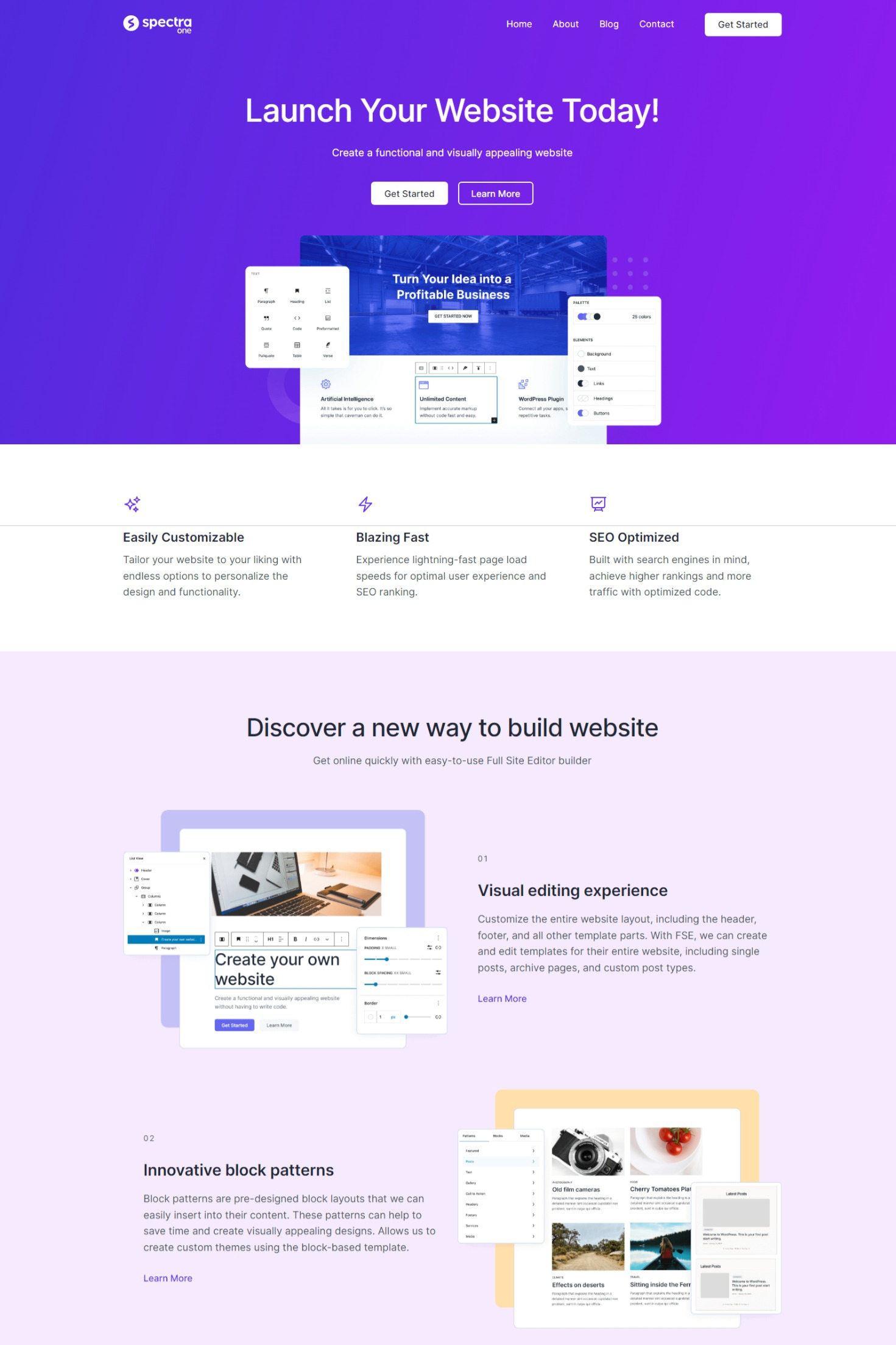
Spectra One comes from Brainstorm Force, the team behind the popular Astra theme. It’s built specifically for the Site Editor, loading only the CSS and JavaScript it needs — nothing extra. With around 8,000 active installs, it’s not the most popular option on this list, but it’s one of the most technically sound free block themes available.
The theme ships with 5 style variations and 30+ block patterns. Its compatibility with the Spectra block plugin (formerly Ultimate Addons for Gutenberg) is optional — the theme works perfectly well without it. When you do pair them, you get a significantly expanded block library including advanced query loops, countdown timers, and interactive elements.
Key features:
- Performance-optimized: loads only necessary CSS/JavaScript
- 5 style variations included
- Compatible with Spectra block plugin (optional)
- Responsive controls for block visibility by device type
- Free with no premium version required
Free vs Pro: Entirely free. Spectra block plugin has a Pro tier if you need the advanced blocks, but the theme itself costs nothing.
Best for: Small business sites, bloggers who prioritize performance, users already in the Brainstorm Force/Astra ecosystem.
Watch out for: Switching from another theme to Spectra One means rebuilding header/footer settings from scratch — block themes don’t carry over classic theme configurations.
7. Raft (ThemeIsle)
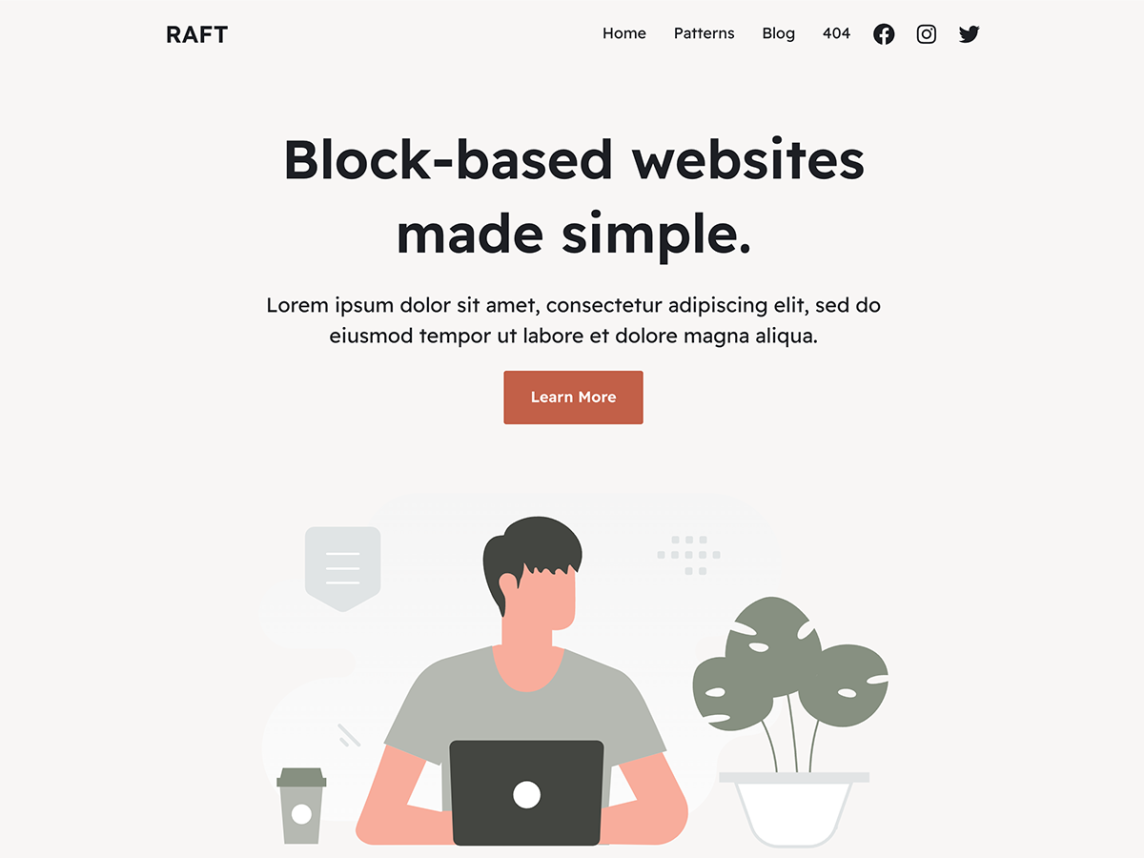
Raft comes from ThemeIsle, one of the established names in WordPress theme development. It’s a versatile block theme with 11 style variations — a mix of beige and grey backgrounds, serif and sans-serif fonts, plus two darker designs — giving you more visual range than most free themes offer.
The theme is designed to work with Otter Blocks, ThemeIsle’s free block plugin. Otter Blocks adds gallery layouts, pricing tables, FAQs, team sections, and call-to-action patterns that fill in the gaps in the core block set. Otter Blocks Pro is available if you need advanced dynamic data or custom field support.
Key features:
- 11 style variations (most in this list for a free theme)
- 30+ block patterns including galleries, pricing, FAQs
- Compatible with WordPress 6.0 and above
- WooCommerce support built in
- Otter Blocks companion plugin extends capabilities significantly
Free vs Pro: Raft is free. Otter Blocks Pro is where ThemeIsle monetizes — pricing varies, but the free version of Otter Blocks handles most needs.
Best for: Blogs, small business sites, startups, agencies looking for a free foundation with room to grow.
Watch out for: The dummy content in templates means setup requires replacing placeholder text and images. Plan time for initial configuration.
8. YITH Wonder
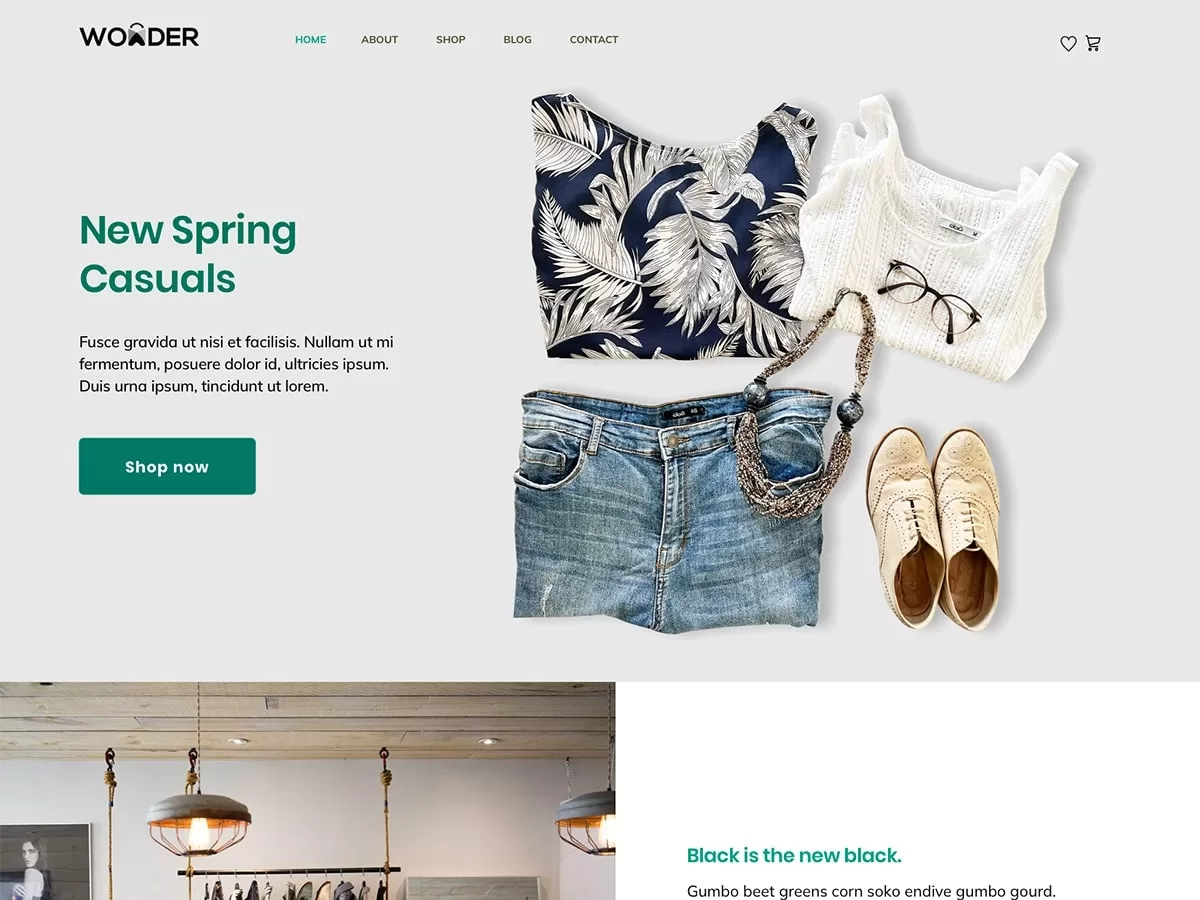
YITH Wonder holds the distinction of being the most-installed third-party block theme on WordPress.org, with 30,000+ installs recorded in November 2023 and the count continuing to grow. That popularity is largely driven by its strong WooCommerce integration — YITH builds some of the most widely-used WooCommerce plugins, and Wonder is designed to work seamlessly with their entire catalog.
With over 60 block patterns, it has one of the deepest pattern libraries in the free block theme space. These span home page layouts, about pages, product showcases, and contact pages. The theme supports full Site Editor customization of every template, including shop pages and product archives.
Key features:
- 60+ block patterns — the most among free block themes on this list
- Deep WooCommerce and YITH plugin integration
- Full Site Editing for all templates including shop pages
- Accessibility-ready (reviewed by the WordPress.org themes team)
- Light and dark color scheme options
Free vs Pro: Entirely free. YITH monetizes through their plugin ecosystem rather than through theme upgrades.
Best for: WooCommerce stores, corporate websites, accessibility-conscious projects.
Watch out for: Support can be limited for the free theme version. If you need hands-on help, factor in whether you’re already using YITH plugins with paid support.
9. Extendable (Extendify)
Extendable takes an interesting approach: rather than one default design, it ships with 23 pre-built style variations, each representing a distinct visual identity — from minimal Scandinavian aesthetics to bold, colorful layouts. Switching between them is one click in Global Styles.
With 50+ block patterns and RTL language support, it handles multilingual and international sites reasonably well. The entire theme is free, which makes it a good option for testing different site directions quickly before committing to a design.
Key features:
- 23 style variations — the widest range on this list
- 50+ block patterns
- RTL language support
- WooCommerce-ready
- 100% free, no premium version
Free vs Pro: Entirely free.
Best for: Quick site launches, testing different visual directions, multilingual sites.
Watch out for: The wide variation range means some styles feel better polished than others. Preview a few before committing. Some styles need customization work to look unique rather than off-the-shelf.
10. Neve FSE (ThemeIsle)
Neve FSE is ThemeIsle’s block theme extension of their highly popular Neve classic theme. If you’re already using Neve, the FSE version is the natural upgrade path — it carries over the design philosophy while moving fully into the Site Editor.
On its own, Neve FSE is a capable lightweight block theme with global style support and FSE templates for all standard page types. It’s more conservative in its design approach than some others on this list, which makes it a good fit for content-heavy sites where the writing should lead.
Key features:
- Extends the Neve brand into FSE territory
- Global styles for site-wide typography and color control
- FSE templates for headers, footers, archives, and single posts
- Performance-focused with clean code
- Compatible with Neve Pro upgrade path
Free vs Pro: Free tier available. Neve Pro (for the broader Neve ecosystem) adds advanced customization for classic and FSE templates.
Best for: Existing Neve users, content sites, bloggers who want a clean, text-focused layout.
Watch out for: Pattern library is smaller than most competitors (20+). You may need to build more layouts manually in the Site Editor.
Free vs Premium Block Themes — When Does It Make Sense to Pay?
The free block theme market is genuinely good in 2026. Kadence, GeneratePress, Blocksy, and Twenty Twenty-Five all offer complete free versions that would have been considered premium quality a few years ago. So when does paying actually make sense?
| Feature | Free Tier | Premium Tier | Worth Paying For? |
|---|---|---|---|
| Core Site Editor compatibility | ✅ Full | ✅ Full | No — free is enough |
| Pattern library | 20–60 patterns | 100–500+ patterns | Yes, for faster builds |
| Support | Community / forums | Priority / email | Yes, if your site earns money |
| Header/footer builder | Varies (some free) | Advanced controls | Depends on design complexity |
| WooCommerce templates | Basic compatibility | Custom product/cart pages | Yes, for serious e-commerce |
| White-label / client tools | No | Some premium tiers | Yes, for agencies |
Current premium pricing (March 2026):
- GeneratePress Premium: $59/year (up to 500 websites) or $249 lifetime
- Kadence Theme Pro: $59/year standalone, or $129/year for the Essential Bundle with Blocks Pro
- Blocksy Pro: $69/year (1 site), $149/year (unlimited)
- Ollie Pro: approximately $79/year — verify at olliewp.com/pricing
A rule of thumb: if the site generates revenue or belongs to a client, spending $59–79/year for priority support and a richer pattern library is almost always worth it. For personal projects or experimental sites, start free.
WordPress Block Themes by Use Case
The “best block theme” depends heavily on what you’re building. Here’s a direct breakdown:
Personal Blog or Content Site
You want something that gets out of the way and lets your writing lead. Twenty Twenty-Five works well here — it’s the least opinionated option and benefits from the WordPress core team’s long-term maintenance. Ollie is a better pick if you want more design personality. Neve FSE suits writers who prefer a plain, text-focused aesthetic.
Small Business or Service Site
You need a professional appearance, contact forms, a services page, and possibly a Google Business Profile integration. Kadence covers this comprehensively in the free tier, and its 500+ pattern library with Kadence Blocks means you can assemble a polished site quickly. Spectra One is a lighter alternative if performance is a priority. Extendable works well for a business that wants to try different visual directions before committing.
Portfolio or Creative Site
You need control over layout, strong image presentation, and something that stands out visually. Ollie is the strongest choice here — the design system is more considered than most. Blocksy competes closely and adds WooCommerce if you sell prints or products. GeneratePress is right for developers building custom portfolio layouts from scratch.
Online Store (WooCommerce)
YITH Wonder is the obvious choice for WooCommerce stores, particularly those using YITH plugins for wishlist, reviews, or booking. Kadence Pro offers the most flexible WooCommerce customization in a block theme. Blocksy Pro handles product page layouts well and is worth the $69/year if you have a growing catalog.
Agency or Client Sites
You need a theme you can replicate and customize efficiently across multiple projects. GeneratePress Premium ($59/year, up to 500 sites) is outstanding value here. Kadence and Ollie Pro are also strong contenders, particularly when combined with a full starter template library.
Beginners (First WordPress Site)
Kadence has the best onboarding experience — the documentation is thorough, the community is large, and the learning curve is gentler than most. Twenty Twenty-Five is the zero-friction option: it’s already installed, and the Site Editor provides guided customization. Spectra One is a solid second choice for users in the Astra/Brainstorm Force ecosystem.
The One Thing Block Themes Still Get Wrong
Block themes have matured significantly, but there’s one area where they still frustrate experienced WordPress builders: navigation and mobile menus.
The default Navigation block in WordPress has two notable limitations. First, mobile menu behavior is basic — you get a hamburger icon that toggles a simple dropdown, with limited control over animation, styling, or layout. Second, mega menus aren’t natively supported. Building a mega menu in a block theme used to require workarounds like using popups as substitutes for the navigation panel.

The good news: there are now solid solutions. Ollie Menu Designer (free, available at wordpress.org/plugins/ollie-menu-designer) was built specifically to solve this. It uses the native block editor to build menus — including mobile-optimized and mega menu layouts — directly within the Site Editor. It’s become the recommended approach for block theme builders who need more than the default navigation offers.
The classic Max Mega Menu plugin also works with block themes if you need enterprise-level navigation with deep customization.
Switching from a Classic Theme to a Block Theme
If you’re moving from a classic theme to one of the options on this list, here’s what survives the switch and what doesn’t:
What survives: All your content (posts, pages, custom post types), media files, plugin data, and database records are untouched. Your installed plugins keep working.
What doesn’t transfer: Classic widget areas are replaced by the block editor in sidebars and footers. Classic menus need to be re-configured in the Navigation block. Customizer settings (colors, fonts, layouts) don’t carry over — you rebuild those in Global Styles.
The WordPress Site Editor now includes an export function that lets you export your customized block theme as a zip file. This is useful if you want to save your configuration or build a custom starter theme for future projects.
What’s New in WordPress Block Themes for 2026
The FSE ecosystem has moved quickly. Here’s a brief rundown of the changes that matter for theme selection in 2026:
- WordPress 6.5 (April 2024): Block Bindings API — lets templates pull dynamic data from custom fields without ACF. Pattern overrides — edit an individual pattern instance without changing the original.
- WordPress 6.6 (July 2024): Zoom Out view (beta) — a high-level design mode for working with full-page patterns and containers.
- WordPress 6.7 (November 2024): Zoom Out stable, Font Library improvements (custom size presets, fluid scaling), Twenty Twenty-Five as default theme, enhanced styling controls (border, shadow, spacing) for individual blocks.
The practical takeaway: the Site Editor is stable enough for production sites in 2026. The concern about FSE being “not ready” that circulated in 2022-2023 is outdated. Most of the gaps that made block themes impractical for client work have been addressed in successive releases.
The area still in active development is data-driven templates — using the Block Bindings API and custom fields to build complex dynamic templates. Classic themes with ACF or advanced meta boxes still have an advantage here, though the gap is closing.
FAQ — Common Questions About WordPress Block Themes
What is a WordPress block theme?
A WordPress block theme is a theme built entirely around the block editor. Instead of using the classic Customizer to control the header, footer, and layout, you edit every part of your site in the Site Editor using blocks. The theme’s design system is defined in a theme.json file, which controls global typography, colors, spacing, and per-block styles.
What’s the difference between a block theme and a classic theme?
Classic themes use the Customizer (and sometimes their own theme options pages) for design settings, and support traditional PHP template files and widget areas. Block themes replace all of that with the Site Editor and block-based templates. Block themes are more flexible for layout customization but require learning the Site Editor workflow. Classic themes are more familiar to longtime WordPress users and may have more options in their settings panel.
Are WordPress block themes good for SEO?
Yes — block themes are generally well-suited for SEO. They tend to produce cleaner HTML with fewer unnecessary scripts and styles, which contributes to faster load times and better Core Web Vitals scores. SEO fundamentals (title tags, meta descriptions, structured content) are handled by your SEO plugin of choice (Yoast, Rank Math, etc.) independently of the theme.
Can I use a block theme with Elementor or other page builders?
Technically yes, but it’s not the intended workflow. Block themes are designed for the native block editor. Using Elementor or Divi inside a block theme means you’re not taking advantage of what makes block themes useful — the Site Editor and its FSE templates. If you’re committed to Elementor, a classic theme like Astra or GeneratePress (in its non-FSE mode) may be a better fit.
Do I need a child theme with a block theme?
Rarely. With classic themes, child themes were essential for safe customization — they let you modify templates without having your changes overwritten by updates. Block themes handle this differently: customizations made in the Site Editor (templates, Global Styles, patterns) are stored in the database, not in theme files. They survive updates without a child theme. The main exception is if you’re a developer modifying theme.json or adding custom template files.
Are block themes faster than classic themes?
Often yes, but it depends on the specific themes you’re comparing. Block themes tend to be leaner because they don’t carry legacy CSS frameworks or PHP template overhead. A well-built block theme like GeneratePress or Spectra One loads only what the current page needs. However, a bloated block theme with dozens of companion plugin dependencies can be just as heavy as any classic theme. The architecture favors speed, but execution varies by developer.
Can I switch from a classic theme to a block theme without losing my content?
Your content — posts, pages, media, and plugin data — is stored in the database and is not affected by a theme switch. What you’ll need to rebuild is the design: global styles, header and footer layout, navigation menus, and any widget areas you’ve configured. The switch is safe for your content; plan time to reconfigure the visual presentation.
Which WordPress block theme is best for beginners?
Kadence is the most beginner-friendly option because of its extensive documentation, large community, and gentle introduction to the Site Editor. Twenty Twenty-Five is the lowest-friction starting point — it’s already installed and requires no configuration to look presentable. For beginners with a specific visual direction in mind, Extendable’s 23 style variations let you try different designs quickly before committing to one.
Do block themes work with WooCommerce?
Yes, all themes on this list support WooCommerce. The level of integration varies: YITH Wonder has the deepest WooCommerce integration (especially with YITH plugins), Kadence Pro and Blocksy Pro offer advanced product page templates, and most free themes provide basic compatibility. The WooCommerce blocks (cart, checkout, product grid) work inside the Site Editor in modern WooCommerce versions.
What is theme.json in WordPress?
theme.json is a configuration file that defines a block theme’s design system. It controls global color palettes, typography scales, spacing presets, layout widths, and per-block styling rules. When you change colors or fonts in Global Styles through the Site Editor, you’re interacting with what theme.json controls — but you don’t need to edit the file directly unless you’re developing a custom theme. For site owners, the Site Editor provides a visual interface for all of this.
Final Thoughts
The block theme ecosystem has settled into a clear competitive landscape. Kadence leads in breadth and beginner accessibility. GeneratePress leads in performance and developer trust. Blocksy and Ollie compete for design-forward users who want more control without a page builder dependency. YITH Wonder owns the WooCommerce segment. Twenty Twenty-Five is the reliable default that earns its place.
The decision ultimately comes down to three things: your site type, your technical comfort level, and whether the free tier covers your needs or a premium upgrade makes economic sense. Most sites — especially personal ones and small businesses starting out — will find a capable free option in this list. Paying becomes worthwhile when you’re building for clients, running an active store, or need priority support for a site that matters.
Block themes are production-ready in 2026. The FSE learning curve is real but short. Give one a genuine try before falling back on page builders out of habit — the performance and simplicity payoff is worth the adjustment.
