



WordPress powers more than 40% of the web — and that popularity makes it a constant target. Brute force attacks, malware injections, SQL exploits, and DDoS floods hit WordPress sites every single day, targeting everything from solo blogs to enterprise storefronts.
A firewall plugin is your site’s first active line of defense. But there’s an important distinction most site owners miss: not all WordPress firewalls work the same way. A DNS-level firewall stops attacks before they reach your server. An application-level firewall lets traffic through first, then decides. That difference matters enormously when you’re under a real attack — and it should directly influence which plugin you choose.
This guide covers seven of the best WordPress firewall plugins available in 2026, with verified pricing, a full feature comparison table, and a clear breakdown of which plugin fits which situation.
best WordPress security plugins
Quick Picks: Best WordPress Firewall Plugins at a Glance
Not sure which plugin to pick? Here’s a fast breakdown before we get into the details:
| Plugin | Firewall Type | Free Plan | Starting Price | Best For |
|---|---|---|---|---|
| Cloudflare | DNS-level | ✅ Yes | $20/month (Pro) | DDoS protection + performance |
| Sucuri | DNS-level | ❌ (scanner only) | $9.99/month (WAF) / $229/year (Platform) | Managed security + malware removal |
| Wordfence | Application-level | ✅ Yes | $149/year (Premium) | Scanning + login security |
| All in One WP Security | Application-level | ✅ Yes (robust) | ~$70/year (Premium) | Beginners + budget-conscious |
| MalCare | Application-level | ✅ Limited | $149/year (Plus) | Bot protection + eCommerce |
| BulletProof Security | Application-level | ✅ Yes | ~$69.95 one-time | Simple .htaccess protection, one-time cost |
| NinjaFirewall | Application-level | ✅ Yes | $69/year (WP+) | Standalone firewall, developer-friendly |
Pricing verified from official sources, March 2026. Always confirm current pricing before purchasing.
What Is a WordPress Firewall Plugin?
A WordPress firewall plugin — more formally called a Web Application Firewall (WAF) — screens incoming requests to your site and blocks those that match known attack patterns. Think of it as a security checkpoint that examines every visitor before they reach your WordPress installation.
The critical distinction is where that checkpoint sits.
DNS-Level Firewalls (Cloud-Based)
With a DNS-level firewall, your domain’s DNS records point to the firewall provider’s servers instead of directly to your hosting server. All traffic flows through their cloud infrastructure first — malicious requests get filtered out, and only clean traffic reaches your actual server.
This matters most during large-scale attacks. A botnet flooding your site with 50,000 requests per minute still hits the firewall’s infrastructure, not yours. Your server never sees that volume. DNS-level firewalls also typically include a CDN, which improves load times as a side benefit.
Examples: Cloudflare, Sucuri Website Firewall
Application-Level Firewalls (Endpoint/Plugin)
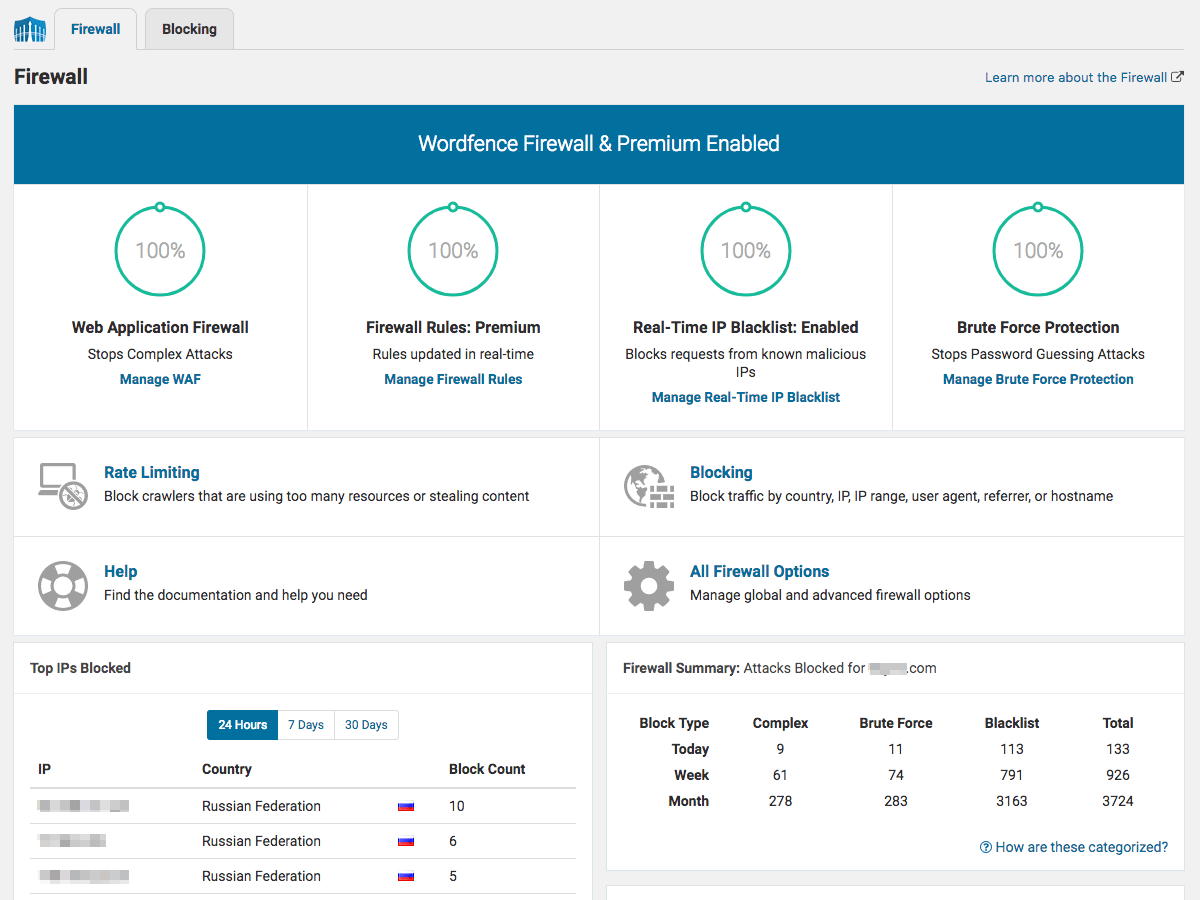
Application-level firewalls are WordPress plugins that run directly on your server. When a request comes in, WordPress loads partially, the firewall plugin intercepts and inspects it, then either passes it through or blocks it.
The tradeoff: your server still receives every request, including the malicious ones. The firewall stops them from causing damage, but the traffic load is already there. For most small-to-medium sites this isn’t a practical problem — but under a sustained DDoS attack, even blocked traffic can overwhelm your hosting resources.
That said, application-level firewalls have one advantage: because they run at the endpoint (your server), they can inspect encrypted traffic after it’s been decrypted. Cloud-based firewalls that use SSL passthrough may not see the full content of encrypted requests as cleanly.
Examples: Wordfence, All in One WP Security, MalCare, NinjaFirewall, BulletProof Security
Which Type Is Right for Your Site?
For personal blogs and small sites with modest traffic, an application-level plugin like Wordfence’s free tier handles the typical threat landscape — brute force attacks, malware injections, known exploit patterns — without any DNS changes or ongoing costs. For business sites, WooCommerce stores, or any site where downtime is expensive, layering a DNS-level firewall on top provides meaningful extra protection, especially against DDoS floods.
What Attacks Does a WordPress Firewall Protect Against?
Understanding the threats helps calibrate how seriously you need to take each type of protection.
- Brute force login attacks: Automated bots trying thousands of username/password combinations against your login page. All major firewalls handle this.
- SQL injection: Malicious database queries injected through input fields or URLs. WAF rules catch most known patterns.
- Cross-site scripting (XSS): Malicious scripts injected into your site’s output to attack visitors. Firewall rules filter these.
- DDoS (Distributed Denial of Service): Traffic floods that overwhelm your server. Only DNS-level firewalls absorb these effectively — application-level plugins cannot prevent the server from receiving the flood.
- File inclusion attacks: Exploits that attempt to include malicious files in your WordPress execution. Firewall rules and malware scanners address these.
- Zero-day exploits: Attacks targeting newly discovered vulnerabilities before patches exist. Real-time firewall rule updates (premium plans) are your main defense here.
- Spam bots: Automated form submissions, comment spam, and registration abuse. Most security plugins include bot detection.
One important caveat: firewalls are not malware removal tools. If your site is already compromised, you need a scanner with cleanup capabilities (Wordfence, Sucuri Platform, MalCare) — not just a firewall. And no plugin prevents 100% of attacks. A layered security approach includes strong passwords, regular updates, and backups alongside your firewall.

The 7 Best WordPress Firewall Plugins Reviewed
1. Cloudflare — Best DNS-Level Firewall for Performance + Protection
Cloudflare is primarily a CDN and network security service, not a WordPress plugin — but it’s one of the most effective ways to add DNS-level firewall protection to any WordPress site. Once you point your domain’s DNS to Cloudflare, all traffic flows through their network spanning 250+ server locations worldwide.

The free tier includes automatic DDoS protection and basic bot management — solid coverage for most personal sites. The Pro plan at $20/month adds the full managed WAF, including the OWASP Core Ruleset and Cloudflare’s own threat intelligence rules. This is where the firewall gets seriously useful for WordPress sites.
What Cloudflare doesn’t provide on its own: malware scanning of your WordPress files, file integrity monitoring, or login security features. You’ll want to pair it with a lightweight application-level security plugin for those functions.
Key features:
- DNS-level firewall — all traffic filtered before reaching your server
- 121 Tbps DDoS mitigation capacity
- 250+ global server locations; CDN included on all plans
- OWASP Core Managed Ruleset + Cloudflare rules (Pro+)
- Bot Fight Mode (free) / Super Bot Fight Mode (Pro+)
- Automatic HTTPS and SSL encryption
- Automatic Platform Optimization (APO) for WordPress speed
Pros:
- Free plan delivers real protection — DDoS coverage at no cost
- Best performance improvement of any option on this list
- Protects all traffic types, not just WordPress-specific threats
- Zero maintenance once configured
Cons:
- Requires DNS change — setup is more involved than installing a plugin
- WAF managed rules require Pro plan ($20/month)
- Does not include WordPress file scanning or malware cleanup
- No WordPress-specific login protection or 2FA
Pricing (March 2026): Free plan (basic DDoS + 5 custom WAF rules). Pro: $20/month. Business: $200/month (overkill for most WordPress sites).
Best for: Sites where performance matters as much as security; sites that want DNS-level DDoS protection; works well paired with Wordfence or All in One WP Security for application-layer protection.
Not ideal for: Site owners who want a simple plugin installation without DNS changes.
2. Sucuri — Best Complete Managed Security Service
Sucuri operates as both a free WordPress security scanner plugin and a paid cloud-based security service. It’s important to understand the distinction: the free plugin you’ll find on WordPress.org is primarily an auditing and scanning tool. The actual firewall — the DNS-level WAF that blocks traffic before it reaches your server — is a paid service that requires a subscription and DNS configuration.

When you subscribe to a Sucuri Platform plan, all your site’s traffic routes through Sucuri’s CloudProxy servers. Their infrastructure blocks around 40 million attacks per day across their customer base, and their research team pushes firewall rule updates continuously. The platform plans also include malware scanning, malware cleanup (with guaranteed response times depending on tier), blacklist removal, and CDN acceleration via their Anycast network.
This makes Sucuri’s Platform tier the most complete hands-off security solution on this list — but also one of the more expensive ones for small sites.
Key features:
- DNS-level cloud WAF via CloudProxy
- DDoS mitigation (L3, L4, and L7 attacks)
- Anycast CDN for improved global performance
- Malware scanning and guaranteed malware cleanup (Platform plans)
- Blacklist removal (Google, McAfee, Norton, etc.)
- Virtual patching for CMS vulnerabilities
- 24/7 security team monitoring
Pros:
- Full managed service — set up and mostly forget it
- Malware removal included in Platform plans (not just detection)
- Strong track record with large WordPress sites
- PCI compliance support
Cons:
- No meaningful free firewall (free plugin is scanner-only)
- Platform plans are expensive relative to plugin-only options
- Requires DNS change, which some beginners find intimidating
- Pricing can climb quickly for multi-site needs
Pricing (March 2026): WAF-only: $9.99/month (Basic) or $19.98/month (Pro, adds SSL support). Full Platform: $229/year (Basic, 30hr cleanup SLA) to $549/year (Business, 6hr cleanup SLA). Junior Developer pack (5 sites): $999.98/year.
Best for: Business sites, WooCommerce stores, and high-traffic publications where downtime and malware cleanup costs are significant. Sites managed by professionals who want a hands-off managed service.
Not ideal for: Personal blogs and small sites on a tight budget.
3. Wordfence Security — Best Free Application-Level Firewall
Wordfence is the most widely used WordPress security plugin in existence — 4+ million active sites run it, backed by 400M+ total downloads on WordPress.org. That scale matters: Wordfence’s threat intelligence is fed by signals from millions of sites, giving their firewall rules and malware signature database a breadth that smaller competitors can’t match.

Wordfence runs as an application-level (endpoint) firewall. Traffic reaches your server, and Wordfence intercepts it before WordPress fully loads. This architecture means your server absorbs the raw request volume during attacks — but the advantage is that Wordfence can inspect decrypted traffic and catch threats that cloud-based systems might miss in encrypted connections.
The free plan is genuinely useful, but there’s a catch worth understanding: free plan firewall rules and malware signatures are updated on a 30-day delay. You get protection against known threats, but new attack patterns are patched in real-time only for premium customers. For most small sites, the 30-day lag is acceptable. For business sites or sites handling sensitive data, the Premium plan’s real-time updates make a meaningful difference.

Key features:
- Endpoint WAF with extended protection rules
- Deep malware scanner (core files, plugins, themes, known malware patterns)
- Login security: 2FA, reCAPTCHA, login attempt limiting, XMLRPC protection
- Live traffic view and IP blocking from the dashboard
- Wordfence Central: manage multiple sites from one dashboard
- Country blocking (Premium)
- Real-time threat intelligence from 4M+ site network
Pros:
- Free plan is robust — most small sites need nothing more
- Best malware scanner on this list (based on community and expert consensus)
- 2FA and login security features are excellent
- Active development and frequent updates
Cons:
- Application-level — doesn’t help if you’re under a serious DDoS attack
- Can consume significant server resources during scans on low-end hosting
- Free plan firewall rules delayed 30 days vs real-time premium
- No CDN included
Pricing (March 2026): Free. Premium: $149/year per site (price increased from $99 in December 2024). Care: $590/year (includes hands-on Wordfence management). Response: $1,250/year (24/7 incident response with 1-hour SLA).
Best for: Most WordPress sites — especially those prioritizing malware scanning and login protection. Excellent free option for small sites; premium tier for business sites needing real-time protection.
Not ideal for: Sites under sustained DDoS attack (needs a DNS-level layer on top). Not recommended as a standalone solution for high-traffic sites without pairing with Cloudflare.
4. All in One WP Security & Firewall — Best Free Plugin for Beginners
With 36 million downloads and a 4.7/5 rating on WordPress.org, All in One WP Security & Firewall (AIOS) is the most installed free security plugin. It earns that position by being genuinely comprehensive without overwhelming beginners — the dashboard shows a security score with clear explanations for each setting.
The firewall is .htaccess-based, meaning firewall rules are applied at the server level through Apache’s configuration file. This is technically more efficient than a PHP-based firewall for basic blocking, but it means some features won’t work on NGINX or Windows IIS servers.
Key features:
- 6G and 7G firewall rules (htaccess-based)
- Brute force login protection with lockout
- 2FA (Google Authenticator, Microsoft Authenticator, Authy)
- User enumeration prevention
- File permission scanner
- Database backup
- Spam comment blocking
- Login page URL rename (hide from bots)
- XSS and SQL query string protection
- Image hotlinking prevention
Pros:
- Completely free plan is more capable than many paid alternatives
- Security score system makes setup approachable for non-technical users
- No account required — everything configured locally
- Regular updates, active support forum on WordPress.org
Cons:
- Malware scanning requires Premium plan
- Country blocking requires Premium
- .htaccess features don’t work on all server types (NGINX, IIS)
- Less powerful firewall than dedicated solutions like Wordfence or Cloudflare
Pricing (March 2026): Free (most features included). Premium from approximately $70/year (adds malware scanning, country blocking, uptime monitoring, advanced 2FA, multisite support).
Best for: Beginners setting up WordPress security for the first time. Personal blogs and low-traffic sites where the free plan covers all essential bases.
Not ideal for: High-traffic business sites or WooCommerce stores that need real-time malware detection and dedicated support.
5. MalCare Security — Best for Bot Protection and eCommerce Sites
MalCare focuses on two things it does particularly well: bot management and malware detection without slowing down your server. The scanning engine runs on MalCare’s own servers rather than yours, which means even deep malware scans don’t spike your server resources — a practical advantage for shared hosting environments.
The free plan detects malware but doesn’t remove it; cleanup requires upgrading to Plus ($149/year). That’s a real limitation, but the detection engine itself is solid, and the bot protection — which blocks bad bots, scraper bots, and brute force bots — is available across all plans.
Key features:
- Cloud-based malware scanning (runs on MalCare’s servers, not yours)
- Real-time application-level firewall with IP reputation database
- Bot protection: blocks brute force, scraper, and known malicious bots
- 1-click malware removal (Plus plan+) in under 60 seconds
- Login protection (CAPTCHA, 2FA, login URL change)
- Vulnerability scanner for plugins and themes
- Geo-blocking (Plus plan+)
- Centralized dashboard for multi-site management
Pros:
- Scanning doesn’t increase server load — good for resource-constrained hosting
- 1-click automated malware removal is fast and practical
- Strong bot protection
- Clean, simple interface compared to Wordfence
Cons:
- Free plan only detects malware — cleanup requires payment
- Firewall rule updates less frequent on free plan (every 7 days)
- More expensive than Wordfence Premium for comparable features
- No CDN or DDoS protection
Pricing (March 2026): Free (detection only). Plus: $149/year (1-click cleanup, geo-blocking, real-time firewall). Prime: $199/year (adds 1-click restore). Pro: $299/year (staging, visual monitoring). Max: $499/year.
Best for: WooCommerce stores and business sites on shared hosting where server resource usage matters. Sites that want automated malware cleanup without technical involvement.
Not ideal for: Users who are happy managing cleanup manually and want the best free scanner — Wordfence wins there.
6. BulletProof Security — Best One-Time Payment Option
BulletProof Security is one of the oldest WordPress security plugins and stands out for one clear reason: the Pro version is a one-time fee of approximately $69.95 for unlimited sites with lifetime free upgrades. No subscriptions, no renewals. For developers managing multiple client sites or budget-conscious site owners who dislike recurring SaaS costs, that’s a meaningful advantage.
The firewall is .htaccess-based and focuses on protecting root WordPress files and the htaccess file itself. It’s not as polished or intuitive as Wordfence, and the interface remains somewhat dated — that’s the consistent tradeoff with BulletProof. But the core protection works.
Key features (Pro):
- .htaccess-based application firewall
- AutoRestore/Quarantine (ARQ) — real-time intrusion detection and automated file restoration
- DB Monitor — database change detection with email alerts
- Uploads Anti-Exploit Guard — restricts malicious file execution from uploads folder
- JTC Anti-Spam/Anti-Hacker (login, registration, comment protection)
- Setup wizard for automatic .htaccess configuration
- Maintenance mode
Pros:
- One-time fee — no recurring subscription
- Unlimited sites on a single Pro license
- ARQ intrusion detection is genuinely useful for file integrity
- Lightweight — minimal server resource usage
Cons:
- Interface is not beginner-friendly — steep learning curve
- Less active community and documentation than Wordfence
- No real-time threat intelligence feed
- Not as strong on malware detection as Wordfence or MalCare
Pricing (March 2026): Free (basic .htaccess firewall). Pro: approximately $69.95 one-time for unlimited sites with lifetime updates.
Best for: Developers managing multiple WordPress sites who want a one-time cost. Technically comfortable users who don’t mind a dated interface.
Not ideal for: Beginners or users who want a modern UI and dedicated customer support.
7. NinjaFirewall — Best Standalone WordPress Firewall
NinjaFirewall takes a different approach: it’s a pure firewall plugin with no bloat. No malware scanner, no checklist features, no login activity logs taking up database space — just a high-performance Web Application Firewall built specifically for WordPress.
What makes NinjaFirewall technically interesting is that it hooks into WordPress before any other plugin loads. Most WordPress security plugins run their firewall after the WordPress core bootstraps; NinjaFirewall runs at the PHP level, intercepting requests even earlier. This gives it a genuine technical advantage for blocking attacks before they touch your WordPress code at all.
Key features:
- Pre-WordPress firewall hook — fires before plugins and themes load
- Full WAF with OWASP Top 10 protection
- File Guard: real-time monitoring of PHP file changes
- Event notifications for attacks, file changes, logins
- IP-based blocking and whitelisting
- Centralized logging
- Network edition for WordPress Multisite and WP Farm setups
Pros:
- Technically one of the most effective application-level firewalls
- Minimal server overhead — no database bloat from log tables
- Developer-friendly with granular rule customization
- Free plan is fully functional as a firewall
Cons:
- No built-in malware scanner — needs a companion plugin
- Less beginner-friendly than Wordfence or All in One WP Security
- Smaller user base = fewer community tutorials
Pricing (March 2026): Free (WP edition). WP+ Edition: approximately $69/year (adds File Guard, enhanced event notifications, premium support). Network edition available for multisite.
Best for: Developers and technically confident users who want a dedicated, high-performance firewall without the overhead of a full security suite. Works well paired with a standalone malware scanner.
Not ideal for: Users who want everything in one plugin — malware scanning, login security, firewall — in a single interface.
Full Feature Comparison: 7 WordPress Firewall Plugins
Here’s the complete picture across all seven plugins — the table most competitors don’t provide:
| Plugin | Firewall Type | Malware Scan | DDoS Defense | CDN | 2FA | GEO Block | Real-time Updates | Free Plan | Paid From | WP.org Rating |
|---|---|---|---|---|---|---|---|---|---|---|
| Cloudflare | DNS-level | ❌ | ✅ 121 Tbps | ✅ | ❌ | ✅ (Pro+) | ✅ | ✅ | $20/mo | N/A (SaaS) |
| Sucuri | DNS-level | ✅ + cleanup | ✅ L3/4/7 | ✅ | ❌ | ✅ | ✅ | ❌ (WAF) | $9.99/mo | N/A (SaaS) |
| Wordfence | Application | ✅ | ⚠️ Limited | ❌ | ✅ | ✅ (paid) | ⚠️ (30-day delay free) | ✅ | $149/yr | 4.7/5 |
| All in One WP Security | Application | ✅ (paid) | ❌ | ❌ | ✅ | ✅ (paid) | ✅ | ✅ (robust) | ~$70/yr | 4.7/5 |
| MalCare | Application | ✅ (cleanup paid) | ❌ | ❌ | ❌ | ✅ (paid) | ⚠️ (7-day free) | ✅ (limited) | $149/yr | 4.3/5 |
| BulletProof Security | Application | ✅ (basic) | ❌ | ❌ | ❌ | ❌ | Manual | ✅ | ~$69.95 once | — |
| NinjaFirewall | Application | ❌ | ❌ | ❌ | ❌ | ❌ | ✅ | ✅ | ~$69/yr | 4.8/5 |
Data compiled from official sources, March 2026. ⚠️ Note: WP Cerber Security is not included because its plugin was removed from WordPress.org in September 2022 due to a security issue and is not recommended for new WordPress installations.
Can You Use Cloudflare and Wordfence Together?
Yes — and for most WordPress sites that need strong security, running both is actually the recommended approach. They address different parts of the threat landscape without significant overlap.
How they complement each other:
- Cloudflare (DNS-level): Handles DDoS attacks, bot floods, and traffic from known malicious IPs before they ever reach your server. Also speeds up your site with global CDN caching.
- Wordfence (application-level): Handles malware scanning, file integrity monitoring, login security, 2FA, and application-layer threats that reach your WordPress installation.

The one configuration detail to be aware of: by default, Wordfence will see Cloudflare’s IP addresses in your server logs rather than the real visitor IPs. This can cause Wordfence to incorrectly block or flag Cloudflare’s servers. The fix is straightforward — in Wordfence’s settings under All Options > General Wordfence Options, enable “How does Wordfence get IPs” and set it to trust Cloudflare’s proxy headers (HTTP_CF_CONNECTING_IP). Cloudflare also maintains a published list of their IP ranges for whitelisting.
Once configured correctly, both tools operate independently without conflict. Cloudflare stops flood-level attacks; Wordfence handles file-level and login threats. Most business sites running high traffic use exactly this combination.
Which WordPress Firewall Plugin Should You Use?
The honest answer depends on your site type, traffic level, technical comfort, and what you actually need protection against. Here’s a practical breakdown:
| Your Situation | Recommended Setup | Why |
|---|---|---|
| Personal blog, minimal budget | All in One WP Security (free) + Cloudflare (free) | Comprehensive basic protection at zero cost; Cloudflare adds DDoS layer |
| Small business site | Wordfence free + Cloudflare free, or Wordfence Premium | Strong scanning + login security; upgrade when real-time rules matter |
| WooCommerce store | MalCare Plus or Sucuri Basic Platform | Automated malware cleanup matters for sites processing payments |
| High-traffic media/news site | Cloudflare Pro + Wordfence Premium | DNS-level DDoS absorption + real-time application-layer protection |
| Developer managing multiple client sites | Wordfence Central (Premium) or MalCare multi-site | Centralized dashboard, bulk management |
| Beginner, wants simple setup | MalCare or All in One WP Security | Plugin-only installation, no DNS changes required |
| Budget-conscious, multiple sites | BulletProof Security Pro (one-time fee) | $69.95 once covers unlimited sites — no subscriptions |
| Technical user, wants lightweight firewall | NinjaFirewall + standalone malware scanner | Best pre-WordPress hook architecture; no overhead from features you don’t need |
A note on layering: for any site beyond a personal blog, using both a DNS-level service (Cloudflare free is enough to start) and an application-level plugin is worth the modest extra effort. The setup takes about 20 minutes and covers threat categories that neither approach handles alone.
FAQ: Frequently Asked Questions About WordPress Firewall Plugins
- Do I really need a firewall plugin if my host already provides security?
- Host-level security and a WordPress firewall plugin address different layers. Most hosting security focuses on server infrastructure — preventing server-level intrusions, DDoS protection at the network level, and sometimes malware scanning at the hosting account level. WordPress-specific threats like brute force login attacks, malware injected through vulnerable plugins, and application-layer exploits are best handled by a dedicated WordPress firewall plugin. Using both provides better coverage than either alone.
- What’s the difference between DNS-level and application-level firewalls in plain terms?
- DNS-level: your visitors’ traffic goes through the firewall provider’s servers first, and threats are filtered before anything reaches your site’s server. Application-level: your server receives all traffic, and the plugin decides what to block after the request arrives. DNS-level is better for DDoS and bot floods; application-level is better for deep WordPress-specific scanning and file integrity checks.
- Is Wordfence’s free plan enough for a small business site?
- For many small business sites, yes — with one caveat. The free plan’s firewall rules are delayed 30 days, meaning new attack patterns are patched in real-time only for Premium users. If your site handles sensitive customer data or you can’t afford downtime, the $149/year Premium plan’s real-time updates are worth it. For a low-traffic informational site, the free plan is a solid choice.
- Can a WordPress firewall plugin actually stop DDoS attacks?
- Application-level plugins cannot stop volumetric DDoS attacks. The attack traffic still arrives at your server, and even if the plugin blocks each request, the sheer volume can overwhelm your hosting resources. Only DNS-level services like Cloudflare or Sucuri’s WAF — which absorb the traffic before it reaches your server — provide effective DDoS mitigation. If DDoS is a concern, a DNS-level layer is not optional.
- Will a firewall plugin slow down my WordPress site?
- Most modern firewall plugins have minimal performance impact under normal conditions. Wordfence and NinjaFirewall are particularly lightweight during normal operation. The exception is during on-demand malware scans, which can briefly spike CPU usage on shared hosting. DNS-level firewalls like Cloudflare actually improve load times by serving content from CDN edge nodes closer to your visitors.
- Can I run two firewall plugins at the same time?
- Running two application-level firewall plugins simultaneously is not recommended — they can conflict, produce duplicate blocks, and double the resource usage for little added benefit. The right combination is one DNS-level layer (Cloudflare or Sucuri WAF) and one application-level plugin (Wordfence, All in One WP Security, etc.). That pairing covers both threat layers without conflict.
- What’s the easiest WordPress firewall plugin to set up?
- For pure ease of installation, MalCare and All in One WP Security require only a standard plugin install — no DNS changes, no server configuration. All in One WP Security’s security score system walks you through configuration step by step. Wordfence is nearly as simple and has extensive documentation. Cloudflare and Sucuri require DNS changes, which adds complexity but is still manageable with their setup wizards.
- How often should I update my firewall plugin?
- Update as soon as updates are available — this applies to all WordPress plugins, but especially security plugins. Outdated security plugins are themselves a common attack vector: attackers specifically target known vulnerabilities in older versions. Enable auto-updates for your security plugin if your hosting environment supports it.
- Does Cloudflare work as a standalone WordPress firewall?
- Cloudflare handles DDoS protection and network-level threats effectively as a standalone DNS-level service, but it doesn’t replace a WordPress-specific security plugin. It won’t scan your WordPress files for malware, protect your login page with 2FA, or detect file changes. For complete protection, pair Cloudflare with a WordPress application-level plugin like Wordfence or All in One WP Security.
- What’s the best completely free WordPress firewall plugin?
- All in One WP Security & Firewall and Wordfence (free tier) are the strongest free options. AIOS’s free plan is surprisingly comprehensive — it includes .htaccess firewall rules, 2FA, brute force protection, and file permission scanning without requiring any paid upgrade for core functions. Wordfence free excels at malware scanning depth. For a DNS-level free option, Cloudflare’s free plan provides DDoS protection and basic bot filtering without cost.
Conclusion
Choosing a WordPress firewall plugin comes down to understanding two things: what type of threats you’re actually facing, and which firewall architecture addresses them.
For most WordPress sites, the practical starting point is simple: install Wordfence’s free plan or All in One WP Security, and add Cloudflare’s free plan to handle DDoS at the network level. That combination costs nothing and covers the vast majority of real-world threats. For business sites and WooCommerce stores, upgrading to Wordfence Premium ($149/year) or Sucuri’s Platform plan adds real-time threat intelligence and guaranteed malware cleanup that makes a meaningful difference when something goes wrong.
The one thing to avoid: choosing a plugin based on install counts or marketing alone. WP Cerber was popular once before being removed from WordPress.org. BulletProof Security has the lowest polish of any option on this list but has one of the most unique pricing models. NinjaFirewall’s small install base understates how technically strong its firewall architecture is. Look at what each plugin actually does, match it to your site’s needs, and update regularly — that’s the practical security strategy that actually works.
