


Hostinger vs Bluehost: Honest Performance, Pricing & WordPress Verdict
Two of the most-searched names in WordPress hosting, and yet the comparison articles that rank for them read almost identically — intro prices, a pros/cons table, and an affiliate link. What most of them skip is the part that actually matters for your decision: what you’ll pay in year three, why their performance data contradicts itself, and which host actually fits your situation rather than the reviewer’s commission.
This comparison is different. We’ve pulled real benchmark data, live review platform scores, and modeled the four-year total cost of ownership — including the email trap that most small business owners walk straight into. The data points to a clear winner for most users, but there are genuine cases where the other host is the smarter call. Both answers are in here.
Bottom Line — Before You Read Further
If you’re in a hurry, here’s the summary. Hostinger wins on price, long-term cost, raw speed (when optimized), and global reach. Bluehost wins on phone support, brand trust, and an officially endorsed WordPress partnership. Neither wins everything.
| Your Situation | Best Choice |
|---|---|
| Long-term budget is your main concern | Hostinger |
| You need phone support available | Bluehost |
| Developer, agency, or technical user | Hostinger |
| First WordPress site, want guided setup | Bluehost |
| eCommerce site serving Asia or Latin America | Hostinger |
| US-based, trust the WordPress.org stamp | Bluehost |
The key numbers: Hostinger’s four-year total cost of ownership comes to roughly $237 for a small business setup (hosting + domain + email). Bluehost’s equivalent runs close to $988. That gap isn’t mainly about hosting — it’s about email. More on that in the pricing section. Learn more about hosting decisions on WPlasma.
What Is Hostinger? A Lean Stack Built for Speed
Hostinger launched in Lithuania in 2004 and has spent the years since quietly building a technical infrastructure that looks nothing like the traditional shared hosting model. By 2026, they host over 3 million websites across more than 10 global data centers, and their differentiation is architectural rather than marketing-driven.
Hostinger’s Architecture Advantage — LiteSpeed Over Apache
The most significant technical difference between Hostinger and virtually every traditional shared host is the web server software. Hostinger runs LiteSpeed Enterprise across its entire shared and cloud hosting fleet — not Apache, not Nginx as a primary.
LiteSpeed’s event-driven architecture handles thousands of concurrent connections without spawning a new process for each visitor. This is the same design philosophy behind Nginx, but LiteSpeed has one additional card: LSCache (LiteSpeed Cache). This isn’t a plugin that sits on top of PHP. It’s a server-level caching module that intercepts WordPress page requests before PHP ever wakes up. When a visitor lands on a cached page, the server serves a pre-built HTML file in milliseconds, bypassing the WordPress database query entirely.
That architecture explains Hostinger’s TTFB numbers — Time to First Byte, which measures how quickly your server responds to a browser request. Optimized Hostinger sites typically clock 200–400ms TTFB. Apache-based shared hosts, including standard Bluehost plans, tend to range 400–600ms. The difference compounds under load. If you’re also evaluating caching strategies, can help you get the most from whichever host you choose.
Storage is NVMe across all plans. NVMe drives connect directly to the server’s PCIe bus — up to 6x faster random I/O than standard SSDs. For WordPress, where every page load involves multiple database queries, this matters more than raw processor speed.
Data center coverage as of 2026: Singapore, India (Mumbai), Indonesia (Jakarta), France, Netherlands, Lithuania, United Kingdom, USA (multiple nodes), Brazil. Nine to ten locations depending on the plan, all selectable at signup — not buried in support tickets.
Hostinger’s hPanel — Modern Interface, Non-Standard Approach
Hostinger doesn’t use cPanel. They built their own: hPanel. The design philosophy resembles a SaaS product more than a server admin console — a sidebar navigation with logical categories (Website, Hosting, Emails, Domains), a global search bar that takes you directly to any setting by keyword, and real-time resource graphs showing your exact CPU usage, RAM allocation, and inode count.
That resource transparency matters. When your site starts pushing against server limits, you can see it happening in hPanel before your site slows down. On Bluehost’s system, resource throttling happens invisibly — users get slower speeds without a dashboard metric explaining why.
The trade-off: hPanel is not cPanel. Developers with years of muscle memory for cPanel will need adjustment time. Migrating from Hostinger to a cPanel-based host is more manual than generating a standard cPanel backup. If your team is deep in cPanel workflows, that friction is worth factoring in.
What Is Bluehost? The WordPress.org Partner With a Legacy Advantage
Bluehost has been around since 2003 and is currently owned by Newfold Digital, one of the largest web hosting conglomerates. Their defining credential: WordPress.org officially recommends them. That recommendation is a paid partnership — Bluehost pays to be listed — but WordPress.org still vets its partners, which gives the endorsement real weight, especially for users building their first site and wanting third-party reassurance.
Bluehost’s WordPress Ecosystem — The Official Seal
Where Hostinger optimizes for architecture, Bluehost optimizes for the WordPress experience specifically. Their setup wizard walks users through naming the site, selecting a theme, and choosing plugins before handing them a fully functional WordPress install. For a non-technical business owner who’s never touched a hosting control panel, this guided experience genuinely reduces the friction of getting started.
The technical stack is Apache with Nginx as a reverse proxy. Under low to moderate load, this is stable and predictable. Under heavy concurrent traffic — think a Black Friday promotion or a post going viral — the process-based Apache model starts to struggle in ways that LiteSpeed’s event-driven architecture doesn’t.
Bluehost uses a modified version of cPanel, wrapped in their own simplified dashboard. Users access day-to-day tasks (WordPress, email, billing) through the Bluehost dashboard, then click through to the cPanel “Advanced” tab for server-level settings. It’s familiar to anyone who’s worked across multiple hosts, and it generates standard cPanel backups that any cPanel-based host can restore.
Bluehost’s 2025 Infrastructure Expansion — What Changed
For most of its history, Bluehost was US-centric to a fault — the vast majority of infrastructure in Utah. In October 2025, they executed a significant expansion, adding data centers in Mumbai, London, Frankfurt, and Sydney. For UK, European, Indian, and Australian users, this changes the calculus meaningfully — latency from Utah to London was always a problem.
The caveat: access to these international nodes isn’t automatic. Users signing up through the main bluehost.com portal often still default to US servers. If international server placement matters for your audience, confirm server location during setup or contact Bluehost support to ensure you’re assigned to the appropriate node. Legacy accounts remain on Utah servers unless migrated.
Bluehost also introduced WonderSuite — an AI content toolset integrated directly into the WordPress editor. It generates blog posts, product descriptions, and design suggestions without requiring a third-party plugin. Paired with their one-click WordPress staging environment (available on all plans), the developer workflow has measurably improved from Bluehost’s older offering.
Pricing Breakdown — Intro Rates vs. What You’ll Actually Pay
Every hosting comparison shows you the intro price. Few of them show you year three. That’s where the real story is, and it’s where a hosting decision that looks obvious at signup starts to feel like a different choice entirely.
Hostinger Pricing (February 2026)
Hostinger’s lowest advertised prices require a 48-month commitment. That’s four years upfront. The upside: you lock in the promotional rate for longer than any other major host. The reality: the renewal rate, when it comes, is steep.
| Plan | Intro Price (48-mo) | Renewal Rate | Websites | Storage | Backups | |
|---|---|---|---|---|---|---|
| Premium | ~$1.99/mo | ~$11.99/mo | 25 | 25GB SSD | Weekly | 2/domain (free yr1) |
| Business | ~$2.99/mo | ~$16.99/mo | 100 | 100GB NVMe | Daily | Included (yr1) |
| Cloud Startup | ~$9.99/mo | ~$29.99/mo | 300 | 300GB NVMe | Daily | Included |
The renewal jump on the Premium plan is roughly 6x the intro rate. On the Business plan, closer to 5.7x. This is normal for the shared hosting industry — Bluehost does it too — but Hostinger’s 48-month promotional window means you’re insulated from it longer than with most hosts.
Bluehost Pricing (February 2026)
Bluehost restructured their plan lineup in late 2025. The old Basic/Plus/Choice Plus/Pro names have been replaced. If you’re seeing older pricing from another review site, the plan names and features may no longer match current offerings.
| Plan | Intro Price (36-mo) | Renewal Rate | Websites | Storage | CDN | Staging |
|---|---|---|---|---|---|---|
| Starter | ~$3.99/mo | ~$11.99/mo | 10 | 10GB NVMe | Free | Yes |
| Business | ~$6.79/mo | ~$21.99/mo | 50 | 50GB NVMe | Free | Yes |
| eCommerce Essential | ~$14.79/mo | ~$26.99/mo | 100 | 100GB NVMe | Free | Yes |
| Pro | ~$9.79/mo | ~$28.99/mo | 100 | 100GB NVMe | Free | Yes |
Bluehost’s promotional terms top out at 36 months — shorter than Hostinger’s 48-month window. After that promotional period ends, a Bluehost Business plan renewal costs roughly $21.99/month — over three times the intro rate.
The Email Cost No One Mentions
Here’s where the real gap appears. Hostinger includes email with hosting plans — two mailboxes per domain free for the first 12 months, then a modest addon rate (from ~$0.35–$1.59 per user/month depending on term). Bluehost does not include ongoing professional email. After a free trial, the practical solution for most Bluehost users is Google Workspace — resold through Bluehost at a promotional $3.50/user/month.
For a small business with three email accounts, that’s $126/year. Over four years, it’s $504 in email costs alone — on top of hosting.
| Cost Component | Hostinger Business | Bluehost Business |
|---|---|---|
| Hosting (initial term) | ~$144 (48mo @ $2.99) | ~$245 (36mo @ $6.79) |
| Hosting renewal (Year 4) | $0 (covered in initial) | ~$264 (12mo @ $21.99) |
| Domain (3 renewals @ ~$15/yr) | ~$45 | ~$72 ($23.99/yr) |
| Domain privacy | $0 (included) | ~$45 ($15/yr × 3) |
| Email — 3 users, 48 months | ~$0–65 (Titan addon, yr 2–4) | ~$504 ($3.50/user × 3 × 48) |
| TOTAL 4-Year TCO | ~$189–237 | ~$1,130 |
The primary driver of that gap isn’t the hosting price — it’s email. If you’re a solo blogger with no email needs, the four-year cost gap narrows significantly. If you’re running a business with multiple team members who each need a professional email address, the difference is substantial.
Performance — Resolving the Speed Contradiction
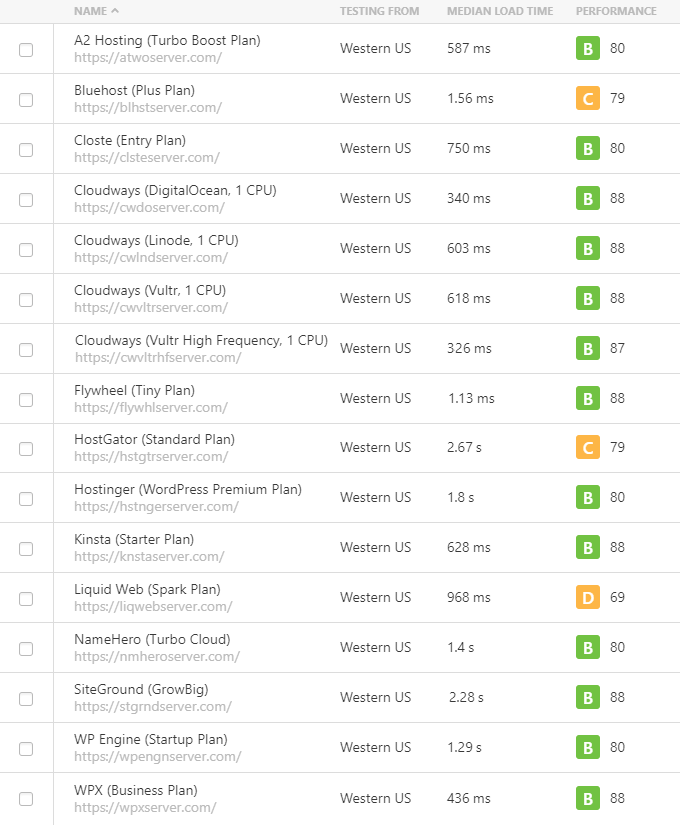
If you’ve read more than two Hostinger vs Bluehost comparisons, you’ve probably noticed something confusing: the performance data doesn’t agree. One article says Hostinger is faster. Another shows Bluehost with a lower load time. Both are citing real tests. The contradiction has an explanation, and once you understand it, the performance picture becomes much clearer.
The Architecture Behind the Numbers
Unoptimized, out-of-the-box: Bluehost can be marginally faster. Their Nginx layer serves static assets (images, CSS, JavaScript) efficiently, and without any configuration, a basic WordPress install can load quickly on Bluehost shared servers.
Optimized with LiteSpeed Cache: Hostinger’s performance pulls significantly ahead. LSCache bypasses PHP interpretation entirely for cached pages, serving static HTML directly from the server kernel. This is the configuration Hostinger recommends and that most experienced Hostinger users run. The WPBeginner tests showed this clearly: Hostinger averaged 72.4ms response time versus Bluehost’s 140ms — nearly double.
When it comes to full page load times, the WPBeginner comparison found Bluehost at 770ms versus Hostinger at 935ms in their specific test configuration. That test used an unoptimized setup. Under optimized conditions, the TTFB and load time data consistently favor Hostinger.
| Metric | Hostinger | Bluehost | Source |
|---|---|---|---|
| TTFB (optimized) | 200–400ms | 400–600ms | Research benchmarks |
| Avg response time | 72.4ms | 140ms | WPBeginner (verified Feb 2026) |
| Page load (WPBeginner test) | 935ms (unoptimized) | 770ms (unoptimized) | WPBeginner (verified Feb 2026) |
| 5-year uptime avg | 99.980% | ~99.97% (varies) | Hostingstep benchmarks |
| Uptime guarantee | 99.9% (with financial SLA) | 99.99% (marketing claim) | Official pages |
| Stress test (concurrent users) | Flat response curve | Exponential spike | Research benchmarks |
| Server technology | LiteSpeed Enterprise | Apache + Nginx | Official + research |
The uptime guarantee comparison is worth unpacking. Hostinger’s 99.9% guarantee comes with a financial compensation clause — if they fall short, you get money back. Bluehost’s 99.99% claim appears prominently in marketing but the service agreement’s language around compensation for downtime on shared plans is significantly less clear. In practice, both hosts are reliable. In documentation, Hostinger is more transparent.
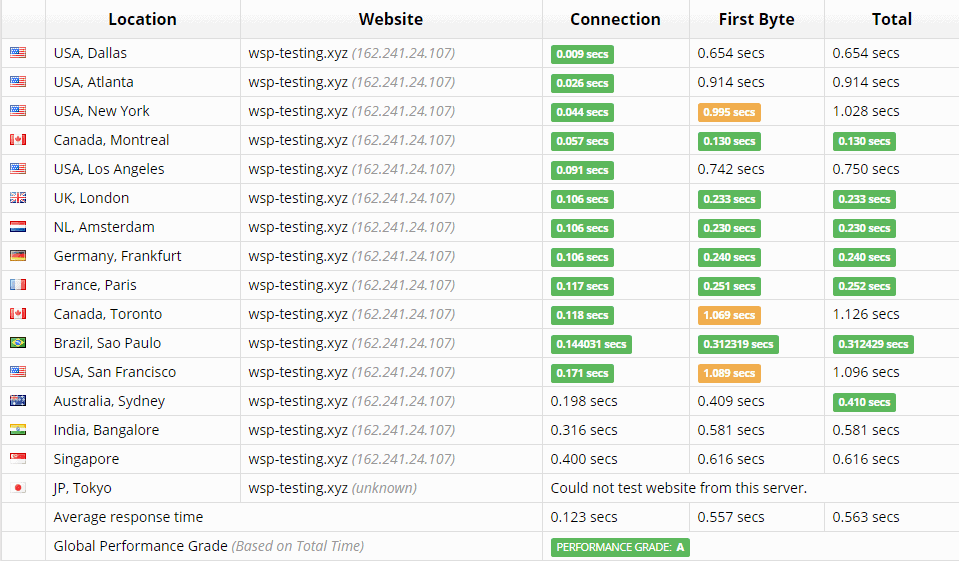
What Bluehost’s 2025 Expansion Means for Performance
Before October 2025, recommending Bluehost to someone running a website for UK, European, or Indian audiences was difficult to justify. The Utah-based infrastructure meant every user request crossed an ocean. The new data centers in London, Frankfurt, Mumbai, and Sydney change that — at least for new accounts. If you’re in the UK and signing up today, London server selection should be available. Verify this during signup; the default may still route you to US infrastructure.
Customer Support — More Channels Doesn’t Always Mean Better Help
Bluehost offers phone support. Hostinger doesn’t. For some users, that’s a dealbreaker before they’ve looked at anything else. For others, what matters is whether the support that exists actually solves their problem.
What Both Hosts Offer
Hostinger: 24/7 live chat (AI bot “Kodee” handles initial triage, routes to human agents for complex issues), email/ticket system, multilingual support. No phone. Average human response time under 2 minutes on chat.
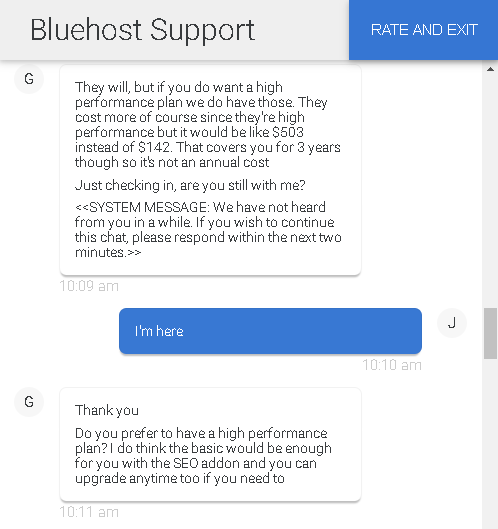
Bluehost: 24/7 live chat, email, and phone support (phone available from the Business tier). Tier 1 agents are often outsourced and tend to follow scripts. A documented support test by WebsitePlanet found a Bluehost chat session lasting 38 minutes, with the agent disappearing for 7 minutes and attempting multiple upsells mid-conversation.
What Users Actually Say — The Data Beyond Trustpilot
Trustpilot scores are close: Hostinger 4.7/5 (from 62,798 reviews, February 2026) versus Bluehost 4.6/5 (from 28,589 reviews). But the underlying data tells a different story. Hostinger’s 1-star rate is 6% — Bluehost’s is 16%. Among a much larger review base, Hostinger generates proportionally fewer negative experiences.
| Platform | Hostinger | Bluehost | Notes |
|---|---|---|---|
| Trustpilot score | 4.7/5 | 4.6/5 | Hostinger: 62,798 reviews; Bluehost: 28,589 |
| Trustpilot 1-star rate | 6% | 16% | Bluehost rate is nearly 3× higher |
| Capterra (overall) | ~4.5/5 | 3.6/5 | Bluehost: 119 verified reviews |
| Capterra (customer service) | ~4.4/5 | 3.3/5 | Significant gap |
| WPBeginner user rating | 4.7/5 (1,053 reviews) | 4.9/5 (325 reviews) | Smaller Bluehost sample |
The Capterra gap — 0.9 points overall, 1.1 points on customer service — is hard to attribute to anything other than a genuine difference in the support experience. Bluehost’s phone number doesn’t compensate if the agents on the other end are working from scripts and recommending paid addons for problems that don’t require them.
/images/2025/10/14/hostinger_vs_bluehost_8.png)
Security — What’s Included and What Gets Added to Your Bill
Security at the shared hosting level is table stakes: free SSL, basic DDoS protection, a firewall. Both Hostinger and Bluehost clear that bar. Where they diverge is in what gets included automatically versus what gets sold as an add-on.
| Security Feature | Hostinger | Bluehost |
|---|---|---|
| Free SSL | All plans, unlimited domains | All plans |
| DDoS protection | All plans (Cloudflare integration) | All plans |
| Web application firewall | All plans | All plans |
| Automated malware scanning | All plans | Business+ only |
| Malware removal | Manual / backup restore | Business+ included; SiteLock add-on on lower tiers |
| Domain privacy | Free (all plans) | ~$15/year (most lower-tier plans) |
Hostinger includes automated malware scanning on all shared plans — it alerts you if malicious code is detected. Removal may require manual intervention or restoring a backup, but the detection layer is free. Bluehost’s comparable protection (malware detection and removal) is included only on Business tier and above; lower-tier users who want it are pointed toward SiteLock, a paid add-on. If a lower-tier Bluehost site gets compromised, the resolution path involves either paying for SiteLock or doing it yourself.
On past incidents: Hostinger experienced a data breach in 2019 that affected approximately 14 million customer records including usernames, passwords, and email addresses. The breach was disclosed quickly and remediation followed. Bluehost had a separate incident in 2015. Both are historical events; neither represents a current security posture, but they’re worth knowing.
Control Panels — hPanel vs cPanel and What It Means for Your Workflow
The choice between hPanel and cPanel isn’t just aesthetic. It affects how you manage your site daily, how you onboard team members, and how easy it is to leave either host in the future.
/images/2025/10/14/hostinger_vs_bluehost_1.png)
| Feature | Hostinger hPanel | Bluehost cPanel |
|---|---|---|
| Interface style | Modern SaaS (Shopify/Stripe-like) | Legacy cPanel + simplified wrapper |
| Resource visibility | Full — CPU, RAM, inodes shown in real time | Opaque — throttling happens invisibly |
| Global search | Yes — type any setting name | No |
| Learning curve | Low for beginners; adjustment for cPanel veterans | Familiar for developers; more cluttered |
| Migration away | More manual (no standard cPanel backup) | Standard cPanel backup (portable) |
| Upsell interruptions | Minimal | Frequent banners and prompts |
/images/2025/10/14/hostinger_vs_bluehost_2.png)
hPanel’s resource transparency is worth highlighting for growing sites. When Hostinger shows you that your site is using 2.4GB of your 3GB RAM allocation, you know it’s time to upgrade. When Bluehost silently throttles your CPU because you’ve hit an undisclosed threshold, you might spend hours troubleshooting slow load times before realizing the cause.
If you’re a developer or agency managing sites for clients, cPanel’s portability is a genuine advantage. A cPanel full backup moves to any compatible host without manual file management. That said, most hosts have migration tools — it’s more of a convenience argument than a hard limitation.
WordPress-Specific Features — What Matters Beyond One-Click Installs
Both hosts install WordPress in under a minute and handle automatic core updates. The differences emerge in staging environments, developer tool access, and how each host approaches AI-assisted site creation.
| Feature | Hostinger | Bluehost |
|---|---|---|
| One-click WordPress install | All plans | All plans |
| Staging environment | Business+ plans | All plans |
| SSH access | All plans (entry-level included) | Higher tiers |
| WP-CLI | All plans | All plans |
| GIT integration | Yes | Yes |
| PHP version control | All plans | All plans |
| AI site creation | Full AI site builder (generates complete site) | WonderSuite (WordPress editor AI assistant) |
| Managed WordPress features | Business+ (staging, daily backups) | All plans (NVMe, CDN, staging included) |
Bluehost has a meaningful advantage on WordPress staging — it’s available on all plans, while Hostinger gates it behind the Business tier. For developers who routinely push changes through a staging environment before touching the live site, this matters at the entry-level plan.
Hostinger’s AI tooling goes in a different direction. Their AI Website Builder generates a complete website from a short prompt — layout, content, images, structure. It’s a site-creation tool. Bluehost’s WonderSuite operates inside the WordPress editor, helping with individual posts and product descriptions. The Hostinger approach suits someone starting from nothing; the Bluehost approach suits someone already running WordPress who wants AI help with ongoing content.
On developer access: Hostinger provides SSH even on entry-level plans, which lets developers connect via command line, run WP-CLI commands, deploy via GIT, and manage files without touching the file manager UI. Bluehost restricts SSH to higher tiers on shared hosting. For solo developers who want terminal access to a cheap host, this is a concrete Hostinger advantage.
Who Should Choose Which — A Persona-Based Decision Guide
The right hosting choice isn’t one-size-fits-all. Here’s a structured breakdown by user type, based on the actual differences between these two hosts rather than marketing language.

| User Type | Best Choice | Key Reason |
|---|---|---|
| Complete beginner (first WordPress site) | Bluehost | WordPress Wizard onboarding, phone support, guided setup removes most friction |
| Budget-conscious blogger or freelancer | Hostinger | 48-month lock-in saves substantially; LiteSpeed performance above its price tier |
| Small business owner (with email needs) | Hostinger | Included email avoids the $500+ four-year Google Workspace cost via Bluehost |
| WordPress developer or agency | Hostinger | SSH on cheap plans, resource transparency, lower TCO for client site management |
| eCommerce site (Asia, LatAm, or global) | Hostinger | Local data centers in Singapore, India, Indonesia, Brazil; NVMe on all plans |
| Non-technical owner who needs phone help | Bluehost | Phone support (Business tier+) provides reassurance that chat-only hosting can’t match |
The budget-conscious blogger or freelancer: Hostinger’s entry-level pricing, locked in for four years, is consistently lower than any comparable Bluehost plan. LiteSpeed’s performance advantage means you’re not trading speed for savings.
The non-technical small business owner: Bluehost’s WordPress Wizard walks you through site creation step by step. Phone support — available from the Business tier — means that when something breaks on a Saturday, you can speak to a human rather than typing into a chat box. The extra cost may be worth it if the alternative is hours of frustration.
The WordPress developer or agency: Hostinger’s SSH access on entry-level plans, WP-CLI, GIT integration, and transparent resource monitoring make it a better technical environment. Lower renewal rates mean better margins when reselling hosting for client sites.
The global entrepreneur running eCommerce: If your customers are in Southeast Asia, India, or South America, server location directly affects your Core Web Vitals scores and conversion rates. Hostinger’s data centers in Singapore, Jakarta, and São Paulo put your store’s servers close to your buyers. Bluehost’s 2025 expansion helps for UK/EU, but its coverage in Asia-Pacific remains thinner than Hostinger’s.
Frequently Asked Questions About Hostinger vs Bluehost
Is Hostinger better than Bluehost for WordPress?
For most use cases, yes — Hostinger’s LiteSpeed architecture provides faster server response times, and the lower long-term cost makes it easier to invest in WordPress plugins and themes instead. The exception: if you’re a complete beginner who needs phone support and guided WordPress setup, Bluehost’s onboarding experience and support channels have genuine advantages that matter more than raw speed at that stage.
Which is cheaper in the long run — Hostinger or Bluehost?
Hostinger, by a significant margin once you factor in email. The four-year total cost for a small business (hosting + domain + three email addresses) runs roughly $190–$240 with Hostinger versus $1,000+ with Bluehost, primarily because Bluehost charges per user per month for professional email after a free trial. If you don’t need business email, the gap narrows to mainly the hosting renewal rate difference, which still favors Hostinger.
Does Bluehost have a money-back guarantee?
Yes — Bluehost offers a 30-day money-back guarantee on hosting plans. Hostinger also offers 30 days. Both guarantees cover the hosting cost; domain registration fees are typically non-refundable. Read the terms carefully if you’re within the trial window and considering a switch.
Is Hostinger’s hPanel easy to use?
For most users, yes. hPanel is designed with a cleaner interface than cPanel — logical categories, a global search bar that finds any setting by keyword, and resource graphs that show your actual server utilization. If you’ve used cPanel for years, there’s an adjustment period. If you’re starting fresh, hPanel is generally more intuitive for day-to-day WordPress management tasks.
Can I get business email with Hostinger?
Yes. Hostinger plans include two email mailboxes per domain free for the first 12 months, after which Business Email is available as a paid addon starting around $0.35–$1.59 per user/month depending on the subscription term. This is substantially cheaper than running email through Google Workspace via Bluehost. Confirm current email pricing at hostinger.com before subscribing.
Does Bluehost offer cloud hosting?
No dedicated cloud hosting product exists under the Bluehost brand — their hosting lineup covers shared, managed WordPress, VPS, and dedicated servers. Hostinger offers Cloud Startup, Cloud Professional, and Cloud Enterprise plans with dedicated resources and isolated environments, starting around $9.99/month on introductory pricing.
Which is faster — Hostinger or Bluehost?
Hostinger, when LiteSpeed Cache is active. In an unoptimized test environment, Bluehost’s 770ms page load time beat Hostinger’s 935ms in WPBeginner’s testing. But Hostinger’s average response time was 72.4ms versus Bluehost’s 140ms — nearly double — in the same test. Under optimized conditions with LSCache enabled, Hostinger’s TTFB runs 200–400ms versus Bluehost’s 400–600ms. The difference between “unoptimized” and “optimized” explains most of the contradictory data you’ll find in other comparisons.
Is Bluehost really recommended by WordPress.org?
Yes. Bluehost is one of three hosting providers officially listed on WordPress.org’s hosting page. The recommendation is a paid partnership — Bluehost pays for the placement. That said, WordPress.org has historically vetted its partners for basic quality standards. The endorsement carries weight, particularly for beginners who want reassurance that their chosen host is compatible with the WordPress platform. Hostinger is not on that list.
Which is more secure — Hostinger or Bluehost?
Both provide SSL, DDoS protection, and a web application firewall on all plans. Hostinger includes automated malware scanning on all tiers; Bluehost restricts automated malware detection and removal to its Business tier and above, with SiteLock available as a paid add-on for lower-tier users. Hostinger had a significant data breach in 2019 affecting 14 million accounts, since remediated with infrastructure changes. Bluehost had a separate incident in 2015. Both histories are relevant context, but neither represents a current security gap.
Can I migrate from Bluehost to Hostinger (or vice versa)?
Yes, and both hosts offer migration support — though the experience differs. Hostinger provides free managed migration assistance, where their team handles the transfer. Bluehost equips users with tools and tutorials but largely puts the migration work on you unless you pay for their premium migration service. If you’re moving from Bluehost to Hostinger, Hostinger’s free migration team is a meaningful convenience. Moving the other direction — Hostinger to Bluehost — is more manual due to hPanel’s non-standard backup format.
Conclusion — Two Good Hosts, Two Different Philosophies
Hostinger and Bluehost represent genuinely different approaches to shared WordPress hosting. Hostinger is a technology-first provider — it invests in LiteSpeed infrastructure, NVMe storage, and a custom control panel designed around performance and cost efficiency. The result is a host that consistently outperforms its price tier, with a four-year cost of ownership that’s difficult for any comparable option to match.
Bluehost is a brand-first provider. It invests in a curated WordPress experience, a recognizable name backed by WordPress.org, and a support model with phone access. For small business owners who don’t want to learn hosting infrastructure and want reassurance that their host has been vetted by the WordPress team, those attributes have real value — even at a higher price.
The data points clearly toward Hostinger for the majority of users: better long-term economics, faster server response times under optimized conditions, broader global data center coverage, and stronger customer satisfaction scores on most platforms. The case for Bluehost is specific: phone support, guided onboarding, cPanel familiarity, and the WordPress.org endorsement for users who need that trust signal.
Neither is a bad choice. The right one depends on whether you’re optimizing for cost and performance, or for comfort and guided support — and those are legitimate different priorities.
