



Bottom Line Up Front
If you run a facts and information blog on Blogger (Blogspot) and want to maximize your Google AdSense earnings, your theme choice matters far more than most bloggers realize. Here are the three best free options right now:
- Citlali — Best overall for information and magazine-style fact blogs; clean ad zones, fast loading, and mobile-first design.
- Mandarin — Best two-column layout for sidebar AdSense placement; excellent CTR positioning for educational content.
- Gridster — Best for high-volume content publishers running news or viral facts sites; magazine grid keeps users browsing longer.
| Fact | Detail |
|---|---|
| Blogger owner | Google (acquired 2003) — native AdSense integration |
| Hosting cost | Free — you keep 100% of AdSense revenue |
| AdSense display CTR avg. | ~0.46% across industries [WordStream Google Ads Benchmarks 2024–2025; verify current figures at Google AdSense support] |
| AdSense approval requirement | Privacy Policy page, About page, original content mandatory |
| Recommended blog age before applying | 6 months minimum (faster with custom domain) |
Running a facts and information blog on Blogger is one of the smartest low-cost content strategies in 2026. You get free hosting from Google, built-in HTTPS, unlimited bandwidth, and — crucially — the easiest path to Google AdSense approval of any free blogging platform. But here is the problem most information bloggers never solve: they install a generic theme, place their AdSense ads in random spots, and wonder why their revenue stays flat. At wplasma.com, we cover everything related to blogging platforms, themes, and monetization — and one of the most consistently overlooked areas is theme selection for AdSense performance.
The theme you choose directly determines where your ads appear, how fast your pages load, how long readers stay, and how many impressions your ad units collect. A theme built for portfolios will kill your AdSense performance. A theme engineered for ad revenue will compound it. This guide gives you an honest, data-informed look at the best free Blogger themes specifically optimized for Google AdSense on facts and information blogs — with real pros and cons, a skill-level guide, and a setup roadmap you can follow today.

Why Blogger Is a Strong Platform for Facts & Information Blogs
Blogger is not the flashiest platform in 2026. WordPress gets most of the headlines, and newer platforms like Ghost or Substack attract writers looking for audiences. But for a very specific type of creator — the builder of fact-based, evergreen information sites monetized by display advertising — Blogger holds a genuinely underrated position.
The core reason is economics. Blogger costs nothing. No monthly hosting bill, no plugin subscriptions, no security service fees. Every dollar your AdSense account generates stays with you. A WordPress.org site running on even budget shared hosting costs $3–10 per month. Over five years, that is $180–$600 in costs before you earn a cent. Blogger eliminates that friction entirely.
Beyond cost, Blogger’s Google ownership creates structural advantages that matter specifically for AdSense publishers:
- Native AdSense integration — Blogger has built-in AdSense connection. Apply for a hosted AdSense account directly through your Blogger dashboard without a separate website verification process.
- Built-in HTTPS/SSL — Google automatically secures all Blogger sites. AdSense requires HTTPS for ad serving; Blogger handles this without any extra setup.
- Unlimited storage and bandwidth — Your information blog can grow to thousands of posts without hitting limits or paying overage fees.
- Up to 100 blogs per Google account — You can manage multiple information niche sites under one account.
- Google indexing priority — While no guarantee, Google’s own platform content tends to get crawled and indexed efficiently, which matters for your organic traffic and ad impressions.
The honest trade-off: Blogger gives you less design flexibility than WordPress, and the template ecosystem is smaller. But for a lean, profitable information blog focused on AdSense revenue, Blogger’s advantages outweigh these limitations — provided you choose the right theme from the start.
What Makes a Blogger Theme “AdSense-Optimized”?
Most free Blogger themes will technically accept AdSense ad code. But accepting code and being optimized for revenue are not the same thing. A truly AdSense-optimized theme is engineered around specific design principles that increase ad visibility, reader retention, and click-through rates.
Pre-Defined Ad Slot Placements
AdSense-ready Blogger themes include widget areas or HTML sections specifically designed for ad units. Rather than squeezing a 728×90 leaderboard into a space that was designed for a blog header image, these themes have pre-built containers at the positions where Google itself recommends ads: above the fold in the header, within article content (after the first 1-2 paragraphs), in the sidebar, and in the footer.
The difference in practice is significant. A theme with a proper in-content ad slot after the opening paragraph will show ads to readers who are actively engaged with your content — the highest-value position for information blogs. A theme without this slot forces you to inject ad code manually via workarounds, which breaks on mobile, misaligns on different screen sizes, and creates a maintenance headache.
Fast Loading Speed and Its Impact on AdSense Revenue
Page speed affects your AdSense earnings in two ways that most bloggers miss. First, slow pages drive readers away before ads have time to load and render — meaning those page visits generate zero impressions. Second, Google’s Core Web Vitals scores affect your search rankings, and fewer organic visitors means fewer ad impressions over time.
For information blogs specifically — where readers often come from Google Search looking for a quick fact — a slow-loading page is a death sentence. Studies consistently show a 1-second delay in page load time reduces page views by approximately 11% (verify exact figure at web.dev/performance). A lightweight Blogger theme with clean code, minimal external scripts, and optimized CSS can load in under 2 seconds on a standard mobile connection. A bloated theme with animation libraries and unused JavaScript may take 5–8 seconds — erasing your AdSense potential before a single reader sees your content.
Mobile Responsiveness and AMP Compatibility
In 2026, mobile devices account for more than 60% of global web traffic. For facts and information blogs specifically — often accessed via mobile search — mobile responsiveness is not optional. A theme that looks good on desktop but collapses on mobile will tank your ad impressions precisely where your readers are.
AMP (Accelerated Mobile Pages) is worth understanding for AdSense publishers. AMP Blogger templates load pages in a fraction of the time of standard pages on mobile networks, specifically because they use a constrained subset of HTML that strips away slow-loading elements. The key fact: AMP templates still display AdSense ads. Google designed the AMP framework with publisher monetization in mind, so AMP ads render even while the page loads at maximum speed. For information blogs where readers arrive on slow mobile connections (rural areas, developing markets), AMP can meaningfully increase the number of ads actually seen and counted by AdSense.
Clean Content Layout for Reader Retention
AdSense revenue is fundamentally a function of ad impressions. More page views per reader equals more impressions equals more revenue. A clean, readable layout keeps readers on your page longer and encourages them to click into related articles. Cluttered themes with too many sidebars, excessive widgets, and confusing navigation push readers away faster — a high bounce rate directly translates to lower AdSense earnings.
For facts and information blogs, where the content itself is the product, a theme that centers the reading experience is not just aesthetically better — it is financially better. Typography matters: clear headings, proper line spacing (1.6–1.8 em), and a comfortable font size (16–18px body text) reduce cognitive load and keep readers engaged through your entire article.
High CTR Design Principles
Certain layout decisions consistently produce higher ad click-through rates on information blogs:
- Ads placed above the fold (visible without scrolling) receive 2-3× more impressions than ads below the fold
- In-content ad placement (within article body) outperforms sidebar and footer placement for information blogs
- White space around ads improves visibility without making ads feel intrusive
- Two-column layouts allow both a primary content area and a persistent sidebar for sticky ad units
| Feature | Why It Matters for AdSense | What to Look For |
|---|---|---|
| Pre-built ad slots | Correct placement without manual code injection | “Ads Ready” label from template provider |
| Page load speed | More ads rendered per visit | Lightweight code, minimal external scripts |
| Mobile responsiveness | 60%+ traffic is mobile | “Responsive” label, test on mobile before installing |
| AMP support | Faster mobile loads = more impressions | “AMP Ready” or separate AMP version available |
| Two-column layout | Dedicated sidebar for persistent ad units | Sidebar widget area clearly present |
| In-content ad zone | Highest CTR position for information blogs | Ad widget support within post body |
| Clean typography | Reader retention → more impressions | Readable font size, proper line height |
| SEO structure | Organic traffic = ad impressions | Proper H1/H2 structure, breadcrumbs, meta support |
Top 10 Free Blogger Themes for Facts & Information Blogs (2026)
The following themes are drawn from established Blogger template repositories (btemplates.com, gooyaabitemplates.com) and are confirmed to be free, responsive, and AdSense-compatible as of 2026. Each entry includes honest assessment of strengths and genuine limitations.
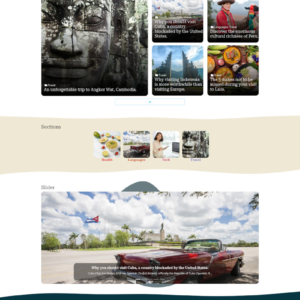
1. Citlali — Best Overall for Information Blogs
What it is: Citlali is a magazine-style Blogger template released in 2023 that combines a clean grid-based homepage with strong in-article ad placement support. It is one of the most consistently recommended free templates for content-heavy information sites.
Why it works for facts blogs: The homepage grid displays multiple articles simultaneously — readers who land on your site from search see related content immediately, extending session time and increasing page views. More page views means more ad impressions. The in-content ad zone after the opening paragraphs targets readers at peak engagement.
Key features:
- Responsive design (mobile, tablet, desktop)
- Pre-built ad slots: header, in-content, sidebar, footer
- Magazine grid homepage
- Social sharing buttons
- SEO-optimized HTML structure
- Fast loading (lightweight CSS)
Honest cons: Citlali’s grid homepage requires a reasonable volume of published posts (15+) to look complete. If you have fewer than 10 articles, the homepage can look sparse. Not the best choice for single-author blogs just starting out.
Best for: Information blogs with a steady publishing cadence (3+ posts per week); viral facts sites; news-style information blogs.
Download source: btemplates.com

2. Mandarin — Best Two-Column Layout
What it is: Mandarin is a two-column Blogger template that separates the main content area from a clearly defined sidebar. This classic layout is the gold standard for AdSense publishers on information blogs because it gives you a persistent sidebar column where sticky or fixed ad units remain visible as readers scroll.
Why it works for facts blogs: Information blog readers tend to read longer articles than entertainment or viral content readers. A two-column layout keeps a 300×250 or 300×600 sidebar ad visible throughout the entire article read, maximizing impressions per session. The design also organically separates ads from content in a way that readers accept — it feels like a traditional magazine or reference website rather than an intrusive experience.
Key features:
- Two-column responsive layout
- Dedicated sidebar with multiple widget zones
- Header ad slot (728×90)
- In-content ad support
- Breadcrumb navigation for SEO
- Sticky sidebar option
Honest cons: The two-column layout compresses the main content area, which can reduce readability on smaller tablet screens. The sidebar disappears on mobile (becomes bottom of page), which means mobile visitors see fewer ads. If your audience is primarily mobile, consider pairing Mandarin with AMP-specific ad configuration.
Best for: Long-form information articles, science facts, history blogs, educational reference sites.
Download source: btemplates.com
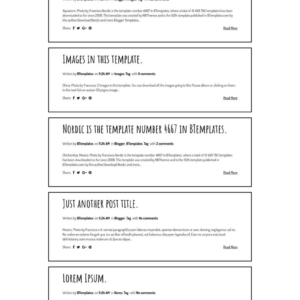
3. Nordic — Best Minimal Design
What it is: Nordic is a minimalist Blogger template with a clean single-column (or optional two-column) layout. It uses white space generously, keeps navigation simple, and strips away all non-essential design elements. The result is a fast-loading, highly readable template.
Why it works for facts blogs: The minimal design creates a high-trust reading environment. Readers who come to your facts blog for accurate information want clarity — not visual noise. Nordic’s clean layout reduces bounce rate because readers feel comfortable staying and reading. More time on page equals more scroll depth, which equals more in-content ad impressions.
Key features:
- Ultra-lightweight code (very fast loading)
- Single-column or two-column variants
- Strong typography defaults
- Ad-ready widget areas
- Simple but effective navigation
- High Lighthouse performance score
Honest cons: Nordic’s minimalism means fewer native ad zones than a dedicated magazine theme. You may need to manually configure in-content ad placement via HTML/XML editing. Not recommended for complete beginners who are uncomfortable with any code editing.
Best for: Long-form fact articles, research-based content, single-author information blogs, science and technology niches.
Download source: btemplates.com
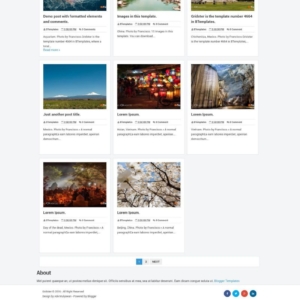
4. Gridster — Best Magazine Grid
What it is: Gridster is a grid-based magazine Blogger template designed for websites that publish content across multiple categories. The homepage presents posts in a tile/card format that lets readers quickly scan and select content — a behavior that drives multi-page sessions and increased ad impressions.
Why it works for facts blogs: Facts and information sites naturally organize by category (science facts, history, geography, etc.). Gridster’s grid layout displays category-specific posts in organized sections, making it easy for readers to stay in your ecosystem rather than bouncing back to Google. Each additional page a reader visits generates another ad impression.
Key features:
- Magazine grid homepage with category sections
- Featured post slider
- Multi-column ad zones
- Responsive (stacks cleanly on mobile)
- Sidebar with sticky ad support
- Social media integration
Honest cons: The featured post slider adds JavaScript weight that can slow initial load time slightly. Information blogs with purely text content may not fully leverage the visual-first grid design. Category organization is mandatory — publishing content without clear categories makes the Gridster homepage look chaotic.
Best for: Multi-category information blogs; viral facts sites; sites covering news, science, history, and trivia.
Download source: btemplates.com
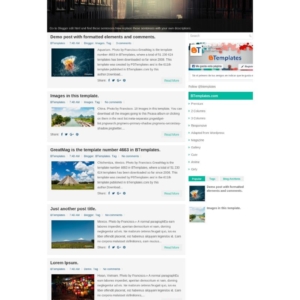
5. GreatMag — Best for High-Volume Content Sites
What it is: GreatMag is a feature-rich magazine-style template built for publishers who release content frequently. The homepage displays posts across multiple layout regions — featured, latest, trending — giving frequent publishers maximum surface area to attract readers to new content.
Why it works for facts blogs: High-volume information publishers (10+ posts per week) need a homepage that handles content density without becoming cluttered. GreatMag’s modular layout sections each serve specific content types, making it easy for return visitors to find new facts without searching through a single reverse-chronological feed.
Key features:
- Multiple homepage content zones (featured, latest, trending)
- Header leaderboard (728×90) ad slot
- Between-section ad zones
- Sidebar with multiple widget areas
- Responsive design
- Related posts widget
Honest cons: GreatMag is one of the heavier templates in this list. If your Blogger blog has slow loading times, GreatMag will not help. Requires solid content library to look professional. SEO configuration needs manual attention — default meta settings are not optimal out of the box.
Best for: Established information blogs with large content libraries; publishers releasing 5–20 articles per week.
Download source: btemplates.com
6. Journal — Best Classic Blog Layout
What it is: Journal is a traditional blog-format Blogger template with a clean reverse-chronological post list, a sidebar, and clearly positioned ad zones. It follows the “classic blog” design that readers have trusted for two decades — because it works.
Why it works for facts blogs: Some information blogs are best served by simplicity. If you write long, detailed fact articles (2,000+ words) that each stand alone, a classic blog layout lets each post take center stage. The sidebar keeps a 300×250 ad unit visible throughout. The simple navigation puts category browsing front and center, encouraging deeper exploration.
Key features:
- Classic reverse-chronological post list
- Two-column (main content + sidebar)
- Header ad slot (728×90)
- Sidebar ad widget area
- Post thumbnail support
- Comment section integrated
Honest cons: Journal’s homepage can feel outdated compared to magazine-grid competitors. It does not naturally encourage multi-article sessions the way a grid layout does. Best suited for single-topic blogs where readers arrive at a specific article via search, rather than browsing from the homepage.
Best for: Single-topic information blogs; niche-authority sites; readers who arrive primarily from search engines.
Download source: btemplates.com
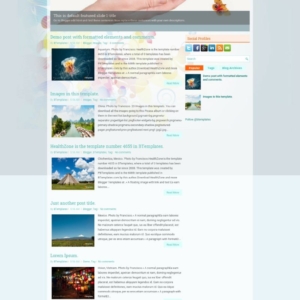
7. HealthZone — Best for Educational and Health Information Niches
What it is: HealthZone is a Blogger template built specifically for health, wellness, and educational information sites. It features a clean design with clear content sections, making it ideal for fact-based health blogs, science education sites, or any information niche requiring reader trust.
Why it works for facts blogs: Health and educational information blogs benefit from a design that signals credibility and authority. HealthZone’s clean layout, clear typography, and organized category structure help readers trust the information they are reading — a critical factor in a niche where reader trust directly affects time-on-site and return visits.
Key features:
- Education/health optimized design
- Clear category navigation
- Ad-ready header, sidebar, footer zones
- Featured posts section
- Mobile responsive
- High-trust visual design
Honest cons: The design is niche-specific. Using HealthZone for non-health/education topics can create a visual mismatch that confuses visitors. The color scheme is fixed and less customizable than neutral templates like Nordic or Journal.
Best for: Health facts blogs, medical information sites, science education, wellness tips, nutrition facts sites.
Download source: btemplates.com
8. SuevaFree — Best for Beginners
What it is: SuevaFree is one of the most beginner-friendly free Blogger templates available. Developed by the Sueva Themes team, it comes with clear documentation, a clean layout, and pre-configured AdSense zones that work out of the box without XML editing.
Why it works for facts blogs: If you are building your first information blog on Blogger and have no experience with theme customization, SuevaFree eliminates the technical friction that causes most beginners to give up. The AdSense zones are ready to receive your ad code through standard widget drag-and-drop.
Key features:
- Beginner-friendly setup
- Pre-configured AdSense widget areas
- Clean, professional design
- Responsive layout
- Detailed documentation included
- No coding required for ad placement
Honest cons: SuevaFree is not the most feature-rich option on this list. As your blog grows, you may find you want more customization options than SuevaFree provides without upgrading to the premium version.
Best for: Absolute beginners; bloggers setting up their first AdSense-monetized information site.
Download source: btemplates.com
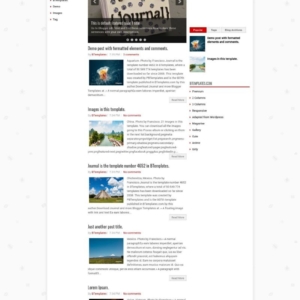
9. Solon — Best SEO-Focused Theme
What it is: Solon is a minimal Blogger template engineered around search engine optimization. It features clean semantic HTML, proper heading hierarchy, fast load times, and a design that avoids any element that could distract search engine crawlers from your content.
Why it works for facts blogs: Your AdSense revenue ultimately depends on organic traffic. Without readers finding your articles through Google, there are no impressions and no clicks. Solon’s SEO-first architecture helps your facts and information articles rank for the specific questions your target readers are typing into search engines.
Key features:
- Semantic HTML structure for SEO
- Clean meta tag support
- Breadcrumb navigation
- Fast loading (minimal external dependencies)
- Ad zones in high-visibility positions
- Structured data support
Honest cons: Solon prioritizes function over form. The visual design is deliberately simple — if you want a visually impressive blog, Solon will disappoint. It is engineered for performance and search rankings, not aesthetics.
Best for: Information blogs prioritizing long-term organic search traffic growth; beginners who understand that SEO drives sustainable AdSense income.
Download source: btemplates.com
10. AMP Simple — Best for Mobile-First AdSense
What it is: AMP Simple (and its variants — look for “AMP Ready” labels on Blogger template repositories) is a Blogger template built on the Accelerated Mobile Pages framework. It loads pages in a fraction of the time of standard templates on mobile networks.
Why it works for facts blogs: If your facts and information blog gets significant traffic from mobile users in developing markets, South Asia, Southeast Asia, or Sub-Saharan Africa — where slower mobile connections are common — an AMP template can dramatically increase the number of page visits that actually result in loaded ads. Readers on 3G connections who get a standard Blogger template may leave before the page (and the ads) finish loading. An AMP page delivers content in under 1 second, keeping those readers and their ad impressions.
Key features:
- AMP HTML framework — ultra-fast mobile loading
- AdSense ads render despite speed constraints
- Mobile-first design
- Reduced bandwidth usage for readers
- Improved mobile search visibility
Honest cons: AMP templates have strict HTML/CSS constraints that limit customization. Some widgets and JavaScript-dependent features will not work in AMP mode. AMP templates require careful AdSense configuration — AMP-specific ad units must be used rather than standard units. Not suitable for bloggers who want maximum design flexibility.
Best for: Information blogs targeting mobile users in high-traffic, mobile-dominant markets; global facts sites with diverse geographic audiences.
Download source: gooyaabitemplates.com
Side-by-Side Comparison: All 10 Free Blogger Themes
| Theme | Layout | Ad Slots | Speed | Mobile | Skill Level | Best For |
|---|---|---|---|---|---|---|
| Citlali | Magazine grid | Header, in-content, sidebar, footer | Fast | Yes | Intermediate | High-volume info sites |
| Mandarin | Two-column | Header, sidebar, in-content | Fast | Yes | Beginner–Intermediate | Long-form articles |
| Nordic | Minimal | Widget-based (manual config) | Very Fast | Yes | Intermediate | Research/science blogs |
| Gridster | Magazine grid | Header, in-section, sidebar | Moderate | Yes | Intermediate | Multi-category info sites |
| GreatMag | Magazine multi-zone | Header, between-sections, sidebar | Moderate | Yes | Intermediate–Advanced | High-volume publishers |
| Journal | Classic blog | Header, sidebar | Fast | Yes | Beginner | Search-traffic info blogs |
| SuevaFree | Clean blog | Pre-configured widget areas | Fast | Yes | Beginner | First-time Blogger users |
| HealthZone | Education/info | Header, sidebar, footer | Fast | Yes | Beginner | Health/education niches |
| Solon | Minimal/SEO | Header, sidebar | Very Fast | Yes | Beginner | SEO-first blogs |
| AMP Simple | AMP mobile-first | AMP ad units | Ultra Fast | AMP | Advanced | Mobile-dominant audiences |
| Niche | Top Pick | Runner-Up | Why |
|---|---|---|---|
| Science & Technology Facts | Nordic | Solon | Clean, credible design; technical readers prefer minimal UI |
| History & Geography | Mandarin | Journal | Two-column suits long-form articles; sidebar for persistent ads |
| Health & Medical Facts | HealthZone | Nordic | Niche-specific design builds trust; clean layout essential for health content |
| Viral Facts / Trivia | Gridster | Citlali | Grid layout drives multi-page sessions and ad impressions |
| News & Current Events | GreatMag | Citlali | Multi-zone homepage for frequent publishing |
| Education & Learning | HealthZone | SuevaFree | Credibility-focused design; easy setup for new bloggers |
| Mobile-heavy audience | AMP Simple | Nordic | AMP delivers ads even on slow connections |
| General information blog | Citlali | Mandarin | Versatile design + strong ad zones work across topics |
How to Choose the Right Theme for Your Facts & Information Blog
No single theme is right for every information blogger. Your optimal choice depends on three factors: your publishing volume, your primary traffic source, and your ad placement strategy.
Match Your Theme to Content Volume
Magazine-style themes like Citlali, Gridster, and GreatMag work best when you have a substantial content library and publish frequently. A magazine homepage that is half-empty looks unprofessional and reduces the content interlinking that drives multi-page sessions.
- 1–3 posts per week (low volume): Journal, SuevaFree, Nordic, or Solon — classic blog formats that look complete even with fewer articles.
- 4–7 posts per week (medium volume): Citlali or Mandarin — enough content to fill the grid and sidebar sections properly.
- 8+ posts per week (high volume): GreatMag or Gridster — multi-zone magazine layouts built to handle content density.
Consider Your Primary Traffic Source
- Google Search (organic): Solon, Nordic, Mandarin — SEO-friendly designs that load fast and structure content cleanly for search crawlers.
- Social media (Facebook, Pinterest): Gridster, Citlali — visual grid layouts that encourage sharing and multi-article browsing after a social click-through.
- Direct/return visitors: GreatMag, Journal — recognizable homepage structures that return visitors navigate confidently.
- Mobile search (60%+ mobile traffic): AMP Simple, Nordic — speed-optimized designs that retain mobile readers through fast load times.
Plan Your Ad Placement Strategy
| Primary Traffic Source | Best Theme | Key Reason |
|---|---|---|
| Google Search (desktop) | Solon or Mandarin | SEO structure + sidebar ad visible throughout long reads |
| Google Search (mobile) | AMP Simple or Nordic | Mobile speed = more ads loaded per visit |
| Facebook / social media | Citlali or Gridster | Grid layout drives session depth and multiple impressions |
| Direct / newsletter | GreatMag or Journal | Familiar structure for return visitors |
| YouTube / video referral | Mandarin or Citlali | Strong in-content ad zones capture engaged readers |
Skill-Level Guide: Which Theme Is Right for You?
Blogger theme installation and configuration require different levels of technical knowledge depending on the theme. Choosing a theme beyond your current skill level creates a frustrating experience and often leads to AdSense placement mistakes that cost you revenue.
| Skill Level | Description | Recommended Themes | What You Can Do |
|---|---|---|---|
| Beginner | No coding experience; uses Blogger dashboard only | SuevaFree, Journal, HealthZone, Solon | Upload XML, drag-and-drop widgets, paste AdSense code into widget areas |
| Intermediate | Comfortable editing basic CSS; understands HTML structure | Mandarin, Citlali, Nordic, Gridster | Edit CSS for minor styling tweaks; add in-content ad zones via HTML/XML edits |
| Advanced | Confident with XML editing; understands Blogger template syntax | GreatMag, AMP Simple, Gridster (full customization) | Modify template XML, create custom ad zones, configure AMP ad units |
A practical tip: if you are a beginner, start with SuevaFree or Journal. Once your blog has 50+ posts and generates a consistent traffic baseline, revisit your theme choice. Many successful information bloggers switch to a more advanced magazine theme after 6–12 months of growth, once they understand their audience and traffic patterns better.
How to Install a Free Blogger Theme: Step-by-Step
Installing a new Blogger theme is straightforward if you follow the steps in order. The most important step — backing up your existing theme — is also the most skipped. Do not skip it.
Step 1: Download the XML Template File
Download your chosen theme from the source site (btemplates.com, gooyaabitemplates.com, etc.). Blogger templates are distributed as .xml files. Save the file to your computer where you can easily find it.
Step 2: Back Up Your Existing Blogger Theme
In your Blogger dashboard: go to Theme → click the three-dot menu (⋮) → select Backup. This downloads your current theme as an XML file. If anything goes wrong with the new theme, you can restore this backup immediately.
Step 3: Upload the New Theme
In Blogger dashboard → Theme → click the arrow next to “Customize” → select Restore → upload your downloaded XML file. Blogger will apply the new theme to your blog. Preview it before confirming.
Step 4: Configure Widgets and Ad Placements
After installation, go to Layout in your Blogger dashboard. You will see the new theme’s widget areas. Add an HTML/JavaScript widget to each ad zone and paste your AdSense ad code. For themes with pre-built ad zones, these widget areas are already positioned correctly.
Step 5: Test on Mobile and Desktop
Before publishing new content, open your blog on a mobile phone and a desktop browser. Check that ads display correctly, the layout is not broken, and navigation works as expected. Use Google PageSpeed Insights (free) to check your page load speed after installation.
Setting Up Google AdSense on Your Blogger Facts Blog
Blogger’s direct connection to Google AdSense makes approval simpler than on self-hosted platforms — but “simpler” does not mean “automatic.” You still need to meet quality thresholds before Google approves your application.
AdSense Eligibility Requirements for Blogger
Google AdSense has specific requirements for Blogger-hosted sites as of 2025–2026 [Source: Google AdSense eligibility requirements]:
- Age requirement: You must be 18 or older. (Under 18: a parent or guardian can apply with their own Google account.)
- Content quality: Original, high-quality content that complies with Google’s content policies. Minimum recommended article length is ~1,000 words per post.
- Required pages: About page, Privacy Policy page, and Contact page — all must be present before applying.
- Custom domain recommended: While .blogspot.com subdomains can get approved, a custom domain (e.g., yourfactsblog.com) significantly improves approval odds and signals legitimacy to Google.
- Blog age: A minimum of 6 months of posting is widely recommended in the community before applying. Blogs with 3+ months of consistent, quality posts can sometimes be approved earlier.
- Hosted AdSense option: If you use Blogger, you can sign up for a hosted AdSense account directly through the Blogger interface — this is a separate, easier application path specifically for Blogger/YouTube creators.
How to Connect AdSense to Your Blogger Blog
The simplest method for Blogger users:
- In your Blogger dashboard, go to Earnings
- Click Sign up for AdSense
- Complete the AdSense application (your Blogger blog URL is pre-filled)
- Wait for Google’s review (typically 1–14 days)
- Once approved, AdSense auto ads can be enabled through the Blogger/AdSense integration
Best Ad Unit Types for Information & Facts Blogs
Not all ad unit types perform equally on information blogs. Based on how readers interact with facts and reference content, the following units consistently produce the best results:
- Responsive display ads: Automatically resize to fit any screen or theme layout. The recommended default for Blogger sites because they adapt to mobile, tablet, and desktop without configuration.
- In-article ads (native format): Placed within the article body after 1–2 paragraphs. These blend with content and typically achieve the highest CTR on information blogs because they appear while readers are actively engaged.
- 728×90 leaderboard (header): Strong performance in the header position above the fold on desktop. Less effective on mobile (where it becomes a small, cropped unit).
- 300×250 medium rectangle (sidebar): The workhorse of blog advertising. Persistent in the sidebar, visible throughout the reading experience on desktop.
- Auto ads: Google automatically identifies optimal ad placement positions on your page. Good for beginners who want to start earning without manually configuring every unit.
A note on ad density: Google’s AdSense policies do not allow more advertisements than content on any page. For facts and information blogs, this means maintaining a healthy content-to-ad ratio. A 1,500-word article can typically support 2–3 ad units without policy risk. Exceeding this risks your AdSense account and degrades reader experience.
AdSense Policy Tips Specific to Facts & Information Sites
Running a facts and information blog brings specific AdSense policy considerations that entertainment or personal blogs do not face. Getting these right protects your account long-term.
Ensure Content Is Original and Substantial
Copying facts from Wikipedia, news sites, or other blogs — even paraphrased — creates thin, low-value content that Google’s quality review systems penalize. Every article on your facts blog should add something original: your analysis, additional context, comparison of sources, or structured presentation of information that goes beyond what competitors offer.
Privacy Policy Page Is Mandatory
If you use Google AdSense and Google Analytics (both common on Blogger), a Privacy Policy page is legally required under GDPR (European Union), CCPA (California), and AdSense program policies. Blogger provides a template through its settings: Settings → Privacy → enable the privacy notice. You should also create a dedicated Privacy Policy page explaining your data collection practices.
Health and Financial Content Requires Extra Caution
Facts and information blogs in health, medical, financial, or legal niches face stricter Google scrutiny under the YMYL (Your Money or Your Life) guidelines. Inaccurate health facts or misleading financial information can result in AdSense account suspension even if the content is not intentionally deceptive. Always cite sources for health/medical facts and include appropriate disclaimers.
Maintain a Healthy Ad-to-Content Ratio
AdSense policies prohibit pages where ads outnumber or overwhelm content. For information blogs, the rule of thumb: no more than 3 ad units per standard article page, and never more visible ad space than visible content space. Pages that feel like “mostly ads with some text” violate policies and receive lower-quality ad traffic even before formal review.
Never Click Your Own Ads
This sounds obvious, but it remains one of the most common causes of AdSense account termination. Never click your own ads, ask others to click them, or attempt to inflate impressions through page refresh tools. Google’s click fraud detection systems catch this reliably.
FAQ: Free Blogger Themes for Google AdSense
1. Can I use Google AdSense on a free Blogger blog?
Yes. Blogger is a Google product and offers a dedicated “hosted AdSense” account type specifically for Blogger creators. You can apply for AdSense directly through your Blogger dashboard under the Earnings section. A .blogspot.com subdomain can qualify, though using a custom domain improves approval odds significantly.
2. What is the best free Blogger theme for AdSense approval?
Theme choice alone does not determine AdSense approval — content quality and policy compliance do. However, themes that create a professional appearance (clean layout, proper navigation, visible About/Privacy/Contact pages) support your application. SuevaFree and Journal are recommended for approval-stage blogs because they present a polished, professional look without complex configuration.
3. How many AdSense ads can I place on a Blogger theme?
Google’s current policy (as of 2024–2025) does not specify a hard limit on the number of ad units, but requires that your page contains more content than advertising. In practice, 2–3 ad units per standard article page is the established safe range. Exceeding this creates both policy risk and reader experience degradation that reduces overall earnings.
4. Are free Blogger templates safe to use?
Free Blogger templates from reputable sources (btemplates.com, gooyaabitemplates.com, SoraTemplates, Templateify) are generally safe. The risk with free templates is outdated code that may conflict with current Blogger features or contain external resource calls that slow your site. Always download from known repositories, scan the XML for unfamiliar external scripts, and back up your existing theme before installing any new template.
5. What is an AMP Blogger template and should I use one?
AMP (Accelerated Mobile Pages) templates use Google’s open-source framework to load pages extremely fast on mobile devices. AMP Blogger templates still display Google AdSense ads (using AMP-specific ad unit code). You should consider AMP if more than 60% of your facts blog’s traffic comes from mobile users, particularly in regions with slower internet connections. The trade-off is reduced design flexibility and more complex AdSense configuration.
6. How do I check if my Blogger theme is mobile-friendly?
Use Google’s free tools: visit Google’s Mobile-Friendly Test and enter your blog URL. It will tell you whether your theme passes Google’s mobile usability standards. Also check Google PageSpeed Insights for both mobile and desktop performance scores. A score above 70 on mobile is the target for AdSense-supported information blogs.
7. Can I use a WordPress-adapted Blogger theme for my facts blog?
Yes. Many popular free Blogger templates are adapted from WordPress designs — they replicate the visual structure of WordPress themes while remaining fully compatible with Blogger’s XML template system. These templates give your facts blog a polished, WordPress-quality appearance without the cost of WordPress hosting. GooyaabiTemplates and SoraTemplates specialize in WordPress-adapted Blogger themes.
8. How does page speed affect my AdSense revenue?
Page speed affects AdSense revenue in two direct ways. First: slow pages mean ads fail to load before readers leave — resulting in page visits that generate zero impressions. Second: Google’s PageSpeed/Core Web Vitals scores influence your search rankings, and lower rankings mean fewer readers overall. A 1-second improvement in page load time can increase page views by ~11% [web performance research; verify at web.dev/performance]. For AdSense publishers, faster sites compound earnings over time through both better rankings and better ad impression rates.
9. What makes a facts and information blog different from other blogs in AdSense terms?
Facts and information blogs have specific reader behavior patterns that affect AdSense performance. Readers arrive with a specific question (often from Google Search), read until they find the answer, and then either leave or explore related content. This means in-content ad placement (within the article body) performs better than sidebar ads for information blogs — because sidebar ads are often invisible to focused readers. Long articles (1,500–3,000 words) generate more scroll-depth and more impressions per visitor. Evergreen content (facts that remain accurate for years) builds sustained organic traffic that generates consistent AdSense income rather than traffic spikes.
10. How often should I update my Blogger theme?
There is no required update schedule for Blogger themes, but there are three situations that should trigger a theme review: (1) Your PageSpeed Insights mobile score drops below 60; (2) Google releases major changes to its algorithms (Core Updates) that shift what signals it evaluates; (3) Your blog’s traffic or content volume has grown significantly beyond what your current theme layout is designed to handle. In general, once you have a well-configured AdSense theme that is generating consistent revenue, avoid changing it for aesthetic reasons alone — stability protects your earnings.
Final Recommendations: Choosing Your Free Blogger AdSense Theme
The best free Blogger theme for your facts and information blog is the one that aligns with your current traffic level, your publishing frequency, and your readers’ primary device. There is no single “winner” — there is only the right match for your specific situation.
If you are starting your first information blog today: begin with SuevaFree or Journal. Get your AdSense account approved, publish consistently, and focus on content quality for the first six months. Once you have a steady stream of organic readers, revisit your theme choice with real data about your audience’s behavior.
If you already have an established facts blog with consistent traffic: evaluate your current theme honestly. Check your PageSpeed score, look at your AdSense impression-per-page rate, and compare it against what an optimized theme like Citlali, Mandarin, or Gridster can deliver. A theme upgrade at this stage can meaningfully increase your earnings from the same traffic volume.
Your theme is the infrastructure your AdSense revenue runs on. Choose it deliberately, configure it carefully, and give it time to compound your results. The information blogging niche on Blogger rewards consistent, patient publishers — and a well-chosen free theme costs you nothing while working for your revenue around the clock.
