



Polls and voting features can make a real difference to how visitors interact with your site. A well-placed poll keeps people engaged longer, gives you direct feedback, and — when set up correctly — helps you make smarter decisions about your content or products. The challenge is finding a WordPress voting plugin that actually fits how you work, rather than forcing you to pay for features you’ll never use.
This guide covers the ten best WordPress voting plugins available right now. Each one has been evaluated on ease of setup, the types of voting it supports, how it handles duplicate votes, reporting quality, pricing, and — crucially — where it falls short. Prices listed reflect March 2026; always verify current pricing on official plugin pages before purchasing.

Quick Comparison — Best WordPress Voting Plugins at a Glance
Not sure which plugin to pick? Here’s the short version before the full reviews.
| Plugin | Best For | Free Plan | Starting Price (Paid) |
|---|---|---|---|
| WPForms | Polls and surveys on business sites | ✅ Lite version | $199.50/year |
| RafflePress | Giveaways with voting | ✅ Basic giveaways | $79.60/year (polls require Pro) |
| YOP Poll | Feature-rich free polling | ✅ Full free version | $27 one-time |
| Poll Maker (AYS Pro) | Standalone poll plugin with varied formats | ✅ Yes | $37 one-time (5 sites) |
| UserFeedback | Quick visitor feedback widgets | ✅ Limited | $49.50/year |
| TotalPoll | Image/video polls, multilingual | ✅ Basic text polls | ~$59/year |
| Formidable Forms | Developers, complex voting logic | ✅ Basic forms | $159.60/year |
| WP-Polls | Simple polls, zero budget | ✅ 100% free | Free |
| CrowdSignal | Multi-format surveys with export | ✅ 2,500 signals | ~$180/year |
| kk Star Ratings | Post ratings with SEO schema | ✅ Core free | Free (paid add-ons) |
Quick decision guide:
- Running a giveaway or contest with votes → RafflePress
- Need a capable free poll plugin → YOP Poll or WP-Polls
- Want feedback forms and visual reports → WPForms or UserFeedback
- Need image or versus-style polls → Poll Maker or TotalPoll
- Want post/article star ratings for SEO → kk Star Ratings
For more plugin recommendations, see our guide to the best WordPress plugins for your site.
What to Look for in a WordPress Voting Plugin
Before choosing a plugin, it helps to know what actually separates a good voting tool from a frustrating one. Here are the key factors worth evaluating:
Ease of setup. Most voting plugins offer a drag-and-drop builder or a straightforward admin interface. Some require shortcodes and CSS editing for full customization. If you’d rather not touch code, stick with builders like WPForms or RafflePress.
Poll types supported. Basic plugins handle single-question multiple choice. More capable ones support image choices, video options, versus/bracket polls, yes/no polls, star ratings, Likert scales, and NPS scoring. Think about what format fits your audience before committing to a plugin.
Duplicate vote prevention. This is where a lot of plugins cut corners. Cookie-based prevention (the most common approach) is trivially easy to bypass — clear your browser cookies and you can vote again. For anything beyond casual engagement polls, look for IP tracking, email OTP verification, or WordPress user account requirements. More on this in the dedicated section below.
Results display and analytics. Can you view results as charts and graphs? Do they update in real time? Can you export data to CSV or PDF? Entry-level plugins often show only basic tallies, while premium tools like WPForms and Formidable Forms generate visual dashboards.
GDPR and data privacy. If your site has European visitors, the plugin needs to handle personal data responsibly. Look for anonymization options, data deletion controls, and cookie consent integration. YOP Poll has an explicit GDPR option; others vary.
Performance impact. A poll plugin that loads heavy scripts on every page can noticeably slow your site. Look for plugins that load scripts only on pages with polls, and check that the plugin is actively maintained for compatibility with current WordPress versions.
For broader site optimization context, see our guide on how to improve your WordPress site speed.
The 10 Best WordPress Voting Plugins Reviewed
1. WPForms — Best for Polls and Surveys on Business Sites
WPForms is primarily a contact form builder, but its Surveys and Polls addon makes it one of the most capable voting tools available for WordPress. The addon is included with the Pro plan, so you don’t pay extra for it — though the Pro plan itself at $199.50/year is the steepest entry point on this list.

What sets it apart from dedicated poll plugins is field variety. You’re not limited to radio buttons — WPForms supports Likert scales, Net Promoter Score fields, star ratings, image choices, and matrix questions. Conditional logic lets you show follow-up questions based on earlier answers, which is valuable for feedback collection where a single “bad” response should trigger more detail.
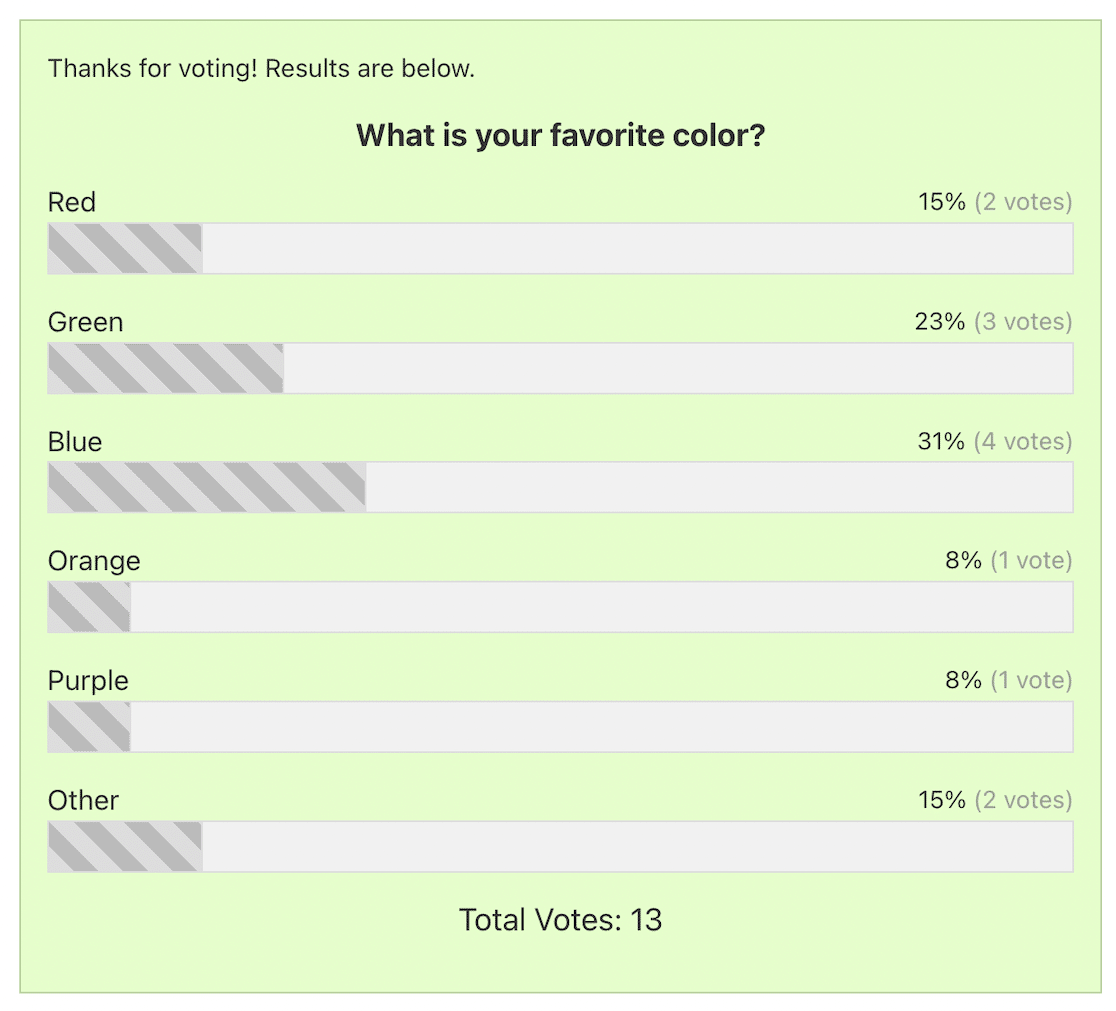
The real-time reporting is genuinely useful — results appear as bar charts, pie charts, or tables in your backend immediately after votes come in. You can export reports as PDF or JPG files. Polls close automatically on a set date without any manual intervention.
Honest limitation: WPForms isn’t the right choice if you’re running a public voting contest where fraud prevention is critical. Its form-based structure means duplicate vote prevention relies primarily on cookies and logged-in user restrictions — not email OTP or fingerprinting. It’s also meaningfully more expensive than dedicated poll plugins.
- Drag-and-drop builder with 2,100+ form templates
- Advanced fields: Likert scale, NPS, star ratings, image choices
- Real-time visual reports (bar charts, pie charts, tables)
- Export reports as PDF or JPG
- Conditional logic for dynamic poll branching
- Automatic poll scheduling (open and close on set dates)
Pricing: Free (WPForms Lite) + Pro from $199.50/year (March 2026, promotional pricing — verify at wpforms.com)
Best for: Small business sites, customer feedback forms, internal employee surveys
2. RafflePress — Best for Giveaways with Voting
RafflePress approaches voting from a different angle: instead of running standalone polls, it ties voting to giveaway entry actions. Visitors who answer a survey question or vote in a poll earn entries into a contest. That incentive structure tends to drive substantially higher participation than a plain “answer this poll” request.
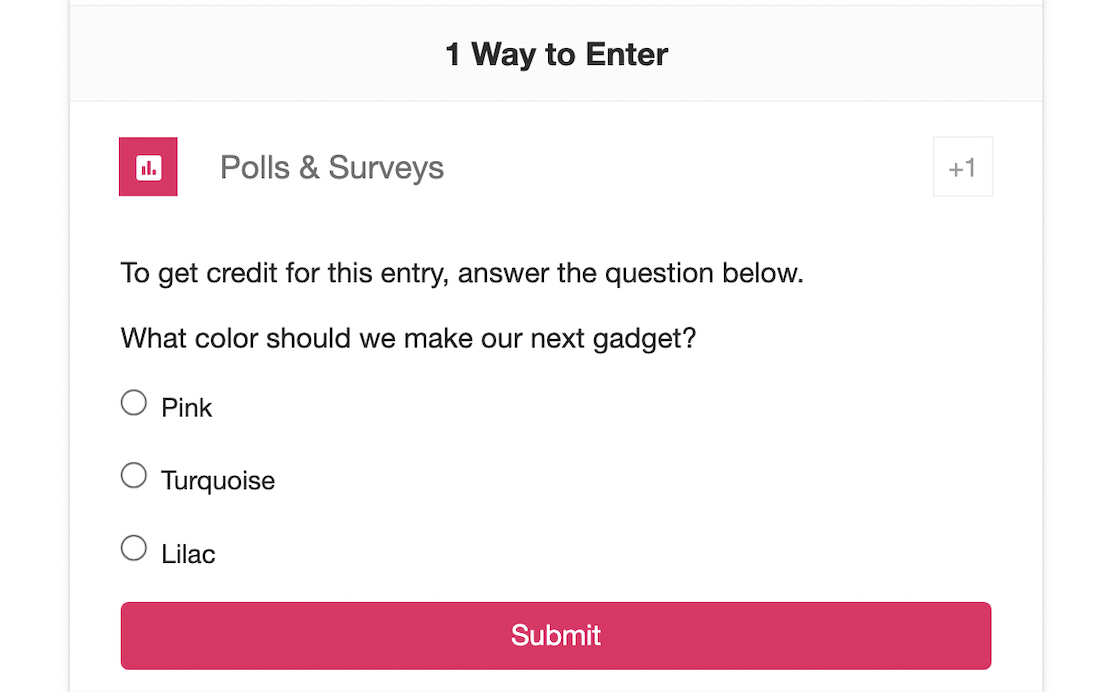
The drag-and-drop widget builder is clean and fast. Setting up a giveaway with a poll action takes under ten minutes. Anti-fraud protections are built in — the plugin tracks entries and flags suspicious duplicate submissions automatically. Social media sharing integrations (Twitter, Facebook, Instagram) help contests spread organically.
Honest limitation: If you just want a basic poll with no giveaway attached, RafflePress is overkill and the UI doesn’t make standalone polling particularly natural. Polls are an entry action, not the primary product. The free version doesn’t include polls at all — you need the Pro plan at $79.60/year minimum.
- Polls and surveys as giveaway entry actions
- Built-in anti-fraud entry tracking
- Social sharing built in for viral spread
- Visual results dashboard
- Templates for common contest types
Pricing: Free (basic giveaways, no polls) + Pro from $79.60/year (March 2026 — verify at rafflepress.com)
Best for: Running contests, growing email subscriber lists, incentivized engagement campaigns
3. YOP Poll — Best Free Plugin with Real Features
YOP Poll is the most capable genuinely free WordPress polling plugin available. The free version handles single and multiple-choice polls, result display controls, voter permissions, Facebook and Google login for vote verification, and automated scheduling. That’s a more complete feature set than many paid alternatives.
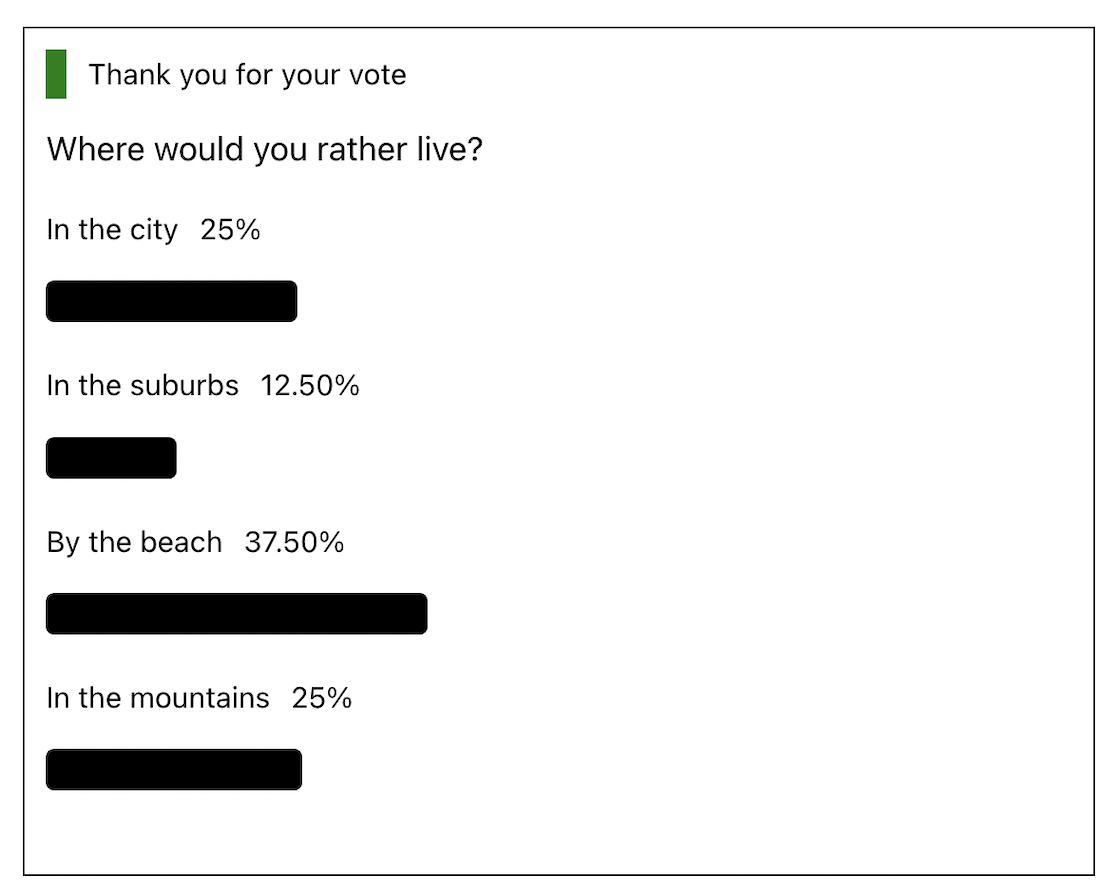
The Pro version’s standout feature is browser fingerprint identity verification — a duplicate vote prevention method that most voting plugins don’t offer. Rather than relying solely on IP address or cookies (both of which are easy to circumvent), fingerprinting combines multiple browser signals to create a unique visitor identifier. It’s not foolproof, but it’s significantly harder to bypass than a simple cookie check.
YOP Poll also includes a countdown timer for polls with end dates, a GDPR compliance option, and 30+ customizable poll templates. The one-time pricing model ($27 for a single site Pro license) makes it an affordable upgrade compared to annual subscription alternatives.
Honest limitation: The interface feels dated compared to modern form builders. The backend settings panel has a lot of options that aren’t immediately intuitive, and the poll visual design — while functional — won’t win any awards without CSS customization.
Looking for other no-cost tools? Check out our list of the best free WordPress plugins.
- Free version includes scheduling, voter permissions, and multiple display styles
- Browser fingerprint identity check (Pro — unique feature)
- Facebook and Google login support for voter verification
- GDPR compliance option
- Countdown timer for poll end dates
- 30+ customizable poll templates
Pricing: Free + Pro from $27 one-time per site (verify current pricing at yop-poll.com)
Best for: Bloggers and content sites wanting capable free polls; anyone needing fingerprint-based duplicate vote prevention
4. Poll Maker by AYS Pro — Best Standalone Poll Plugin
Poll Maker is a dedicated WordPress poll plugin with one of the widest ranges of poll formats available. It supports standard multiple-choice polls, image polls, video polls, yes/no votes, range sliders, versus/bracket-style polls, and — usefully — the option for users to add their own custom answer. That last option is something most poll plugins skip entirely.
The plugin has 7,000+ active installs on WordPress.org with a 4.3/5 star rating, and version 6.2.3 was released February 11, 2026 — confirming it’s actively maintained. Integrations with Mailchimp, Zapier, and Slack make it workable for teams that want vote results piped into existing workflows. The Business plan at $37 (one-time, 5 sites) is one of the better value propositions on this list.
Important naming note: There are two plugins with similar names that cause genuine confusion. Poll Maker by AYS Pro (wordpress.org/plugins/poll-maker/) is the plugin reviewed here. There is also a separate plugin called ePoll / WP Poll Maker (a different product). User reviews of the ePoll plugin from 2024 document serious issues: VPN blocking that doesn’t function, cookie-based vote limits easily bypassed, mobile design breaking on the frontend, conflicts with Elementor builder, and poor support response times. These problems are specific to ePoll — not Poll Maker by AYS Pro. Double-check the plugin author before installing.
Honest limitation: The admin interface is less polished than WPForms or RafflePress. First-time setup requires more clicking through menus before things feel organized. The free version’s styling options look dated without manual customization.
- Multiple poll formats: image, video, versus, yes/no, range slider, custom answer
- Integrations with Mailchimp, Zapier, and Slack
- Anti-spam controls: IP, cookie, email verification options
- Export results to CSV
- Restrict voters by country
- 30-day money-back guarantee on paid plans
Pricing: Free + Business $37 one-time (5 sites) + Developer $149 one-time (unlimited sites) — March 2026, verify at ays-pro.com
Best for: Sites running frequent polls in varied formats; teams needing Mailchimp or Zapier integration
5. UserFeedback — Best for Quick Visitor Feedback
UserFeedback takes a different approach than most voting plugins: rather than placing a poll inside a post, it delivers feedback questions via a pop-up widget that can appear on any page of your site. This works well for sites that want lightweight, non-intrusive feedback collection without building out full forms.

Smart targeting lets you show specific questions on specific pages — so a checkout page might ask “How easy was this process?” while a blog post triggers “Was this article helpful?” Conditional logic skips irrelevant follow-up questions based on previous answers. Integration with MonsterInsights and Google Analytics gives a fuller picture of how voters interact with your site beyond the poll itself.
Honest limitation: UserFeedback isn’t built for public contests or image polls. It’s a feedback collection tool that happens to support voting-style questions — not a full-featured polling platform. The free version is quite limited, and the Pro plan at $49.50/year unlocks most of what makes it genuinely useful.
- Pop-up widget polls that appear across your site without embedding shortcodes
- Smart page targeting — show polls on specific pages or sections
- Conditional logic to skip irrelevant questions
- Google Analytics integration via MonsterInsights
- Thank-you redirects and email notifications after voting
- Visual reports in the WordPress backend
Pricing: Free (very limited) + Pro from $49.50/year (March 2026, verify at userfeedback.com)
Best for: SaaS sites, blogs, eCommerce sites wanting passive on-page feedback without embedding full forms
6. TotalPoll — Best Mid-Range Dedicated Poll Plugin
TotalPoll is purpose-built for polls — not forms, not giveaways, just polls. That focus shows in the feature set: it supports text, image, video, and audio choices in a single poll. You can set the poll to show or hide results until after voting, add custom fields to collect voter information, and restrict voting by user role or registration status. Built-in localization supports 12+ languages out of the box, which makes it one of the better options for multilingual WordPress sites.
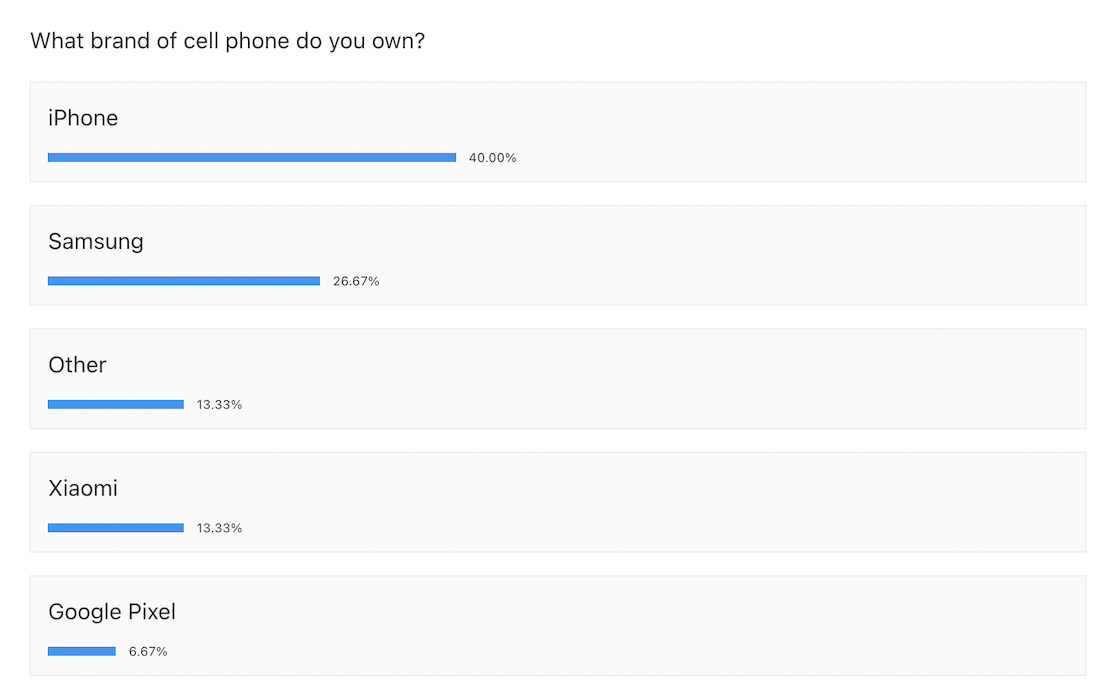
The setup wizard walks first-time users through the basics, which helps. The front-end display is clean with animated results. However, the backend dashboard can feel cluttered when building more complex polls — there are a lot of options crammed into the interface, and it’s not always immediately obvious where to find specific settings.
Honest limitation: TotalPoll’s UX isn’t as streamlined as WPForms or RafflePress. The free version only supports basic text polls — image and media choices require the paid plan. Pricing verification is recommended at totalsuite.net since it has varied across sources.
- Image, video, and audio answer choices (Pro)
- Built-in localization for 12+ languages
- Setup wizard for first-time configuration
- Custom fields to collect additional voter data
- Automatic poll scheduling
- Embeddable in posts, pages, widgets, and via email
Pricing: Free (text polls only) + Pro (verify current pricing at totalsuite.net)
Best for: Multilingual WordPress sites; polls with image or video answer choices
7. Formidable Forms — Best for Developers and Complex Voting
Formidable Forms is the most technically capable option on this list, built for users who need voting forms with conditional logic, access permissions, scoring, and data views that go well beyond a basic poll. The Surveys & Polls addon adds Likert scales, NPS, sliders, and detailed reporting. There’s also a Quiz Maker feature for scored quizzes — useful if you want voting to feed into something more interactive, like a product recommender or graded assessment.
The visual form styler handles appearance customization without CSS. Scheduling options, access permissions, and detailed action controls give developers fine-grained control over who can vote and when votes are processed. Results are viewable as graphs and charts in both the backend and on the frontend.
Honest limitation: The learning curve is real. Formidable Forms has more settings than most users will ever need, and it takes time to figure out the Surveys addon’s configuration relative to the core form builder. The Business plan at $159.60/year is the entry point for poll features — that’s a significant investment for users whose primary goal is just running a poll.
For a broader look at form building options, see our comparison of the best WordPress form plugins.
- Advanced poll fields: Likert scale, NPS, sliders, star ratings
- Quiz Maker with automatic scoring
- Conditional logic for dynamic poll branching
- Access permissions and scheduling controls
- Visual reports on frontend and backend
- Limit voting to logged-in users
Pricing: Free + Business from $159.60/year (March 2026, verify at formidableforms.com)
Best for: Developers, power users, sites needing complex voting logic, scored quizzes, or form-and-poll integration
8. WP-Polls — Best Completely Free Lightweight Option
WP-Polls does one thing and does it well: it creates simple polls that visitors can vote in, with results displayed immediately via AJAX (no page reload required). With 90,000–100,000+ active installs and a 4.5/5 rating on WordPress.org, it’s been a reliable free option for years.
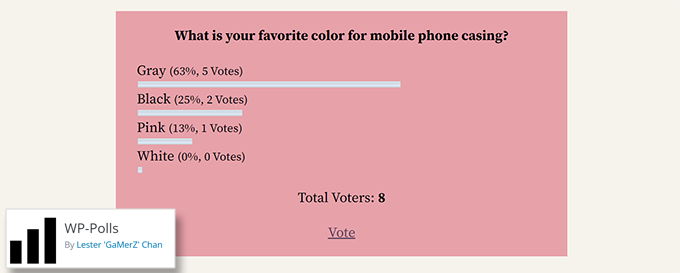
Setup is genuinely fast. Create a question, add options, choose whether users can select multiple answers, set a start and end date, and embed via shortcode or widget. Results display as bar charts or percentage breakdowns immediately after voting. Styling requires custom CSS — there’s no visual customizer.
Honest limitation: WP-Polls has no built-in analytics dashboard, no visual reporting, no image support, and no integrations. It does basic polling with zero cost and no ongoing fees. If you need anything beyond a simple text-based poll, you’ll outgrow it quickly.
- Completely free — no premium tier
- AJAX-powered real-time results (no page reload)
- Single or multiple-choice voting
- Poll scheduling with start and end dates
- Embed via widget or shortcode
- 90,000–100,000+ active installs on WordPress.org
Pricing: Free
Best for: Personal blogs, small sites, anyone needing a basic single-question poll with no budget
9. CrowdSignal — Best for Multi-Format Surveys
CrowdSignal (formerly Polldaddy) is built by Automattic — the company behind WordPress.com, WooCommerce, and Jetpack. That heritage means it integrates particularly well into WordPress.com hosted sites and Jetpack-connected self-hosted installs. For standalone self-hosted WordPress, it works via a dedicated plugin.
The plugin’s strength is format variety: 14 question types including free-text, multiple choice, ranking, rating, and Likert scales. Results export to CSV, PDF, Excel, XML, and Google Docs — more formats than any other plugin on this list. The real-time results display includes clean bar and graph visualizations.
Honest limitation: CrowdSignal’s pricing is based on “signals” — each answer submitted counts as one signal. The free tier gives you 2,500 signals before you hit the cap, after which you need the Premium plan at approximately $180/year. For high-traffic sites running busy polls, that ceiling arrives quickly. The interface also feels more enterprise-oriented than some of the beginner-friendly alternatives.
- 14 question and form types
- Real-time results with visual charts
- Export to CSV, PDF, Excel, XML, Google Docs
- Custom poll themes with color and font control
- Built by Automattic (WordPress.com’s parent company)
- Free tier: first 2,500 signals
Pricing: Free (2,500 signals) + Premium ~$180/year (March 2026, verify at crowdsignal.com)
Best for: Users needing diverse question types and multi-format data export; WordPress.com users
10. kk Star Ratings — Best for Post Ratings
kk Star Ratings isn’t a polling plugin in the traditional sense — it adds a star rating widget to your WordPress posts and pages so readers can rate content with 1–5 stars. Where it earns its spot on this list is the built-in schema.org markup, which tells Google about the ratings and can enable star rating rich snippets in search results. That’s a real SEO advantage that most voting plugins can’t offer.
Setup requires no theme code changes. You enable ratings for specific content types (posts, pages, or custom post types), configure the appearance, and the widget appears automatically or via shortcode. Voting is restricted to one submission per IP address. The core plugin is free, with paid add-ons available for extended functionality.
Honest limitation: kk Star Ratings is limited to stars. If you need any other voting format — polls, surveys, image choices — this isn’t the tool. Analytics are also basic compared to full survey platforms.
If schema markup and SEO optimization are a priority, our roundup of the best WordPress SEO plugins covers the wider landscape.
- Star rating widget for posts, pages, and custom post types
- Built-in schema.org markup for Google rich snippets
- No theme file edits required
- Shortcode placement for flexible positioning
- IP-based vote restriction
- Core plugin is completely free
Pricing: Free (core) + paid add-ons (verify at wordpress.org/plugins/kk-star-ratings/)
Best for: Blogs and review sites wanting schema-ready post ratings; anyone prioritizing SEO-friendly star ratings
—
Preventing Duplicate Votes — How Each Method Actually Works
Duplicate vote prevention is the least-discussed part of voting plugin selection, and it matters a lot for anything beyond a casual “just for fun” poll. Most plugins use cookie-based tracking by default — and that’s where the problem starts.
Here’s how each method works in practice:
| Method | How It Works | Bypass Risk | Plugins That Use It |
|---|---|---|---|
| Cookie tracking | Stores a flag in the visitor’s browser after voting | HIGH — delete browser cookies to vote again | Most plugins (default method) |
| IP address tracking | Records the voter’s IP; blocks repeat votes from same IP | MEDIUM — VPNs, shared office/school IPs bypass this | Poll Maker, TotalPoll, most premium plugins |
| Email OTP verification | Sends a one-time code to an email address before vote counts | LOW — requires unique email per vote | Some premium plugins and contest tools |
| WordPress user login | Only logged-in users with verified accounts can vote | LOW — secure, but requires visitors to have accounts | YOP Poll, WPForms, Formidable Forms, most plugins (optional) |
| Browser fingerprinting | Combines browser, OS, screen resolution, and other signals to identify unique visitors | MEDIUM-LOW — harder to bypass than cookies or IP alone | YOP Poll Pro (unique feature) |
For low-stakes engagement polls on a blog, cookie tracking is fine. For anything where vote integrity matters — contests, product feedback that influences decisions, employee surveys — use IP tracking at minimum, and consider requiring WordPress user login or email verification for the highest confidence.
One documented real-world case: user reviews of the ePoll plugin (2024) specifically note that its cookie-based “one vote per device” feature was easily bypassed by clearing browser cookies. The VPN blocking feature in that plugin was also reported as non-functional. This isn’t unique to ePoll — it highlights why the underlying method matters more than the marketing description.
Vote integrity is just one part of site security — our guide to WordPress security plugins worth using covers the broader picture.
Free Voting Plugins Compared — What You Actually Get
Several plugins advertise a free version, but the practical limitations vary enormously. Here’s an honest look at what each free tier actually includes:
| Plugin | Poll Types (Free) | Anti-Fraud (Free) | Analytics (Free) | Customization (Free) |
|---|---|---|---|---|
| WP-Polls | Text only (single/multiple choice) | Cookie + IP | Basic tally only | CSS required for styling |
| YOP Poll | Multiple choice, scheduling | Cookie + IP + FB/Google login | Bar and pie charts | 30+ templates, color controls |
| Poll Maker (AYS Pro) | Multiple choice, image, yes/no | Cookie + IP | Charts included | Color/font controls |
| TotalPoll | Text only | Cookie + IP | Basic | Limited without Pro |
| kk Star Ratings | Star ratings only | IP-based | Basic counts | Schema markup included |
YOP Poll’s free version stands out here — it includes scheduling, multiple templates, social login, and chart-based results at no cost. WP-Polls is the most lightweight but the least featured. Poll Maker strikes a decent balance. TotalPoll’s free tier is fairly restricted, and kk Star Ratings is only relevant if star ratings are all you need.
Voting Plugin Pricing — Annual Subscriptions vs. One-Time Licenses
One underappreciated difference between these plugins is the licensing model. Most charge annual subscription fees, but a few offer one-time lifetime licenses. If you’re managing a site long-term, that distinction adds up significantly.
| Plugin | License Type | Lowest Paid Price | Notes |
|---|---|---|---|
| WPForms | Annual subscription | $199.50/yr | Promo pricing; renews at higher rate |
| RafflePress | Annual subscription | $79.60/yr (Pro with polls) | Plus plan ($31.60/yr) has no polls |
| UserFeedback | Annual subscription | $49.50/yr | — |
| TotalPoll | Annual subscription | Verify at totalsuite.net | Pricing has varied across sources |
| Formidable Forms | Annual subscription | $159.60/yr | Business plan required for polls |
| CrowdSignal | Annual subscription | ~$180/yr | Signal-based pricing model |
| YOP Poll | One-time per site | $27 (1 site) | No annual renewal |
| Poll Maker (AYS Pro) | One-time per tier | $37 (5 sites) | 30-day money-back; no renewal |
| WP-Polls | Free | $0 | No paid tier |
| kk Star Ratings | Free (core) | Free | Paid add-ons available |
If you’re budget-conscious and just need solid polling features, YOP Poll ($27 once) and Poll Maker ($37 once for 5 sites) offer strong value. Annual subscription plugins are more justifiable when you’re using them as part of a broader feature set — WPForms, for example, is also your contact form and lead capture tool, so the $199.50/year covers much more than just polls.
All prices reflect March 2026 promotional pricing where noted. Renewal rates for subscription-based plugins are often higher than first-year promotional prices — confirm the renewal rate before purchasing.
Which WordPress Voting Plugin Is Right for You?
The best plugin depends on what you’re actually trying to do. Here’s a practical guide:
| If you want to… | Use this plugin | Why |
|---|---|---|
| Run a giveaway or contest with votes | RafflePress | Built-in anti-fraud, giveaway mechanics, viral sharing |
| Add a simple free poll to any post | WP-Polls or YOP Poll (free) | Zero cost, quick setup, reliable results |
| Collect feedback forms and surveys | WPForms or UserFeedback | Visual reports, conditional logic, business-ready |
| Run image or head-to-head versus polls | Poll Maker or TotalPoll | Support for image and media answer types natively |
| Build complex voting with scoring or branching | Formidable Forms | Full conditional logic, quiz maker, developer-grade controls |
| Add star ratings to blog posts for SEO | kk Star Ratings | Free, schema.org markup, Google rich snippet eligible |
| Collect quick on-page feedback passively | UserFeedback | Pop-up widgets, smart targeting, no shortcodes needed |
| Run polls on a multilingual site | TotalPoll | 12+ language localization built in |
| Export survey data in multiple formats | CrowdSignal | CSV, PDF, Excel, XML, Google Docs export options |
| Use the most secure duplicate vote prevention | YOP Poll Pro | Browser fingerprinting — unique feature among polling plugins |
Need help navigating WordPress plugins more broadly? Our complete guide to WordPress plugins is a good starting point.
Frequently Asked Questions
What is the best free WordPress voting plugin?
For most sites, YOP Poll is the strongest free option — it includes scheduling, multiple display styles, social login verification, and basic chart reporting without spending anything. WP-Polls is the better pick if you want the simplest possible implementation with the lightest performance footprint. Both are actively maintained and have substantial install bases on WordPress.org.
How do I add a poll to a WordPress post or page?
The process varies by plugin but generally follows the same steps: install and activate the plugin, create your poll in the plugin’s admin section, then embed it in a post or page using a shortcode, a Gutenberg block, or the plugin’s widget. WPForms, RafflePress, and UserFeedback use the WordPress block editor for placement — no shortcode required. Older plugins like WP-Polls and YOP Poll use shortcodes.
Can visitors vote without logging in?
Yes — most WordPress voting plugins allow anonymous voting by default. However, anonymous voting typically relies on cookie or IP-based duplicate prevention, which is easier to bypass than requiring a login. If you need secure voting where each person can only vote once, requiring a WordPress user account login is the most reliable approach. YOP Poll also supports Facebook and Google login as a middle-ground option.
Which voting plugin is best for running a giveaway or contest?
RafflePress is the clear choice for giveaway contests. It’s designed specifically for this use case, with built-in anti-fraud entry tracking, social sharing mechanics, and polls as one of many possible entry actions. Other polling plugins can handle contests, but they’d require more manual setup and lack RafflePress’s native giveaway infrastructure.
Do voting plugins slow down my WordPress site?
A well-coded voting plugin shouldn’t meaningfully affect site speed if it loads its scripts only on pages where polls actually appear. Plugins that load scripts sitewide — or that make multiple database calls per page load — can add overhead. The simplest free options (WP-Polls, YOP Poll, kk Star Ratings) tend to be the most lightweight. Heavy form builders (WPForms, Formidable Forms) load more assets but typically do so efficiently when configured properly. Always test with a speed tool like GTmetrix or PageSpeed Insights after installing any new plugin.
Which voting plugins support image polls?
Poll Maker by AYS Pro and TotalPoll are the strongest options for image-based polling. WPForms also supports image choices in its poll forms (Pro plan required). YOP Poll includes image questions in its Pro version. WP-Polls and kk Star Ratings do not support image-based voting.
How do I stop people from voting multiple times?
The most reliable methods, from least to most secure: cookie tracking (easy to bypass), IP address tracking (bypassed by VPNs and shared networks), WordPress user account login (requires accounts), and email OTP verification (requires unique email). YOP Poll Pro adds browser fingerprinting as an additional layer. For important votes, combining IP tracking with user login provides a practical balance of security and accessibility.
Are WordPress voting plugins GDPR compliant?
GDPR compliance depends on how you configure the plugin and how voter data is stored. YOP Poll includes an explicit GDPR option that anonymizes voter data. WPForms supports GDPR fields and data deletion. Most other plugins handle this through WordPress’s general privacy settings rather than plugin-specific GDPR features. If you’re collecting identifiable information (email addresses for OTP, names with votes), you need to address this in your site’s privacy policy and ensure data is handled appropriately under applicable regulations. For European visitors, check whether the plugin stores IP addresses and how long that data is retained.
Can I display poll results in real time?
Yes — real-time result display is standard across most plugins on this list. WP-Polls uses AJAX to update results without a page reload immediately after a user submits a vote. WPForms, Poll Maker, YOP Poll, and TotalPoll all support live result displays. You can typically choose whether to show results before or after voting, or hide them entirely until the poll closes.
Which voting plugin has the best analytics and reporting?
WPForms has the most polished reporting — visual dashboards with multiple chart types, export to PDF/JPG, and survey reporting that breaks down individual response patterns. Formidable Forms is comparable for advanced users who need data views and calculated fields. CrowdSignal wins on export format variety (CSV, PDF, Excel, XML, Google Docs). For basic visual reports without a premium price, YOP Poll and Poll Maker include charts in their free versions.
Final Thoughts
There’s no single “best” WordPress voting plugin — the right choice depends on what you’re building. WPForms handles professional feedback collection well but costs more than dedicated poll tools. RafflePress is the strongest choice when voting is part of a contest. YOP Poll delivers more features for free than most plugins offer in a paid tier. kk Star Ratings solves a specific SEO problem — post ratings in Google search results — that other plugins don’t address.
For most small business owners and bloggers starting with polls, begin with a free option (YOP Poll or WP-Polls) to understand what features you actually need before committing to an annual subscription. Duplicate vote prevention is worth thinking through before launch — the default cookie-based approach won’t hold up if your poll results actually matter.
All pricing in this article reflects March 2026 data. Promotional pricing and renewal rates change regularly — verify current prices directly on each plugin’s official page before making a decision.
