


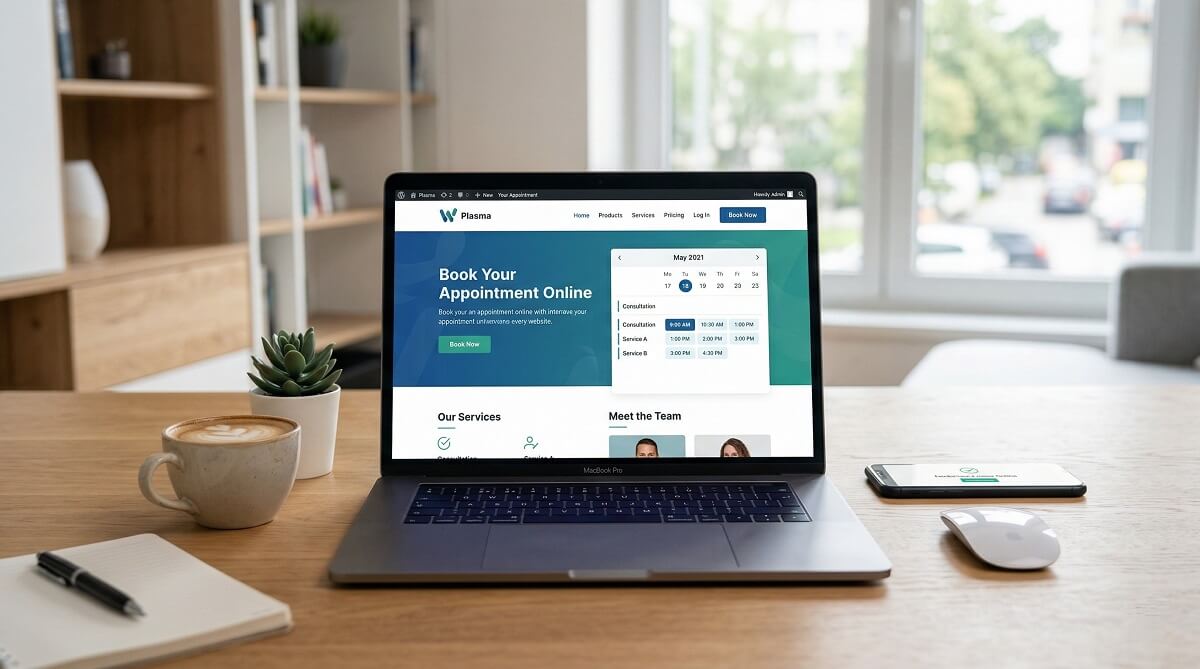
Choosing a WordPress theme for your appointment-based business is harder than it looks. The market mixes dedicated booking themes, general-purpose themes, and plugin-heavy solutions under the same label — which leaves a lot of business owners buying the wrong thing. If you’ve spent time searching and found yourself reading plugin comparison lists when you actually need a theme, you’re not alone.
This guide cuts through that. Below you’ll find the best WordPress appointment booking themes organized by business type, with honest assessments of what each one actually offers, what plugin it bundles (if any), and what kind of business it suits best. Pricing is based on verified data from vendor pages as of March 2026 — always confirm at time of purchase.
If you’re also evaluating standalone scheduling tools, see our roundup of the best WordPress booking plugins for a full plugin-focused comparison.
Quick Summary — Which Theme Fits Your Business?
If you’re short on time, here’s a practical starting point. The table below maps common business types to their most suitable theme and an alternative if the first pick doesn’t fit your budget or style.
| Business Type | Best Theme | Alternative | Price Range | Page Builder |
|---|---|---|---|---|
| Salon / Barbershop | Nelson | Mien | $69–$79 | Elementor |
| Medical / Healthcare | Sirpi | Physio | $59–$69 | Elementor |
| Fitness / Yoga | Formie | Yoge | $59–$69 | Elementor |
| Coaching / Tutoring | Coachzee | Edme | $59–$79 | Elementor |
| General Small Business | Entrepreneur | Blocksy (free tier) | Free–$69/yr | Elementor / Block |
None of these are perfect fits for every use case, but they give you a solid starting point. The sections below explain the reasoning behind each pick in detail.
Theme or Plugin — What Do You Actually Need?
Before picking a theme, it’s worth understanding what you’re actually buying. A WordPress appointment booking theme handles the visual design of your site — the layout, typography, color scheme, and niche-specific pages like service listings, staff profiles, and booking landing pages. A booking plugin handles the actual scheduling logic — available time slots, calendar management, payment processing, and email notifications.
Most appointment booking themes don’t include standalone scheduling functionality on their own. What makes them “booking themes” is that they’re designed and pre-configured to work with a specific scheduling tool, and many bundle that tool as a free add-on.
For a deeper breakdown of how each scheduling tool works on its own, the WordPress booking plugins guide covers the functional layer in detail.
When a theme + bundled plugin makes sense
If you want a complete solution out of the box — a professionally designed site that’s already wired up for online scheduling — a dedicated booking theme that bundles a premium plugin is the right choice. MotoPress themes, for example, all include the MotoPress Appointment Booking plugin (a premium plugin valued at around $89/year) at no extra charge. Themes like Formie bundle Amelia, and Cloe Brooks comes with Quickcal.
When a standalone plugin + any theme works better
If you already have a WordPress site or a preferred theme, you don’t need a dedicated booking theme at all. Just add a quality booking plugin to your existing setup. BookingPress, Easy Appointments, and Sugar Calendar Bookings all work with virtually any WordPress theme, including free ones from WordPress.org.

What to Look for in a WordPress Booking Theme
Not all booking themes are equally capable. Before spending time on demos and trial setups, check these five areas:
Booking Plugin Integration
The most important question: which booking plugin does the theme bundle, and is it the full premium version? Some themes include a limited plugin that requires paid add-ons for features like SMS notifications, payment gateways, or Zoom integration. Check which features come in the included plugin vs. which require separate purchase.
Page Builder Compatibility
Most appointment booking themes on the market are built with Elementor. If you’re comfortable with Elementor’s drag-and-drop interface, this is a natural fit. Blocksy is the notable exception — it’s built natively for the WordPress block editor (Full Site Editing), which is the direction WordPress itself is heading.
Mobile Booking Experience
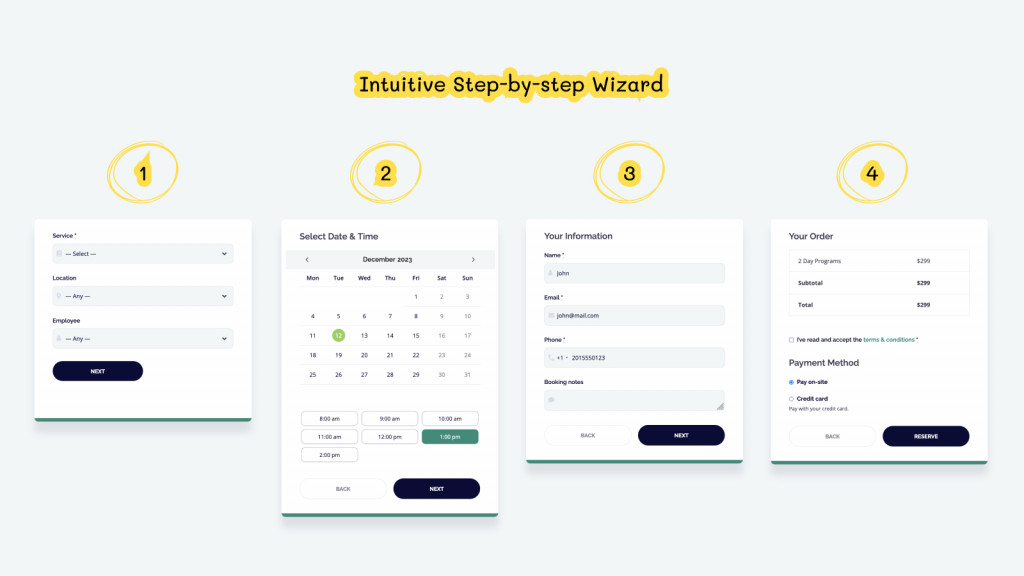
A significant share of appointment bookings happen on mobile. The booking form itself — not just the homepage design — needs to work smoothly on phones. Multi-step booking wizards that compress well on small screens perform better than forms that require horizontal scrolling or pinch-to-zoom. Test the mobile experience before committing.
Payment Processing Options
If you want to collect a deposit or full payment at booking, check which gateways the bundled plugin supports. The MotoPress Appointment Booking plugin covers PayPal, Stripe (including Apple Pay, Google Pay, and Link), Square, and bank transfer. WooCommerce integration expands this further for both MotoPress and other themes. Plugins like Amelia and BookingPress also handle multiple payment gateways in their premium tiers.
Niche Design Fit
A medical booking site needs to project trust and clinical clarity. A yoga studio needs something warm and lifestyle-oriented. A barbershop site needs edge. Generic themes adapted for booking often miss these nuances — purpose-built niche themes start from the right visual foundation. It’s harder to redesign a theme’s personality than its colors.
Best WordPress Appointment Booking Themes by Niche
These picks are grouped by business type because that’s how most people actually think about this decision. If you run a yoga studio, you don’t browse through 40 themes — you want the two or three that were designed with your business in mind.
Best for Salons, Barbershops & Beauty
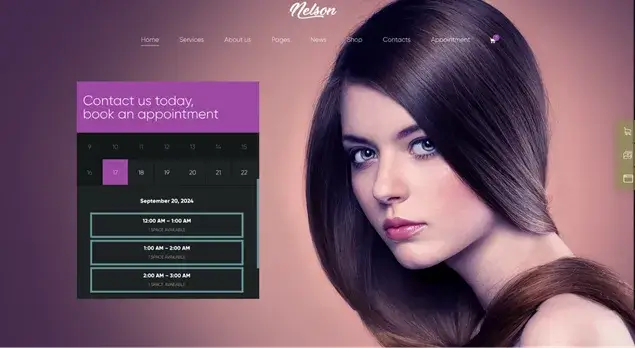
Nelson ($69 one-time) is the standout choice for barbershops and tattoo studios. Its dark, high-contrast aesthetic is immediately recognizable as fitting for this niche, and it comes with pre-optimized demo content and Elementor page builder support. Clients can browse services and book online without leaving the page flow.
Mien ($79 one-time) takes a cleaner, lighter direction aimed at eyelash salons and beauty companies. It includes tools to build a product store alongside the appointment system, which is useful if you also sell beauty products. The portfolio features are well-suited to before-and-after galleries that salons often rely on.
For both themes, verify which booking plugin is bundled at purchase — plugin features (especially around payment gateways and SMS reminders) determine how fully automated your booking process can be.
Best for Medical, Dental & Healthcare

Sirpi ($69 one-time) is purpose-built for medical institutions and solo practitioners. Built with Elementor and WooCommerce-ready out of the box, it covers the design needs of small clinics, dermatology practices, and specialty care providers. Trust signals — clean typography, professional layout, clear service pages — are baked into the design rather than bolted on.
Physio ($59 one-time) suits physiotherapy and rehabilitation clinics specifically. It’s bright and clinical without feeling cold, and it accepts bookings automatically from the site. If you want the lowest entry price in the healthcare niche with solid design quality, Physio is worth a close look.
Healthcare booking sites benefit significantly from automated confirmation and reminder emails — patients who receive reminders show up far more reliably. Make sure the scheduling tool included with your theme sends these notifications automatically, without requiring a paid add-on.
Best for Fitness, Yoga & Wellness

Formie ($69 one-time) is the strongest all-around choice for fitness businesses. It ships with four pre-built demos (gym, fitness club, yoga studio, personal trainer), integrates Amelia for appointment management, and supports WooCommerce for membership sales alongside regular bookings. If your fitness business combines class bookings with membership subscriptions, this is the only theme on this list that handles both natively.
Yoge ($59 one-time) is yoga-specific through and through — 15 homepage layouts, service scheduling, and class presentation tools designed specifically for yoga studios. If you’re building a single-studio yoga site and want the best yoga-first design at the lowest price on this list, Yoge delivers without the extras Formie carries.
Best for Coaching, Consulting & Tutoring

Coachzee ($79 one-time) handles individual sessions, group bookings, and virtual appointments — making it a genuinely flexible choice for life coaches, consultants, therapists, and fitness instructors who offer varied session formats. Its fast-loading design and appointment management system are both strong points for this client-heavy use case.
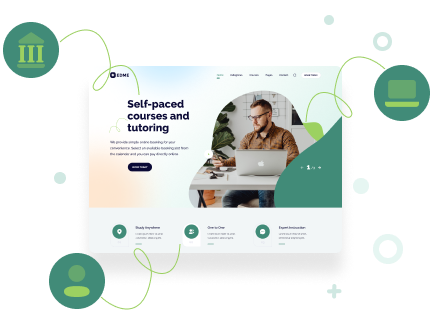
Edme (MotoPress — verify price at purchase) is the best choice if your business is specifically education or tutoring. It comes with the MotoPress Appointment Booking plugin bundled for free, pre-configured for tutor-to-student booking. The theme includes detailed tutor profile pages, rich course/lesson pages, and a student account system where clients can log in and view their upcoming sessions. For online tutoring businesses or training centers, this is the most purpose-built option available.
Cloe Brooks ($69 one-time) serves the consulting and psychology niche with a focus on client intake and scheduling. Using the integrated Quickcal plugin, it lets you manage appointments directly from your site, build custom intake forms, and clearly display your service fees and availability.
Best for Multipurpose / General Small Business
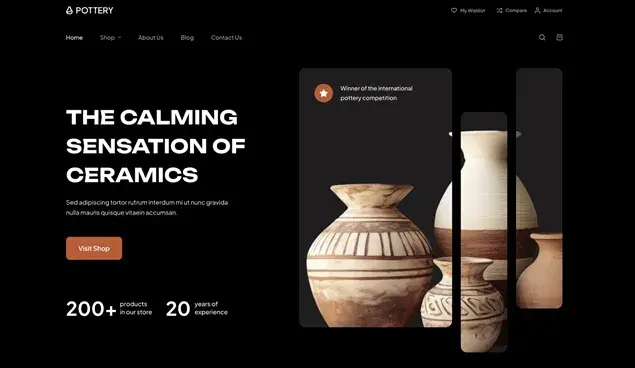
Entrepreneur ($59 one-time) is one of the most widely used appointment-friendly themes for small businesses that don’t fit neatly into a single niche. Consultants, business advisors, barber shops, and gyms all use it as a solid starting point. Elementor compatibility and the pre-built demo content make initial setup quick.
Kingo ($59 one-time) spans a broad range of small businesses — from carpenters and car repair centers to consultants and tour operators. If your business doesn’t fit the niche categories above and you want flexible design with strong booking integration, Kingo’s creative portfolio and landing pages give you room to shape the brand identity yourself.
Blocksy (free / $69 per year) is the most distinctive option on this list because it’s the only one built natively for the WordPress block editor. Its free tier covers the basics — you pair it with a free booking plugin like Booking Calendar or Easy Appointments. The premium tier ($69/year) unlocks advanced customization options. For businesses that want future-proof compatibility with the direction WordPress is heading, Blocksy is worth serious consideration.
Not sure which editor to build with? The Elementor vs. block editor comparison breaks down the practical differences for site builders.
WordPress Appointment Booking Themes — Pricing & Features Compared
The table below pulls together verified data from vendor pages as of March 2026 (source: bookingpressplugin.com and individual theme vendor pages). Prices are in USD; verify at time of purchase as promotional pricing and marketplace variations can affect what you pay.
| Theme | Price | License | Bundled Plugin | Page Builder | Best Niche |
|---|---|---|---|---|---|
| Entrepreneur | $59 | One-time | Check vendor | Elementor | Multipurpose small biz |
| Nelson | $69 | One-time | Check vendor | Elementor | Salon / Barbershop |
| Mien | $79 | One-time | Check vendor | Varies | Beauty / Eyelash |
| Sirpi | $69 | One-time | Check vendor | Elementor | Medical / Healthcare |
| Physio | $59 | One-time | Check vendor | Varies | Physical Therapy |
| Formie | $69 | One-time | Amelia | Elementor | Fitness / Gym / Yoga |
| Yoge | $59 | One-time | Check vendor | Varies | Yoga Studio |
| Coachzee | $79 | One-time | MotoPress AB | Elementor | Coaching / Consulting |
| Edme | Verify at vendor | One-time | MotoPress AB (free) | Elementor + Stratum | Education / Tutoring |
| Cloe Brooks | $69 | One-time | Quickcal | Varies | Consulting / Psychology |
| Nutrico | $59 | One-time | Check vendor | Varies | Health & Nutrition |
| Kingo | $59 | One-time | Check vendor | Elementor | General Small Business |
| Listeo | $79 | One-time | Dokan | Elementor | Service Directory |
| Blocksy | Free / $69/yr | Annual | None (any plugin) | Block Editor | Multipurpose |
Prices in USD, verified from vendor pages and marketplace listings (March 2026). “MotoPress AB” = MotoPress Appointment Booking plugin, bundled free. Always verify current pricing at time of purchase.
Before committing to any purchase, the WordPress theme buying guide walks through licensing, support, and update policies worth checking.
Free WordPress Appointment Booking Themes — Are There Good Options?
Almost every “best booking themes” roundup skips this section entirely. But for personal users and early-stage businesses, the free route is completely viable — especially if your scheduling needs are straightforward.
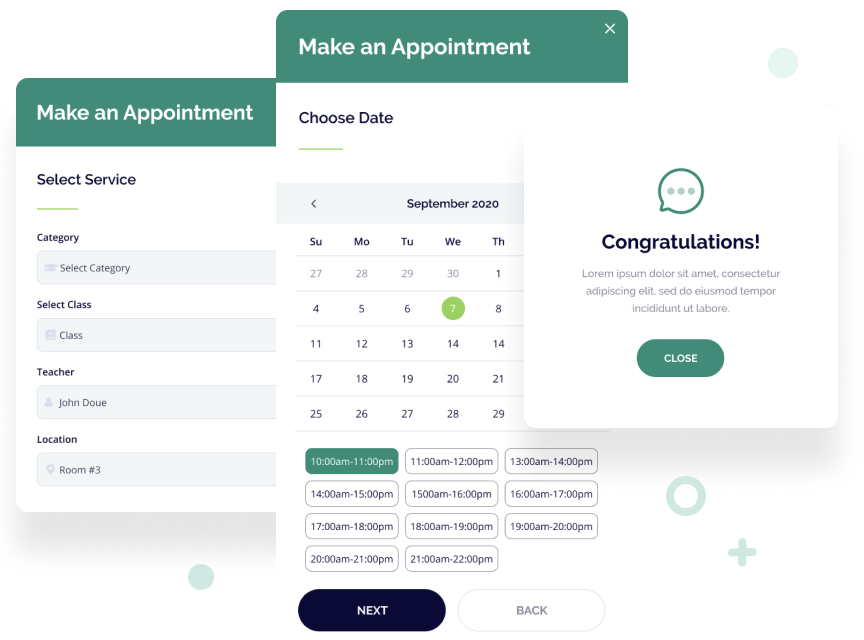
Blocksy free tier
Blocksy’s free version is genuinely capable. You get a clean, fast theme with full customization through the WordPress Customizer, and because it’s plugin-agnostic, you can pair it with any free booking plugin. The free tier doesn’t lock you out of the booking functionality — that comes from the plugin, not the theme itself.
Free booking plugins that work with any theme
Two free plugins are worth knowing:
- Booking Calendar (wordpress.org) — 4.7/5 stars across 646 reviews with over 4.8 million installs (last updated February 2026). It covers calendar views, custom booking fields, anti-double-booking, CAPTCHA spam protection, and time-slot scheduling. Payment gateway support requires a paid tier, but the free version is one of the most battle-tested booking tools on WordPress.org.
- Easy Appointments (wordpress.org) — free, 4.3/5 stars, 1.75 million installs (last updated February 2026). Handles multiple locations, services, and staff with a flexible timetable system, customizable notification emails, CSV export, and two Gutenberg blocks included. Google Calendar sync and payment integrations are available as paid extensions, keeping the free tier lean for simpler scheduling needs.
When it makes sense to pay for a premium theme
The free combination (Blocksy + Booking Calendar or Easy Appointments) works well for businesses that don’t need complex payment processing or niche-specific design out of the box. You’ll spend more time customizing. If your business has an established identity and you want professional design and a fully configured booking system from day one, a premium theme — typically $59–$79 one-time — is a reasonable investment that pays off quickly in setup time saved.
Which WordPress Appointment Booking Theme Should You Use?
Based on the analysis above, here’s a practical decision matrix:
| Business Type | Best Theme Pick | Alternative | Budget Option |
|---|---|---|---|
| Solo therapist / life coach | Coachzee | Cloe Brooks | Blocksy + BookingPress free |
| Yoga / fitness studio | Formie | Yoge | Blocksy + Easy Appointments |
| Medical practice / clinic | Sirpi | Physio | Blocksy + Booking Calendar |
| Barbershop / salon | Nelson | Mien | Blocksy + BookIt free |
| Tutoring center / online courses | Edme | Coachzee | Blocksy + Simply Schedule free |
| General small business | Entrepreneur | Kingo | Blocksy + Booking Calendar |
| Multi-vendor service directory | Listeo + Dokan | Blocksy + BookingPress | – |
✅ Best for: Small business owners who want a ready-to-launch site with minimal configuration, where the design language matches their industry from day one.
❌ Not ideal for: Developers building fully custom solutions from scratch — in that case, a page builder theme or block theme with a standalone plugin will give you more control.
⚠️ Consider carefully: If your booking requirements are complex — group sessions, multiple locations, advanced staff scheduling — evaluate the bundled plugin’s capabilities before buying the theme. The plugin’s feature limits matter more than the theme’s design.
For a full feature-by-feature breakdown of each scheduling tool, see our WordPress appointment plugins detailed comparison.
FAQ — WordPress Appointment Booking Themes
- What is a WordPress appointment booking theme?
- A WordPress appointment booking theme is a pre-designed website template built specifically for service-based businesses that take appointments. Unlike general WordPress themes, these are pre-configured with booking-specific pages (service listings, staff profiles, booking landing pages) and typically bundle or integrate closely with a booking plugin that handles the actual scheduling logic.
- Do WordPress appointment booking themes include a booking plugin?
- Many do, but not all. Themes from MotoPress (like Coachzee and Edme) bundle the MotoPress Appointment Booking plugin for free. Formie integrates Amelia, and Cloe Brooks includes Quickcal. Blocksy, on the other hand, is plugin-agnostic — it works with any booking plugin you choose. Always check what’s included before purchasing, since bundled plugins can represent $79–$149/year in saved costs.
- How much does a WordPress appointment booking theme cost?
- Premium appointment booking themes typically cost between $59 and $79 as a one-time purchase on ThemeForest and similar marketplaces. Blocksy is an exception with a free tier and a $69/year premium plan. Prices were verified from vendor pages in March 2026 — confirm at time of purchase.
- Can I use any WordPress theme with a booking plugin?
- Yes. Any well-coded WordPress theme is compatible with booking plugins like Easy Appointments, Booking Calendar, BookingPress, or Sugar Calendar Bookings. The booking plugin handles all the functional logic independently of the theme. A dedicated booking theme simply gives you purpose-built design and pre-configured layouts that save setup time.
- What is the best free WordPress appointment booking theme?
- Blocksy offers the strongest free tier among booking-compatible themes. Its free version is fast, customizable, and works with any booking plugin. For a fully functional free setup, combine Blocksy with Easy Appointments (free, multi-staff support) or Booking Calendar (free, robust feature set) from WordPress.org.
- Which WordPress booking theme is best for a medical or healthcare website?
- Sirpi ($69) is the strongest choice for medical and healthcare sites — it’s Elementor-powered, WooCommerce-ready for service payments, and built with the design trust signals that healthcare clients expect. Physio ($59) is a solid alternative for physiotherapy and rehabilitation clinics specifically, at a lower price point.
- Do WordPress booking themes work on mobile?
- All modern WordPress booking themes are built to be mobile-responsive. However, “responsive” doesn’t always mean the mobile booking experience is seamless — some themes compress their booking forms well on phones while others don’t. Before purchasing, test the theme’s live demo on a mobile device, specifically the booking form flow, to confirm the client-side experience is smooth.
- What is the difference between Elementor-based themes and block editor themes for bookings?
- The vast majority of appointment booking themes use Elementor for customization. Elementor gives you extensive visual control through drag-and-drop, and it’s familiar to most freelancers and agencies. Block editor themes (like Blocksy) use WordPress’s native Full Site Editing, which is faster, more lightweight, and aligned with where WordPress is heading long-term. If you’re building a new site in 2026, both are viable — Elementor has more booking-specific starter templates; block themes have better long-term compatibility with WordPress core.
- How do I accept payments through my WordPress booking theme?
- Payment processing comes from the booking plugin, not the theme. Check which plugin your theme bundles and which gateways that plugin supports. The MotoPress Appointment Booking plugin (bundled with Coachzee and Edme) supports PayPal, Stripe (including Apple Pay, Google Pay), Square, and direct bank transfer. Most premium booking plugins support at least Stripe and PayPal. Adding WooCommerce to your setup opens up dozens of additional payment gateways.
- Can I switch booking themes without losing my booking data?
- Your booking data is stored by the booking plugin, not by the theme. Switching themes won’t delete your appointments, client records, or availability settings — that data lives in the plugin’s database tables. What you’ll lose is custom theme-specific design and any theme-specific page layouts. The booking functionality itself stays intact. This also means if you switch to a different booking plugin, you may need to migrate or re-enter booking data carefully.
Final Thoughts
The right WordPress appointment booking theme comes down to three factors: your business niche, your budget, and the complexity of your booking requirements. A yoga studio and a medical clinic both need booking themes, but they need different design languages and different plugin capabilities.
For most small businesses, the simplest path is to pick a purpose-built niche theme that bundles a solid booking plugin — you get professional design and functional booking in one purchase. For budget-conscious operators or those with existing sites, pairing Blocksy’s free tier with Easy Appointments or Booking Calendar gives you a capable, cost-free foundation to build on.
Before purchasing any premium theme, verify that the bundled plugin’s feature set covers your actual needs — especially around payment gateways, staff scheduling, and notification options. The theme is the easy part; the plugin is where the real booking work happens.
