


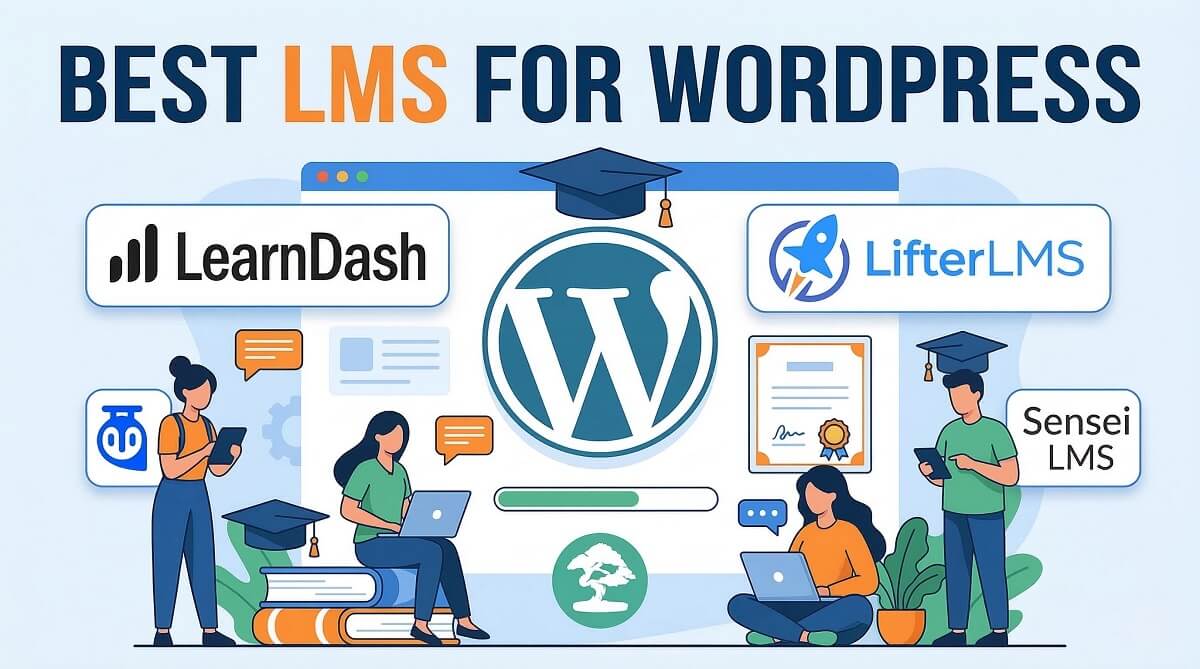
Best LMS for WordPress: Honest Comparison for Small Businesses
The global eLearning market is projected to reach $325 billion by 2025, and small business owners are seizing this opportunity to monetize their expertise through online courses. If you run a coaching business, consulting firm, or training company, choosing the right Learning Management System (LMS) plugin for WordPress can make the difference between a profitable course platform and a frustrating money pit.
I’ve tested over a dozen WordPress LMS plugins to help you avoid the common pitfalls: hidden costs that triple your initial budget, performance issues that drive students away, and feature gaps that force expensive platform migrations. This guide focuses on what small business owners actually need to know—total cost of ownership, business model fit, and implementation realities—not just feature checklists that look good on paper but fail in practice.
What to Look For in a WordPress LMS Plugin
Before diving into specific plugins, you need a framework for evaluation. Most comparison articles focus on feature counts, but features mean nothing if they don’t serve your business model or fit your budget over three years.
Course Creation Tools That Actually Work
A drag-and-drop course builder sounds appealing until you discover it only works with specific page builders or requires a steep learning curve. Look for plugins that use the native WordPress block editor (Gutenberg) or provide intuitive interfaces that don’t require developer skills. The best course builders allow you to organize content into courses, sections, and lessons with clear progress tracking.
You’ll also need flexible content types: video hosting (or integration with Vimeo/YouTube), PDF downloads, audio files, and text lessons. Some plugins limit file uploads in their free tiers, forcing expensive upgrades when you exceed storage limits. Check these restrictions before committing.
Student Management Without the Headaches
Managing students should be simple: enrollment, progress tracking, and communication tools. The reality? Many plugins require separate add-ons for basic features like manual enrollment, bulk imports, or email notifications. You need clear dashboards showing who’s enrolled, how far they’ve progressed, and completion rates.
Group management is critical if you sell to businesses or offer cohort-based courses. Not all LMS plugins handle this well—some treat it as a premium feature that costs $99+ extra.
Monetization Options That Match Your Business Model
How you make money matters. Selling individual courses requires different tools than running a membership site with unlimited access. Here’s what to consider:
- One-time course sales: Requires payment gateway integration (Stripe, PayPal) and shopping cart functionality
- Subscriptions: Monthly or annual access requires recurring billing support
- Course bundles: Package multiple courses at a discount price
- Memberships: Unlimited access to all courses for a recurring fee
- Free + paid tiers: Offer some content free to attract leads, gate premium content
Many plugins integrate with WooCommerce for monetization, which adds complexity but offers flexibility. Others build payment processing directly into the plugin, which is simpler but may limit your pricing strategies.
Assessment and Certification Tools
Quizzes and certificates aren’t just nice-to-haves—they’re essential for student engagement and completion rates. Studies show that courses with quizzes typically have better retention than those without. Look for these capabilities:
- Multiple question types (multiple choice, true/false, fill-in-blank, essay)
- Question randomization to prevent cheating
- Time limits and passing scores
- Automated grading (for objective questions)
- Customizable certificates with student names and completion dates
Some plugins restrict these features to paid tiers, while others include them in the free core plugin. This distinction dramatically affects your total cost.
Performance and Scalability
Running an LMS on WordPress places heavier demands on hosting than a standard blog. Logged-in users, video streaming, quiz processing, and database queries all contribute to higher resource usage. A plugin that works fine with 50 students might slow to a crawl at 500.
According to independent performance testing, LearnDash can support 50,000+ users with page loads under 2 seconds when properly optimized with caching and a quality hosting plan. In contrast, lighter plugins like Sensei LMS run smoothly on most shared hosting plans but may lack advanced features.
Consider your growth trajectory. If you plan to scale to thousands of students, budget for VPS or managed WordPress hosting ($30-100/month) rather than shared hosting ($5-15/month).
Support Quality and Documentation
When you’re stuck at 2 AM trying to fix a payment gateway error, support quality matters. Free plugins typically offer community forum support only—responses may take days or never come. Premium plugins usually provide email or ticket support, but response times vary widely.
Documentation quality is equally important. Comprehensive guides, video tutorials, and active communities reduce your dependency on direct support. Plugins with large user bases (like LifterLMS with 1.3 million+ downloads) tend to have more community resources and third-party tutorials.
LearnDash: Premium Power for Professional Course Creators
LearnDash has been the gold standard for WordPress LMS plugins since 2012, powering courses for major brands like Yoast, University of Florida, and Tony Robbins. Unlike freemium competitors, LearnDash is premium-only, which means the entire feature set is available from the start—no surprise upgrade costs for basic functionality.

Core Features and Capabilities
LearnDash’s course builder allows unlimited courses, lessons, topics, and quizzes. The drag-and-drop curriculum builder makes it simple to organize complex course structures with prerequisites, drip-fed content, and scheduled lesson releases. You can create eight different quiz question types, including essay questions with manual grading.
Content protection is robust: video progression tracking ensures students can’t skip ahead, and lesson timers can enforce minimum viewing times. The plugin includes built-in certificates with dynamic shortcodes for student names, completion dates, and scores.
For 2026, LearnDash introduced AI-powered features: an AI course outline builder that generates curriculum structures from topics, and an AI quiz builder that creates questions from your lesson content. These tools can cut course creation time significantly.
Pricing Structure (February 2026)
Current LearnDash pricing is straightforward with transparent annual licensing:
| Plan | Price | Sites | Support |
|---|---|---|---|
| Basic | $199/year | 1 site | 1 year support + updates |
| Plus Package | $399/year | 10 sites | 1 year support + updates |
| Pro Package | $799/year | Unlimited sites | 1 year support + updates |
| StellarSites (Cloud) | $24-29/month | Hosted solution | Includes hosting + support |
Pricing is straightforward with no hidden costs for core features. However, payment gateways (Stripe, PayPal) require additional plugins or integration with WooCommerce. ProPanel (advanced reporting) and Zapier integration are available as add-ons.
Best For
- Professional course creators who need sophisticated assessment features and detailed reporting
- Universities and training companies requiring SCORM compliance and formal assessments
- High-volume course sites planning to scale to thousands of students
- Developers and agencies building custom solutions for clients
Not Recommended For
- Complete beginners testing the waters with online courses (try LifterLMS or Tutor LMS free first)
- Budget-conscious solopreneurs who can’t justify $199/year upfront
- Users needing built-in email marketing (requires third-party integration)
Performance Considerations
LearnDash is feature-rich, which means it requires more server resources than lightweight alternatives. Testing shows it can handle 50,000+ users with proper hosting and optimization (caching plugins, CDN, database optimization). For best performance with 500+ concurrent students, use managed WordPress hosting or VPS.
LifterLMS: Free Core with Powerful Add-ons
LifterLMS takes a different approach: the core plugin is completely free with unlimited courses, students, and earnings. This makes it ideal for testing whether online courses fit your business model before investing money. The catch? Advanced features require purchasing add-ons or bundles.
What’s Free vs. Paid
The free core plugin includes course and membership creation, unlimited lessons and quizzes, basic reporting, student dashboards, and customizable certificates. You can build and sell courses without paying anything.
What requires paid add-ons:
- Payment processors: Stripe, PayPal, Authorize.net ($99 each)
- Advanced quizzes: Question banks, randomization ($99)
- Assignments: Student file uploads for homework ($99)
- Advanced video: Video progression tracking ($99)
- Social learning: Course discussions and forums ($99)
- Advanced reporting: Cohort analysis, custom reports ($99)
LifterLMS offers bundles to reduce costs:
| Bundle | Price | Includes |
|---|---|---|
| Earth Bundle | $149.50/year | Payment gateways, assignments, advanced quizzes, certificates |
| Universe Bundle | $249.50/year | Earth + advanced video, social learning, WooCommerce integration |
| Infinity Bundle | $749.50/year | All add-ons + priority support (for agencies/developers) |
Course Builder and Student Experience
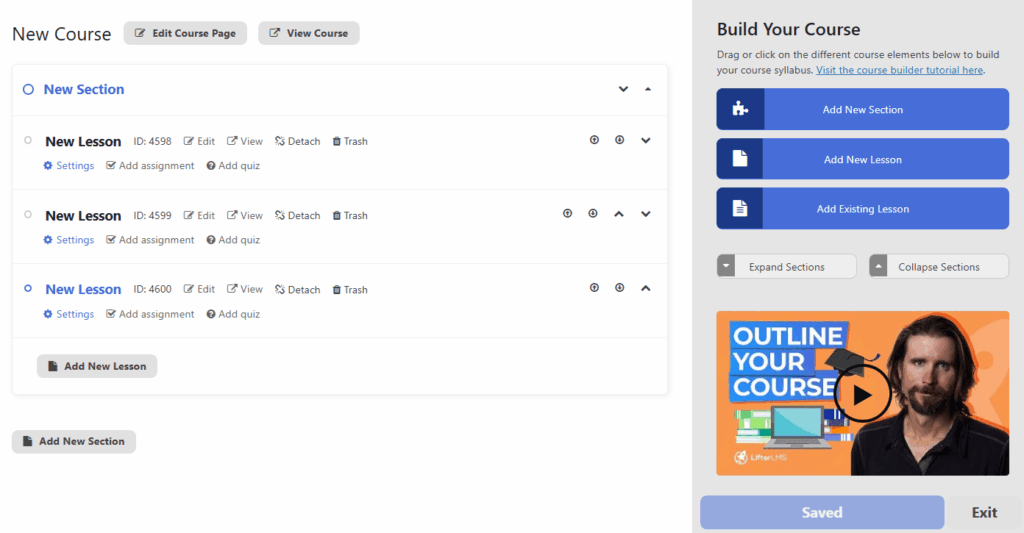
LifterLMS uses its own visual course builder separate from the WordPress editor. You can drag and drop lessons into sections, set prerequisites, and schedule content drip. The student dashboard is clean and shows progress across all enrolled courses.
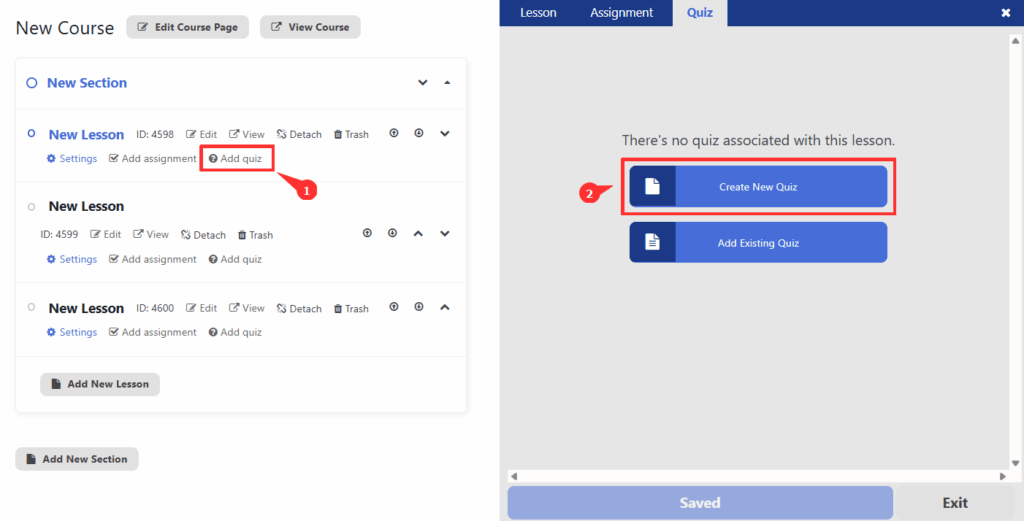
Engagement tools include achievement badges, customizable certificates, and email notifications for course progress. The free version supports basic quiz types; advanced question formats require the Advanced Quizzes add-on.
Best For
- Budget-conscious beginners who want to start free and upgrade as revenue grows
- Membership site owners who need flexible access control and recurring billing
- Coaches and consultants offering both courses and one-on-one services
- WordPress users comfortable with WooCommerce (for more payment flexibility)
Not Recommended For
- Users who need payment processing immediately (requires $99 add-on or WooCommerce setup)
- Instructors requiring advanced video protection without additional costs
- Those who prefer all-inclusive pricing over à la carte add-ons
Total Cost Reality
While LifterLMS starts free, most serious course businesses end up spending $150-250/year for essential add-ons. A realistic first-year budget:
- Core plugin: Free
- Stripe payment gateway: $99/year
- Assignments (for student submissions): $99/year
- Advanced quizzes: $99/year
- Total: $297/year (vs. $199/year for LearnDash with everything included)
The advantage? You can start free, validate your course idea, and only pay for features once you’re making money.
Tutor LMS: Modern Interface with AI Course Generation
Tutor LMS has gained over 70,000 active users since its launch, praised for its modern, intuitive interface and fast performance. The plugin offers both free and premium tiers, with a focus on making course creation accessible to non-technical users.
Free vs. Pro Features
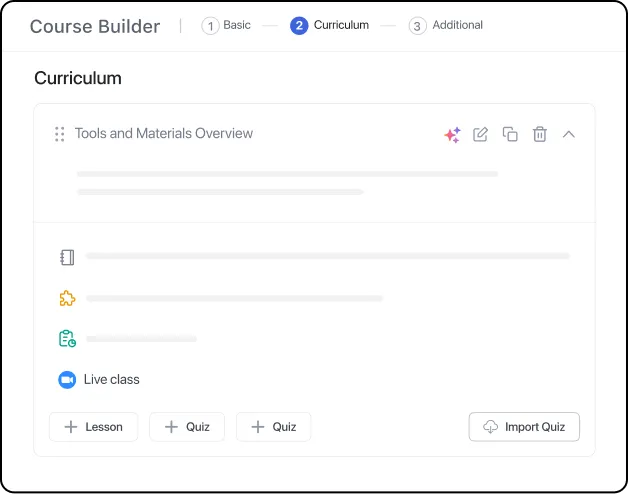
The free version includes unlimited courses and students, a visual course builder using the WordPress block editor, quiz creation with multiple question types, frontend student dashboards, and basic reporting. You can build functional courses without paying.
Tutor LMS Pro adds critical monetization and engagement features:
- WooCommerce and Easy Digital Downloads integration
- Content drip (scheduled lesson releases)
- Enhanced quiz options (question pools, timers, attempts)
- Certificates with customization
- Email notifications and reminders
- Multi-instructor support for marketplace sites
- Advanced reporting and analytics
- Course bundles and subscriptions
Pricing Options (February 2026)
Tutor LMS pricing offers both annual and lifetime license options:
| Plan | Annual Price | Lifetime Price | Sites |
|---|---|---|---|
| Individual | $199/year | $499 one-time | 1 site |
| Business | $399/year | $999 one-time | 10 sites |
| Agency | $799/year | $1,899 one-time | Unlimited sites |
Tutor LMS offers lifetime licenses, which can be cost-effective if you plan to use it for 3+ years. The Individual plan at $499 lifetime equals $166/year over three years—cheaper than the annual subscription.
AI-Powered Course Creation
For 2026, Tutor LMS introduced AI course generation: describe your topic, and the AI creates a complete course outline with modules and lesson suggestions. You can then customize and add content. While not perfect, this feature can save hours in the planning phase.

Best For
- Educators and teachers moving traditional courses online
- Marketplace creators who need multi-instructor support
- WooCommerce users who want integrated course sales
- Budget buyers willing to pay once with lifetime licenses
- Users who value modern UI over extensive feature sets
Not Recommended For
- Advanced educators needing sophisticated quiz logic and branching
- High-volume sites requiring enterprise-level performance optimization
- Users who need extensive third-party integrations (ecosystem is smaller than LearnDash)
Performance Notes
Tutor LMS is praised for performance—it runs smoothly on standard shared hosting plans. The plugin uses optimized database queries and doesn’t bloat page load times. Users report good performance with 70,000+ students across the user base.
LearnPress: Budget-Friendly with Add-on Flexibility
LearnPress has been a popular free WordPress LMS plugin since 2014, developed by ThimPress. It offers a different monetization model: the core is free with 8 free add-ons, and 30+ premium add-ons are available individually—no forced bundles.
What’s Included Free
The free LearnPress core includes unlimited courses and lessons, basic quizzes (multiple choice, true/false, single choice), student management, course prerequisites, and lesson ordering. The 8 free add-ons cover essential needs:
- Certificates
- Course Review
- Wishlist
- Prerequisites
- Collections
- Co-instructors
- Course Coming Soon
- Random Quiz

Premium Add-ons (Pay Per Feature)
LearnPress sells 30+ premium add-ons individually, typically $29-79 each (one-time payment). Common add-ons include:
- WooCommerce integration ($69)
- Stripe payment gateway ($49)
- Content Drip ($39)
- Advanced Quiz ($49)
- Assignment ($49)
- bbPress forum integration ($39)
- Gradebook ($49)
The à la carte approach means you only pay for what you need. However, costs add up quickly if you need multiple add-ons. A typical setup (WooCommerce + Stripe + Content Drip + Advanced Quiz) runs $206 one-time—still cheaper than annual subscriptions if you use it long-term.
AI Features for 2026
LearnPress added AI course generation tools in 2026: input a topic, and the AI generates course outlines, lesson descriptions, and quiz questions. The quality varies—you’ll need to edit the output—but it provides a useful starting template.

Best For
- Budget-conscious course creators who prefer one-time payments over subscriptions
- Simple course sites without complex requirements
- Users who want to pay only for needed features (not bundled packages)
- International creators (LearnPress supports 27 languages)
Not Recommended For
- Users needing premium support (community forum only for free users)
- Advanced course creators requiring sophisticated membership models
- Those who want everything bundled in one price (add-on costs can exceed competitors)
Performance Considerations
LearnPress uses custom database tables for better performance compared to plugins that rely solely on WordPress post types. It runs adequately on shared hosting for small to medium course sites (under 1,000 students). For larger sites, consider VPS hosting.
Sensei LMS: Official WooCommerce Integration
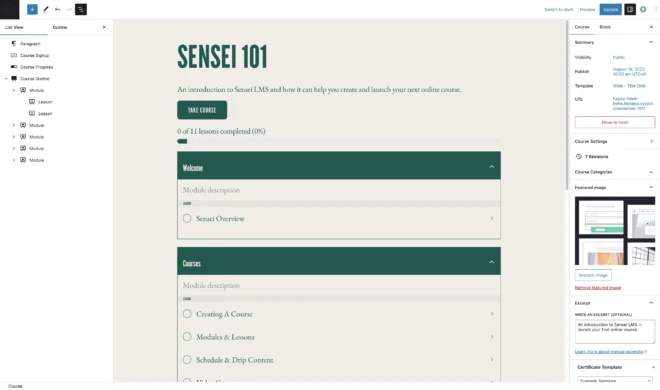
Sensei LMS is developed by Automattic (the company behind WordPress.com and WooCommerce), which gives it an advantage for WooCommerce users. The integration is native and seamless—no third-party add-ons required.
Free vs. Pro Versions
Sensei LMS offers a free core plugin with basic course creation, lessons, quizzes, and student management. It’s lightweight and runs smoothly on most hosting plans without performance issues.
Sensei Pro ($149/year for 1 site) adds essential features:
- WooCommerce integration (sell courses as products)
- Content drip (scheduled lesson releases)
- Advanced quizzes (question banks, randomization)
- Interactive videos with checkpoints
- Course groups for cohort-based learning
- Flashcards for student review
- Detailed progress reports
Pricing (February 2026)
Sensei Pro costs $149/year for a single site, making it one of the most affordable premium options. There’s no 10-site or unlimited license—agencies need separate licenses per client site.
Best For
- WooCommerce store owners adding courses to existing product catalogs
- Beginners who want simplicity over extensive features
- Budget-conscious users needing basic course functionality ($149/year is competitive)
- Users prioritizing performance (Sensei is lightweight and fast)
Not Recommended For
- Course creators not using WooCommerce (limited payment options otherwise)
- Advanced users needing membership tiers, gamification, or social learning
- Agencies managing multiple client sites (no multi-site licenses)
Performance Notes
Sensei LMS is one of the lightest WordPress LMS plugins available. It runs smoothly on shared hosting and doesn’t require special caching configurations. This makes it ideal for small to mid-sized course sites prioritizing speed.
MasterStudy LMS: Visual Appeal with Multimedia Focus
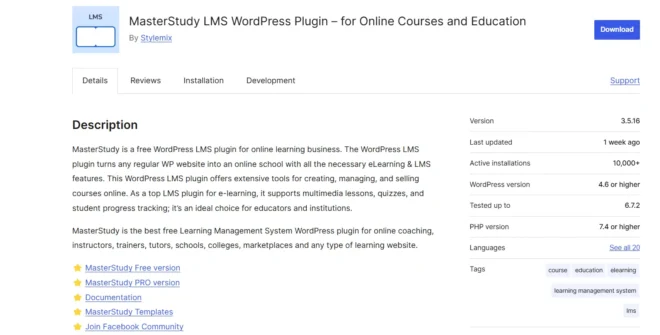
MasterStudy LMS by StylemixThemes emphasizes visual design and multimedia course content. It’s popular with creators in creative fields (photography, design, video production) who need attractive course presentations.
Free vs. Paid Features
The free Starter plan includes basic course creation, lessons, quizzes, student dashboards, and certificates. It works for simple courses but lacks monetization features.
Premium plans add:
- WooCommerce and PayPal integration
- Content drip scheduling
- Prerequisites and course bundles
- Advanced quizzes with question pools
- Email notifications
- Course reviews and ratings
- SCORM compliance
Pricing Structure (February 2026)
| Plan | Price | Sites |
|---|---|---|
| Starter | Free | 1 site |
| Single Site | $149/year | 1 site |
| 10 Sites | $299/year | 10 sites |
| Unlimited | $599/year | Unlimited sites |
Best For
- Creative professionals (photographers, designers, videographers) who want visually appealing courses
- Video-heavy courses with multimedia content
- SCORM compliance needs for corporate training
- Multi-site agencies (10-site and unlimited plans available)
Not Recommended For
- Users prioritizing performance over visual design (can be resource-heavy)
- Simple text-based courses (features may be overkill)
- Tight budgets (free version is limited; premium starts at $149/year)
Academy LMS: Performance-Focused Alternative
Academy LMS is a newer entrant emphasizing performance through custom database architecture. Rather than using WordPress posts for courses, it uses dedicated tables—resulting in claimed speed improvements of up to 60% compared to traditional LMS plugins.
Key Features
Academy LMS supports six content types: courses, coaching sessions, memberships, digital downloads, marketplace functionality, and community features. This all-in-one approach reduces the need for multiple plugins.
Performance features include optimized database queries, lazy loading, and efficient caching. The plugin includes a migration tool for switching from other LMS platforms (LearnDash, LifterLMS, Tutor LMS, LearnPress).
Best For
- Performance-conscious creators worried about site speed
- Multi-format content creators offering courses, coaching, and memberships
- Users migrating from other platforms (built-in migration tools)
- White-label needs (branding customization available)
Not Recommended For
- Users wanting extensive third-party integrations (newer plugin = smaller ecosystem)
- Those needing proven long-term reliability (relatively new compared to LearnDash/LifterLMS)
MemberPress Courses: Simple Courses for Membership Sites
If you already use MemberPress for membership management, MemberPress Courses is a lightweight course add-on. It’s not a standalone LMS—it requires MemberPress and focuses on basic course delivery for membership sites.
What It Offers
MemberPress Courses provides simple course creation with lessons organized into sections, basic quizzes, completion tracking, and certificates. It integrates directly with MemberPress membership levels, making it easy to gate courses by subscription tier.
Best For
- Existing MemberPress users who want to add courses without a separate LMS
- Membership sites where courses are a secondary feature, not the main offering
- Simple course delivery without advanced quiz or engagement needs
Not Recommended For
- Dedicated course businesses (lacks features compared to full LMS plugins)
- Users not already using MemberPress ($179+/year dependency)
- Advanced course creators needing sophisticated assessments
What You’ll Actually Pay: Total Cost Breakdown
Plugin prices tell only part of the story. Beyond the plugin cost, expect to budget $300-600 per year for hosting, domain, and essentials. Here’s a realistic breakdown for independent course businesses.
Year One Costs
| Expense | Budget Option | Mid-Range | Premium |
|---|---|---|---|
| LMS Plugin | $0 (LifterLMS/LearnPress free) | $149-199 (Sensei/LearnDash) | $399-799 (LearnDash Plus/Pro) |
| Hosting | $60/year (shared hosting) | $180/year (better shared) | $600+/year (managed WordPress) |
| Domain | $12/year | $15/year | $15/year |
| SSL Certificate | $0 (Let’s Encrypt free) | $0 (included with hosting) | $0 (included) |
| Theme | $0 (free theme) | $59 (premium one-time) | $89 (premium + support) |
| Payment Gateway Add-ons | $99 (Stripe for LifterLMS) | $0 (WooCommerce free) | $0 (included in LearnDash) |
| Email Marketing | $0 (MailChimp free tier) | $180/year (ConvertKit) | $360/year (ActiveCampaign) |
| Video Hosting | $0 (YouTube/self-host) | $96/year (Vimeo Plus) | $540/year (Vimeo Premium) |
| YEAR ONE TOTAL | $171-271 | $679-829 | $1,604-2,404+ |
Ongoing Annual Costs (Years 2-3)
Most costs recur annually, though some (theme, initial add-ons) are one-time purchases:
- LMS plugin renewal: $0-799/year (depending on plugin)
- Hosting: $60-600+/year (costs may increase with traffic)
- Domain renewal: $12-15/year
- Email marketing: $0-360+/year (grows with subscriber count)
- Video hosting: $0-540+/year
- Maintenance/security plugins: $50-200/year
Hidden Costs to Watch For
Budget for these potential expenses:
- WooCommerce extensions: If using WooCommerce for payments, subscriptions ($199/year), bookings ($249/year), or product bundles can add up
- Backup solutions: Premium backup plugins like UpdraftPlus Premium ($70/year) or BlogVault ($89/year)
- CDN services: For global course delivery, CDNs like Cloudflare Pro ($20/month) or BunnyCDN ($1/TB)
- Developer costs: Custom design or functionality can run $500-5,000 depending on complexity
- Migration costs: Switching platforms later may require professional help ($300-2,000)
Three-Year Cost Comparison
| Plugin | Year 1 | Year 2 | Year 3 | 3-Year Total |
|---|---|---|---|---|
| LifterLMS Free + Add-ons | $297 | $297 | $297 | $891 |
| LearnDash Basic | $199 | $199 | $199 | $597 |
| Tutor LMS Individual (Annual) | $199 | $199 | $199 | $597 |
| Tutor LMS Individual (Lifetime) | $499 | $0 | $0 | $499 |
| Sensei Pro | $149 | $149 | $149 | $447 |
| LearnPress + Add-ons | $206 | $0 | $0 | $206 |
Note: These are plugin-only costs. Add hosting ($180-1,800), domain ($36-45), email marketing ($0-1,080), and video hosting ($0-1,620) for total three-year investment of $500-5,000+ depending on choices.
Free vs. Paid: Which Plugins Offer True Value?
The free-vs-paid decision isn’t just about budget—it’s about business model fit and growth trajectory. Here’s how to decide which approach works for you.
When Free Tiers Make Sense
Start with a free LMS plugin if:
- You’re testing course viability: Before investing money, validate that your audience will buy courses
- You need basic functionality only: Simple courses without drip content, advanced quizzes, or complex memberships
- You can use WooCommerce: Free plugins often require WooCommerce for payments, which adds complexity but costs nothing
- You have time to learn: Free plugins may require more setup and troubleshooting without premium support
- Budget is extremely tight: $0 initial investment means less financial risk
Best free options: LifterLMS core, Tutor LMS free, LearnPress free, Sensei LMS free
When Premium Justifies the Cost
Invest in a premium LMS plugin when:
- You’re serious about course revenue: Premium features (drip content, advanced quizzes, certificates) improve completion rates and justify higher prices
- Time is valuable: Premium support saves hours of troubleshooting compared to community forums
- You need monetization features immediately: Built-in payment gateways, subscriptions, and bundles are included
- You’re scaling quickly: Premium plugins handle larger student bases with better performance
- Professional image matters: Polished features, certificates, and reporting build credibility
Best premium options: LearnDash ($199/year), Tutor LMS Pro ($199/year or $499 lifetime), Sensei Pro ($149/year)
The Upgrade Path Reality
Most course creators follow this progression:
- Month 1-3: Start with free core plugin, use WooCommerce for payments, offer 1-2 courses
- Month 4-6: Realize limitations (no drip content, basic quizzes, manual student management)
- Month 6-12: Upgrade to premium or purchase essential add-ons as revenue reaches $1,000+/month
- Year 2+: Consider platform migration if original choice doesn’t scale or lacks needed features
The free-to-paid transition works well with LifterLMS (pay for add-ons as needed) or Tutor LMS (clean upgrade path). It’s harder with plugins that require complete replacement.
Performance and Hosting Considerations
An LMS site is not a blog. Logged-in users, database-heavy course queries, video streaming, and quiz processing demand more from your hosting than static pages. Choose the wrong hosting, and even the best LMS plugin will frustrate students with slow page loads.
Hosting Requirements by Site Size
| Site Size | Students | Recommended Hosting | Monthly Cost |
|---|---|---|---|
| Starter | 1-100 | Good shared hosting (SiteGround, Bluehost) | $5-15/month |
| Growing | 100-1,000 | Managed WordPress (Flywheel, Kinsta starter) | $15-35/month |
| Established | 1,000-5,000 | VPS or Managed WordPress (Kinsta, WP Engine) | $35-100/month |
| Large Scale | 5,000+ | Dedicated server or enterprise hosting | $100-500+/month |
Performance Benchmarks by Plugin
Independent testing reveals performance differences:
| Plugin | Weight Category | Database Queries | Recommended Hosting |
|---|---|---|---|
| LearnDash | Heavy | High (feature-rich) | VPS or managed WordPress for 500+ students |
| LifterLMS | Medium-Heavy | Medium-High | Good shared hosting for <500, VPS for growth |
| Tutor LMS | Medium | Optimized queries | Shared hosting adequate for most uses |
| Sensei LMS | Lightweight | Low overhead | Shared hosting works well |
| LearnPress | Medium | Custom tables improve performance | Shared hosting for <1,000 students |
| Academy LMS | Lightweight-Medium | Custom DB architecture (optimized) | Shared hosting for most sites |
Optimization Tips for Better Performance
Regardless of plugin choice, implement these optimizations:
- Caching plugin: WP Rocket ($49/year) or W3 Total Cache (free) reduce database queries
- Object caching: Redis or Memcached dramatically improve logged-in user performance
- CDN for video: Use Vimeo, Wistia, or BunnyCDN instead of self-hosting large video files
- Database optimization: Regular cleanup with WP-Optimize or manual query optimization
- Lazy loading: Load lesson content and images only as students scroll
- Limit plugins: Every plugin adds overhead; remove unused ones
- PHP version: Use PHP 8.0+ for significant speed improvements over 7.4
When to Upgrade Hosting
Signs you’ve outgrown your current hosting:
- Page load times exceed 3 seconds for logged-in students
- Site crashes during peak enrollment periods
- Database timeouts during quiz submissions
- Hosting provider sends resource limit warnings
- Video playback stutters or buffers frequently
Don’t wait for a crisis—upgrade proactively when approaching 70-80% of your hosting plan’s capacity.
Which LMS Fits Your Business Model?
Generic “best for beginners” recommendations miss the point. Your business model determines which features matter most. Here’s how to match plugins to your specific use case.
For Coaching Businesses
Your needs: Mix of courses and 1:1 services, booking integration, client management, progress tracking for personalized coaching
Recommended: LifterLMS with booking add-ons or Academy LMS (includes coaching features)
Why: LifterLMS offers flexible access control for mixing group courses with individual coaching. Academy LMS explicitly supports coaching session booking. Both allow tiered pricing.
Avoid: LearnDash (overkill for coaching), LearnPress (lacks coaching-specific features)
For Consulting Firms (Client Training Portals)
Your needs: White-label branding, client-specific course access, professional reporting, group management, secure content
Recommended: LearnDash or Academy LMS (white-label)
Why: LearnDash’s groups feature allows creating separate training portals per client with custom branding. Advanced reporting shows client executives exactly which employees completed training. Academy LMS offers white-label customization.
Avoid: Free plugins with limited branding control, plugins without group management
For Fitness Trainers and Wellness Coaches
Your needs: Video-heavy courses, progress tracking, community features, mobile access, simple pricing
Recommended: Tutor LMS or MasterStudy LMS
Why: Both excel at video course delivery and have modern, visually appealing interfaces that match fitness/wellness branding. Tutor LMS integrates well with WooCommerce for supplement sales alongside courses. MasterStudy handles multimedia beautifully.
Avoid: Text-heavy plugins, complex membership structures that confuse fitness clients
For Corporate Training Departments
Your needs: SCORM compliance, mandatory training tracking, detailed reporting, bulk enrollment, compliance certifications
Recommended: LearnDash or MasterStudy LMS (both support SCORM)
Why: SCORM compliance allows reusing training content across platforms. LearnDash’s advanced reporting tracks completion for compliance audits. Both support mandatory training workflows.
Avoid: Plugins without SCORM support, those lacking robust reporting
For Online Educators and Course Marketplaces
Your needs: Multi-instructor support, course marketplace functionality, revenue sharing, affiliate programs, large student capacity
Recommended: Tutor LMS or Academy LMS
Why: Tutor LMS explicitly supports multi-instructor marketplaces with revenue sharing. Academy LMS includes marketplace features and handles large student bases efficiently.
Avoid: Single-instructor plugins, those without built-in marketplace features
For Membership Site Owners
Your needs: Drip content, multiple membership tiers, recurring billing, content gating, member-only courses
Recommended: LifterLMS (built-in memberships) or MemberPress Courses (if already using MemberPress)
Why: LifterLMS treats memberships as a core feature, not an add-on. Content drip, access control, and recurring billing are well-integrated. MemberPress Courses directly extends existing membership sites without requiring additional configuration.
Avoid: Course-only plugins that treat memberships as an afterthought
For Solo Course Creators on a Budget
Your needs: Low initial cost, simple course delivery, upgrade path as revenue grows, good documentation for self-service
Recommended: LifterLMS free, Tutor LMS free, or LearnPress
Why: All offer functional free tiers for validating course ideas. LifterLMS and Tutor LMS have clear upgrade paths when you’re ready. LearnPress allows buying only needed features à la carte.
Avoid: Premium-only plugins (LearnDash), complex enterprise solutions
Security and Content Protection
Course creators worry about content theft—and rightfully so. Video courses can be downloaded and redistributed, PDFs can be shared, and login credentials can be passed around. While no system is foolproof, LMS plugins vary in their protection capabilities.
Video Protection Strategies
Self-hosted videos on WordPress are the least secure—students can right-click and download files. Better approaches:
- Vimeo or Wistia: Domain-level privacy ensures videos only play on your site, not if the URL is shared
- HLS streaming: Breaks videos into encrypted chunks that can’t be easily downloaded
- Watermarking: Display student names on videos to discourage sharing
- Time-limited links: URLs expire after a set period
LearnDash and LifterLMS support video progression tracking—students can’t skip ahead or download. Tutor LMS Pro includes interactive video checkpoints. LearnPress requires add-ons for advanced video protection.
PDF and Content Security
PDFs are inherently downloadable, but you can reduce sharing:
- Right-click disable: Basic deterrent (easily bypassed)
- Watermarked PDFs: Generate PDFs with student names embedded
- View-only access: Use Google Drive or SlideShare embedding instead of downloadable files
- Drip content: Release materials gradually so students can’t download everything at once
User Authentication and Access Control
Prevent account sharing with:
- Login limits: Restrict simultaneous logins from different IP addresses
- Device limits: Allow course access on a maximum number of devices
- IP tracking: Flag suspicious login patterns (different countries within hours)
- Inactivity timeouts: Auto-logout after periods of no activity
LearnDash and LifterLMS offer add-ons for these features. Sensei and Tutor LMS have basic protections but may require third-party plugins for advanced controls.
GDPR Compliance
If you have European students, GDPR compliance is mandatory:
- Data export: Students can request all stored personal data
- Data deletion: Right to be forgotten requires complete data removal
- Cookie consent: Clear opt-in for tracking cookies
- Privacy policies: Transparent data usage explanations
Most major LMS plugins support WordPress’s native GDPR tools (export/delete personal data). Verify this before launching if you have EU customers.
Regular Backups and Security Hardening
Beyond content protection, secure your entire site:
- Automated backups: Daily backups to off-site storage (UpdraftPlus, BlogVault)
- Security plugins: Wordfence or Sucuri for malware scanning and firewall
- SSL/HTTPS: Essential for payment processing and student trust
- Strong passwords: Enforce minimum password requirements
- Two-factor authentication: Extra login security layer
- Regular updates: Keep WordPress, plugins, and themes current
Support Quality and Community Resources
When you hit a wall at midnight trying to troubleshoot a payment gateway error, support quality makes the difference between resolving it quickly or losing a night of sleep. LMS plugins vary dramatically in support responsiveness and resource availability.
Support Tiers Explained
| Plugin | Free Support | Paid Support | Documentation Quality | Community Size |
|---|---|---|---|---|
| LearnDash | None (premium only) | Email/ticket, 24-48hr response | Excellent (detailed docs + videos) | Large (active Facebook group) |
| LifterLMS | Community forum | Email/ticket with bundles | Excellent (comprehensive guides) | Very large (1.3M+ downloads) |
| Tutor LMS | Community forum | Priority email with Pro | Good (improving documentation) | Growing (70K+ users) |
| LearnPress | Community forum | Email with paid add-ons | Fair (some gaps in documentation) | Medium (active community) |
| Sensei LMS | Community forum | Email/chat with Pro | Good (Automattic quality standards) | Medium (10K+ installs) |
| MasterStudy | Community forum | Email with premium | Good (visual tutorials) | Medium (25K+ users) |
What Premium Support Actually Means
Don’t assume “premium support” equals instant help. Reality varies:
- Response time: 24-48 hours is standard for email/ticket. Chat support (rare for LMS plugins) offers faster responses.
- Support quality: Junior support staff may escalate complex issues, adding days to resolution
- Support scope: Most cover plugin bugs and basic usage, not custom code or third-party plugin conflicts
- Support hours: Business hours in the developer’s timezone, not 24/7
Making the Most of Community Resources
Free support via forums can be effective if you know how to use it:
- Search first: Most questions are already answered in documentation or forum archives
- Detailed questions: Include WordPress version, plugin version, hosting details, error messages
- Screenshots/videos: Visual problem descriptions get faster, more accurate help
- Active participation: Help others to build goodwill in the community
Plugins with larger user bases (LifterLMS, LearnPress) have more community members who can answer questions. Newer plugins (Academy LMS) have smaller communities but may offer more direct developer responses.
Documentation Quality Matters
High-quality documentation reduces your need for direct support:
- LearnDash: Comprehensive written docs plus video walkthroughs for every feature
- LifterLMS: Detailed guides, FAQs, and growing YouTube tutorial library
- Tutor LMS: Improving docs; some areas lack depth but expanding
- Sensei LMS: Benefits from Automattic’s documentation standards (clear, well-organized)
Test documentation before committing to a plugin: search for “how to [common task]” and see if you can find clear answers.
AI and Automation Capabilities (2026 Update)
WordPress LMS plugins are embracing AI to reduce the time investment in course creation. As of February 2026, several plugins offer AI-powered features that can save hours in planning and content generation.
AI Course Outline Generators
LearnDash and LearnPress both introduced AI course outline builders:
- Input: Course topic, target audience, learning objectives
- Output: Complete course structure with modules, lessons, and suggested topics
- Customization: Edit the AI-generated outline to match your approach
- Time savings: Reduces course planning from hours to minutes
Quality varies—AI outlines provide useful scaffolding but require human refinement. They’re best for getting unstuck during the planning phase, not as final course structures.
AI Quiz Generation
LearnDash’s AI quiz builder generates questions from lesson content:
- Input: Lesson text or video transcript
- Output: Multiple-choice, true/false, and fill-in-blank questions
- Quality: Varies by content clarity; requires review before publishing
- Use case: Quick comprehension checks, not high-stakes assessments
Tutor LMS is developing similar AI quiz tools for their 2026 roadmap.
Automated Email Sequences
While not strictly “AI,” smart automation is growing:
- Behavior-triggered emails: Send messages based on student progress (completed lesson, quiz failure, inactivity)
- Drip campaigns: Automated onboarding sequences for new students
- Re-engagement: Automatic reminders for students who haven’t logged in recently
Most LMS plugins integrate with email marketing tools (ActiveCampaign, ConvertKit, MailChimp) for advanced automation. Native email features within LMS plugins are still basic.
Smart Content Recommendations
No WordPress LMS plugin yet offers Netflix-style personalized course recommendations based on student behavior. This remains a gap compared to standalone platforms like Teachable or Thinkific.
Automation Scorecard (February 2026)
| Plugin | AI Course Outlines | AI Quiz Generation | Email Automation | Smart Recommendations |
|---|---|---|---|---|
| LearnDash | ✅ Yes | ✅ Yes | Via integrations | ❌ No |
| LifterLMS | ❌ No | ❌ No | Basic built-in + integrations | ❌ No |
| Tutor LMS | ✅ Yes (basic) | Planned 2026 | Pro version + integrations | ❌ No |
| LearnPress | ✅ Yes | ✅ Yes | Via integrations | ❌ No |
| Sensei LMS | ❌ No | ❌ No | Via integrations | ❌ No |
| Others | ❌ No | ❌ No | Via integrations | ❌ No |
AI features are still emerging—useful for speeding up certain tasks but not replacing human course design expertise.
Side-by-Side Feature Comparison
Here’s a comprehensive feature comparison to help you evaluate plugins at a glance:
| Feature | LearnDash | LifterLMS | Tutor LMS | LearnPress | Sensei | MasterStudy |
|---|---|---|---|---|---|---|
| Free Version | ❌ | ✅ | ✅ | ✅ | ✅ | ✅ |
| Unlimited Courses | ✅ | ✅ | ✅ | ✅ | ✅ | ✅ |
| Course Builder | Drag-drop | Visual builder | Block editor | Custom builder | Block editor | Visual builder |
| Drip Content | ✅ Included | ✅ Included | Pro only | $39 add-on | Pro only | Premium |
| Quiz Types | 8+ types | Basic (free) / Advanced (paid) | Multiple types | Basic | Basic (free) / Advanced (Pro) | Multiple |
| Certificates | ✅ Included | ✅ Included | Pro only | ✅ Free add-on | Pro only | Premium |
| Payment Gateways | WooCommerce | $99 each / WooCommerce | WooCommerce | $49-69 add-ons | WooCommerce included Pro | WooCommerce / PayPal |
| Subscriptions | Via WooCommerce | ✅ Built-in | Pro + WooCommerce | Via WooCommerce | Via WooCommerce | Premium |
| Multi-Instructor | Limited | Limited | ✅ Pro version | ✅ Free add-on | ❌ | Premium |
| SCORM Support | Add-on | ❌ | ❌ | ❌ | ❌ | ✅ Premium |
| AI Features | ✅ Outlines + Quizzes | ❌ | ✅ Outlines (basic) | ✅ Outlines + Quizzes | ❌ | ❌ |
| Mobile App | Third-party | Third-party | ❌ | ✅ Available | ❌ | ❌ |
| Entry Price | $199/year | Free / $149.50 bundles | Free / $199/year Pro | Free / $29-79 add-ons | Free / $149/year Pro | Free / $149/year |
Migration Considerations: Switching Platforms Later
Choosing the wrong LMS isn’t fatal, but migration is painful. If you start with one plugin and later need to switch, here’s what to expect.
What Migrates Easily
- Course content: Text lessons can be copied manually or with migration tools
- Student data: Names, emails, and basic info export via CSV
- Video files: If hosted externally (Vimeo, YouTube), just re-embed
What Migrates with Difficulty
- Course structure: Module/lesson organization often requires rebuilding
- Quiz questions: Question formats vary; manual recreation common
- Student progress: Completion data rarely transfers between plugins
- Certificates: Custom designs require recreation
- Custom functionality: Any custom code or integrations break
Migration Tools and Services
Academy LMS offers built-in migration tools from LearnDash, LifterLMS, Tutor LMS, and LearnPress. This simplifies the process if Academy LMS meets your needs.
For other migrations, consider hiring a developer ($500-2,000 depending on course volume and complexity). Manual migration is possible but time-consuming—budget 2-4 hours per course for rebuild.
Minimizing Migration Pain
To make future migrations easier:
- Host videos externally: Vimeo or Wistia URLs transfer easily
- Keep lesson content simple: Standard WordPress blocks migrate better than custom shortcodes
- Export data regularly: CSV backups of students and progress
- Document customizations: Track any custom code or third-party integrations
- Test before switching: Set up the new plugin on a staging site first
When to Migrate vs. Stick It Out
Migrate when:
- Current plugin lacks critical features for your growing business
- Performance issues persist despite optimization
- Plugin development stalls (no updates for 6+ months)
- Support quality deteriorates significantly
Stick it out when:
- Issues are minor and can be worked around
- You have extensive custom development on current plugin
- Large student base would lose progress in migration
- Migration costs exceed new plugin benefits
Frequently Asked Questions
Can I start with a free LMS plugin and upgrade later?
Yes, and this is a smart approach for validating your course idea before investing money. LifterLMS, Tutor LMS, LearnPress, Sensei LMS, and MasterStudy LMS all offer free versions you can start with. As your revenue grows, you can upgrade to paid plans or purchase add-ons for advanced features like drip content, advanced quizzes, and payment gateways. The main limitation: free tiers often lack monetization features, so you’ll need to integrate WooCommerce or purchase payment gateway add-ons to actually sell courses.
Which LMS plugin is best for small business coaching?
LifterLMS and Academy LMS are best suited for coaching businesses. LifterLMS offers flexible membership and course combinations, allowing you to mix group courses with individual coaching tiers. Academy LMS explicitly supports coaching session booking alongside courses. Both allow tiered pricing and drip content to structure coaching programs. Avoid LearnDash (designed for larger-scale training) and LearnPress (lacks coaching-specific features) unless you only need basic course delivery.
What are the hidden costs of WordPress LMS plugins?
Beyond plugin costs, budget for hosting ($60-600/year), domain ($12-15/year), payment gateway add-ons ($0-99 each), email marketing ($0-360/year), video hosting ($0-540/year), themes ($0-89), backup solutions ($0-89/year), and potential developer costs for customization ($500-5,000). Total first-year investment ranges from $171 for a minimal setup to $2,400+ for a professional configuration. See the “What You’ll Actually Pay” section for detailed breakdowns by budget level.
How many students can WordPress LMS plugins handle?
This depends heavily on your hosting and plugin choice. Sensei LMS and Tutor LMS run well on shared hosting for 100-1,000 students. LearnDash can support 50,000+ users with page loads under 2 seconds when optimized with VPS or managed WordPress hosting, caching, and CDN. For small sites (under 500 students), good shared hosting ($5-15/month) works. For 500-5,000 students, upgrade to managed WordPress or VPS ($35-100/month). Above 5,000 students, consider dedicated servers or enterprise hosting ($100-500+/month).
Do I need WooCommerce for selling courses?
Not always, but often. Free LMS plugins (LifterLMS, Tutor LMS, LearnPress) typically require WooCommerce or paid add-ons for payment processing. LearnDash works with WooCommerce or other payment integrations. Sensei LMS Pro includes WooCommerce integration at no extra cost. LifterLMS sells payment gateway add-ons ($99 each for Stripe, PayPal) as an alternative to WooCommerce. WooCommerce is free and powerful but adds complexity—it’s essentially running an e-commerce store. For simple course sales, direct payment gateways (if available) are easier.
Which plugin offers the best value for lifetime cost?
Over three years, LearnPress offers the lowest cost if you only need basic features: $206 one-time for essential add-ons (WooCommerce integration, Stripe, drip content, advanced quizzes). Tutor LMS lifetime license ($499) works out to $166/year over three years—cheaper than annual subscriptions. Sensei Pro at $149/year totals $447 over three years. LearnDash Basic at $199/year totals $597. LifterLMS with essential add-ons costs approximately $297/year or $891 over three years. However, cheapest doesn’t always mean best value—factor in features, support quality, and scalability.
How do I protect my course content from piracy?
Use domain-restricted video hosting (Vimeo, Wistia) so videos only play on your site. Enable video progression tracking so students can’t skip or download. Generate watermarked PDFs with student names embedded. Implement login limits to prevent account sharing. Use drip content to release materials gradually. Enable SSL/HTTPS for all pages. Consider content expiration (time-limited access to downloads). No system is foolproof—determined pirates will find ways—but these measures deter casual sharing. LearnDash and LifterLMS offer the most robust content protection features, while free plugins require third-party solutions.
Can I use my LMS plugin with any WordPress theme?
Yes, WordPress LMS plugins work with any properly coded WordPress theme. However, some themes are optimized for specific LMS plugins and offer better visual integration. For example, Astra and Kadence themes work well with most LMS plugins. Some plugin developers sell dedicated themes: LearnDash has recommended themes, MasterStudy LMS offers its own theme, Tutor LMS integrates with various themes. If visual design is critical, check whether your preferred theme has built-in LMS styling or if you’ll need custom CSS. Most plugins provide basic styling that works adequately with standard themes.
What’s the difference between an LMS plugin and a course platform like Teachable?
WordPress LMS plugins require self-hosting: you manage the server, WordPress installation, security, backups, and updates. Platforms like Teachable or Thinkific are fully hosted—they handle infrastructure, so you just add content. Trade-offs: WordPress plugins offer more control, customization, and no revenue sharing (Teachable takes 5-10% of sales). Hosted platforms are simpler for non-technical users and include built-in marketing tools, but monthly fees ($39-499) and transaction fees add up. WordPress wins on long-term cost and control; hosted platforms win on ease of use and maintenance-free operation. Choose based on your technical comfort and budget.
How long does it take to set up a WordPress LMS site?
For a basic setup with a simple course: 4-8 hours (WordPress installation, plugin setup, first course creation). For a professional site with custom design: 20-40 hours (theme customization, branding, multiple courses, payment testing, email integration). For a complex implementation with custom features: 40-100+ hours (developer involvement, custom code, integrations). This doesn’t include course content creation—expect 8-20 hours per hour of finished course content when factoring in filming, editing, writing, and quiz creation. Plan for 1-2 weeks from start to first course launch if working part-time, or 3-5 days if full-time.
Final Recommendations: Choosing Your WordPress LMS
After testing and comparing these plugins, here’s my honest guidance based on different scenarios.
Best Overall for Most Small Businesses: LearnDash
If you can afford the $199/year entry price and need a professional, feature-complete solution from day one, LearnDash is hard to beat. You get advanced quizzes, drip content, certificates, robust reporting, and AI course tools included—no surprise upgrade costs for basic features. It scales well if your course business grows to thousands of students. The main drawbacks: no free tier for testing, and it requires quality hosting for best performance.
Best Value for Budget-Conscious Beginners: LifterLMS
Start with the free core plugin to validate your course idea without financial risk. When you’re ready to monetize, purchase only the add-ons you need (payment gateways, advanced quizzes, assignments) or bundle them at $149.50/year. The flexible pricing model aligns costs with your business growth. The main drawback: total costs can exceed all-inclusive competitors if you need many add-ons.
Best for WooCommerce Users: Sensei LMS
At $149/year with native WooCommerce integration included, Sensei Pro offers excellent value for store owners adding courses. It’s lightweight, fast, and backed by Automattic (WordPress.com and WooCommerce creators). The main limitation: fewer advanced features than LearnDash or LifterLMS, making it best for straightforward course sites.
Best Modern Interface: Tutor LMS
Tutor LMS combines a modern, intuitive interface with competitive pricing ($199/year annual or $499 lifetime). The lifetime option is particularly appealing for long-term course businesses—it pays for itself in 2.5 years compared to annual subscriptions. Multi-instructor support makes it ideal for marketplace sites. The main concern: smaller ecosystem and shorter track record than established competitors.
Best for One-Time Payment Model: LearnPress
If you prefer buying features once rather than annual subscriptions, LearnPress’s à la carte model works well. A typical setup (WooCommerce integration, Stripe, drip content, advanced quizzes) costs $206 one-time—no recurring fees. The main drawback: costs can add up if you need many add-ons, and support is community-based unless you purchase premium add-ons.
Best for Performance-Focused Sites: Academy LMS
If site speed is your top priority and you like the all-in-one approach (courses + coaching + memberships), Academy LMS’s custom database architecture delivers on performance claims. Built-in migration tools ease switching from other platforms. The main risk: it’s newer with a smaller user base and ecosystem than established plugins.
The Bottom Line
There’s no single “best” WordPress LMS plugin—only the best for your specific business model, budget, and technical comfort level. If you’re just starting out, begin with a free tier (LifterLMS, Tutor LMS, or LearnPress) to validate demand before investing. Once you’re generating $500+/month in course revenue, upgrade to premium features or consider LearnDash for its comprehensive feature set.
Pay attention to total cost of ownership over three years, not just the initial plugin price. A $199/year plugin with everything included may cost less than a free plugin requiring $99 add-ons for payment gateways, drip content, and advanced quizzes.
Most importantly: choose a plugin you can grow with. Migrating platforms later is possible but painful—better to start with a solid foundation that scales with your business. Focus on matching the plugin to your business model (coaching, training, education, memberships), budget honestly for hosting and essentials, and prioritize support quality if you’re not technically confident.
The eLearning market continues to grow, and WordPress LMS plugins make it accessible for small businesses to participate without the high costs and revenue sharing of hosted platforms. Choose wisely, invest in quality hosting, protect your content, and focus on creating courses that genuinely help your students succeed.
